
1. Introduction
Welcome to the CoolFire VB01B Dual Alarm Clock with Bed Shaker. This device is designed to provide a reliable and effective wake-up solution, especially for heavy sleepers, individuals with hearing impairments, and frequent travelers. It combines powerful vibration, adjustable alarm sounds, and convenient features to ensure you wake up on time.
2. Package Contents
- CoolFire VB01B Dual Alarm Clock
- Vibrating Bed Shaker
- USB Charging Cable
- User Manual (this document)
3. Product Overview
The CoolFire VB01B features a compact design with an intuitive control panel and a clear LCD display. The device is shaped uniquely for portability and ease of use.

Figure 1: CoolFire VB01B Dual Alarm Clock with its control panel.
3.1. Main Components
- LCD Display: Shows time, date, and alarm settings.
- Control Buttons: Five buttons for setting time, alarms, vibration, and snooze functions.
- Flashlight: Integrated light for night-time convenience.
- Vibration Unit: Connects to the main unit for silent, powerful alerts.
- USB Port: For charging the internal rechargeable battery.
4. Setup
4.1. Initial Charging
Before first use, fully charge your CoolFire alarm clock. Connect the provided USB charging cable to the device's USB port and plug the other end into any standard USB power adapter (not included) or a computer USB port. A full charge provides weeks of uninterrupted use.

Figure 2: Connecting the USB cable for charging.
4.2. Backup Battery (Optional)
The device does not include batteries, but it supports backup batteries (e.g., AAA batteries, not included) to retain time and alarm settings during power outages or when the main rechargeable battery is depleted. Refer to the battery compartment for proper installation.
5. Operating Instructions
5.1. Setting Time and Date
Use the dedicated buttons on the control panel to set the current time and date. The LCD display will guide you through the process. The device supports 12-hour and 24-hour formats and features automatic Daylight Saving Time (DST) adjustment.
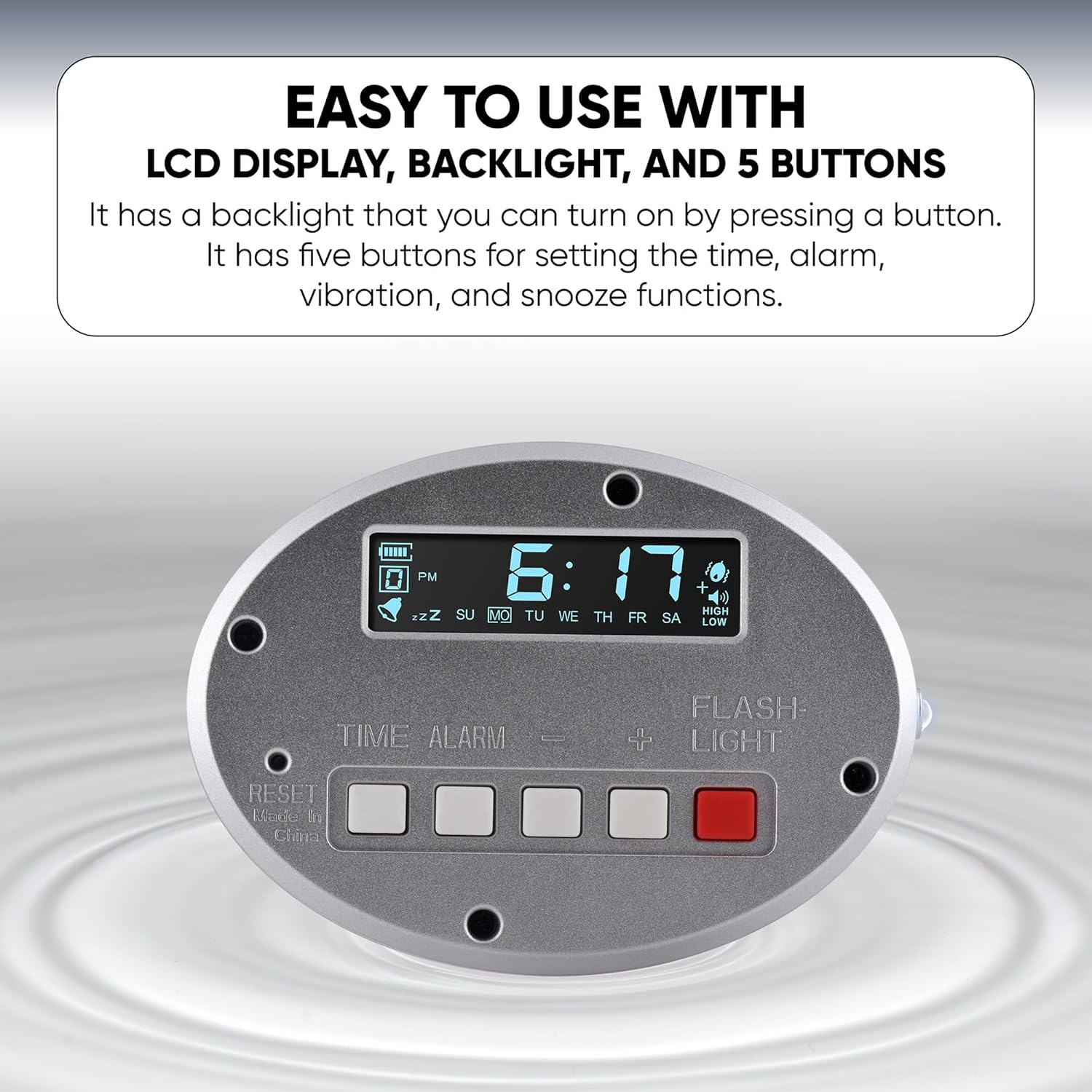
Figure 3: Control panel for setting time and alarms.
5.2. Setting Alarms
The CoolFire alarm clock supports up to four independent alarms. Follow the on-screen prompts using the control buttons to set your desired wake-up times. You can configure alarms for specific days of the week, allowing for different schedules on weekdays and weekends.
5.3. Alarm Modes
Choose from three distinct alarm modes:
- Vibration Only: Ideal for silent wake-ups without disturbing others.
- Sound Only: A loud audible alarm.
- Vibration + Sound: Combines both methods for maximum effectiveness.
5.4. Using the Bed Shaker
For optimal performance, place the vibrating bed shaker unit under your pillow or mattress. You can adjust the vibration intensity and duration to suit your personal preference, ensuring a powerful wake-up for even the deepest sleepers.

Figure 4: The CoolFire VB01B designed for heavy sleepers.
5.5. Flashlight Function
The alarm clock includes a built-in flashlight. Press the designated button to activate or deactivate the bright, focused light, useful for navigating in the dark without disturbing others.

Figure 5: Flashlight function for night-time convenience.
5.6. Snooze Function
When an alarm activates, press the snooze button to temporarily pause the alarm for a short period. The alarm will reactivate after the snooze duration ends.
5.7. Adjusting Display Brightness
The LCD display features adjustable brightness settings. Use the appropriate control button to cycle through brightness levels to suit your environment.
6. Maintenance
To maintain your CoolFire alarm clock, wipe it with a soft, dry cloth. Avoid using abrasive cleaners or solvents. Keep the device away from water and extreme temperatures.
7. Troubleshooting
- Device not turning on: Ensure the device is fully charged. Check the USB cable connection.
- Alarm not activating: Verify that the alarm is set correctly and enabled. Check the selected alarm mode (vibration, sound, or both).
- Difficulty setting time/alarms: Refer to Section 5.1 and 5.2. Ensure you are pressing the correct buttons in sequence. Some users find initial setup requires patience.
- Charging issues: Ensure the USB cable is securely connected to both the device and the power source. Try a different USB port or adapter.
- Vibration not strong enough: Adjust the vibration intensity settings. Ensure the bed shaker is placed directly under your pillow or mattress.
8. Specifications
| Feature | Detail |
|---|---|
| Brand | Coolfire |
| Model Number | VB01B |
| Color | Silver |
| Display Type | Digital |
| Special Feature | Vibrating Alarm |
| Product Dimensions | 2"W x 0.6"H |
| Power Source | Corded Electric (Rechargeable) |
| Room Type | Bedroom, Kid's Room, Study Room |
| Shape | Rectangular |
| Item Weight | 1.6 ounces |
| UPC | 841321107685 |
| Manufacturer | DaveEcom |
9. Warranty and Support
For warranty information or technical support, please refer to the contact details provided with your product packaging or visit the official Coolfire website. Keep your purchase receipt for warranty claims.