
PLEGBLE PL-515
PLEGBLE PL-515 4K Foldable Drone User Manual
Model: PL-515 | Brand: PLEGBLE
Introduction
This manual provides comprehensive instructions for the safe operation, setup, maintenance, and troubleshooting of your PLEGBLE PL-515 4K Foldable Drone. Please read thoroughly before first use to ensure optimal performance and safety.
What's in the Box
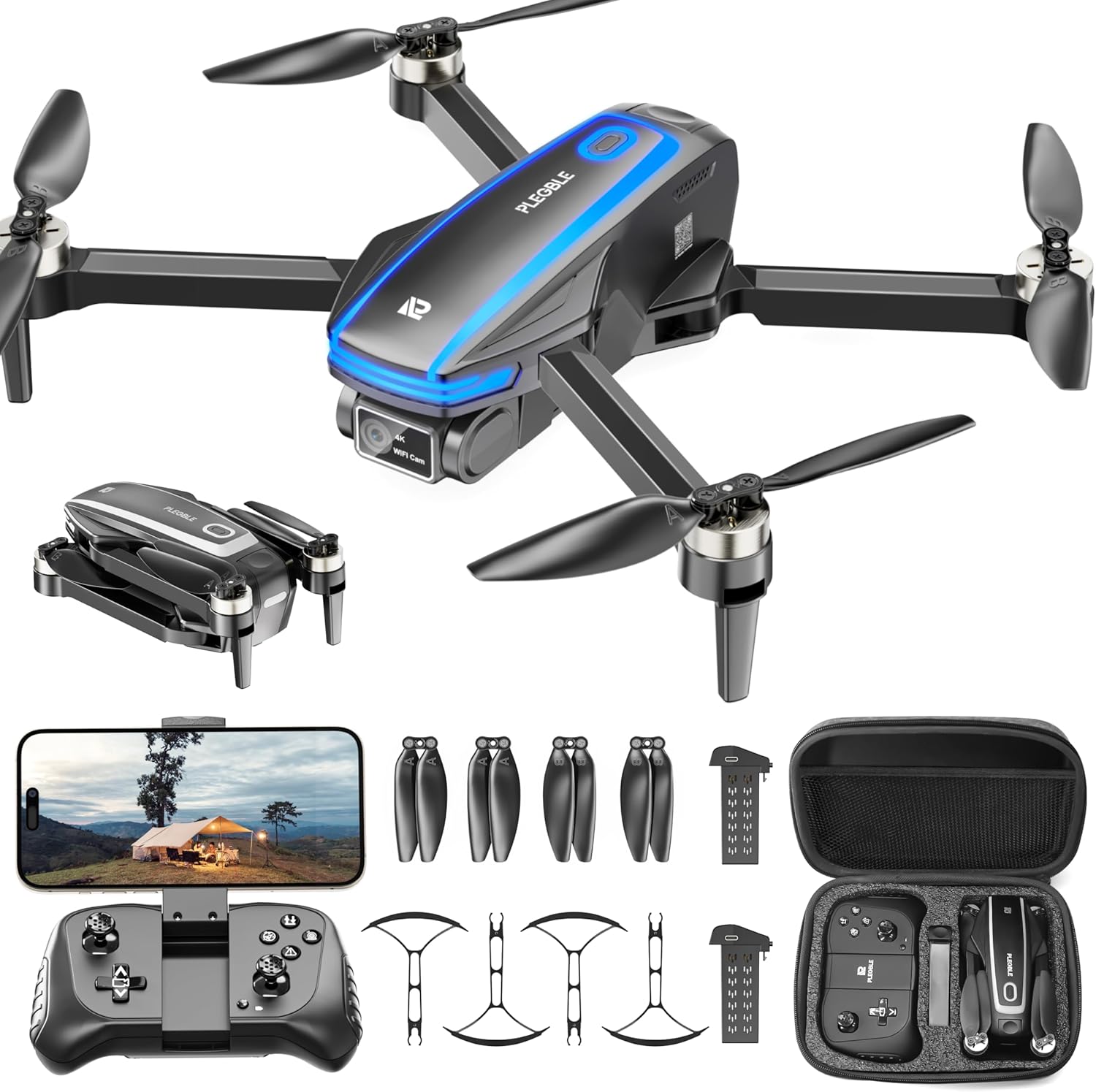
The PLEGBLE PL-515 drone package includes all necessary components for immediate use and maintenance. The image displays the drone in both folded and unfolded states, the remote controller, two batteries, propeller guards, spare propellers, a charging cable, and a carrying case.
- Drone Unit (PL-515)
- Remote Control
- Two 1500mAh Lithium Polymer Batteries
- Propeller Guards (set of 4)
- Spare Propellers
- USB Charging Cable (USB-C/PD compatible)
- Carrying Case
- User Manual (this document)
Setup Guide
1. Unfolding the Drone
Gently unfold the drone arms until they click into place. Ensure all four arms are fully extended before flight.

Image: The PLEGBLE PL-515 drone in its unfolded state, ready for operation.
2. Battery Installation and Charging
Insert the charged battery into the drone's battery compartment until it clicks securely. For the remote control, open the battery compartment and insert 3 AAA batteries (not included). Charge drone batteries using the provided USB cable. A full charge takes approximately 60 minutes and provides up to 16 minutes of flight time per battery.

Image: A drone battery connected to a USB-C charging cable, illustrating the charging process.
3. Propeller Guard Installation
For added safety, especially for beginners or indoor flights, attach the propeller guards to each arm of the drone. Align the guard with the designated slots and push gently until it snaps into place.

Image: The drone with all four propeller guards securely attached, enhancing safety.
4. Remote Control Overview
Familiarize yourself with the remote control's buttons and joysticks. The controller features dual joysticks for flight control, dedicated buttons for one-key takeoff/landing, emergency stop, photo/video capture, and speed adjustment. A smartphone holder is integrated for FPV viewing.

Image: A detailed diagram illustrating the functions of each button and joystick on the remote controller.
5. App Installation and Connection
Download the official PLEGBLE drone app from your smartphone's app store by scanning the QR code provided in the manual or on the product packaging. Connect your smartphone to the drone's Wi-Fi network (usually named "PLEGBLE-XXXX"). Open the app to view the FPV feed and access smart flight features.

Image: A smartphone securely mounted on the remote controller, displaying the live First Person View (FPV) from the drone's camera.
6. Quick Start Guide
- After assembling the drone battery, press and hold for 3 seconds to power on.
- Rotate the drone arms outward and place the drone flat on the ground, ensuring that the drone camera aligns with the user's line of sight.
- Power on the remote control after assembling the battery. The drone and remote control will automatically synchronize frequencies. The LED light on the drone will flash on the right side and then turn solid, indicating successful frequency synchronization.
- Simultaneously push the left and right control sticks on the remote down to a 45° angle. The LED light on the drone will transition from solid to flashing and back to solid, and a beep will sound from the buzzer, indicating successful gyroscope calibration.
- Press the one-key takeoff button on the remote control for successful takeoff.
Operating the Drone
Basic Flight Controls
- Takeoff/Landing: Use the dedicated one-key button on the remote for automated takeoff and landing.
- Altitude Hold: The drone maintains a stable hover at a desired height, simplifying control.
- Directional Control: Use the left joystick for altitude and rotation, and the right joystick for forward/backward and left/right movement.
Advanced Features
- Headless Mode: In this mode, the drone's orientation is relative to the pilot, eliminating the need to adjust its position in the air.
- 360° Flip: Press the designated button on the remote to perform impressive aerial flips.
- Speed Adjustment: Cycle through low, medium, and high-speed modes using the speed button on the remote. Speed mode 1 is recommended for indoor flight, and speed mode 3 for outdoor flight.
- Voice Control: Utilize voice commands through the app for hands-free control.
- Gesture Photography: Perform specific hand gestures in front of the camera to trigger photo or video recording.

This image highlights several key operational features of the drone, including its WiFi transmission range of 300ft, voice control capabilities, gesture photography for easy capture, efficient brushless motors, and the protective propeller guards for safe flying.
Camera Operation
The drone is equipped with a 4K UHD camera with image stabilization and an adjustable 90° to 130° lens. Use the remote control or app to adjust the camera angle and capture high-resolution photos (JPEG) and videos (MP4) at 3840 x 2160 resolution. The FPV feature provides a real-time view on your smartphone.
Image: A close-up view of the drone's 4K UHD camera, emphasizing its 130-degree wide-angle lens for expansive aerial shots.
Official Product Videos
What the Plegble Drones with Camera looks like up close
Video Description: This video provides a detailed close-up look at the PLEGBLE drone, showcasing its design and components.
Surprisingly Easy To Fly - Plegble 4K Camera Drone Review
Video Description: An influencer review highlighting the ease of flying the PLEGBLE 4K camera drone, suitable for beginners.
So good for beginners
Video Description: A video demonstrating the drone's user-friendliness, making it an excellent choice for beginners.
Maintenance
- Cleaning: Regularly wipe the drone body and camera lens with a soft, dry cloth. Avoid using harsh chemicals.
- Propeller Replacement: If propellers are damaged, replace them immediately using the provided spare parts and screwdriver. Ensure correct orientation (A and B propellers).
- Battery Care: Store batteries in a cool, dry place. Do not overcharge or over-discharge. If not used for extended periods, charge them to about 50% capacity.
Troubleshooting
| Problem | Possible Cause | Solution |
|---|---|---|
| Drone fails to take off. | Low battery; improper calibration; propellers blocked. | Charge batteries fully; recalibrate gyroscope; check for obstructions. |
| Unstable flight/drifting. | Uncalibrated gyroscope; strong wind; damaged propellers. | Recalibrate gyroscope; fly in calm conditions; replace damaged propellers. |
| No FPV feed on app. | Wi-Fi not connected; app not open; drone not powered on. | Ensure Wi-Fi connection to drone; open app; power on drone. |
| Remote control unresponsive. | Low remote battery; not paired with drone. | Replace AAA batteries; re-pair remote with drone (follow quick start steps). |
Specifications
| Feature | Detail |
|---|---|
| Brand | PLEGBLE |
| Model Name | PL-515 |
| Video Capture Resolution | 4K (3840 x 2160) |
| Lens Angle | Adjustable 90° to 130° |
| Connectivity Technology | Wi-Fi |
| Max Control Range | 100 Meters |
| Battery Capacity | 1500 mAh (x2 included) |
| Flight Time | Up to 16 minutes per battery (32 minutes total) |
| Charging Technology | USB 3.0 (USB-C/PD compatible) |
| Motor Type | Brushless |
| Item Weight | Less than 250 grams (No FAA/Remote ID registration required in US) |
| Special Features | 360 Degree Flip, Speed Adjustment, Foldable, Auto-Landing, FPV, Voice Control, Gesture Photography, Child Lock |
Warranty and Support
PLEGBLE offers a comprehensive warranty for your PL-515 drone:
- 45-Day Replacement: If your PLEGBLE drone experiences a breakdown within 45 days of delivery due to normal usage, we will replace it at no cost to you.
- Extended Coverage: Scan the QR code below to extend your coverage period up to 24 months.

Scan for Warranty Extension: https://scan.erweicaihong.cn/XHVY
Customer Support
For any assistance, questions, or problem-solving, please feel free to contact our customer support team:
Related documentsPL-515

Ask a question about this manual
Ask about setup, troubleshooting, compatibility, parts, safety, or missing instructions. Manuals+ will review the question and use this page’s manual context to help answer it.