
Monster XKO01
Monster XKO01 True Wireless Stereo Earphones User Manual
Model: XKO01
Introduction
Thank you for choosing the Monster XKO01 True Wireless Stereo Earphones. This manual provides essential information for setting up, operating, and maintaining your new earphones. Please read this manual thoroughly before use to ensure optimal performance and longevity of your device.
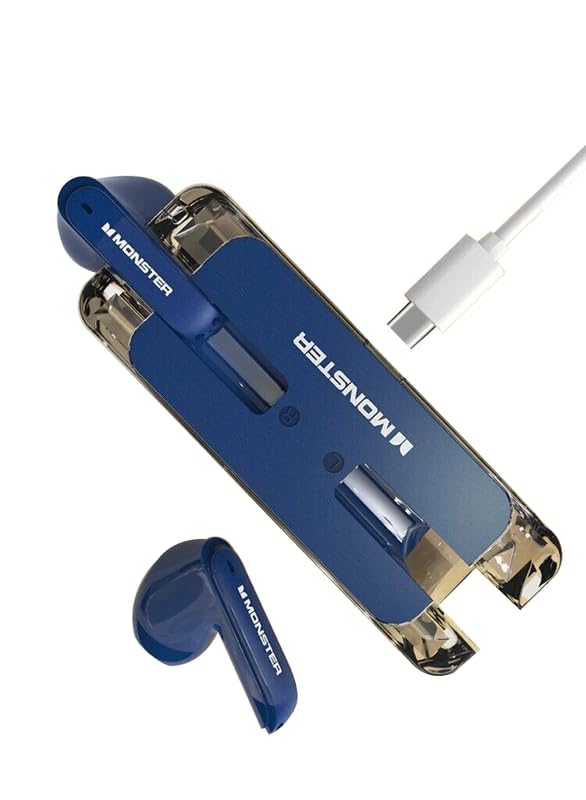
Figure 1: Monster XKO01 True Wireless Stereo Earphones, charging case, and USB-C charging cable. The earphones are blue, and the charging case is a transparent and blue design.
Package Contents
Ensure all items are present in the package:
- Monster XKO01 True Wireless Stereo Earphones (Left and Right)
- Charging Case
- USB-C Charging Cable
- User Manual (this document)
Setup
1. Charging the Earphones and Case
Before first use, fully charge the earphones and the charging case.
- Place both earphones into the charging case, ensuring they are correctly seated.
- Connect the USB-C charging cable to the charging port on the case and the other end to a USB power adapter (not included) or a computer's USB port.
- The indicator lights on the case will show charging status. A full charge typically takes approximately 1.5 to 2 hours.
Figure 2: Connecting the USB-C charging cable to the charging case.
2. Pairing with a Bluetooth Device
The Monster XKO01 earphones use Bluetooth for wireless connection.
- Open the charging case. The earphones will automatically enter pairing mode, indicated by flashing lights on the earphones.
- On your device (smartphone, tablet, computer), enable Bluetooth.
- Search for available Bluetooth devices. Select "Monster XKO01" from the list.
- Once connected, the earphone indicator lights will turn off or show a steady light, and you will hear a confirmation tone.
- If pairing fails, turn off Bluetooth on your device, place the earphones back in the case, close the case, then repeat the steps.
Operating Instructions
Power On/Off
- Power On: Open the charging case, and the earphones will automatically power on and connect to the last paired device.
- Power Off: Place the earphones back into the charging case and close the lid. They will automatically disconnect and power off.
Touch Controls
The Monster XKO01 earphones feature touch-sensitive controls on each earbud.
| Action | Left Earbud | Right Earbud |
|---|---|---|
| Play/Pause | Single tap | Single tap |
| Next Track | Double tap | Double tap |
| Previous Track | Triple tap | Triple tap |
| Answer/End Call | Single tap | Single tap |
| Reject Call | Press and hold for 2 seconds | Press and hold for 2 seconds |
| Activate Voice Assistant | Press and hold for 3 seconds | Press and hold for 3 seconds |
Note: Volume control may need to be adjusted directly on your connected device.
Maintenance
Proper maintenance ensures the longevity and performance of your Monster XKO01 earphones.
- Cleaning: Use a soft, dry, lint-free cloth to clean the earphones and charging case. Do not use abrasive cleaners, alcohol, or chemical solvents.
- Storage: When not in use, store the earphones in their charging case to protect them and keep them charged.
- Avoid Water: The earphones are not waterproof. Avoid exposure to water, moisture, or extreme temperatures.
- Charging: Only use the provided USB-C cable for charging.
Troubleshooting
If you encounter issues with your Monster XKO01 earphones, refer to the following common solutions:
| Problem | Possible Solution |
|---|---|
| Earphones not pairing |
|
| Only one earphone working |
|
| No sound |
|
| Charging case not charging |
|
Specifications
| Feature | Detail |
|---|---|
| Model Name | Monster XKO01 |
| Brand | Monster |
| Form Factor | In-Ear |
| Microphone Format | Built-In |
| Control Method | Touch |
| Material | Plastic |
| Manufacturer | Shenzhen Qishun Innovation Technology Development Co., Ltd |
| Date First Available | 18 April 2024 |
Warranty and Support
For warranty information and customer support, please refer to the warranty card included with your product or visit the official Monster website.
Official Monster Store: Visit the Monster Store on Amazon.in
Ask a question about this manual
Ask about setup, troubleshooting, compatibility, parts, safety, or missing instructions. Manuals+ will review the question and use this page’s manual context to help answer it.