
ELECTROPRIME CAR2178
ELECTROPRIME Portable EV Charger User Manual
Model: CAR2178
Introduction
Thank you for choosing the ELECTROPRIME Portable Adjustable Current New Energy Vehicle Type 2 Charger. This manual provides essential information for the safe and efficient operation, maintenance, and troubleshooting of your new EV charger. Please read this manual thoroughly before using the product and keep it for future reference.
This portable EV charger is designed for convenient home use, offering adjustable current settings and robust protection features to ensure safe and reliable charging for your electric vehicle.
Safety Information
Always adhere to the following safety guidelines to prevent injury, damage to the charger, or damage to your vehicle:
- Ensure the charging environment is dry and well-ventilated. Do not use the charger in wet conditions or near flammable materials.
- Do not attempt to open, disassemble, or modify the charger. Refer all servicing to qualified personnel.
- Verify that the power outlet matches the charger's voltage and current requirements. Use a properly grounded CEE plug socket.
- Avoid touching the charging pins directly.
- Keep the charger out of reach of children.
- In case of any abnormal operation, smoke, or unusual smell, immediately disconnect the power and contact support.
- The charger is equipped with multiple protection functions including leakage protection, overvoltage/undervoltage protection, lightning protection, overcurrent protection, overheating protection, grounding protection, and overload protection. These features are designed for your safety.
Setup
Follow these steps to set up your ELECTROPRIME Portable EV Charger:
- Unpack the Charger: Carefully remove the charger and its components from the packaging. Inspect for any visible damage.
- Choose a Location: Select a dry, stable, and well-ventilated location near your electric vehicle and a suitable CEE plug power outlet. Ensure the 5-meter cable can comfortably reach your vehicle's charging port.
- Connect to Power: Insert the CEE plug firmly into a compatible and properly grounded power outlet.
- Initial Check: The OLED display should illuminate, indicating the charger is powered on and ready.
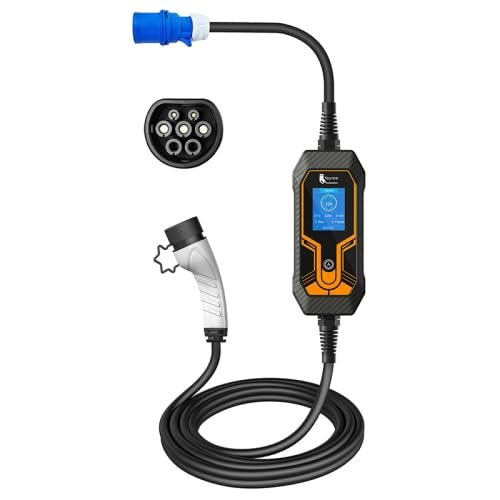
Image: Overview of the ELECTROPRIME Portable EV Charger, showing the CEE plug, the main control unit with display, and the Type 2 vehicle connector.
Operating Instructions
This section details how to operate your portable EV charger for efficient charging.
- Adjust Current (if desired): Before plugging the charger into your car, you can adjust the charging current. The charger supports 8A, 10A, 16A, 25A, and 32A. Use the button on the control unit to cycle through the available current settings. The smart chip will remember your last selected current for future charges.
- Connect to Vehicle: Insert the Type 2 connector firmly into your electric vehicle's charging port. Ensure a secure connection.
- Monitor Charging: The OLED display and indicator lights on the charging station will show the current charging status, including voltage, current, power, and charging time.
- Charging Completion: Once your vehicle is fully charged, the charger will automatically stop. Disconnect the Type 2 connector from your vehicle first, then unplug the CEE plug from the power outlet.

Image: The charger's specifications, highlighting its 7KW, 32A, single-phase capability, and the range of adjustable current settings (8A-32A).
Temperature Protection
The charger incorporates intelligent temperature management for safety:
- If the internal temperature exceeds 70°C but is below 85°C, the charger will automatically reduce the charging current to prevent overheating.
- If the internal temperature reaches or exceeds 85°C, the charger will cut off power within 0.2 seconds to ensure safety.
- Charging will automatically resume when the temperature drops below 65°C.
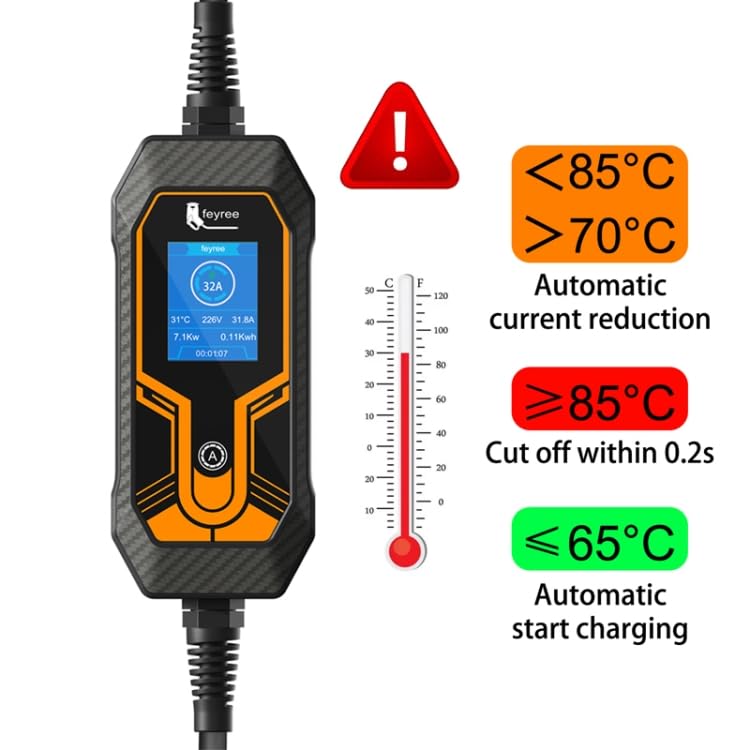
Image: Visual representation of the charger's automatic temperature protection system, showing thresholds for current reduction and power cut-off.
Maintenance
Proper maintenance ensures the longevity and optimal performance of your charger:
- Cleaning: Disconnect the charger from power before cleaning. Use a soft, dry cloth to wipe the exterior. Do not use harsh chemicals or abrasive cleaners.
- Storage: When not in use, store the charger in a cool, dry place, away from direct sunlight and extreme temperatures. The special socket design helps prevent dust from entering the interface.
- Cable Care: Avoid kinking or bending the cable sharply. The TPU wire is designed for wear and pressure resistance, but proper handling extends its life.
- Inspection: Periodically inspect the cable, plugs, and control unit for any signs of damage, wear, or corrosion. If any damage is found, do not use the charger and contact support.
Troubleshooting
If you encounter issues with your charger, refer to the following common problems and solutions:
| Problem | Possible Cause | Solution |
|---|---|---|
| Charger not powering on. | No power from outlet; loose connection; internal fault. | Check power outlet with another device. Ensure CEE plug is fully inserted. If problem persists, contact support. |
| Charging stops unexpectedly. | Overheating protection activated; vehicle fully charged; power interruption; internal fault. | Check display for error codes. Allow charger to cool down if overheating. Verify vehicle charging status. Check power supply. |
| Display shows error message. | Leakage, overvoltage, undervoltage, overcurrent, grounding, or overload detected. | Note the error code/message. Disconnect and reconnect the charger. If the error persists, consult the specific error code in a more detailed manual (if available) or contact support. |
| Cannot adjust current. | Attempting to adjust current while connected to vehicle. | Disconnect the charger from the vehicle first, then adjust the current setting. |
For issues not listed here or if troubleshooting steps do not resolve the problem, please contact ELECTROPRIME customer support.
Specifications
| Feature | Detail |
|---|---|
| Dimensions | 235mm x 99mm x 52mm |
| Shell Material | Thermoplastic material |
| Cable Length | 5 meters |
| Protection Level | IP55 |
| Number of Phases | Single phase |
| Rated Input Voltage Range | 80-220V AC |
| Rated Output Current | Adjustable: 8A / 10A / 16A / 25A / 32A |
| Rated Output Voltage | AC220V |
| Rated Input Frequency | 50-60Hz |
| External Impact Resistance | Withstands 1-meter drop and 2-ton vehicle crushing force |
| Mechanical Life | Approx. 10,000 times of unloading and plugging |
| Display Type | OLED display + indicator light |
| Working Temperature | -30°C to +55°C |
| Protection Functions | Leakage, overvoltage/undervoltage, lightning, overcurrent, overheating, grounding, overload protection. |
Warranty and Support
ELECTROPRIME products are manufactured to high-quality standards. For information regarding warranty coverage, please refer to the specific warranty policy provided at the time of purchase or visit the official ELECTROPRIME website.
For technical support, troubleshooting assistance, or inquiries about replacement parts, please contact ELECTROPRIME customer service. When contacting support, please have your product model number (CAR2178) and purchase details ready.
Manufacturer: ELECTROPRIME
Ask a question about this manual
Ask about setup, troubleshooting, compatibility, parts, safety, or missing instructions. Manuals+ will review the question and use this page’s manual context to help answer it.