
ELECTROPRIME KL-YP08
ELECTROPRIME KUULAA KL-YP08 Car Wireless Bluetooth Receiver User Manual
Model: KL-YP08
Introduction
The ELECTROPRIME KUULAA KL-YP08 is a versatile Car Wireless Bluetooth Receiver designed to bring wireless audio streaming and hands-free calling capabilities to your vehicle or any audio device with a 3.5mm AUX input. Featuring Bluetooth 5.0 technology, it ensures stable and efficient connectivity for an enhanced audio experience.
Product Features
- Bluetooth 5.0 Connectivity: Provides stable and high-efficiency wireless transmission.
- Hands-Free Calling: Built-in microphone with -42db sensitivity for clear calls.
- Wide Compatibility: Plug-and-play design for audio devices with a 3.5mm AUX input.
- Automatic Reconnection: Connects automatically to previously paired devices.
- HD Audio Decoding: Supports lossless music playback for high-fidelity sound.
- Long Transmission Distance: Up to 10 meters (33 feet) without obstacles.
- Long Battery Life: Approximately 10 hours of music playback on a single charge.
- Compact and Lightweight Design: Easy to carry and integrate into any setup.
Package Contents
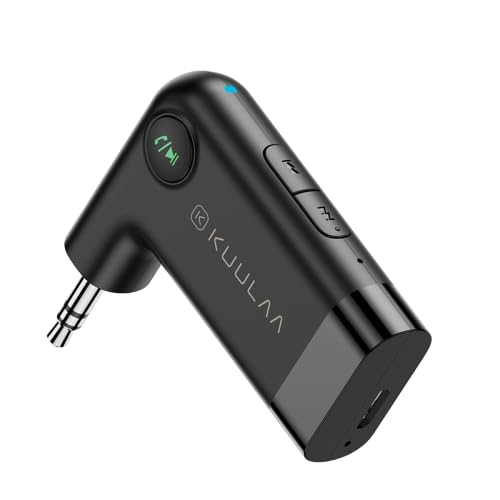
Image: The ELECTROPRIME KUULAA KL-YP08 Bluetooth Receiver, showcasing its compact design and 3.5mm AUX connector.
- 1 x KUULAA KL-YP08 Car Wireless Bluetooth Receiver
- 1 x Micro USB Charging Cable (approx. 50cm)
Note: Contents are as shown in product images.
Product Overview and Controls
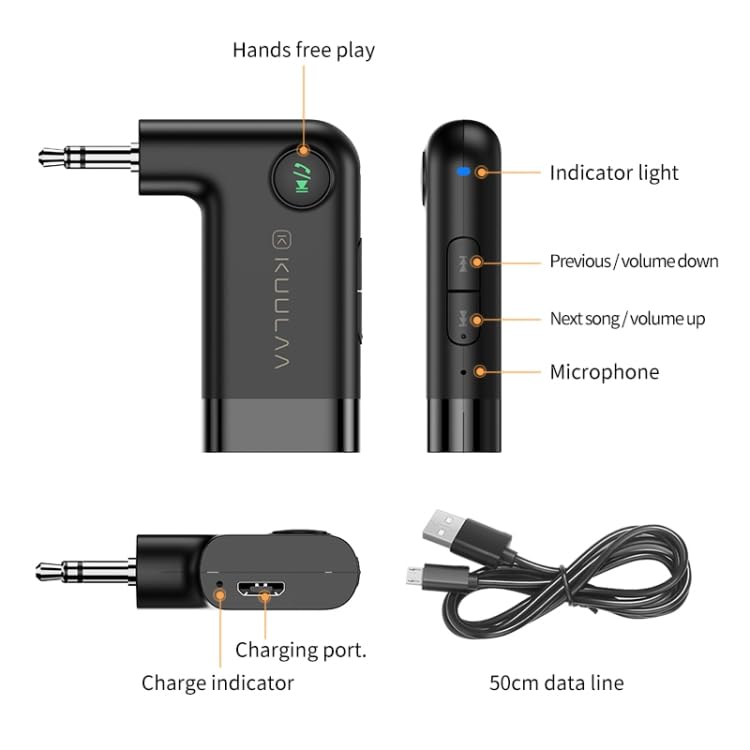
Image: A detailed diagram of the KUULAA KL-YP08 Bluetooth Receiver, highlighting its various components and controls, including the indicator light, previous/volume down button, next song/volume up button, microphone, hands-free play button, charging port, charge indicator, and the included 50cm data line.
Familiarize yourself with the device's layout:
- Indicator Light: Shows device status (pairing, connected, charging).
- Previous / Volume Down Button: Short press for previous track, long press for volume down.
- Next Song / Volume Up Button: Short press for next track, long press for volume up.
- Microphone: For hands-free calls.
- Hands-Free Play Button: Multi-function button for power, play/pause, answer/end calls.
- Charging Port: Micro USB port for charging.
- Charge Indicator: Light indicating charging status.
- 3.5mm Stereo Plug: Output interface for connecting to AUX input.
Setup and Pairing
- Charge the Device: Before first use, fully charge the receiver using the provided Micro USB cable. Connect the cable to the receiver's charging port and a USB power source (e.g., car charger, computer USB port). The charge indicator will show charging status.
- Power On: Press and hold the Hands-Free Play button until the indicator light flashes, indicating it's powered on and in pairing mode.
- Connect to Audio System: Plug the 3.5mm stereo plug of the receiver into the AUX input of your car stereo or home audio system.
- Pair with Your Phone:
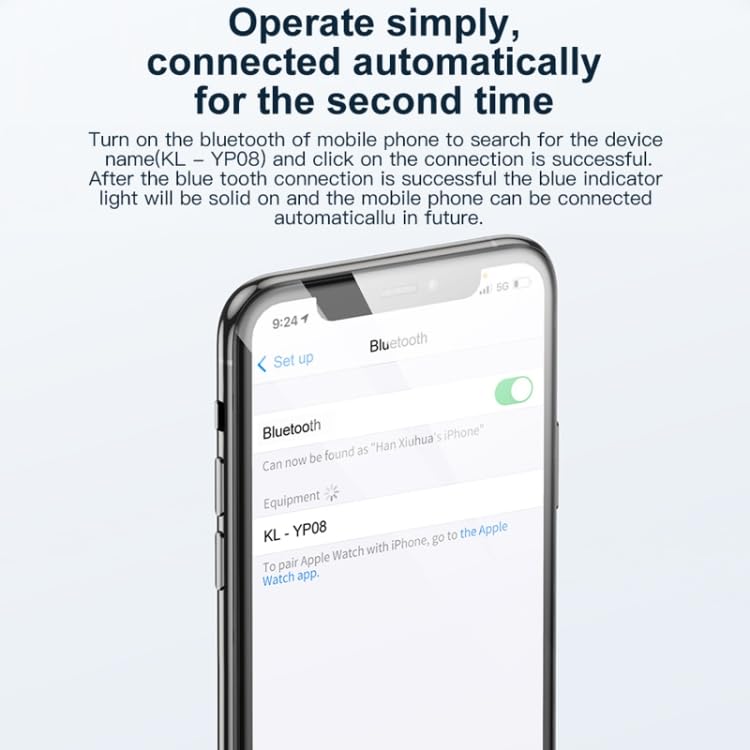
Image: A smartphone screen displaying the Bluetooth settings menu, with "KL-YP08" visible as a discoverable device, illustrating the pairing process.
- On your mobile phone, go to the Bluetooth settings.
- Turn on Bluetooth and search for available devices.
- Select "KL-YP08" from the list of devices to connect.
- Once connected, the blue indicator light on the receiver will become solid.
- Automatic Reconnection: After the initial successful pairing, the receiver will automatically connect to your phone's Bluetooth when powered on and within range.
Operating Instructions
Music Playback
- Play/Pause: Short press the Hands-Free Play button.
- Next Track: Short press the "Next Song / Volume Up" button.
- Previous Track: Short press the "Previous / Volume Down" button.
- Volume Up: Long press the "Next Song / Volume Up" button.
- Volume Down: Long press the "Previous / Volume Down" button.
Hands-Free Calling
- Answer Call: Short press the Hands-Free Play button when a call comes in.
- End Call: Short press the Hands-Free Play button during a call.
- Reject Call: Long press the Hands-Free Play button when a call comes in.
- Redial Last Number: Double-press the Hands-Free Play button.
Power Management
- Power On: Press and hold the Hands-Free Play button until the indicator light flashes.
- Power Off: Press and hold the Hands-Free Play button until the indicator light turns off.
Maintenance
- Keep the device dry. Avoid exposure to moisture, rain, or liquids.
- Do not expose the device to extreme temperatures.
- Clean the device with a soft, dry cloth. Do not use harsh chemicals or abrasive cleaners.
- Store the device in a cool, dry place when not in use for extended periods.
- Avoid dropping or subjecting the device to strong impacts.
Troubleshooting
| Problem | Possible Solution |
|---|---|
| Device does not power on. | Ensure the device is fully charged. Connect it to a power source and try again. |
| Cannot pair with phone. |
|
| No audio output. |
|
| Poor audio quality or disconnections. |
|
Specifications
| Feature | Detail |
|---|---|
| Bluetooth Version | 5.0 |
| Output Interface | 3.5mm Stereo Plug |
| MIC Sensitivity | -42db |
| Frequency Response | 50Hz-20KHz |
| Signal to Noise Ratio | 75db |
| Battery Capacity | 145mAh |
| Bluetooth Distance | Approx. 10 meters (without obstacles) |
| Music Playback Length | Approx. 10 hours |
| Material | ABS+PC |
| Charging | Micro USB DC5V/100mA |
| Product Size | Approx. 5 x 1.15 x 4.8cm |
| Product Weight | Approx. 12.3g |
| Data Cable Length | Approx. 50cm |
Warranty and Support
For warranty information and customer support, please refer to the documentation provided with your purchase or contact ELECTROPRIME customer service directly. Details regarding warranty policy may also be available on the official ELECTROPRIME website or through your point of purchase.
Manufacturer: ELECTROPRIME
Model Number: TBD0603679501A
Ask a question about this manual
Ask about setup, troubleshooting, compatibility, parts, safety, or missing instructions. Manuals+ will review the question and use this page’s manual context to help answer it.