
ELECTROPRIME EDA005970601A
ELECTROPRIME B5303 10.26 inch Portable Car MP5 Player
User Manual
1. Introduction
Thank you for choosing the ELECTROPRIME B5303 10.26 inch Portable Car MP5 Player. This device is designed to enhance your in-car entertainment and connectivity experience, offering a wide range of features including wireless CarPlay and Android Auto, Bluetooth connectivity, media playback from various sources, and FM transmission.
This manual provides detailed instructions on how to set up, operate, and maintain your new car MP5 player. Please read it thoroughly before use to ensure proper installation and optimal performance.
2. Product Overview and Package Contents
The ELECTROPRIME B5303 is a versatile portable car MP5 player featuring a large 10.26-inch display. Below is an image of the product and a list of items included in your package.
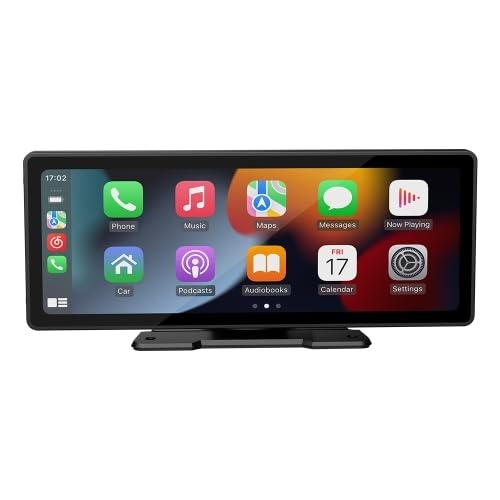
Figure 2.1: Front view of the ELECTROPRIME B5303 Portable Car MP5 Player displaying the CarPlay interface.
Package Contents:
- Host Unit (1x)
- User Instructions Manual (1x)
- Cigarette Lighter Power Cord (with USB charging port) (1x)
- Installation Bracket (2x)
- Reversing Video Cable (1x)
Note: Accessories, instructions, and packaging may be updated by the manufacturer from time to time. Please refer to the actual contents received.
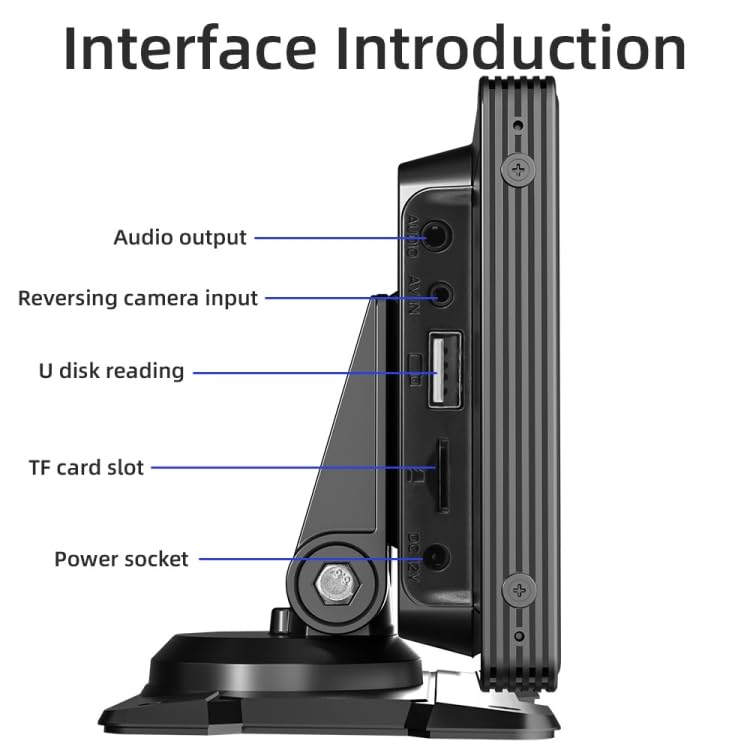
Figure 2.2: Side view illustrating the various input/output ports on the ELECTROPRIME B5303. These include the Audio output, Reversing camera input, USB port for U disk reading, TF card slot, and the Power socket.
3. Setup and Installation
Follow these steps to properly set up and install your portable car MP5 player.
3.1 Mounting the Device
- Attach the provided installation brackets to the main unit.
- Choose a suitable location on your dashboard that does not obstruct your view or interfere with vehicle controls.
- Securely mount the device using the brackets. Ensure it is stable and does not move during driving.
3.2 Power Connection
- Insert the cigarette lighter power cord into your vehicle's 12V or 24V cigarette lighter socket.
- Connect the other end of the power cord to the DC 12V power socket on the side of the MP5 player (refer to Figure 2.2).
- The unit should power on automatically or by pressing the power button.
3.3 Optional Rear View Camera Connection
If you have an optional rearview camera, connect it as follows:
- Connect the reversing video cable to the "Reversing camera input" port on the MP5 player (refer to Figure 2.2).
- Route the cable to your rearview camera and connect it according to the camera's instructions.
- Ensure the camera's power is correctly wired to your vehicle's reverse light circuit for automatic activation.
4. Operating Instructions
This section details the various functions and how to operate your ELECTROPRIME B5303.
4.1 Basic Operations
- Power On/Off: The device typically powers on with the vehicle's ignition. Press and hold the power button (if available) to manually turn it on or off.
- Volume Control: Adjust volume using the on-screen controls or physical buttons if present.
- Screen Brightness: Access display settings through the main menu to adjust brightness for optimal viewing.
4.2 Media Playback (SD Card / U Disk)
The device supports playback of audio, video, and image files from SD cards and USB drives (U disk).
- Insert your SD card into the TF card slot or your USB drive into the USB2.0 port (refer to Figure 2.2).
- Navigate to the respective media player application on the device's main interface.
- Select the desired file type (audio, video, or image) and choose the file to play.
Supported Formats:
- Audio: MP3, AAC, APE, OGG, M4A, RA, WAV
- Video: H263, H264, H265, DIVX HD, AVI, FLV, MKV, MPEG, MP4, WMV9, VC, ASF, TS, QT
- Image: JPEG, PNG, BMP, GIF, TIFF
4.3 Bluetooth Function
Connect your smartphone via Bluetooth for hands-free calling and audio streaming.
- On the MP5 player, go to the Bluetooth settings.
- Enable Bluetooth on your smartphone and search for available devices.
- Select "CarPlay" (default name) from the list on your phone to pair.
- Once paired, you can make/receive calls and play music through the MP5 player.
4.4 Smartphone Integration (CarPlay / Android Auto / Screen Mirroring)
The device supports both wired and wireless CarPlay/Android Auto, as well as wired screen mirroring.
- Wireless Connection: Ensure your phone's Wi-Fi and Bluetooth are enabled. The device will automatically prompt for connection when in range. Follow on-screen instructions to complete the setup.
- Wired Connection: Connect your smartphone to the USB port of the MP5 player using a compatible USB cable. The device will automatically detect and launch CarPlay or Android Auto, or initiate screen mirroring.
4.5 Radio Frequency Transmitting Function (FM Transmitter)
Transmit audio from the MP5 player to your car's FM radio.
- Access the FM Transmitter settings on the MP5 player.
- Select an unused FM frequency from the available options.
- Tune your car's FM radio to the same frequency.
- Audio from the MP5 player will now play through your car's speakers.
Available Frequencies: 88.60, 89.20, 89.50, 89.80, 91.50, 91.80, 93.00, 93.60, 93.90, 94.50, 95.10, 95.70 MHz.
4.6 Rear View Function
If a rearview camera is connected, the display will automatically switch to the camera view when the vehicle is put into reverse gear.
5. Maintenance
Proper maintenance ensures the longevity and optimal performance of your device.
- Cleaning: Use a soft, dry, lint-free cloth to clean the screen and exterior. For stubborn smudges, slightly dampen the cloth with water. Do not use harsh chemicals, abrasive cleaners, or solvents.
- Temperature: Operate the device within the specified working temperature range of -10°C to 60°C. Avoid exposing it to extreme heat or cold.
- Storage: When not in use for extended periods, store the device in a cool, dry place away from direct sunlight.
- Handling: Avoid dropping the device or subjecting it to strong impacts.
6. Troubleshooting
If you encounter issues with your ELECTROPRIME B5303, refer to the following common problems and solutions.
| Problem | Possible Cause | Solution |
|---|---|---|
| Device does not power on. | No power supply; loose connection; blown fuse in vehicle. | Check if the cigarette lighter socket has power. Ensure the power cord is securely connected. Check vehicle's fuse box. |
| No sound from car speakers. | FM transmitter not set correctly; car radio not tuned to correct frequency; volume too low. | Ensure FM transmitter is enabled and set to an unused frequency. Tune car radio to the same frequency. Increase volume on both the MP5 player and car radio. |
| Bluetooth connection fails. | Bluetooth not enabled; device not in pairing mode; interference. | Ensure Bluetooth is enabled on both devices. Restart both devices. Try pairing again. Move closer to the device. |
| CarPlay/Android Auto not connecting. | Incorrect cable; phone settings; Wi-Fi/Bluetooth issues for wireless. | For wired, use a high-quality data cable. For wireless, ensure Wi-Fi and Bluetooth are on and connected. Check phone's CarPlay/Android Auto settings. Restart phone and MP5 player. |
| Rearview camera not displaying. | Camera not connected; incorrect wiring; faulty camera. | Verify the reversing video cable is securely connected. Ensure the camera is properly powered and wired to the reverse light trigger. Test with another camera if possible. |
If the problem persists after trying these solutions, please contact customer support.
7. Specifications
Detailed technical specifications for the ELECTROPRIME B5303 Portable Car MP5 Player.
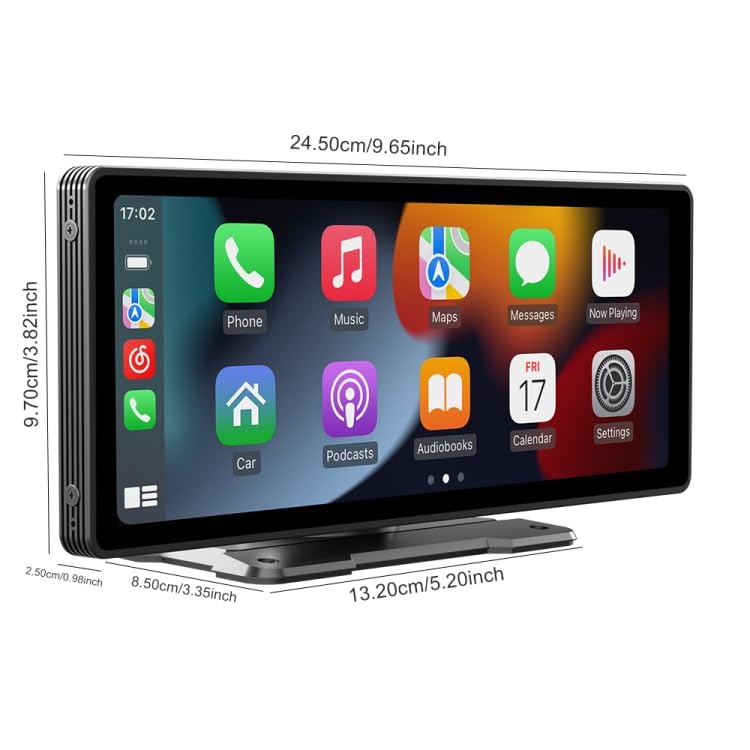
Figure 7.1: Dimensions of the ELECTROPRIME B5303 Portable Car MP5 Player. The main unit measures approximately 24.50 cm (9.65 inches) in width and 9.70 cm (3.82 inches) in height. The depth is about 2.50 cm (0.98 inches). The base measures 13.20 cm (5.20 inches) in width and 8.50 cm (3.35 inches) in depth.
| Feature | Detail |
|---|---|
| System | Quanzhi melis system |
| Software Solution | F133 |
| CPU | F133 |
| Running Memory | 1Gbit DRAM |
| Display Size | 10.26 inches |
| Display Resolution | 600x1600 |
| Bluetooth Version | 5.0 (Default Name: CarPlay) |
| WiFi Frequency | 2.4G/5G dual frequency |
| Radio Transmission Frequencies | 88.60/89.20/89.50/89.80/91.50/91.80/93.00/93.60/93.90/94.50/95.10/95.70 MHz |
| Radio Transmitter IC | AB5301B |
| Power Amplifier IC | CS8571E |
| Output Power | Built-in 1W speaker |
| Working Voltage | 12~30V |
| Working Temperature | -10~60 degrees Celsius |
| USB Interface | USB2.0 |
| AUX Port Parameters | Audio output: Supported; Reversing video input: Supported |
| Supported Languages | English, Chinese, Spanish, Portuguese, Russian, German, French, Polish, Turkish, Arabic, Hebrew, Italian, Czech, Japanese, Korean, Thai |
8. Warranty and Support
ELECTROPRIME products are designed for reliability and performance. For warranty claims, technical support, or service inquiries, please refer to the retailer or manufacturer's official support channels.
Please note that the manufacturer reserves the right to update accessories, instructions, and packaging without prior notice. Always refer to the latest information provided with your product or on the official ELECTROPRIME website for the most current details regarding warranty and support.
For further assistance, please contact your point of purchase or visit the ELECTROPRIME official website.
Ask a question about this manual
Ask about setup, troubleshooting, compatibility, parts, safety, or missing instructions. Manuals+ will review the question and use this page’s manual context to help answer it.