
ACiQ ACIQ-07PTC
ACiQ ACIQ-07PTC 7,000 BTU PTAC Unit User Manual
Model: ACIQ-07PTC
Introduction
This manual provides comprehensive instructions for the ACiQ 7,000 BTU PTAC unit (Model ACIQ-07PTC). It covers essential information for safe and efficient operation, including setup, daily use, maintenance, and troubleshooting. Please read this manual thoroughly before installing or operating your unit and retain it for future reference.
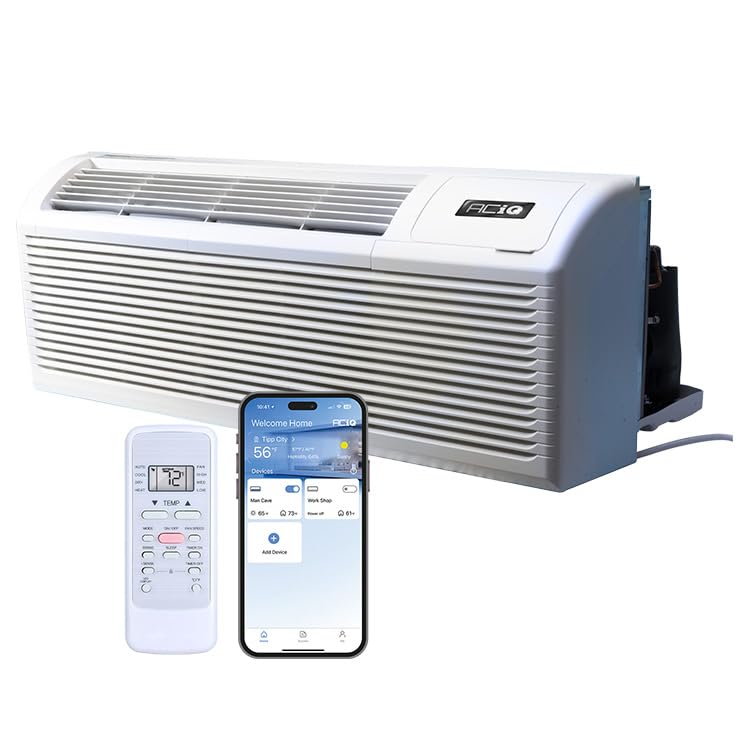
Figure 1: ACiQ ACIQ-07PTC PTAC Unit
Important Safety Information
Always follow basic safety precautions when using electrical appliances to reduce the risk of fire, electric shock, or injury. This unit operates on 208/230V power. Ensure proper grounding and use a dedicated circuit. Do not block air inlets or outlets. Disconnect power before servicing.
Setup and Installation
The ACiQ-07PTC PTAC unit is designed for drop-in replacement in standard 42" x 16" wall sleeves. A wall sleeve and grille are not included and must be purchased separately. Ensure the electrical supply is 208/230V with a NEMA 6-15P power receptacle.
Dimensions and Placement
The unit dimensions are approximately 20.94"D x 42.01"W x 15.98"H. Proper placement within a compatible wall sleeve is crucial for optimal performance and safety.

Figure 2: ACiQ PTAC Unit Sizing Diagram
Electrical Requirements
The unit requires a 208/230V, 15 Amp electrical circuit. A 7 ft power cord with a NEMA 6-15P plug is included. Ensure the receptacle is correctly installed and grounded by a qualified electrician.

Figure 3: Electrical Specifications and Plug Type
Operating Instructions
Your ACiQ PTAC unit offers multiple operating modes and smart features for optimal comfort.
Control Panel and Remote
The unit features a sleek LED display and an integrated control panel. A remote control is included for convenient operation. Any 24-volt thermostat is also compatible for external control.

Figure 4: Unit Control Panel
Operating Modes
- Cooling: Provides cooling for rooms up to 200-300 square feet.
- Heating: Utilizes a heat pump for efficient heating. A 2.5 kW backup electric heat kit activates if the heat pump struggles in extreme cold (around 32°F outdoor temperatures).
- Fan: Circulates air without heating or cooling.

Figure 5: Operating Modes and Temperature Ranges
Smart Features
- Infrared (IR) Sensor: Compatible with 3rd party controllers for enhanced automation.
- Auto Restart: The unit automatically restarts with your most recent settings after a power outage.
- Built-in WiFi: Control the unit seamlessly via the ACiQ app for customized comfort from your smartphone.

Figure 6: Auto Restart Feature

Figure 7: ACiQ App for Smart Control
Maintenance
Regular maintenance ensures optimal performance and longevity of your ACiQ PTAC unit.
Cleaning Air Filters
The unit comes with two washable air filters. Clean them regularly to maintain air quality and unit efficiency. Refer to the filter access diagram for removal and reinstallation.

Figure 8: Removing Air Filter for Cleaning
General Cleaning
Wipe the exterior of the unit with a soft, damp cloth. Do not use abrasive cleaners or solvents. Ensure the drain kit is clear of obstructions for proper condensate drainage.
Troubleshooting
This section provides solutions to common issues you might encounter.
| Problem | Possible Cause | Solution |
|---|---|---|
| Unit does not turn on | No power, circuit breaker tripped, power cord unplugged. | Check power supply, reset breaker, ensure cord is securely plugged in. |
| Insufficient cooling/heating | Dirty air filters, blocked air vents, incorrect temperature setting, room size exceeds capacity. | Clean filters, clear vents, adjust temperature, ensure unit is appropriate for room size (200-300 sq ft). |
| Unusual noise | Loose parts, foreign object in fan, unit not level. | Inspect unit for loose components, remove any obstructions, ensure unit is level. If noise persists, contact support. |
Specifications
| Feature | Detail |
|---|---|
| Model Number | ACIQ-07PTC |
| Cooling Capacity | 7,000 BTU (0.58 Tons) |
| Heating Capacity | 2.5 kW Backup Electric Heat |
| EER (Cooling) | 13.1 |
| Coverage Area | 200-300 sq ft |
| Product Dimensions (D x W x H) | 20.94" x 42.01" x 15.98" |
| Electrical | 208/230V, 15 Amp, 1 Phase, 60Hz |
| Plug Type | NEMA 6-15P |
| Special Features | Infrared Sensor, LED Display, Washable Air Filters, Auto Restart, Built-in WiFi |
| Refrigerant | R 410A |
Warranty and Support
ACiQ provides reliable HVAC solutions. For warranty information and technical support, please refer to the documentation included with your purchase or visit the official ACiQ website. Ensure you register your product to activate your warranty.
For additional assistance, contact a certified ACiQ seller or technical support.
Product Videos
Olmo Packaged Terminal Air Conditioner Overview
This video provides an overview of the Olmo PTAC unit, highlighting its features, BTU capacities (9K, 12K, 15K), EER2 rating, Smart Connect app control, thermostat compatibility, heating capacity, and additional features like Auto Defrost, Dual Fan Speed, Auto Restart, LED Display, and Fresh Air Input. Note: The video mentions Olmo, which is related to ACiQ products.
Related documentsACIQ-07PTC


Ask a question about this manual
Ask about setup, troubleshooting, compatibility, parts, safety, or missing instructions. Manuals+ will review the question and use this page’s manual context to help answer it.