
1. Introduction
This manual provides detailed instructions for the installation, setup, and operation of your new Road Top 12.3-inch Ultra-Narrow Touchscreen. This system is designed to upgrade your BMW 5 Series F10/F11 (2012-2016 with NBT System) by adding wireless Apple CarPlay, Android Auto, and mirrorlink functionalities while retaining all original OEM features.

Video: Overview of the 12.3-inch Ultra-Narrow Linux Touchscreen for BMW 5 Series F10.
2. Safety Information
Warning:
- Professional installation is recommended. Incorrect installation may damage the vehicle's electrical system or the product.
- Always disconnect the vehicle's battery before beginning any electrical work to prevent short circuits.
- Ensure all connections are secure and properly insulated to avoid electrical hazards.
- Test all functions of the device thoroughly before reassembling the dashboard to confirm proper operation.
- Do not operate the device in a manner that distracts you from driving. Always prioritize road safety.
3. Package Contents
Verify that all items are present in the package:
- Car Screen (12.3-inch Ultra-Narrow Touchscreen)
- Power Cable
- USB Cable
- AUX Cable
- Bracket
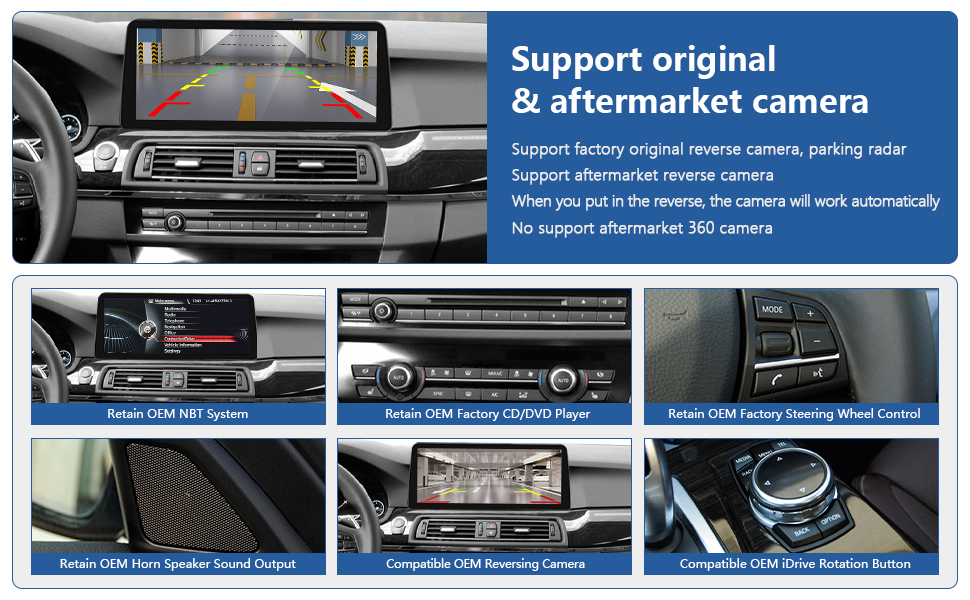
Image: Included components of the Road Top 12.3-inch Touchscreen system.
4. Compatibility
This 12.3-inch Ultra-Narrow CarPlay Touchscreen is compatible with:
- BMW 5 Series F10/F11 (2012-2016 Year) with NBT System.
Important Note: Not compatible with BMW 5 Series F07 Car, or vehicles with CIC/EVO ID5/EVO ID6 systems.

Image: Visual guide for compatible BMW models and NBT system identification.
5. Key Features
The Road Top 12.3-inch Touchscreen offers the following enhancements:
- Retains Original OEM System: Keeps all original car functions, including radio, amplifier, joystick control, and factory cameras.
- Wireless CarPlay & Android Auto: Seamless integration for navigation, music, calls, and more.
- Wireless Mirrorlink: Supports screen mirroring for both iOS and Android phones.
- High-Resolution Touchscreen: 1920x720 HD resolution for a clear display.
- Automatic Day/Night Mode: Adjusts display brightness based on car headlights for comfortable viewing.
- Camera Support: Compatible with factory original reverse camera, parking radar, and aftermarket reverse/front view cameras (CVBS input). Does not support aftermarket 360 cameras.
- Control Methods: Supports hand touch control and original steering wheel control buttons.
- Enhanced Audio: Built-in Bluetooth module and EQ adjustable for optimal sound quality.

Image: Visual representation of the main features of the product.
6. Installation Guide
Important: Installation requires removing parts of the car dashboard. It is crucial to test all functions before fully reassembling the dashboard.
6.1 General Installation Steps
Video: Detailed installation guide for Wireless CarPlay in BMW 5 Series.
6.2 Fiber Optic Cable Transfer (If Applicable)
If your vehicle uses fiber optic cables for audio, you may need to transfer them to ensure sound functionality.
Video: Instructions on how to transfer fiber optic cables for audio connection.
6.3 Installation Comparison

Image: Visual comparison of the dashboard before and after the new screen installation.
7. Setup
7.1 Screen Resolution Adjustment
If the screen display is distorted or incorrect after installation, adjust the resolution settings.
Video: Guide on adjusting screen resolution settings.
7.2 Language Setup
Configure the system language to your preference.
Video: Instructions for setting the system language.
7.3 Wireless CarPlay Connection
Connect your iPhone wirelessly to the system for CarPlay functionality.
Video: Steps to connect to Wireless CarPlay.
7.4 Wireless AirPlay Connection
Mirror your iPhone screen to the display using AirPlay.
Video: How to connect to Wireless AirPlay.
8. Operating Instructions
8.1 Switching Between Systems
Easily switch between the new Linux system and your original BMW OEM system.
Video: Demonstrates switching between the new system and the original BMW system.
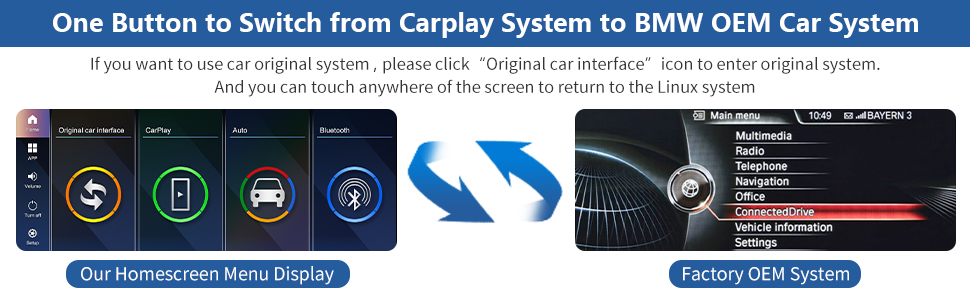
Image: Visual guide for switching between CarPlay and OEM systems.
8.2 Menu Display Interface
Explore the various menu options and interface of the Linux touchscreen.
Video: Overview of the Menu Display Interface for the BMW Linux Touchscreen.
8.3 Day and Night Mode
The system automatically adjusts the display between day and night modes based on your car's original headlights for optimal visibility.

Image: Illustration of automatic day and night mode adjustment.
8.4 Camera Functions
The system supports various camera inputs, including original and aftermarket options.

Image: Details on supported camera functions.

Image: Comprehensive view of retained OEM functions and camera support.
8.5 Audio Settings
The system includes a built-in Bluetooth module and adjustable EQ for optimal audio experience.

Image: Information on AUX and Bluetooth audio support.
9. Troubleshooting
Most issues can be resolved by checking cable connections and settings. If you encounter problems, refer to the following common solutions:
- No Sound: Ensure all audio cables are correctly connected. If your car uses fiber optic cables, confirm they are properly transferred. Check the AUX input setting in the system.
- Display Issues (Distorted/Incorrect): Adjust the screen resolution in the system settings (refer to Section 7.1).
- Connectivity Problems (CarPlay/Android Auto): Verify that Wi-Fi and Bluetooth are enabled on your phone and the system. Ensure correct pairing and authorization.
- Original Functions Not Working: Double-check all wiring connections, especially those related to the OEM system. Ensure the system is correctly configured to retain OEM functions.
If problems persist, please contact Road Top Direct customer support for assistance.
10. Specifications
| Feature | Detail |
|---|---|
| Item Weight | 4.6 pounds |
| Package Dimensions | 15.43 x 7.24 x 6.77 inches |
| Display Size | 12.3 Inches |
| Resolution | 720 x 1280 |
| Special Feature | Apple CarPlay, Android Auto |
| Connectivity Technology | Bluetooth |
| Vehicle Service Type | Car |
| Mounting Type | Dashboard Mount |
11. Warranty
This product comes with a standard manufacturer's warranty. Please refer to the product packaging or contact Road Top Direct for specific warranty terms and conditions.
12. Customer Support
For any questions, technical assistance, or troubleshooting not covered in this manual, please contact Road Top Direct customer support. You can typically find contact information on the product packaging or the seller's page where you purchased the item.