
1. Introduction
Thank you for choosing the Villastar Pool Heat Pump. This manual provides essential information for the safe and efficient operation, installation, and maintenance of your new pool heater. Please read this manual thoroughly before use and retain it for future reference.

Figure 1: Villastar Pool Heat Pump Model YC-005
This image displays the main unit of the Villastar Pool Heat Pump, featuring its compact design, front fan, and digital display. The power cord and water connections are visible on the side.
2. Safety Information
Always adhere to the following safety precautions to prevent injury or damage to the unit.
- Ensure the unit is installed by a qualified professional if you are not familiar with plumbing and electrical work.
- Do not operate the unit if any part is damaged or if the power cord is frayed.
- Keep children and pets away from the unit during operation.
- Ensure proper ventilation around the unit. Do not block the fan or air vents.
- Always disconnect power before performing any maintenance or troubleshooting.
- The unit features automatic leakage protection, low-voltage switch, and high/low temperature protection for enhanced safety.
3. Package Contents
Verify that all components are present and undamaged upon unpacking:
- Villastar Pool Heat Pump Unit (Model YC-005)
- Inlet and Outlet Joints
- Water Pump Unions
- Hose Clamps
- Corrugated Pipes (Hoses)
- User Manual
4. Setup and Installation
The Villastar Pool Heat Pump is designed for easy installation with 1-1/4" water pipe connections. No special plumbing or electrical work is typically needed for standard setups.
4.1 Site Selection
- Place the unit on a stable, level surface near your pool and existing filtration system.
- Ensure adequate air circulation around the unit.
- The unit operates between 23°F to 109.4°F air temperature.
4.2 Connecting the Unit
- Prepare Auxiliary Materials: Gather all necessary pipes, joints, and clamps. Ensure you have a filter pump and the swimming pool ready.
- Attach Clamps to Pipes: Slide the hose clamps onto the corrugated pipes.
- Connect Heat Pump Joints: Securely attach the heat pump inlet and outlet joint fittings to the corresponding ports on the heat pump unit.
- Connect Water Pump Union: Connect the water pump union to the pipe leading from your filter pump.
- Connect Pipes to System: Connect the corrugated pipes from the heat pump to your filter pump and then to the pool. Ensure all connections are tight using the hose clamps to prevent leaks.
- Remove Air from System: Before powering on, add water to the system to remove any trapped air. This is crucial for proper operation.
Video 1: Villastar Above Ground Pool Heat Pump Easy to Install
This video demonstrates the step-by-step process of connecting the Villastar pool heat pump to an existing pool filtration system, including preparing materials, attaching hoses, and ensuring proper water flow.
Video 2: Villastar Mini Swimming Pool Heat Pump for Above-Ground Pool Overview
This video provides a general overview of the Villastar Mini Swimming Pool Heat Pump, showcasing its features and compact size, and briefly touching upon its installation process.
5. Operating Instructions
The Villastar Pool Heat Pump features an intuitive LED control panel for easy temperature and mode adjustments.
5.1 Control Panel Overview

Figure 2: Control Panel for Villastar Pool Heat Pump
This image highlights the digital LED display and control buttons on the unit, including power, mode selection, and temperature adjustment buttons.
- Power Button: Turns the unit ON/OFF.
- Up/Down Arrows: Adjust the desired water temperature.
- Mode (M) Button: Switches between heating mode, cooling mode, and automatic mode (heating + cooling).
- The LED screen displays the current pool water temperature.
5.2 Initial Startup and Temperature Setting
- Power On: Plug in the unit. The display will show "OFF". Press the Power button to start the unit.
- View Temperature: The set temperature will flash three times, then the actual water temperature will be displayed.
- Change Mode: Press the "M" key to cycle through heating mode (sun icon), cooling mode (snowflake icon), and automatic mode (both icons).
- Adjust Temperature: Use the Up or Down arrow keys to set your desired water temperature. The unit will automatically work to reach and maintain this temperature.
The unit efficiently warms pools up to 5,000 gallons, maintaining water temperatures between 59°F-104°F for heating and 46°F-82°F for cooling.
Video 3: Villastar Pool Heat Pump Display and Operation
This video demonstrates how to power on the unit, view the current temperature, switch between heating and cooling modes, and adjust the desired temperature using the control panel.
6. Maintenance
Regular maintenance ensures optimal performance and longevity of your Villastar Pool Heat Pump.
- Clean Fan and Vents: Periodically inspect and clean the fan blades and air intake/exhaust vents to ensure unobstructed airflow.
- Check Water Connections: Regularly inspect all pipe connections for leaks and tighten clamps as needed.
- Winterization: If you live in an area with freezing temperatures, ensure the unit is properly winterized by draining all water from the system to prevent damage.
- Professional Servicing: For complex issues or annual checks, consider professional servicing.
7. Troubleshooting
Here are some common issues and their potential solutions:
| Problem | Possible Cause | Solution |
|---|---|---|
| Unit not turning on | No power, tripped breaker, loose connection. | Check power supply, reset breaker, ensure secure connections. |
| Pool not heating/cooling | Incorrect temperature setting, low water flow, air in system, unit too small for pool size. | Verify settings, check filter pump operation, bleed air from system, allow more time for larger pools. |
| Unusual noise from unit | Debris in fan, loose components, internal issue. | Inspect fan for obstructions, check for loose parts. If persistent, contact support. |
| Water leakage | Loose pipe connections, damaged seals. | Tighten hose clamps, inspect seals for damage. |
For further assistance, please contact Villastar customer support.
8. Specifications
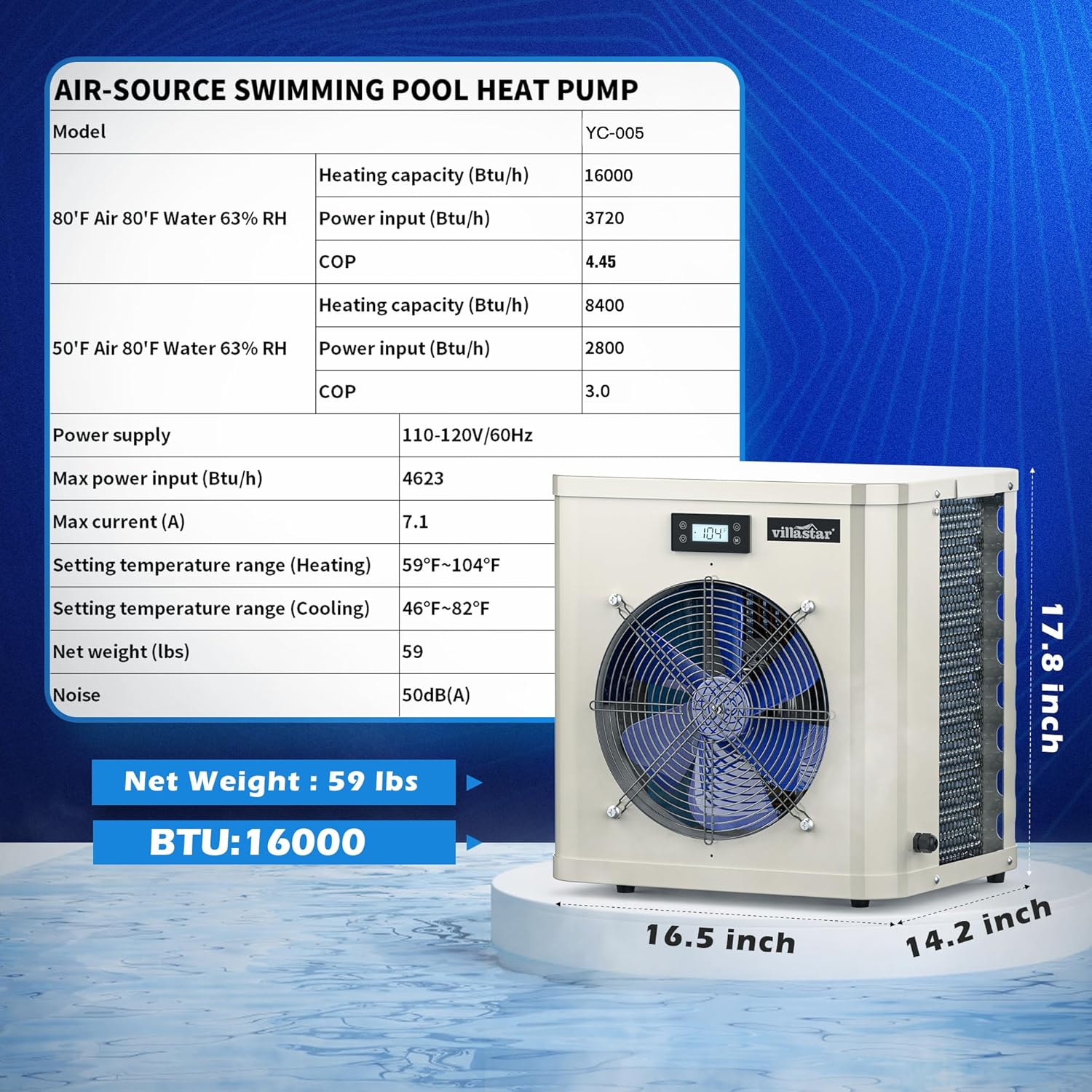
Figure 3: Air-Source Swimming Pool Heat Pump Specifications
This image provides a detailed table of technical specifications for the YC-005 model, including heating capacity, power input, COP, temperature ranges, and dimensions.
| Feature | Detail |
|---|---|
| Model | YC-005 |
| Heating Capacity (BTU/hr) | 16,036 (at 80°F Air, 80°F Water, 63% RH) |
| Power Input (BTU/hr) | 3,599 (at 80°F Air, 80°F Water, 63% RH) |
| COP | 4.45 (at 80°F Air, 80°F Water, 63% RH) |
| Recommended Pool Size | Up to 5,000 gallons |
| Heating Temperature Range | 59°F - 104°F |
| Cooling Temperature Range | 46°F - 82°F |
| Operating Air Temperature | 23°F - 109.4°F |
| Power Supply | 110-120V/60Hz |
| Max Current | 7.1 A |
| Net Weight | 67.9 pounds |
| Product Dimensions | 15 x 16.5 x 20 inches |
| Noise Level | 50 dB(A) |
| Manufacturer | villastar |
| Country of Origin | China |
9. Warranty and Support
Villastar is committed to providing exceptional products and customer service.
- Protection Plans: Extended protection plans are available for purchase (e.g., 2-Year, 3-Year Protection Plans).
- Returns: The product is eligible for 30-day easy returns.
- Customer Support: Villastar offers 24-hour online support to assist with any questions or issues you may encounter.
- For specific warranty details or to contact support, please refer to the contact information provided with your purchase or visit the official Villastar store.

