
1. Important Safety Instructions
Please read all instructions carefully before using this appliance and retain them for future reference. Failure to follow these instructions may result in electric shock, fire, or serious personal injury.
- Always unplug the fan from the power outlet before cleaning, servicing, or moving it.
- Do not immerse the fan in water or other liquids.
- Keep the fan out of reach of children and pets. Close supervision is necessary when the fan is used near children.
- Do not operate the fan with a damaged cord or plug, or after the fan malfunctions or has been dropped or damaged in any manner.
- Avoid placing the fan in areas with high humidity or direct sunlight.
- Ensure the fan is placed on a stable, level surface to prevent tipping.
- Do not insert fingers or foreign objects into the grille while the fan is operating.
- This fan is intended for indoor use only. Do not use outdoors.
2. Product Overview
The ceamorfco Pedestal Fan is a versatile air circulator designed for optimal comfort. It features a powerful DC motor, adjustable height, omni-directional oscillation, and multiple speed settings, all controllable via a remote.
Key Features:
- Powerful DC Motor: Delivers up to 880 CFM/min airflow with energy efficiency and quiet operation.
- Adjustable Height: Four height settings ranging from 20 to 43 inches for versatile use as a desk, portable, or pedestal fan.
- Omni-Directional Air Circulation: 90° horizontal and 90° vertical oscillation for comprehensive air distribution.
- 32 Speed Settings: Precise control over airflow intensity.
- 12-Hour Timer: Programmable shut-off for convenience and energy saving.
- Remote Control: Convenient operation from a distance.
- Quiet Operation: As low as 30dB noise level for undisturbed use.
Package Contents:
- Fan Head Assembly
- Base
- Lifting Rods (3 sections)
- Remote Control (with 1 CR2032 battery included)
- Power Adapter
- User Manual
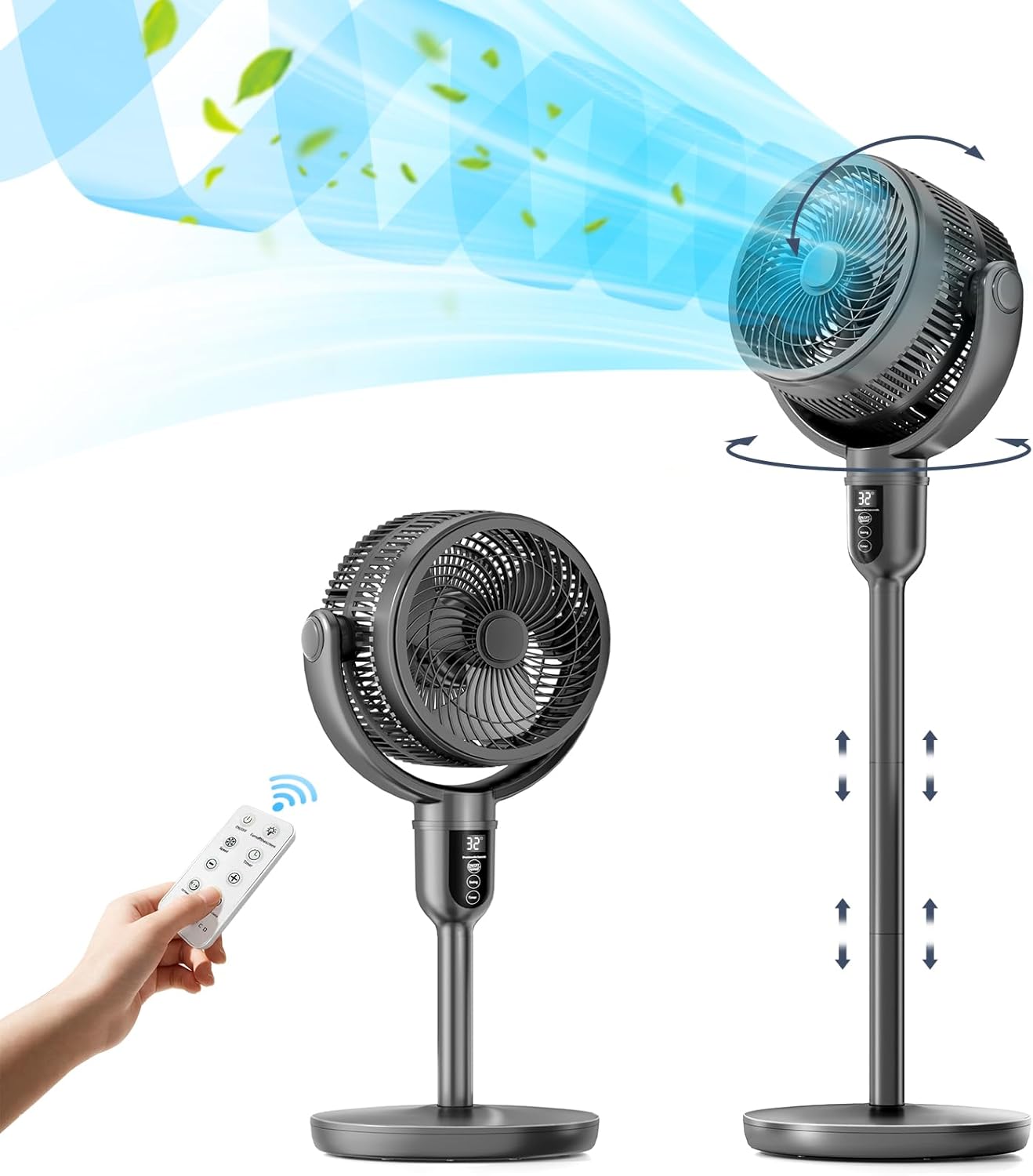
The image displays the ceamorfco Pedestal Fan in two configurations: a shorter table fan setup with a remote control, and a taller standing fan setup. Blue arrows indicate the omni-directional airflow and adjustable height. The fan is dark grey with a circular head and a sleek, minimalist design.
3. Assembly Instructions
The ceamorfco Pedestal Fan is designed for easy assembly. Follow these steps to set up your fan:
- Place the base on a flat, stable surface.
- Insert the desired number of lifting rods into the base and twist to secure. The fan supports 1, 2, or 3 rods for different heights.
- Attach the fan head assembly to the top lifting rod and twist to secure. Ensure all connections are firm.
- Connect the power adapter to the fan and then plug it into a standard electrical outlet.

This image illustrates the fan's versatility, showcasing four different height settings: a 20-inch table fan, a 27.6-inch portable fan, a 35.2-inch air circulator, and a 43-inch pedestal fan. Each configuration is shown in a different room setting, highlighting its adaptability.
4. Operating the Fan
Control Panel:
The fan features an intuitive control panel located on the stand. It includes a digital display and touch-sensitive buttons for various functions:
- Power Button: Turns the fan On/Off.
- Speed Adjustment: Increases or decreases the fan speed (32 levels).
- Mode Button: Cycles through different fan modes (e.g., Normal, Sleep, Natural).
- Timer Button: Sets the automatic shut-off timer (up to 12 hours).
- Oscillation Button: Activates or deactivates horizontal and vertical oscillation.
Remote Control:
The included remote control provides convenient access to all fan functions. Ensure the CR2032 battery is correctly installed. The remote can be stored in a dedicated slot on the fan stand when not in use.
- Power Button: Turns the fan On/Off.
- Speed Buttons (+/-): Adjusts the fan speed.
- Mode Button: Selects fan modes.
- Timer Button: Sets the timer.
- Oscillation Button: Controls horizontal and vertical oscillation.

This image provides a detailed view of the fan's control panel, which features a digital display and touch buttons for power, speed, mode, and timer. Below it, the remote control is shown, detailing buttons for power, oscillation, speed adjustment (+/-), mode selection, and timer settings. The remote also has a dedicated storage slot on the fan.
Adjusting Height:
The fan's height can be adjusted by adding or removing the lifting rod sections. The fan supports heights from 20 inches (table fan) to 43 inches (pedestal fan). Ensure the fan is unplugged before making height adjustments and that all sections are securely fastened after adjustment.
Oscillation and Tilt:
The fan offers 90° horizontal (left and right) and 90° vertical (up and down) oscillation. This omni-directional movement ensures air is circulated throughout the entire room. Activate or deactivate this feature using the oscillation button on the control panel or remote.

The image illustrates the fan's omni-directional air sweep capability. It shows the fan head rotating 90 degrees horizontally (left and right) and tilting 90 degrees vertically (up and down), providing comprehensive air circulation throughout a room. A person is shown comfortably seated in the background, benefiting from the airflow.
5. Maintenance and Cleaning
Regular cleaning and maintenance will ensure the longevity and optimal performance of your fan.
- Always unplug the fan from the power source before cleaning.
- Wipe the exterior surfaces of the fan with a soft, damp cloth. Do not use abrasive cleaners, waxes, or solvents as these may damage the finish.
- For cleaning the fan blades, carefully remove the front grille. Wipe the blades with a soft, dry or slightly damp cloth. Ensure the blades are completely dry before reattaching the grille.
- Do not allow water to drip into the motor housing.
- Store the fan in a cool, dry place when not in use for extended periods.
6. Troubleshooting
If you encounter any issues with your ceamorfco Pedestal Fan, please refer to the following troubleshooting guide:
| Issue | Possible Cause | Solution |
|---|---|---|
| Fan does not turn on. | No power supply; Power cord not properly connected; Power button not pressed. | Ensure the power cord is securely plugged into a working electrical outlet. Press the power button on the control panel or remote. |
| Remote control is not working. | Battery is dead or incorrectly inserted; Obstruction between remote and fan; Remote out of range. | Replace the CR2032 battery in the remote control. Ensure there is a clear line of sight between the remote and the fan's sensor. Operate the remote within the specified range. |
| Oscillation is noisy or not smooth. | Obstruction in the oscillation mechanism; Fan head not securely attached. | Unplug the fan and check for any foreign objects obstructing the oscillation mechanism. Ensure the fan head is securely fastened to the lifting rod. |
| Weak airflow. | Low speed setting; Dirty fan blades/grille. | Increase the fan speed using the control panel or remote. Clean the fan blades and grilles as described in the Maintenance section. |
7. Specifications
Detailed technical specifications for the ceamorfco Pedestal Fan:
| Feature | Specification |
|---|---|
| Brand | ceamorfco |
| Model Name | ceamorfco (B0D24RGHDR) |
| Color | Grey |
| Electric Fan Design | Floor Fan / Pedestal Fan |
| Power Source | DC |
| Product Dimensions | 12.6"D x 13.77"W x 43"H (Max Height) |
| Adjustable Height | 20" - 43" |
| Special Features | Adjustable Height, Manual, Oscillating, Remote Controlled, Timer |
| Recommended Uses | Indoor |
| Noise Level | 30 Decibels |
| Wattage | 45 watts |
| Number of Blades | 3 |
| Air Flow Capacity | 880 Cubic Feet Per Minute |
| Control Method | Remote, Touch |
| Efficiency | 19.56 cubic feet per minute per watt |
| Batteries Required | 1 CR2032 (included for remote) |
| Certifications | FCC, UL |
8. Warranty and Support
Your ceamorfco Pedestal Fan is covered by a manufacturer's warranty. Please refer to the specific warranty documentation included with your purchase for details regarding coverage period and terms.
For technical support, troubleshooting assistance, or warranty claims, please contact ceamorfco customer service. Contact information can typically be found on the product packaging or the official ceamorfco website.