
1. Introduction
This manual provides comprehensive instructions for the ELECTROPRIME HOPESTAR A22 IPX6 Waterproof Portable Bluetooth Speaker. Please read this manual carefully before using the product to ensure proper operation and to maximize its lifespan. Keep this manual for future reference.
2. Product Features
- Support for 1+1 Serial Function (True Wireless Stereo - TWS)
- Stereo Surround Sound with Surging Bass
- IPX6 Waterproof Design for Outdoor Use
- Compact and Lightweight Design with Lanyard for Easy Portability
- Bluetooth Version 5.0 for Stable Connectivity
- Multi-mode Playback: Bluetooth, TF Card, USB Input, AUX, and FM Radio Function
3. Package Contents
- 1 x ELECTROPRIME HOPESTAR A22 Bluetooth Speaker
- 1 x USB Charging Cable
- 1 x AUX Audio Cable
- 1 x User Manual
4. Controls and Indicators
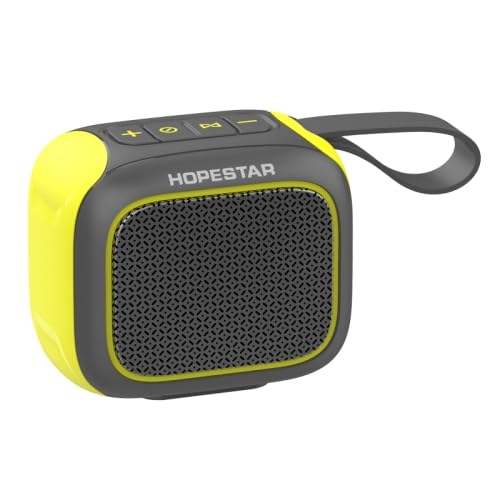
Image: Top view of the ELECTROPRIME HOPESTAR A22 speaker, highlighting the control panel with buttons for volume, mode, and playback.
- Power Button: Long press to power on/off.
- Play/Pause Button: Short press to play/pause music. Short press to answer/end calls.
- '+' Button: Short press for Volume Up. Long press for Next Track.
- '-' Button: Short press for Volume Down. Long press for Previous Track.
- Mode Button: Short press to switch between Bluetooth, TF Card, USB, AUX, and FM Radio modes.
- LED Indicator: Displays charging status, Bluetooth pairing status, and mode indication.
5. Setup
5.1 Charging the Speaker
- Connect the small end of the provided USB charging cable to the charging port on the speaker.
- Connect the larger end of the USB cable to a USB power adapter (5V 2A recommended) or a computer's USB port.
- The LED indicator will illuminate during charging and turn off when fully charged.
5.2 Powering On/Off
- To Power On: Long press the Power button until you hear an audible prompt.
- To Power Off: Long press the Power button again until you hear an audible prompt.
5.3 Bluetooth Pairing
- Ensure the speaker is powered on and in Bluetooth mode (indicated by a flashing LED). If not, short press the Mode button to switch to Bluetooth mode.
- Enable Bluetooth on your mobile device (smartphone, tablet, etc.).
- Search for "HOPESTAR A22" in the list of available Bluetooth devices.
- Select "HOPESTAR A22" to connect. Once connected, the LED indicator will stop flashing and you will hear a confirmation sound.
6. Operating Instructions
6.1 Bluetooth Mode
After successful pairing, you can play audio from your connected device. Use the speaker's Play/Pause, Volume Up/Down, and Next/Previous Track buttons to control playback.
6.2 TF Card / USB Input Mode
Insert a TF (microSD) card or a USB flash drive containing MP3/WMA audio files into the respective slot. The speaker will automatically switch to the corresponding mode and begin playing music.
6.3 AUX Mode
Connect one end of the provided 3.5mm AUX audio cable to the speaker's AUX port and the other end to the audio output jack of your device. The speaker will automatically switch to AUX mode.
6.4 FM Radio Mode
Short press the Mode button until you enter FM Radio mode. Long press the Play/Pause button to initiate an automatic scan for available FM stations. The speaker will save the found stations. Use the '+' and '-' buttons to navigate between saved stations.
6.5 1+1 Serial Function (TWS Pairing)
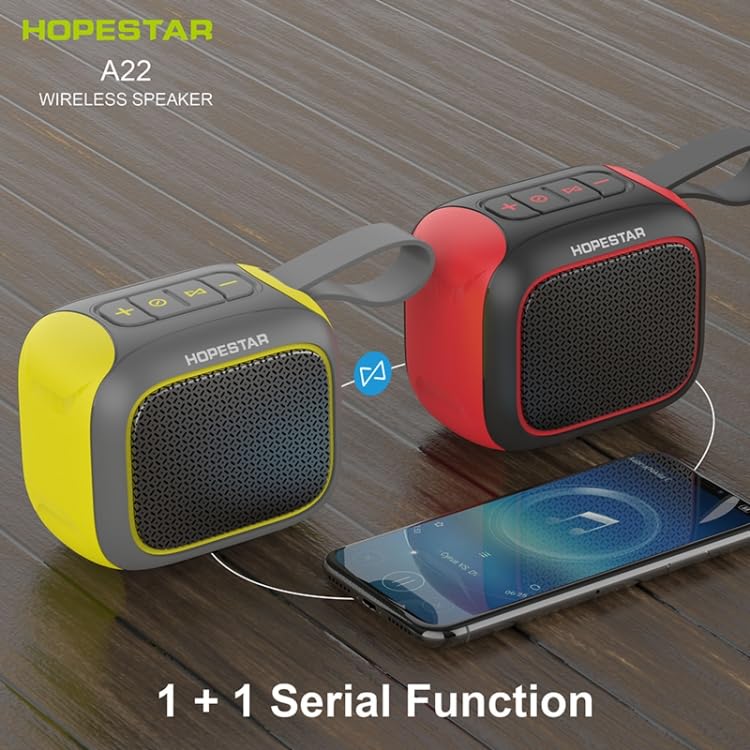
Image: Two ELECTROPRIME HOPESTAR A22 speakers (one yellow/black, one red/black) demonstrating the 1+1 Serial Function, indicating they can be paired for stereo sound.
- Ensure both HOPESTAR A22 speakers are powered on and not connected to any Bluetooth device.
- On one of the speakers (this will be the primary speaker), long press the Mode button. You will hear a prompt indicating it is searching for another speaker.
- The two speakers will automatically pair with each other. Once successfully paired, you will hear a confirmation sound.
- Now, connect your mobile device to the primary speaker via Bluetooth as described in section 5.3. Audio will play in stereo through both speakers.
7. Maintenance
- Cleaning: Use a soft, dry cloth to clean the speaker. Do not use abrasive cleaners, alcohol, or other chemical solvents, as they may damage the surface.
- Water Resistance: The speaker is IPX6 waterproof. Ensure the rubber flap covering the ports is securely closed before exposing the speaker to water. Do not submerge the speaker in water.
- Storage: Store the speaker in a cool, dry place away from direct sunlight and extreme temperatures.
- Battery Care: To prolong battery life, charge the speaker regularly and avoid completely draining the battery. If not used for a long period, charge it at least once every three months.
8. Troubleshooting
| Problem | Possible Cause | Solution |
|---|---|---|
| Speaker does not power on. | Low battery. | Charge the speaker fully. |
| No sound. | Volume too low; Incorrect mode; Not connected. | Increase volume; Press Mode button to select correct input; Ensure Bluetooth is connected. |
| Cannot pair via Bluetooth. | Speaker not in pairing mode; Device Bluetooth off; Too far apart. | Ensure speaker is flashing LED; Turn on device Bluetooth; Move speaker closer to device (within 10m). |
| Poor sound quality. | Interference; Low battery; Distance. | Move away from other electronic devices; Charge speaker; Reduce distance between speaker and device. |
9. Specifications
| Feature | Specification |
|---|---|
| Model | EDA005224501A |
| Bluetooth Version | 5.0 |
| Bluetooth Range | Up to 10 meters (33 feet) |
| Output Power | 5W |
| Rated Voltage | 5V 2A |
| Frequency Range | 100Hz-10KHz |
| Battery Capacity | 500mAh Lithium Battery |
| Playing Time | 4-5 hours (at 70% volume) |
| Supported Audio Formats | MP3, WMA |
| Playback Modes | Bluetooth, TF Card, USB Input, AUX, FM |
| Product Dimensions | 102mm x 76mm x 86mm |
| Waterproof Rating | IPX6 |
| Product Weight | 0.50 kg (1.11 lb) |
10. Warranty and Support
This product is covered by a standard manufacturer's warranty. For detailed warranty terms and conditions, please refer to the documentation provided at the time of purchase or contact your retailer.
For technical support, troubleshooting assistance, or any inquiries regarding your ELECTROPRIME HOPESTAR A22 speaker, please contact the customer support team of your retailer or the manufacturer. Please have your model number (EDA005224501A) and purchase information ready when contacting support.