
ELECTROPRIME TG659
User Manual
ELECTROPRIME T&G TG659 Outdoor Portable TWS Mini Bluetooth Speaker
Model: TG659 (Item Model Number: EDA005535101E)
Product Overview
The ELECTROPRIME T&G TG659 is a compact and versatile portable Bluetooth speaker designed for outdoor use. It features TWS (True Wireless Stereo) connectivity, multiple playback modes, and IPX7 waterproofing, making it an ideal companion for various activities.
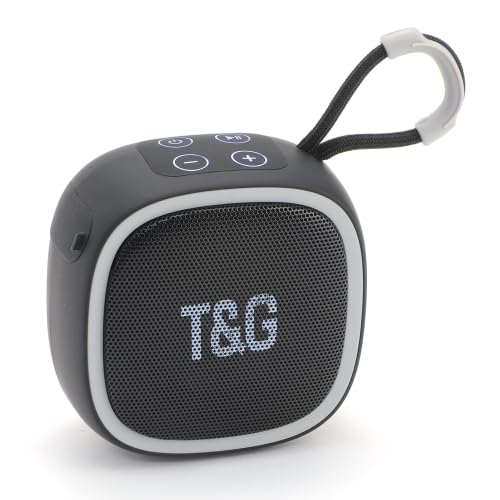
Front view of the black ELECTROPRIME T&G TG659 speaker, showing the speaker grille with 'T&G' logo and control buttons on top.
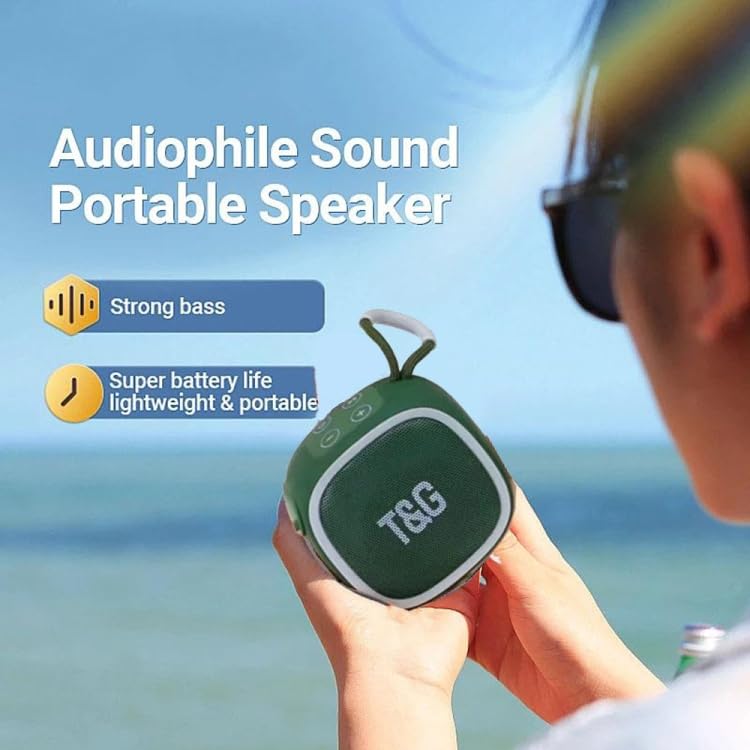
A person holding the green version of the T&G TG659 speaker, illustrating its portability and highlighting features like strong bass and super battery life.

An array of T&G TG659 speakers in various colors (black, green, blue, red), showcasing the available color options and compact design.
Key Features
- Bluetooth 5.3: Ensures high-speed transmission, low power consumption, and stable signal without interference.
- Clear Audio: Equipped with a 52mm unit speaker and advanced audio decoding for clear and loud sound.
- IPX7 Waterproof: Designed to withstand splashes and temporary submersion, ideal for outdoor use.
- TWS Interconnection: Connect two speakers simultaneously for a true three-dimensional surround sound experience.
- Portable Design: Mini body design with an exquisite lanyard for easy carrying.
- Multiple Playback Modes: Supports Bluetooth, TF card, TWS interconnection, FM radio, and AUX playback.
- Long Battery Life: Built-in 500mAh battery provides approximately 3-5 hours of music playback on a full charge.
Specifications
| Bluetooth Version | 5.3 |
| Wireless Transmission Range | 10 meters |
| Audio Noise Ratio | 90dB |
| Battery Capacity | 500mAh / 3.7V |
| Charging Voltage | DC 5V / 500mAh |
| Playback Time (Normal Volume) | Approx. 3-5 hours |
| Speaker Specifications | OD 52mm x 1 |
| Speaker Power | 4 ohm / 5W x 1 |
| Frequency Response | 120Hz - 20KHz |
| Dimensions (L x W x H) | 90.3mm x 90.3mm x 53.5mm |
| Weight | 218g |
Setup
Charging the Speaker
Before first use, it is recommended to fully charge the speaker to ensure optimal battery performance.
- Connect the provided USB charging cable to the speaker's charging port.
- Connect the other end of the USB cable to a 5V/500mAh USB power adapter (not included) or a computer's USB port.
- The charging indicator light will illuminate during charging. It will typically turn off or change color once the battery is fully charged.
Bluetooth Pairing
Follow these steps to connect your speaker to a Bluetooth-enabled device:
- Power on the speaker by pressing and holding the power button. The speaker will enter Bluetooth pairing mode, indicated by a voice prompt or a flashing LED light.
- On your mobile device (smartphone, tablet, etc.), enable Bluetooth and search for available devices.
- Select "TG659" (or a similar name) from the list of found devices.
- Once connected, the speaker will provide an audio confirmation, and the LED indicator will typically stop flashing and remain solid.
Operating Instructions
Power On/Off
Press and hold the power button for a few seconds to turn the speaker on or off.
Volume Control
- Press the '+' button to increase the volume.
- Press the '-' button to decrease the volume.
Playback Modes
The speaker supports various playback modes. Use the mode button (often labeled 'M' or indicated by an icon) to switch between them.
Bluetooth Mode
- After successful pairing, audio from your connected device will play through the speaker.
- Press the Play/Pause button to pause or resume playback.
- Use the next/previous track buttons (if available on the speaker) to skip tracks.
TF Card Mode
- Insert a TF (microSD) card with audio files into the designated slot.
- The speaker will automatically switch to TF card mode and begin playback of the audio files.
FM Radio Mode
- Switch to FM radio mode using the mode button.
- The speaker will automatically scan and save available radio stations.
- Use the next/previous track buttons to navigate between saved stations.
AUX Mode
- Connect an audio device (e.g., MP3 player, computer) using a 3.5mm AUX cable (not included) to the speaker's AUX input port.
- The speaker will automatically switch to AUX mode, and audio from the connected device will play.
TWS (True Wireless Stereo) Interconnection
To achieve a stereo sound experience, you can connect two TG659 speakers together:
- Ensure both TG659 speakers are powered off.
- Turn on both speakers. They should both enter Bluetooth pairing mode.
- On one of the speakers, double-press the power button (or a dedicated TWS button if present). This speaker will search for another TG659 speaker to pair with.
- Once the two speakers are successfully connected to each other, you will hear a confirmation sound. They will now function as a stereo pair.
- Finally, connect your mobile device to one of the speakers via Bluetooth. Audio will now play in stereo through both speakers.
Maintenance
Cleaning
- Wipe the speaker with a soft, slightly damp cloth.
- Do not use harsh chemicals, abrasive cleaners, or solvents, as these can damage the speaker's finish or internal components.
Waterproofing (IPX7)
- The speaker is IPX7 waterproof, meaning it can withstand immersion in water up to 1 meter (3.3 feet) for up to 30 minutes.
- Always ensure that the charging port cover and any other port covers are securely closed before exposing the speaker to water.
- Avoid exposing the speaker to saltwater, chlorinated water, or other chemicals. If exposed, rinse with fresh water and dry thoroughly before charging or using.
Storage
- Store the speaker in a cool, dry place away from direct sunlight, extreme temperatures, and high humidity.
- If storing for extended periods, charge the battery periodically (e.g., every 3-6 months) to maintain its lifespan and prevent deep discharge.
Troubleshooting
Speaker not turning on
- Ensure the battery is charged. Connect the speaker to a power source and try again.
- Press and hold the power button for a longer duration (e.g., 5-10 seconds).
Speaker not pairing via Bluetooth
- Ensure the speaker is in Bluetooth pairing mode (flashing LED).
- Make sure Bluetooth is enabled on your device and it's within the 10-meter wireless transmission range.
- Forget or remove "TG659" from your device's Bluetooth list and attempt to pair again.
- Turn off and then turn on both the speaker and your device.
No sound or low volume
- Check the volume levels on both the speaker and your connected device.
- Ensure the speaker is properly connected to your device (Bluetooth, TF card, or AUX).
- If using TF card or AUX, ensure the media is playing and the cable is fully inserted.
TWS pairing issues
- Ensure both speakers are TG659 models and are fully charged.
- Make sure no other Bluetooth devices are connected to either speaker during the TWS pairing process.
- Try resetting both speakers (if a reset function is available) and repeat the TWS pairing steps carefully.
Warranty and Support
For detailed warranty information, technical support, or service inquiries regarding your ELECTROPRIME T&G TG659 speaker, please refer to the contact details provided with your product packaging. You may also visit the official ELECTROPRIME website for the most up-to-date support resources.
Note: This manual provides general guidelines. Specific warranty terms and support procedures may vary by region and purchase location.
Ask a question about this manual
Ask about setup, troubleshooting, compatibility, parts, safety, or missing instructions. Manuals+ will review the question and use this page’s manual context to help answer it.