
ELECTROPRIME IP6D1078W
User Manual: ELECTROPRIME XT83 PRO Bluetooth Earphones
Model: IP6D1078W
1. Introduction
Thank you for choosing the ELECTROPRIME Compatiable for Original Lenovo XT83 PRO Bluetooth Earphones. These earphones are designed to provide a high-quality audio experience with advanced features such as Bluetooth 5.1 connectivity, noise reduction for calls, and smart touch controls. This manual will guide you through the setup, operation, and maintenance of your new earphones.
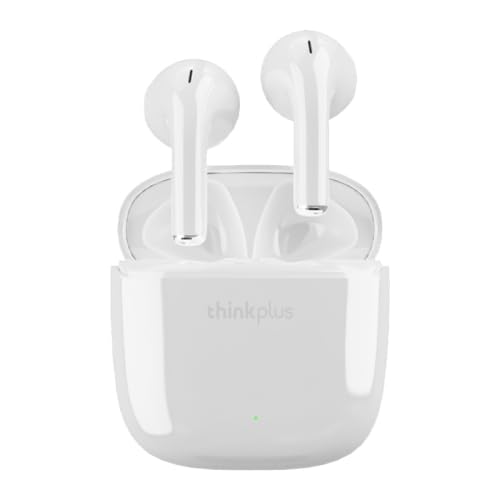
Image 1.1: The ELECTROPRIME XT83 PRO Bluetooth Earphones in their charging case.
2. Product Features
- Bluetooth 5.1 Technology: Ensures stable connection and low latency, ideal for gaming and media consumption.
- AAC/SBC Dual Audio Decoding: Provides high-definition audio with enhanced bass sound.
- Smart Call Noise Reduction: Delivers clear voice calls by minimizing background noise.
- Smart Touch Controls: Easy operation for managing calls, music playback, and voice assistant activation.
- Flexible Usage: Can be used as a single earbud or as a pair for stereo sound.
- Automatic Pairing: Earphones automatically power on, pair with each other, and reconnect to the last paired device upon removal from the charging case.
- Long-lasting Battery Life: Up to 15 hours of combined usage with the charging case.
- Comfortable Design: Ergonomically designed for extended wear.

Image 2.1: Illustration of single and double earbud use. Note: Product color shown in image may vary from actual product (white).

Image 2.2: Illustration of high-definition audio and bass performance. Note: Product color shown in image may vary from actual product (white).
3. Package Contents
Please check the box for the following items:
- ELECTROPRIME XT83 PRO Bluetooth Earphones (Left and Right)
- Charging Case
- Ear Cushions
- USB Charging Cable (assumed to be included)
- User Manual (this document)
4. Setup Guide
4.1. Charging the Earphones and Case
Before first use, fully charge the earphones and the charging case.
- Place the earphones into the charging case. Ensure they are correctly seated.
- Connect the charging case to a USB power source using the provided USB charging cable.
- The indicator light on the charging case will show charging status.
- Charging time for earphones is approximately 1 hour. Charging time for the case is approximately 2 hours.
4.2. Pairing with Your Device
The earphones support automatic pairing for convenience.
- Ensure the earphones are charged.
- Open the charging case. The earphones will automatically power on and enter pairing mode.
- On your device (smartphone, tablet, etc.), enable Bluetooth.
- Search for available Bluetooth devices. You should see "XT83 PRO" or a similar name in the list.
- Select "XT83 PRO" to connect. Once connected, a voice prompt will confirm the successful pairing.
- For subsequent use, simply open the charging case, and the earphones will automatically reconnect to the last paired device.
5. Operating Instructions
5.1. Smart Touch Controls
The ELECTROPRIME XT83 PRO earphones feature intuitive touch controls on each earbud.
- Play/Pause: Single tap on either earbud.
- Next Song: Double tap on the right earbud.
- Previous Song: Double tap on the left earbud.
- Volume Up: Triple tap on the right earbud.
- Volume Down: Triple tap on the left earbud.
- Answer/End Call: Single tap on either earbud during an incoming call or active call.
- Reject Call: Press and hold either earbud for 2 seconds during an incoming call.
- Activate Voice Assistant: Press and hold either earbud for 3 seconds.
5.2. Single Earbud Use
You can use either the left or right earbud independently.
- Take one earbud out of the charging case. It will automatically power on and attempt to connect.
- If it doesn't connect automatically, manually pair it via your device's Bluetooth settings.
- To switch to dual earbud use, simply take the other earbud out of the case. They will automatically connect to each other.
6. Maintenance
6.1. Cleaning
- Regularly clean the earbuds and charging case with a soft, dry, lint-free cloth.
- Do not use abrasive cleaners, alcohol, or chemical solvents.
- Gently clean the charging contacts on both the earbuds and the case to ensure proper charging.
6.2. Storage
- When not in use, always store the earphones in their charging case to protect them and keep them charged.
- Store in a cool, dry place, away from extreme temperatures and direct sunlight.
7. Troubleshooting
If you encounter any issues with your earphones, please refer to the following common solutions:
- Earphones not pairing with device:
- Ensure Bluetooth is enabled on your device.
- Make sure the earphones are charged.
- Forget the device from your phone's Bluetooth settings and try pairing again.
- Restart your device and the earphones (by placing them back in the case and taking them out).
- Only one earbud working:
- Place both earbuds back into the charging case, close the lid, wait a few seconds, then take them out simultaneously.
- Ensure both earbuds are charged.
- No sound or low volume:
- Adjust the volume on both your device and the earphones.
- Ensure the earphones are properly connected to your device.
- Clean any debris from the earbud speaker mesh.
- Charging issues:
- Ensure the charging cable is securely connected to both the case and the power source.
- Check if the charging contacts on the earbuds and case are clean and free of obstruction.
- Try a different charging cable or power adapter.
8. Specifications
| Parameter | Value |
|---|---|
| Model Number | IP6D1078W |
| Bluetooth Version | V5.1 |
| Bluetooth Distance | 10 meters (approx. 33 feet) |
| Charging Case Battery Capacity | 250mAh |
| Single Earphone Battery Capacity | 25mAh |
| Standby Time | 60 hours |
| Talk Time | 2.5 hours |
| Listening Time | 3 hours |
| Headphone Charging Time | Approx. 1 hour |
| Charging Box Charging Time | Approx. 2 hours |
| Horn Diameter | 10mm |
| Material | Plastic |
| Special Features | Noise Cancellation |
9. Warranty and Support
Specific warranty details for the ELECTROPRIME XT83 PRO Bluetooth Earphones are not provided in this manual. For warranty claims, technical support, or further assistance, please refer to the product packaging or contact the ELECTROPRIME customer service directly through their official website or the retailer from whom you purchased the product.
Ask a question about this manual
Ask about setup, troubleshooting, compatibility, parts, safety, or missing instructions. Manuals+ will review the question and use this page’s manual context to help answer it.