
Product Overview
The ELECTROPRIME HOPESTAR A6 Max is a robust and portable Bluetooth speaker designed for outdoor use, featuring IPX6 water resistance. It delivers powerful audio with high-fidelity speakers and supports various playback modes including Bluetooth, AUX, USB disk, and TF card. Its durable design and integrated lanyard make it an ideal companion for travel and outdoor activities.
Key Features
- Bluetooth V5.1 Connectivity: Ensures stable and efficient wireless audio streaming.
- IPX6 Waterproof Design: Provides protection against strong jets of water, suitable for outdoor parties and rainy conditions.
- High-Fidelity Speakers: Delivers natural and delicate sound reproduction.
- Multiple Playback Modes: Supports Bluetooth, standard 3.5mm AUX input, USB disk, and TF card playback.
- Audio Format Support: Decodes MP3, WAV, WMA, FLAC, and APE music formats.
- Memory Function: Resumes transmission from breakpoints for seamless playback.
- Adjustable Audio Controls: Allows adjustment of microphone volume, microphone reverberation, and master volume.
- Portable Design: Features a convenient lanyard for easy carrying.
- Long Battery Life: Equipped with a 12000mAh lithium-ion battery for extended playing time.
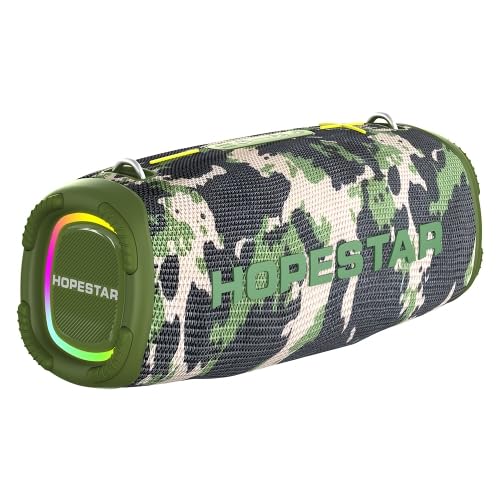
Figure 1: The ELECTROPRIME HOPESTAR A6 Max Portable Bluetooth Speaker, showcasing its camouflage design and integrated RGB lighting.
Package Contents
Please check the package contents upon unboxing to ensure all items are present and in good condition.
- ELECTROPRIME HOPESTAR A6 Max Bluetooth Speaker
- USB Charging Cable
- 3.5mm AUX Audio Cable
- User Manual
Setup
1. Charging the Speaker
- Connect the provided USB charging cable to the speaker's charging port.
- Connect the other end of the USB cable to a 5V 2A USB power adapter (not included) or a computer's USB port.
- The charging indicator light will illuminate during charging and turn off once fully charged.
- A full charge typically takes approximately 6-7 hours.
2. Powering On/Off
- To Power On: Press and hold the Power button for a few seconds until you hear an audible prompt and the indicator lights illuminate.
- To Power Off: Press and hold the Power button again for a few seconds until you hear an audible prompt and the indicator lights turn off.
3. Bluetooth Pairing
- Ensure the speaker is powered on and in Bluetooth pairing mode (indicated by a flashing blue light). If not, briefly press the Mode button to switch to Bluetooth mode.
- On your mobile device (smartphone, tablet, etc.), enable Bluetooth and search for available devices.
- Select "HOPESTAR A6 Max" from the list of found devices.
- Once successfully paired, you will hear a confirmation sound, and the Bluetooth indicator light will remain solid blue.
- The speaker will automatically reconnect to the last paired device when powered on, if the device is within range and Bluetooth is enabled.
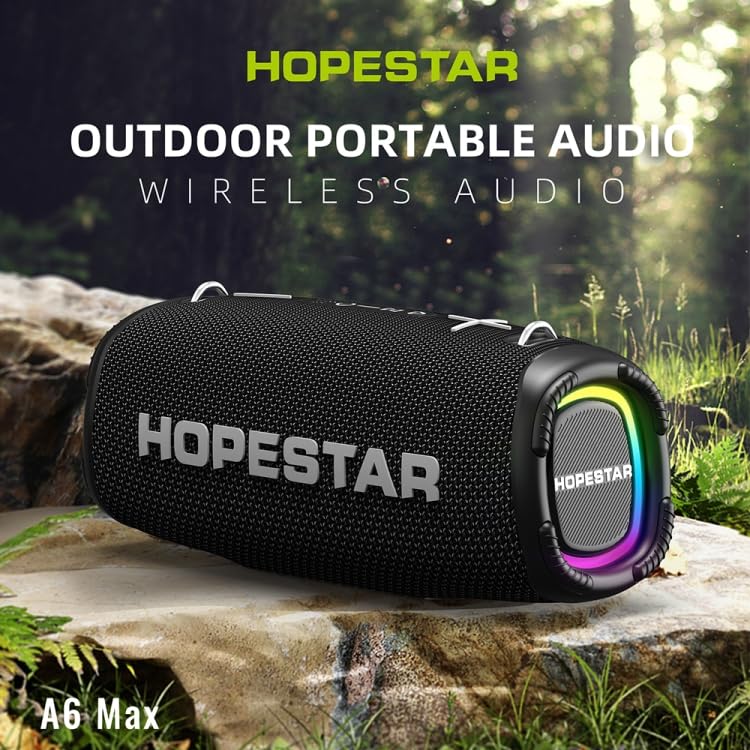
Figure 2: The HOPESTAR A6 Max speaker positioned outdoors, highlighting its portability and suitability for various environments.
Operating Instructions
1. Bluetooth Playback
After successful Bluetooth pairing, you can play audio from your connected device. Use your device's controls or the speaker's buttons for playback control.
2. AUX Input
- Connect one end of the 3.5mm AUX audio cable to the speaker's AUX input port.
- Connect the other end to the audio output jack of your external audio device (e.g., MP3 player, computer).
- The speaker will automatically switch to AUX mode, or you may need to press the Mode button to select AUX.
3. USB Disk / TF Card Playback
- Insert a USB flash drive or a TF (microSD) card containing MP3, WAV, WMA, FLAC, or APE audio files into the respective port on the speaker.
- The speaker will automatically detect the storage device and begin playing music. If not, press the Mode button to switch to USB/TF card mode.
4. True Wireless Stereo (TWS) Pairing
To achieve a stereo sound experience, you can pair two HOPESTAR A6 Max speakers together.
- Ensure both speakers are powered on and not connected to any Bluetooth device.
- On one speaker (this will be the primary speaker), press and hold the TWS button (often indicated by two interlocking circles or a similar icon) until you hear a prompt.
- The primary speaker will search for the secondary speaker. Once connected, you will hear a confirmation sound.
- Now, connect your mobile device to the primary speaker via Bluetooth as described in the "Bluetooth Pairing" section. Audio will play through both speakers in stereo.
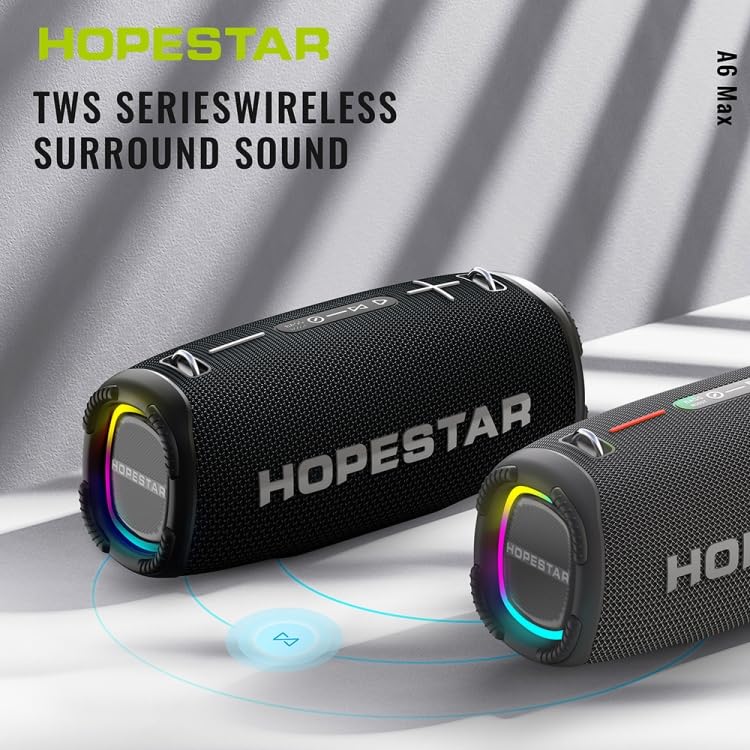
Figure 3: Two HOPESTAR A6 Max speakers wirelessly connected, illustrating the True Wireless Stereo (TWS) function for enhanced audio.
5. Call Management
- Answer Call: Briefly press the Play/Pause button when an incoming call rings.
- End Call: Briefly press the Play/Pause button during a call.
- Reject Call: Press and hold the Play/Pause button for 2 seconds during an incoming call.
6. Volume and Track Control
- Volume Up: Briefly press the "+" button.
- Volume Down: Briefly press the "-" button.
- Next Track: Press and hold the "+" button.
- Previous Track: Press and hold the "-" button.
Maintenance
Proper maintenance ensures the longevity and optimal performance of your speaker.
1. Cleaning
- Wipe the speaker's surface with a soft, damp cloth.
- Do not use abrasive cleaners, alcohol, benzene, or other chemical solvents, as these may damage the surface or internal components.
- Ensure all ports are dry before charging or connecting cables after exposure to water.
2. Storage
- Store the speaker in a cool, dry place away from direct sunlight and extreme temperatures.
- If storing for an extended period, charge the battery to approximately 50% every few months to preserve battery health.
3. Water Resistance (IPX6)
- The speaker is rated IPX6, meaning it is protected against powerful water jets. It is suitable for use in rainy conditions or near splashes.
- Do not immerse the speaker in water.
- Ensure the charging port and other covers are securely closed before exposing the speaker to water.
Troubleshooting
If you encounter issues with your speaker, please refer to the following common problems and solutions:
| Problem | Possible Cause | Solution |
|---|---|---|
| Speaker does not power on. | Low battery; Power button not pressed correctly. | Charge the speaker fully. Press and hold the Power button firmly for a few seconds. |
| Cannot pair via Bluetooth. | Speaker not in pairing mode; Device Bluetooth off; Too far from speaker; Interference. | Ensure speaker is in Bluetooth pairing mode (flashing blue light). Enable Bluetooth on your device. Move device closer to speaker. Avoid strong electromagnetic interference. |
| No sound from speaker. | Volume too low; Incorrect input mode; Device not playing audio. | Increase speaker and device volume. Press Mode button to select correct input (Bluetooth, AUX, USB/TF). Ensure audio is playing on your connected device. |
| Sound distortion. | Volume too high; Low battery; Poor audio source. | Reduce volume on both speaker and device. Charge the speaker. Try a different audio source or file. |
| TWS pairing fails. | Speakers already paired to a device; Too far apart. | Ensure both speakers are disconnected from any Bluetooth devices. Place speakers close to each other during TWS pairing. |
Specifications
Detailed technical specifications for the ELECTROPRIME HOPESTAR A6 Max Bluetooth Speaker:
| Bluetooth Version | V5.1 |
| Transmission Distance | Up to 10 meters (33 feet) |
| Output Power | 50W x 1 (main speaker), 15W x 2 (side speakers) |
| Playing Time | 6-7 hours (at moderate volume) |
| Frequency Range | 80Hz - 15KHz |
| Speaker Configuration | 1 x 119mm (4 ohm 50W), 2 x 78mm (4 ohm 15W) |
| Input Power | DC 5V 2A |
| Battery Type | 18650 Lithium-ion Battery |
| Battery Capacity | 12000mAh |
| Audio Input Interface | Standard 3.5mm Headphone Jack (Stereo) |
| Supported Playback Modes | U disk, TF card, AUX, Bluetooth |
| Supported Music Formats | MP3, WAV, WMA, FLAC, APE |
| Dimensions (L x W x H) | 162mm x 380mm x 146mm (6.38in x 14.96in x 5.75in) |
| Weight | Approximately 4.50 kg (9.93 lb) |
| Waterproof Rating | IPX6 |
Warranty and Support
ELECTROPRIME products are manufactured with high-quality standards. This product comes with a standard manufacturer's warranty against defects in materials and workmanship from the date of purchase.
For warranty claims, technical support, or any inquiries, please contact your retailer or the ELECTROPRIME customer service team. Please retain your proof of purchase for warranty validation.
Note: Warranty terms and conditions may vary based on region and retailer. Please refer to the specific warranty information provided at the time of purchase.
Contact Information:
- Manufacturer: ELECTROGADGETSSTORE
- Email: support@electroprime.com (Example email, please refer to actual product documentation for official contact.)
- Website: www.electroprime.com (Example website, please refer to actual product documentation for official contact.)