
ELECTROPRIME IP7G0955B
User Manual
ELECTROPRIME Compatiable for HOPESTAR Party One RGB Lighting Wireless Bluetooth Speaker
Product Overview
The ELECTROPRIME Compatiable for HOPESTAR Party One RGB Lighting Wireless Bluetooth Speaker is a versatile and powerful audio device designed for portable entertainment. It features robust sound quality with strong bass, dynamic RGB lighting, and multiple connectivity options including Bluetooth, TF card, and AUX input. This speaker is built for outdoor use with IPX6 waterproofing and includes a mobile phone stand function, making it ideal for parties and gatherings.
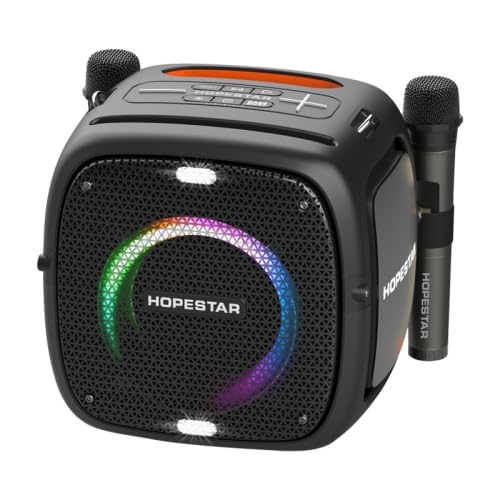
Figure 1: Front view of the ELECTROPRIME HOPESTAR Party One Speaker, showcasing the RGB lighting and included microphones.
Key Features
- Powerful Audio: Strong welding sound quality with surging bass and 80W output power.
- Wireless Connectivity: Bluetooth 5.0 for stable connections up to 10 meters, supporting automatic device search.
- Multi-format Playback: Supports MP3 and WMA format music files, TF card playback, and AUX audio input (3.5mm).
- Dynamic RGB Lighting: Features 7 different lighting modes that flash according to sound quality.
- Dual Microphone Support: Includes support for two wireless V-segment microphones for karaoke or public speaking.
- EQ Mode: Offers three sound effects for customized audio experience.
- Mobile Power Function: Can act as a power bank for other devices.
- Durable Design: Environmental protection waterproof ABS material with IPX6 rating.
- Portable: Designed with a strap and portable features for easy carrying, suitable for outdoor parties.
- Mobile Phone Stand: Integrated function for convenient device placement.
- 1+1 Pairing: Supports connecting two speakers for a stereo experience.
Setup Guide
1. Unpacking and Initial Charge
Carefully remove the speaker and all accessories from the packaging. Before first use, fully charge the speaker using a 5V 2A power adapter (not included) connected to the input port. The battery capacity is 2400MAH, providing approximately 10 hours of use on a full charge.
2. Powering On/Off
Locate the power button, typically on the control panel. Press and hold the power button for a few seconds to turn the speaker ON. Repeat the action to turn it OFF.
3. Mounting Options
The speaker features a sturdy hexagonal screw design for bracket mounting. This allows the speaker to be placed on a compatible stand as needed for optimal sound projection.
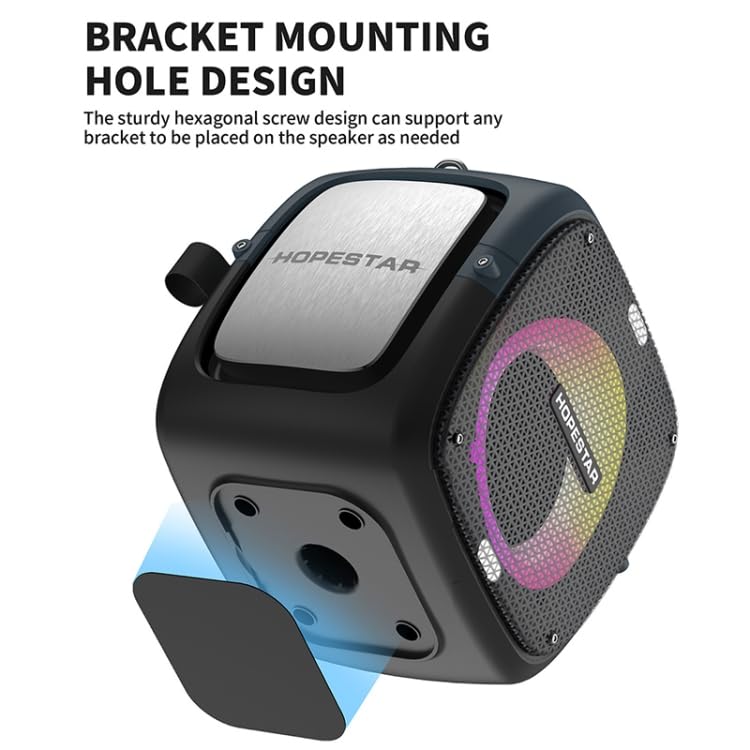
Figure 2: Underside view of the speaker, highlighting the bracket mounting hole for stand compatibility.
Operating Instructions
1. Bluetooth Pairing
- Turn on the speaker. It will automatically enter Bluetooth pairing mode.
- On your device (smartphone, tablet, etc.), enable Bluetooth and search for available devices.
- Select "HOPESTAR Party One" or a similar name from the list.
- Once connected, the speaker will indicate successful pairing, and you can begin playing audio wirelessly. The effective range is up to 10 meters.
2. Audio Playback
- Bluetooth: After pairing, play audio from your connected device.
- TF Card: Insert a TF (microSD) card containing MP3 or WMA music files into the designated slot. The speaker will automatically detect and play the files.
- AUX Input: Connect an external audio source (MP3 player, computer, etc.) to the speaker's 3.5mm AUX input interface using an audio cable. The speaker will switch to AUX mode.
3. Microphone Usage
The speaker supports two wireless V-segment microphones. To use, ensure the microphones are powered on and within range of the speaker. They should automatically connect. Adjust microphone volume using the speaker's controls.
4. EQ Mode and Lighting Control
Use the control panel buttons to cycle through the three available EQ sound effects. The speaker also features 7 different LED lighting modes that flash in sync with the music. Refer to the control panel for dedicated lighting control buttons, if available, or they may be integrated with other function buttons.
5. 1+1 Pairing (True Wireless Stereo)
To achieve a stereo sound experience, you can pair two ELECTROPRIME HOPESTAR Party One speakers together. Turn on both speakers. On one speaker, initiate the 1+1 pairing mode (refer to specific button on control panel, usually marked TWS or Link). The speakers will connect to each other, and then you can connect your device to one of the speakers via Bluetooth. Audio will play in stereo across both units.
Maintenance
1. Cleaning
Wipe the speaker's exterior with a soft, damp cloth. Do not use harsh chemicals or abrasive cleaners. Ensure all ports are dry before use, especially after exposure to water.
2. Battery Care
To prolong battery life, avoid fully discharging the speaker frequently. Recharge the battery when the low battery indicator appears. If storing the speaker for an extended period, charge it to approximately 50% every few months.
3. Waterproofing (IPX6)
The speaker has an IPX6 waterproof rating, meaning it is protected against high-pressure water jets from any direction. It is suitable for outdoor use and can withstand splashes or rain. Do not submerge the speaker in water. Ensure all port covers are securely closed before exposing the speaker to water.
Troubleshooting
- No Power: Ensure the speaker is fully charged. Connect it to a power source and try turning it on again.
- No Sound: Check the volume levels on both the speaker and your connected device. Ensure the correct input mode (Bluetooth, TF, AUX) is selected. If using AUX, check the cable connection.
- Bluetooth Pairing Issues: Ensure the speaker is in pairing mode. Turn off and on Bluetooth on your device. Move your device closer to the speaker. Clear previous Bluetooth connections on your device and try pairing again.
- Microphone Not Working: Ensure microphones are charged and powered on. Check their connection to the speaker.
- Distorted Sound: Reduce the volume on both the speaker and your device. Ensure the audio source is not corrupted.
Specifications
| Model Number | IP7G0955B |
| Brand | ELECTROPRIME |
| Power Source | Battery Powered |
| Battery Capacity | 2400MAH |
| Use Time | 10 hours |
| Bluetooth Version | 5.0 |
| Communication Distance | 10 meters |
| Output Power | 80 Watts |
| Input Power | 5V 2A |
| Frequency Response | 180HZ-18KHZ |
| Audio Input Interface | 3.5mm AUX |
| Speaker Configuration | 135mm, 4 ohms 60W*1; 52mm*2, 4 ohms 10W |
| Material | Acrylonitrile Butadiene Styrene (ABS) |
| Waterproof Rating | IPX6 |
| Dimensions (LxWxH) | 283mm x 228mm x 271mm |
| Weight | 5.61 kgs / 12.36 lb (Package Weight) |
| Compatible Devices | Smartphones, Tablets, Computers |
| Special Features | Wireless, Portable, Bluetooth, Waterproof, RGB Lighting, Mobile Phone Stand, Dual Mic Support, EQ Mode, 1+1 Pairing |
Warranty and Support
Information regarding product warranty and customer support is not provided within this manual. Please refer to the product packaging or the retailer's website for details on warranty coverage and how to contact customer service for assistance.
Ask a question about this manual
Ask about setup, troubleshooting, compatibility, parts, safety, or missing instructions. Manuals+ will review the question and use this page’s manual context to help answer it.