
ELECTROPRIME BT-511
ELECTROPRIME BT-511 Mini LED HD Mirror Bluetooth Speaker User Manual
Model: BT-511
Brand: ELECTROPRIME
Introduction
Thank you for purchasing the ELECTROPRIME BT-511 Mini LED HD Mirror Bluetooth Speaker. This device combines a high-definition mirror display with a powerful Bluetooth speaker, offering features such as dual alarm clock, real-time temperature display, TF card playback, AUX input, and hands-free calling. Please read this manual carefully before use to ensure proper operation and to maximize your experience with the product.
Safety Information
- Do not expose the device to extreme temperatures, direct sunlight, or high humidity.
- Avoid dropping or subjecting the device to strong impacts.
- Do not disassemble, repair, or modify the device yourself. Refer to qualified service personnel.
- Keep the device away from water or other liquids to prevent electric shock or damage.
- Use only the specified charging method (USB charging) and ensure the power supply meets the device's requirements.
- Clean the device with a soft, dry cloth. Do not use abrasive cleaners or solvents.
Package Contents
- ELECTROPRIME BT-511 Mini LED HD Mirror Bluetooth Speaker
- USB Charging Cable
- User Manual
Product Overview
The ELECTROPRIME BT-511 features a sleek design with an LED mirror display and intuitive controls. Below are key components:
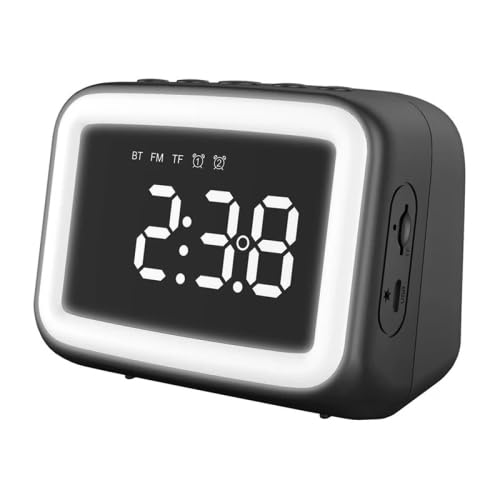
Figure 1: Front view of the ELECTROPRIME BT-511 speaker. This image displays the speaker's main LED mirror screen, showing the time '2:38' and various icons for Bluetooth, FM radio, TF card, and alarm. The speaker has a black casing with a white illuminated border around the screen.
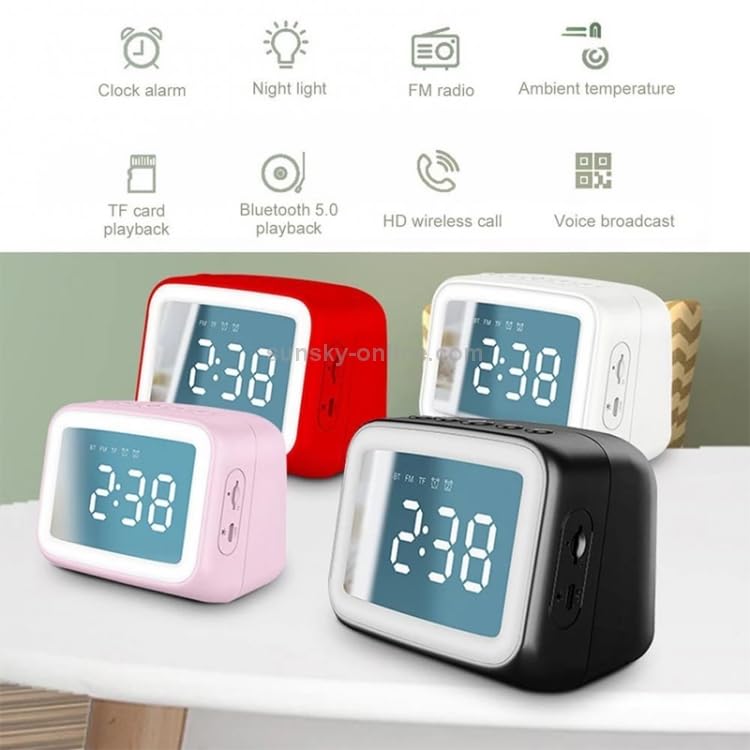
Figure 2: Feature overview of the BT-511 speaker. This diagram highlights eight key functionalities: Clock alarm, Night light, FM radio, Ambient temperature display, TF card playback, Bluetooth 5.0 playback, HD wireless call, and Voice broadcast. The image also shows four speakers in different colors (red, white, pink, black) in the background.
- LED Mirror Display: Shows time, temperature, and various mode indicators.
- Control Buttons: (Located on top, inferred from typical designs) Power, Mode, Volume Up/Next, Volume Down/Previous, Play/Pause/Call.
- Ports: (Located on side/back, inferred from description) USB charging port, TF card slot, 3.5mm AUX input.
Setup
1. Charging the Speaker
- Connect the provided USB charging cable to the speaker's charging port.
- Connect the other end of the USB cable to a USB power adapter (not included) or a computer's USB port.
- The charging indicator will illuminate. A full charge takes approximately 2 hours.
- Once fully charged, the indicator light will change or turn off, indicating the speaker is ready for use.
2. Powering On/Off
- To Power On: Press and hold the Power button (usually located on the top or back) for a few seconds until the LED display lights up.
- To Power Off: Press and hold the Power button again until the display turns off.
Operating Instructions
1. Bluetooth Pairing
- Ensure the speaker is powered on. It will automatically enter Bluetooth pairing mode, indicated by a flashing Bluetooth icon on the display.
- On your smartphone or tablet, enable Bluetooth and search for available devices.
- Select "BT-511" (or similar name) from the list of devices.
- Once paired, the Bluetooth icon on the speaker's display will stop flashing and remain solid. You can now play audio from your device through the speaker.
2. TF Card Playback
- Insert a TF (MicroSD) card with WAV/WMA/MP3/PLAC/APE audio files into the TF card slot on the speaker.
- The speaker will automatically detect the card and switch to TF card playback mode. If not, press the Mode button to cycle through modes until TF card mode is active.
- Use the Play/Pause, Next, and Previous buttons to control playback.
3. AUX Playback
- Connect one end of a 3.5mm audio cable (not included) to the AUX input port on the speaker.
- Connect the other end of the cable to the audio output jack of your external device (e.g., MP3 player, computer).
- The speaker will automatically switch to AUX mode. If not, press the Mode button to cycle through modes until AUX mode is active.
- Control playback from your external device.
4. Dual Alarm Clock Setup
- Press the Alarm button (or a dedicated button, refer to device markings) to enter alarm setting mode.
- Use the Volume Up/Down or Next/Previous buttons to adjust the hour and minute.
- Press the Alarm button again to confirm each setting and move to the next.
- Repeat for the second alarm if desired.
- To enable/disable an alarm, short press the Alarm button until the alarm icon appears/disappears.
5. Real-time Temperature Display
The speaker automatically displays the ambient temperature on its LED screen. No specific action is required to activate this feature.
6. Hands-Free Calling
- Ensure the speaker is paired with your Bluetooth-enabled smartphone.
- When a call comes in, the speaker will ring. Press the Play/Pause button (often doubles as Call Answer/End) to answer the call.
- Speak into the speaker's built-in microphone.
- To end a call, press the Play/Pause button again.
- To reject a call, press and hold the Play/Pause button.
7. FM Radio (If applicable)
- Press the Mode button to switch to FM radio mode.
- Press and hold the Play/Pause button to initiate an automatic station scan. The speaker will save available stations.
- Use the Next/Previous buttons to switch between saved stations.
8. Night Light Function (If applicable)
The speaker may feature an integrated night light. Refer to the device's specific buttons or the main image (Figure 2) for a dedicated light button or a long-press function on an existing button to activate/deactivate the night light.
Maintenance
- Cleaning: Use a soft, dry, lint-free cloth to clean the speaker's surface and mirror display. Do not use liquid cleaners, sprays, or abrasive materials.
- Storage: When not in use for extended periods, store the speaker in a cool, dry place, away from direct sunlight and extreme temperatures.
- Battery Care: To prolong battery life, avoid fully discharging the battery frequently. Charge the speaker regularly, even if not in constant use.
Troubleshooting
| Problem | Possible Cause | Solution |
|---|---|---|
| Speaker does not power on. | Low battery; Power button not pressed correctly. | Charge the speaker fully. Press and hold the Power button for 3-5 seconds. |
| Cannot pair via Bluetooth. | Speaker not in pairing mode; Device Bluetooth off; Too far from speaker. | Ensure speaker is in Bluetooth mode (flashing icon). Turn off/on Bluetooth on your device. Move device closer to speaker (within 10 meters). |
| No sound from speaker. | Volume too low; Incorrect mode selected; Audio source issue. | Increase speaker volume and device volume. Ensure correct mode (BT, TF, AUX) is selected. Check audio source playback. |
| Alarm does not sound. | Alarm not set or enabled; Volume too low. | Verify alarm time and ensure alarm icon is displayed. Increase speaker volume. |
| Display is dim or off. | Power saving mode; Low battery. | Press any button to wake the display. Charge the speaker. |
Specifications
| Feature | Detail |
|---|---|
| Model | BT-511 (TBD0326789901C) |
| Dimensions | 10.3 x 8 x 7 cm |
| Weight | 0.34 kg (340 g) |
| Material | Plastic |
| Power Supply | USB Charging |
| Battery Capacity | 1200mAh |
| Charging Time | Approx. 2 hours |
| Playing Time | Approx. 4 hours |
| Connection Method | Bluetooth (Effective distance: 10 meters) |
| Frequency Response | 100 Hz - 20 kHz |
| Audio Format Support | WAV/WMA/MP3/PLAC/APE |
| Special Features | TF card playback, AUX playback, Dual alarm mode, Real-time temperature, Hands-free calling, LED HD mirror, Subwoofer diaphragm, Bluetooth, Wireless |
| Certifications | CE, ROHS |
Warranty and Support
This product comes with a standard manufacturer's warranty. Please refer to the warranty card included in your package for specific terms and conditions. For technical support, troubleshooting assistance, or warranty claims, please contact ELECTROPRIME customer service through the retailer where you purchased the product or visit the official ELECTROPRIME website for contact information.
Ask a question about this manual
Ask about setup, troubleshooting, compatibility, parts, safety, or missing instructions. Manuals+ will review the question and use this page’s manual context to help answer it.