
1. Introduction
Thank you for purchasing the ELECTROPRIME DUZZONA W10-S 15W 3-in-1 Foldable Wireless Charger Stand. This device is designed to provide convenient and efficient wireless charging for your compatible mobile phone, smartwatch, and earbuds simultaneously. Please read this manual carefully before use to ensure proper operation and to maximize the product's lifespan.
2. Product Overview
2.1 Key Features
- Simultaneous charging for mobile phone, smartwatch, and earbuds.
- Sensitive and instant wireless charging.
- Foldable design for easy portability and storage.
- Integrated back heat dissipation design for efficient heat release.
- Built-in multiple safety protections for secure and fast charging.
2.2 Components
The charger stand consists of a main charging pad for phones, a dedicated area for smartwatches, and a base for earbud charging. It features a foldable hinge mechanism for compact storage.
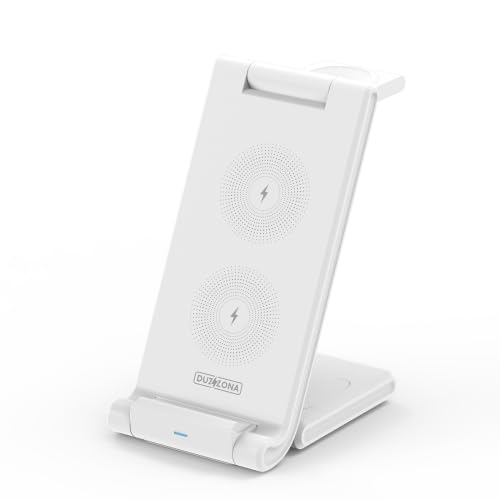
Figure 1: Front view of the ELECTROPRIME DUZZONA W10-S 3-in-1 Foldable Wireless Charger Stand in upright position.
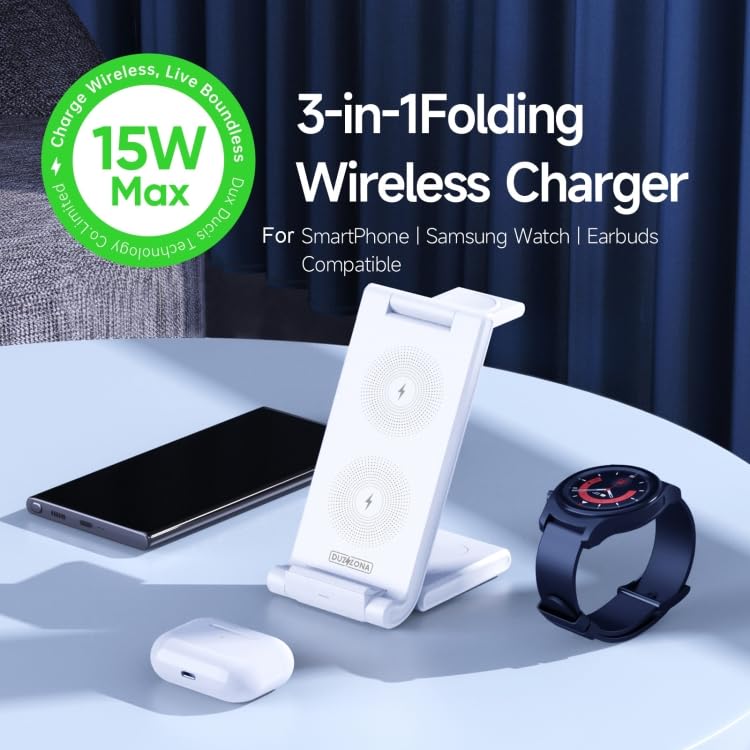
Figure 2: The charger stand in use, simultaneously charging a smartphone, smartwatch, and earbuds.

Figure 3: Illustration of the reverse folding design for compact storage.
3. Setup
3.1 Unboxing
- Carefully remove the charger stand from its packaging.
- Ensure all components are present.
3.2 Connecting to Power
- Connect a compatible power adapter (not included) to the charger stand's input port.
- Plug the power adapter into a wall outlet. For optimal performance, use a Quick Charge (QC) 3.0 or Power Delivery (PD) compatible adapter with sufficient power output (e.g., 9V/3A or 12V/1.5A).
3.3 Positioning the Device
Place the charger stand on a stable, flat surface. You can adjust the angle of the phone charging pad by unfolding the stand to your desired viewing position.
4. Operating Instructions
4.1 Charging a Mobile Phone
- Ensure your mobile phone is wireless charging compatible.
- Place your phone centrally on the main charging pad. The phone will automatically begin charging.
- The charger supports various output powers: 15W, 10W, 7.5W, and 5W, depending on your phone's capabilities and the power adapter used.
4.2 Charging a Smartwatch
- Ensure your smartwatch is wireless charging compatible.
- Place your smartwatch on the designated watch charging area. It will automatically begin charging at up to 3W.
4.3 Charging Earbuds
- Ensure your earbud case supports wireless charging.
- Place the earbud case on the designated earbud charging area at the base of the stand. It will automatically begin charging at up to 3W.
Note: For optimal charging performance, ensure devices are properly aligned with their respective charging coils. Remove any thick phone cases that may interfere with wireless charging.
5. Maintenance
5.1 Cleaning
To clean the charger stand, disconnect it from the power source. Use a soft, dry cloth to wipe the surfaces. Do not use abrasive cleaners or immerse the device in water.
5.2 Storage
Thanks to its foldable design, the charger stand can be easily folded for compact storage when not in use or for travel. Store it in a cool, dry place away from direct sunlight and extreme temperatures.
5.3 Heat Dissipation
The charger features a back heat dissipation design to manage temperature during charging. Ensure the ventilation areas are not blocked to maintain efficient operation.
6. Troubleshooting
- Device not charging:
- Ensure the charger stand is properly connected to a working power outlet.
- Verify that your device is wireless charging compatible.
- Check if the device is correctly aligned on the charging pad.
- Remove any thick cases or metallic objects from your device.
- Try using a different power adapter and cable.
- Slow charging:
- Ensure you are using a Quick Charge (QC) 3.0 or Power Delivery (PD) compatible adapter with sufficient output.
- Check for proper alignment of the device on the charging pad.
- Close unnecessary background applications on your device.
- LED indicator not working:
- Ensure the charger is powered on.
- If the issue persists, contact customer support.
The charger has built-in multiple safety protections, including over-current, over-voltage, over-temperature, and short-circuit protection. If an issue occurs, the charger may temporarily stop functioning to protect your devices.
7. Specifications
| Feature | Specification |
|---|---|
| Model Number | W10-S (EDA0042425) |
| Material | ABS + Silicone |
| Weight | 175g (0.45lb) |
| Dimensions (Folded) | 152 x 73 x 135mm |
| Input | 5V/3A, 9V/3A, 12V/1.5A |
| Mobile Phone Output | 15W / 10W / 7.5W / 5W |
| Headphones Output | 3W (Max) |
| Smartwatch Output | 3W (Max) |
| Mounting Type | Tabletop Mount |
| Total USB Ports | 1 (for power input) |
8. Warranty and Support
8.1 Warranty Policy
This product is covered by a warranty policy. Please refer to the warranty information provided at the time of purchase or contact your retailer for details regarding warranty terms and conditions.
8.2 Customer Support
If you encounter any issues or have questions regarding the ELECTROPRIME DUZZONA W10-S charger stand that are not addressed in this manual, please contact ELECTROPRIME customer support for assistance.