
ELECTROPRIME EDA003873201A
ELECTROPRIME Compatible for Lenovo LP10 TWS Wireless Bluetooth Earphones User Manual
Model: EDA003873201A
1. Introduction
Thank you for choosing the ELECTROPRIME Compatible for Lenovo LP10 TWS Wireless Bluetooth Earphones. This manual provides detailed instructions on how to set up, operate, and maintain your new earphones. Featuring Bluetooth 5.2 for stable connectivity, noise reduction technology, and a convenient charging case, these earphones are designed for an enhanced audio experience. Please read this manual carefully before use to ensure optimal performance and longevity of your device.
2. Package Contents
Please check the package for the following items:
- ELECTROPRIME Compatible for Lenovo LP10 TWS Earbuds (Left & Right)
- Charging Case
- USB Type-C Charging Cable
- User Manual
3. Product Overview
Familiarize yourself with the components of your earphones and charging case.
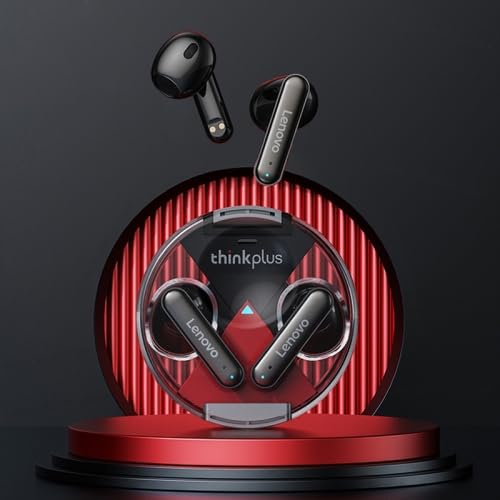
Image 1: The ELECTROPRIME Compatible for Lenovo LP10 TWS Earbuds shown with their transparent charging case. The earbuds are black with silver accents, and the case is clear with a black base, highlighting the 'thinkplus' branding.
Touch Control Functions
The earphones feature intuitive touch controls for various functions. Refer to the image below for a visual guide to the touch gestures.
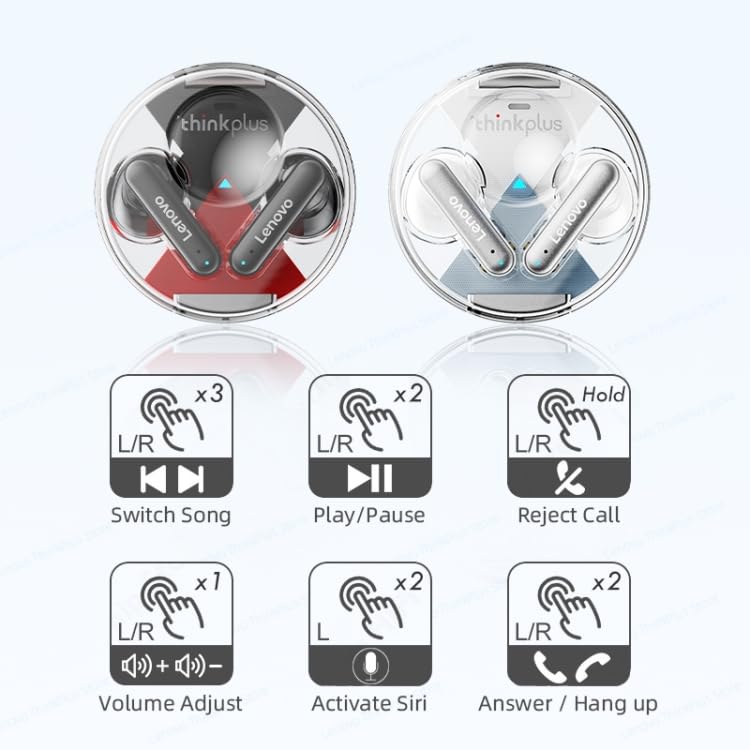
Image 2: A diagram illustrating the touch control gestures for the earbuds. It shows: 3 taps for switching songs, 2 taps for play/pause, long press for rejecting calls, 1 tap for volume adjust, 2 taps on left for activating Siri, and 2 taps on right for answering/hanging up calls.
4. Setup
4.1 Charging the Earphones and Case
Before first use, fully charge the earphones and the charging case.
- Connect the USB Type-C charging cable to the charging port on the case and the other end to a 5V USB power source.
- The charging case has a 300mAh battery capacity and the earphones have a 30mAh capacity each.
- Charging indicators (white light + blue light) on the case will show the charging status.
- Once fully charged, disconnect the cable. The charging case can fully charge the earphones approximately 5 times, providing over 30 hours of music time.
4.2 Pairing with Your Device
- Open the charging case. The earphones will automatically power on and enter pairing mode.
- On your smartphone or Bluetooth-enabled device, go to the Bluetooth settings.
- Search for available devices and select "Lenovo LP10" (or similar name) from the list.
- Once connected, you will hear a confirmation prompt, and the earphones will be ready for use.
- The earphones support Bluetooth V5.2 for a stable and low-latency connection.
5. Operating Instructions
5.1 Power On/Off
- Power On: Open the charging case, and the earphones will automatically power on.
- Power Off: Place the earphones back into the charging case and close the lid. They will automatically power off and begin charging.
5.2 Music Playback
- Play/Pause: Double-tap either earbud.
- Next Song: Triple-tap either earbud.
- Volume Adjust: Single-tap either earbud. (Specific earbud for up/down may vary, try both).
5.3 Call Management
- Answer/Hang Up Call: Double-tap either earbud.
- Reject Call: Long press either earbud.
5.4 Voice Assistant
- Activate Voice Assistant (Siri/Google Assistant): Double-tap the left earbud.
5.5 Music/Game Dual Mode
The earphones support a dual mode for music and gaming, offering synchronized sound quality and low latency for gaming. The method to switch between modes is typically through a specific touch gesture or automatic detection. Refer to the product's quick start guide or experiment with touch controls if not explicitly stated.
6. Maintenance
Proper care ensures the longevity of your earphones.
- Cleaning: Use a soft, dry, lint-free cloth to clean the earbuds and charging case. Do not use harsh chemicals or abrasive materials.
- Water Resistance: The earphones feature IP54 waterproof technology, protecting them from splashes and sweat. Do not submerge them in water or expose them to heavy rain.
- Storage: When not in use, store the earphones in their charging case to protect them and keep them charged. Avoid storing them in extreme temperatures (hot or cold) or in dusty environments.
- Battery Care: To preserve battery life, avoid fully discharging the earphones and case frequently. Charge them regularly, even if not in constant use.
7. Troubleshooting
If you encounter issues, try the following solutions:
- Earphones not pairing:
- Ensure both earphones are charged.
- Turn off Bluetooth on your device and turn it back on.
- Forget/delete "Lenovo LP10" from your device's Bluetooth list and try pairing again.
- Place earphones back in the case, close the lid, wait a few seconds, then open again to reset.
- No sound from one earbud:
- Ensure both earbuds are charged.
- Try placing both earbuds back in the case and taking them out again.
- Re-pair the earphones with your device.
- Charging issues:
- Check if the charging cable is securely connected to both the case and the power source.
- Try a different USB port or charging adapter.
- Ensure the charging contacts on the earbuds and inside the case are clean and free of debris.
- Low volume or poor sound quality:
- Adjust the volume on both your device and the earphones.
- Ensure the earphones are properly seated in your ears.
- Clean any earwax or debris from the earbud nozzles.
8. Specifications
Detailed technical specifications for the ELECTROPRIME Compatible for Lenovo LP10 TWS Earphones:
| Feature | Specification |
|---|---|
| Model Number | EDA003873201A |
| Bluetooth Version | BT5.2 |
| Wearing Method | Half In-Ear |
| Horn Diameter | 13mm |
| Speaker Material | Composite Membrane |
| Headphone Battery Capacity | 30mAh (each earbud) |
| Earphone Playback Time | Approx. 7 hours |
| Earphone Talk Time | Approx. 7.5 hours |
| Supported Audio Format | SBC |
| Operation Method | Touch Control |
| Charging Case Battery Capacity | 300mAh |
| Charging Parameters | 5V-300mA |
| Charging Port | Type-C Interface |
| Waterproof Rating | IP54 |
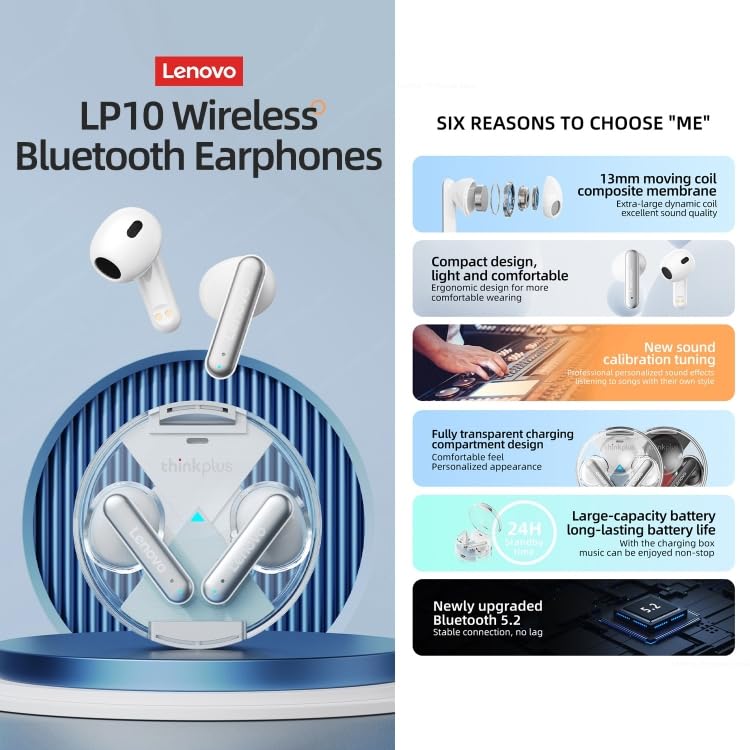
Image 3: An infographic highlighting six key features of the earphones: 13mm moving coil composite membrane for sound quality, compact and comfortable design, new sound calibration tuning, fully transparent charging compartment design, large-capacity battery for long-lasting life (24H with case), and newly upgraded Bluetooth 5.2 for stable connection.
9. Warranty and Support
ELECTROPRIME products are designed for reliability and performance. For any warranty claims, technical support, or inquiries, please contact ELECTROPRIME customer service through the retailer where you purchased the product or visit the official ELECTROPRIME website for contact information. Please retain your proof of purchase for warranty purposes.
Ask a question about this manual
Ask about setup, troubleshooting, compatibility, parts, safety, or missing instructions. Manuals+ will review the question and use this page’s manual context to help answer it.