
ELECTROPRIME P50 Mini
User Manual
ELECTROPRIME HOPESTAR P50 Mini Bluetooth Speaker
Model: P50 Mini
Introduction
Thank you for purchasing the ELECTROPRIME HOPESTAR P50 Mini TWS Outdoor RGB Light IPX6 Waterproof Bluetooth Speaker. This manual provides essential information for setting up, operating, and maintaining your speaker to ensure optimal performance and longevity.
Product Overview
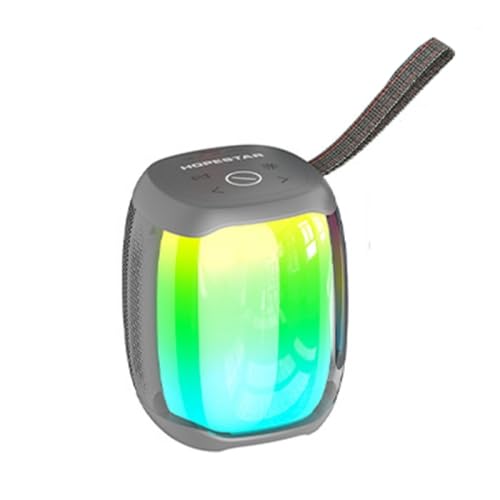
Figure 1: Front view of the ELECTROPRIME HOPESTAR P50 Mini Bluetooth Speaker, showcasing its compact design and vibrant RGB light effects. The speaker is grey with a black strap.
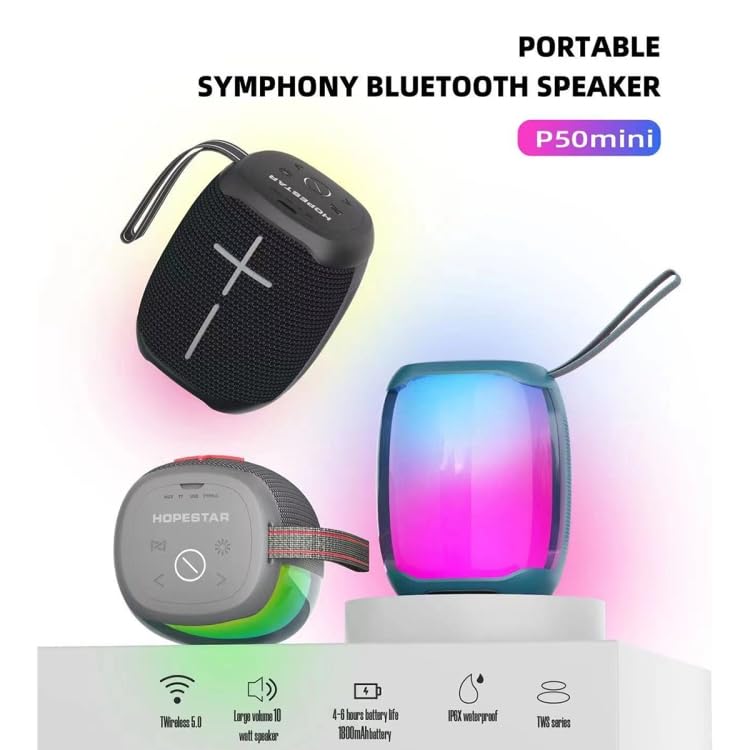
Figure 2: Feature highlights of the P50 Mini speaker, illustrating its key specifications such as Wireless 5.0 connectivity, 10W output, 4-6 hours battery life, IPX6 waterproofing, and TWS capability.
The ELECTROPRIME HOPESTAR P50 Mini is a compact, portable Bluetooth speaker designed for outdoor use. It features TWS (True Wireless Stereo) functionality, allowing two speakers to be paired for a stereo sound experience. The speaker also includes dynamic RGB lighting and is rated IPX6 waterproof, making it suitable for various environments.
Important Safety Information
- Do not expose the speaker to extreme temperatures or direct sunlight for prolonged periods.
- Avoid dropping or subjecting the speaker to strong impacts.
- Do not disassemble, repair, or modify the speaker yourself. Contact qualified service personnel for any repairs.
- Keep the speaker away from medical devices, as it contains magnets.
- Ensure the charging port cover is securely closed when using the speaker near water to maintain IPX6 waterproofing.
- Use only the specified charging voltage (5V=1A) to prevent damage.
Package Contents
Please check the package for the following items:
- ELECTROPRIME HOPESTAR P50 Mini Bluetooth Speaker
- USB Charging Cable
- 3.5mm Audio Cable
- User Manual (this document)
Setup
Charging the Speaker
- Locate the charging port on the speaker.
- Connect the provided USB charging cable to the speaker's charging port.
- Connect the other end of the USB cable to a 5V=1A USB power adapter (not included) or a computer's USB port.
- The charging indicator light will illuminate during charging and turn off when fully charged.
- A full charge typically takes approximately 2-3 hours.
Powering On/Off
- To Power On: Press and hold the Power button for a few seconds until you hear an audible prompt and the RGB lights illuminate.
- To Power Off: Press and hold the Power button again for a few seconds until you hear an audible prompt and the lights turn off.
Operating Instructions
Bluetooth Pairing
- Ensure the speaker is powered on and in Bluetooth pairing mode (indicated by a flashing LED light).
- On your device (smartphone, tablet, etc.), enable Bluetooth and search for available devices.
- Select "HOPESTAR P50 Mini" or a similar name from the list of devices.
- Once paired, you will hear a confirmation sound, and the LED light will stop flashing.
- The speaker will automatically reconnect to the last paired device when powered on, if the device is within range and Bluetooth is enabled.
True Wireless Stereo (TWS) Pairing
To achieve a stereo sound experience, you can pair two HOPESTAR P50 Mini speakers together:
- Ensure both speakers are powered on and not connected to any Bluetooth device.
- On one of the speakers (this will be the primary speaker), double-press the TWS button (usually indicated by a chain link icon or similar).
- The primary speaker will search for the secondary speaker. Once connected, you will hear a confirmation sound.
- Now, connect your device to the primary speaker via Bluetooth as described in the "Bluetooth Pairing" section. Both speakers will play audio in stereo.
Using the 3.5mm Audio Input (AUX Mode)
- Connect one end of the provided 3.5mm audio cable to the AUX-in port on the speaker.
- Connect the other end of the cable to the headphone jack of your audio device.
- The speaker will automatically switch to AUX mode.
Controlling Playback and Volume
- Play/Pause: Press the Play/Pause button (often indicated by a triangle or similar icon).
- Volume Up: Press the Volume Up button (+).
- Volume Down: Press the Volume Down button (-).
- Next Track: Press and hold the Volume Up button (+) or a dedicated Next Track button.
- Previous Track: Press and hold the Volume Down button (-) or a dedicated Previous Track button.
RGB Light Control
The speaker features dynamic RGB lighting. Refer to the speaker's physical buttons for light control. Typically, there is a dedicated light button to cycle through different light modes or turn them off/on.
Maintenance
- Cleaning: Use a soft, dry cloth to wipe the speaker's surface. Do not use abrasive cleaners, alcohol, or chemical solvents.
- Storage: When not in use for extended periods, store the speaker in a cool, dry place away from direct sunlight and extreme temperatures.
- Battery Care: To prolong battery life, avoid fully discharging the battery frequently. Charge the speaker regularly, even if not in use, to maintain battery health.
- Waterproofing: While IPX6 waterproof, avoid submerging the speaker. Ensure the charging port cover is sealed tightly before exposure to water splashes or rain.
Troubleshooting
| Problem | Possible Cause | Solution |
|---|---|---|
| Speaker does not power on. | Battery is low or depleted. | Charge the speaker fully. |
| Cannot pair via Bluetooth. | Speaker is not in pairing mode; Device's Bluetooth is off; Speaker is too far from device; Speaker is already connected to another device. | Ensure speaker is in pairing mode; Turn on Bluetooth on your device; Move speaker closer to device (within 10 meters); Disconnect from other devices. |
| No sound or low volume. | Volume on speaker or device is too low; Speaker is not properly connected; Audio source issue. | Increase volume on both speaker and device; Re-pair Bluetooth or re-connect AUX cable; Check audio source. |
| TWS pairing fails. | Speakers are too far apart; One speaker is already paired to a device. | Ensure both speakers are close to each other; Disconnect both speakers from any Bluetooth devices before initiating TWS pairing. |
Specifications
| Feature | Detail |
|---|---|
| Wireless Standard | Bluetooth 5.0 |
| Transmission Distance | Up to 10 meters (33 feet) |
| Output Power | 10W |
| Playing Time | 4-6 hours |
| Frequency Effect | 80Hz-15KHz |
| Waterproof Grade | IPX6 |
| Input Power | 5V=1A |
| Battery Type | 18650 Lithium Ion Battery |
| Battery Capacity | 1800mAh |
| Audio Input Interface | Standard 3.5mm Headphone Jack (Stereo) |
| Dimensions (L x W x H) | 105mm x 105mm x 115mm |
| Model Number | P50 Mini (EDA004245101B) |
Warranty and Support
For warranty information and customer support, please refer to the warranty card included with your product or contact ELECTROPRIME customer service through the retailer where you purchased the product. Please retain your proof of purchase for warranty claims.
Manufacturer: ELECTROGADGETSSTORE
Date First Available: 18 April 2024
Ask a question about this manual
Ask about setup, troubleshooting, compatibility, parts, safety, or missing instructions. Manuals+ will review the question and use this page’s manual context to help answer it.