
ELECTROPRIME HC23
ELECTROPRIME HOCO HC23 Rick Outdoor Bluetooth Speaker User Manual
Model: HC23 (EDA006018201D) | Brand: ELECTROPRIME
1. Introduction
Welcome to the user manual for your new ELECTROPRIME HOCO HC23 Rick Outdoor Bluetooth Speaker. This manual provides comprehensive instructions on how to set up, operate, and maintain your speaker to ensure optimal performance and longevity. Please read this manual carefully before using the product and keep it for future reference.
2. Safety Information
To ensure safe operation and prevent damage, please observe the following safety precautions:
- Do not expose the speaker to extreme temperatures, direct sunlight, or high humidity.
- Avoid dropping or subjecting the speaker to strong impacts.
- Do not disassemble, repair, or modify the speaker yourself. Refer all servicing to qualified personnel.
- Keep the speaker away from water and other liquids. If it gets wet, power it off immediately and allow it to dry completely before use.
- Use only the provided charging cable or a certified equivalent.
- Do not use abrasive cleaners or solvents to clean the speaker. Use a soft, dry cloth.
- Keep out of reach of children.
3. Package Contents
Please check the package contents upon opening to ensure all items are present:
- ELECTROPRIME HOCO HC23 Rick Outdoor Bluetooth Speaker
- USB Charging Cable
- Shoulder Strap
- User Manual
4. Product Overview
The ELECTROPRIME HOCO HC23 Rick is a versatile outdoor Bluetooth speaker designed for robust sound and portability. It features Bluetooth 5.3 connectivity, FM radio, TF card and U disk support, and True Wireless Stereo (TWS) functionality for an enhanced audio experience.
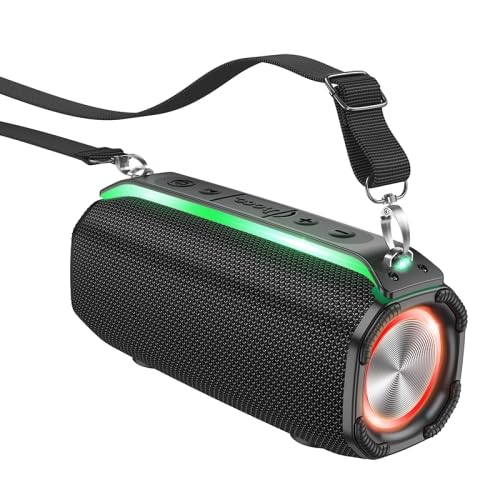
Figure 4.1: Front view of the ELECTROPRIME HOCO HC23 Rick Outdoor Bluetooth Speaker, showing the speaker grille, control panel, and attached shoulder strap.
4.1 Controls and Ports
Familiarize yourself with the various buttons and ports on your speaker:
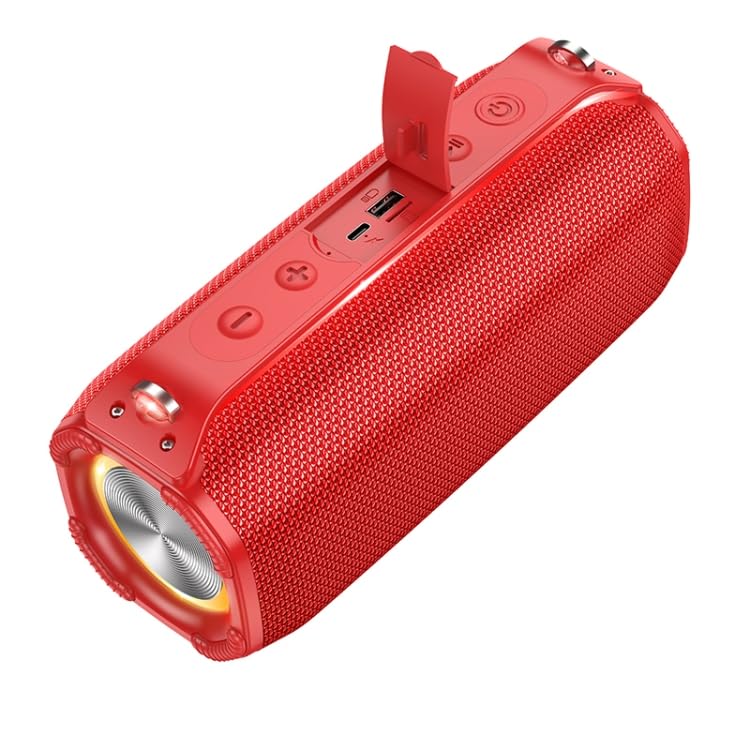
Figure 4.2: Top view of the speaker, highlighting the control buttons and the protective flap covering the charging port, TF card slot, and USB port.
- Power Button: Press and hold to turn on/off. Short press to change mode.
- Play/Pause Button: Play or pause audio. In FM mode, short press to auto-scan.
- Volume Down / Previous Track Button: Short press for previous track, long press to decrease volume.
- Volume Up / Next Track Button: Short press for next track, long press to increase volume.
- USB Charging Port: For charging the speaker.
- TF Card Slot: Insert a TF (MicroSD) card for music playback.
- USB Port: Insert a USB flash drive for music playback.
5. Setup
5.1 Charging the Speaker
Before first use, fully charge the speaker. The charging time is approximately 4 hours.
- Connect the small end of the USB charging cable to the USB Charging Port on the speaker.
- Connect the large end of the USB charging cable to a USB power adapter (not included) or a computer's USB port.
- The charging indicator light will illuminate during charging and turn off when fully charged.
5.2 Powering On/Off
- To power on, press and hold the Power Button until you hear an audible prompt.
- To power off, press and hold the Power Button again until you hear an audible prompt.
6. Operating Instructions
6.1 Bluetooth Pairing
The speaker will automatically enter Bluetooth pairing mode when powered on for the first time or if no device is connected.
- Ensure the speaker is powered on and in Bluetooth mode (indicated by a flashing blue LED).
- Enable Bluetooth on your smartphone, tablet, or other audio device.
- Search for "HC23" in the list of available Bluetooth devices.
- Select "HC23" to connect. Once connected, you will hear a confirmation sound, and the LED indicator will stop flashing.
- You can now play audio through the speaker.
6.2 FM Radio Mode
- Short press the Power Button to cycle through modes until you reach FM Radio mode.
- Short press the Play/Pause Button to automatically scan and save available FM stations.
- Use the Volume Up/Next Track and Volume Down/Previous Track buttons to navigate between saved stations.
6.3 TF Card / U Disk Playback
- Insert a TF (MicroSD) card or a USB flash drive into the respective slot on the speaker.
- The speaker will automatically switch to TF card or U disk mode and begin playing audio files.
- Use the Play/Pause, Volume Up/Next Track, and Volume Down/Previous Track buttons to control playback.
6.4 TWS Function (True Wireless Stereo)
The TWS function allows you to connect two HC23 speakers together for a true stereo sound experience.
- Ensure both HC23 speakers are powered on and not connected to any Bluetooth device.
- On one of the speakers (this will be the primary speaker), long press the Play/Pause button until you hear a TWS pairing prompt.
- The two speakers will automatically search and connect to each other. Once connected, you will hear a confirmation sound.
- Now, connect your Bluetooth device to the primary speaker as described in section 6.1. Audio will play in stereo through both speakers.
6.5 Basic Controls Summary
| Button | Function (Short Press) | Function (Long Press) |
|---|---|---|
| Power Button | Change Mode (Bluetooth/FM/TF/USB) | Power On/Off |
| Play/Pause Button | Play/Pause (Music); Auto-scan (FM) | TWS Pairing (in Bluetooth mode) |
| Volume Down / Previous Track | Previous Track | Volume Down |
| Volume Up / Next Track | Next Track | Volume Up |
7. Maintenance
Proper care and maintenance will extend the life of your speaker:
- Cleaning: Use a soft, dry, lint-free cloth to clean the speaker's surface. Do not use harsh chemicals, cleaning solvents, or strong detergents.
- Storage: When not in use for extended periods, store the speaker in a cool, dry place away from direct sunlight and extreme temperatures.
- Battery Care: To preserve battery life, charge the speaker at least once every three months if not used regularly. Avoid fully discharging the battery frequently.
- Water Resistance: While designed for outdoor use, avoid submerging the speaker in water. Ensure all port covers are securely closed to protect against splashes.
8. Troubleshooting
If you encounter issues with your speaker, please refer to the following table for common problems and solutions:
| Problem | Possible Cause | Solution |
|---|---|---|
| Speaker does not turn on. | Low battery. | Charge the speaker fully. |
| Cannot pair with Bluetooth device. | Speaker not in pairing mode; Device Bluetooth off; Too far apart. | Ensure speaker is in Bluetooth pairing mode. Turn Bluetooth on your device. Move speaker closer to device (within 10 meters). Forget "HC23" on your device and try pairing again. |
| No sound. | Volume too low; Incorrect mode; Device not connected. | Increase speaker and device volume. Ensure correct mode (Bluetooth, FM, TF, USB). Reconnect Bluetooth device. |
| FM radio reception is poor. | Weak signal; Interference. | Move to an open area. Try auto-scanning again. |
| TF card/U disk not playing. | Incorrect file format; Card/disk not inserted correctly; Corrupted files. | Ensure audio files are in compatible format (e.g., MP3). Reinsert the card/disk. Try with a different card/disk. |
9. Specifications
Technical specifications for the ELECTROPRIME HOCO HC23 Rick Outdoor Bluetooth Speaker:
| Feature | Detail |
|---|---|
| Bluetooth Version | 5.3 |
| Bluetooth Chip | Jerry AC6966B |
| Battery Capacity | 2400mAh |
| Charging Time | Approximately 4 hours |
| Usage Time | Approximately 6 hours |
| Speaker Unit | 57mm x 2 |
| Rated Power | 5W x 2 (Total 10W) |
| Dimensions (LxWxH) | 228 x 110 x 93 mm |
| Weight | 960g |
| Supported Modes | Bluetooth, FM Radio, TF Card, U Disk, TWS |
| Model Name | HC23 |
| Item Model Number | EDA006018201D |
10. Warranty and Support
ELECTROPRIME products are manufactured to the highest quality standards. For information regarding warranty coverage, please refer to the warranty card included with your purchase or visit the official ELECTROPRIME website. For technical support or customer service inquiries, please contact your retailer or the ELECTROPRIME customer support team.
Manufacturer: ELECTROGADGETSSTORE
Date First Available: 18 April 2024
Ask a question about this manual
Ask about setup, troubleshooting, compatibility, parts, safety, or missing instructions. Manuals+ will review the question and use this page’s manual context to help answer it.