
ELECTROPRIME IPXS8011E
User Manual
ELECTROPRIME Zealot S24 Portable Stereo Bluetooth Speaker
Model: IPXS8011E
1. Introduction
Thank you for purchasing the ELECTROPRIME Zealot S24 Portable Stereo Bluetooth Speaker. This manual provides detailed instructions for the proper use, setup, and maintenance of your device. Please read this manual thoroughly before operating the speaker to ensure optimal performance and longevity.
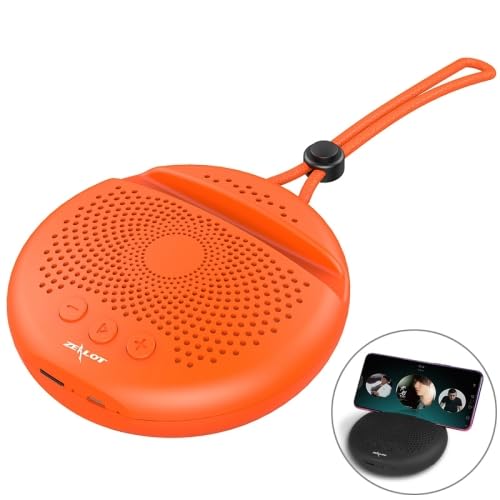
Figure 1: ELECTROPRIME Zealot S24 Portable Bluetooth Speaker. This image shows the orange, circular speaker with its integrated phone card slot and a black lanyard. An inset image shows a phone placed in the slot, demonstrating its use.
2. Package Contents
Please check the package contents upon unboxing to ensure all items are present:
- 1 x ELECTROPRIME Zealot S24 Portable Stereo Bluetooth Speaker
- 1 x Instruction Manual (this document)
- 1 x Charging Cable
3. Product Features
- Bluetooth V5.0+EDR: Ensures strong, fast, and stable wireless connection up to 10 meters.
- HiFi Stereo Sound: Equipped with a low-frequency radiator for dynamic audio quality.
- Hands-Free Calling: Built-in sensitive microphone with HD noise reduction for clear calls.
- Integrated Phone Card Slot: Securely holds your mobile device for an enhanced viewing experience.
- Long Battery Life: Built-in 2000mAh lithium battery provides up to 12 hours of playback.
- Portable Design: Compact and lightweight (230g) with an adjustable nylon lanyard for easy carrying.
- Durable Material: Constructed from ABS with a skin-friendly rubber oil process for a fine and smooth finish.
- Intuitive Controls: Clearly marked buttons for easy operation.
4. Controls and Indicators
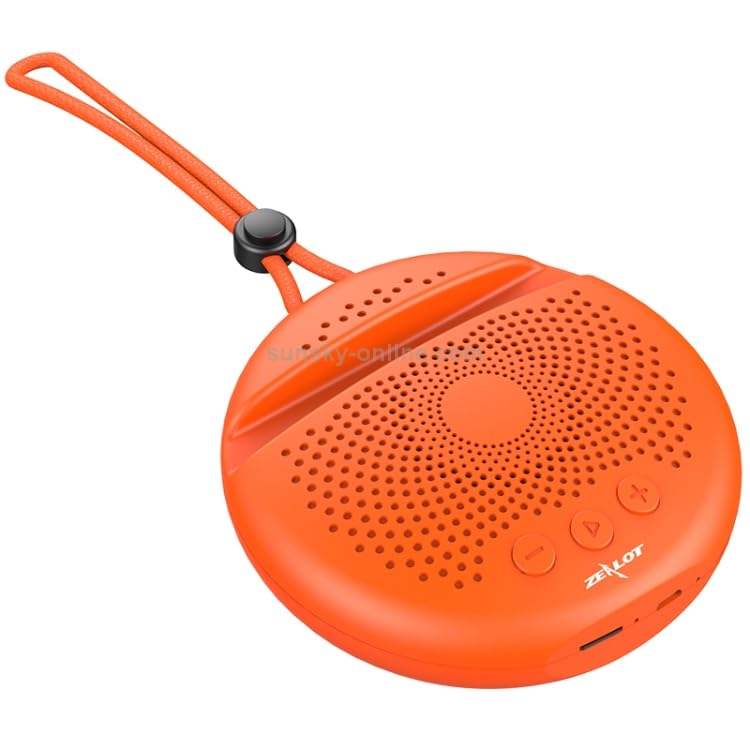
Figure 2: Top view of the speaker, highlighting the control buttons. From left to right, these include a power/mode button, a play/pause button, a volume down/previous track button, and a volume up/next track button.
The ELECTROPRIME Zealot S24 features intuitive controls located on the top surface:
- Power/Mode Button: Press and hold to power on/off. Short press to switch between Bluetooth and TF card modes.
- Play/Pause Button: Press to play or pause audio. Press to answer or end calls.
- Volume Down / Previous Track Button: Short press to decrease volume. Long press to go to the previous track.
- Volume Up / Next Track Button: Short press to increase volume. Long press to go to the next track.
- Microphone: Located near the controls for hands-free calling.
- Charging Port: Micro USB port for charging the device.
- TF Card Slot: Slot for inserting a TF (microSD) card for direct audio playback.
5. Setup
5.1 Charging the Speaker
Before first use, fully charge the speaker. Connect the provided charging cable to the speaker's charging port and the other end to a DC 5V power source (e.g., USB wall adapter, computer USB port).
- Charging Time: Approximately 3 hours for a full charge.
- Charging Indicator: A red LED typically indicates charging, and turns off or changes color when fully charged.
5.2 Bluetooth Pairing
- Ensure the speaker is fully charged.
- Press and hold the Power button to turn on the speaker. It will enter Bluetooth pairing mode automatically, indicated by a flashing LED (color may vary).
- On your mobile device (smartphone, tablet), enable Bluetooth and search for available devices.
- Select "Zealot S24" from the list of found devices.
- Once paired, the speaker will emit a confirmation sound, and the LED indicator will stop flashing and remain solid.
- The speaker is now ready to play audio from your device.
Note: The speaker will automatically attempt to reconnect to the last paired device when powered on, if that device is within range and has Bluetooth enabled.
6. Operating Instructions
6.1 Playing Audio via Bluetooth
After successful Bluetooth pairing, open your preferred music application on your connected device and start playback. Use the speaker's volume buttons or your device's volume controls to adjust the sound level.
- Play/Pause: Short press the Play/Pause button.
- Next Track: Long press the Volume Up (+) button.
- Previous Track: Long press the Volume Down (-) button.
6.2 Using the TF Card Slot
The speaker supports audio playback directly from a TF (microSD) card. Insert a TF card with MP3 audio files into the designated slot. The speaker will automatically switch to TF card mode and begin playing music.
- To switch back to Bluetooth mode, short press the Power/Mode button.
6.3 Hands-Free Calling
When connected via Bluetooth, the speaker can be used for hands-free calls:
- Answer Call: Short press the Play/Pause button when an incoming call rings.
- End Call: Short press the Play/Pause button during a call.
- Reject Call: Long press the Play/Pause button when an incoming call rings.
- Redial Last Number: Double-press the Play/Pause button.
6.4 Using the Mobile Card Slot Holder
The integrated slot on the speaker's top surface is designed to hold your smartphone or small tablet, providing a convenient stand for watching videos or making video calls while enjoying the speaker's audio.
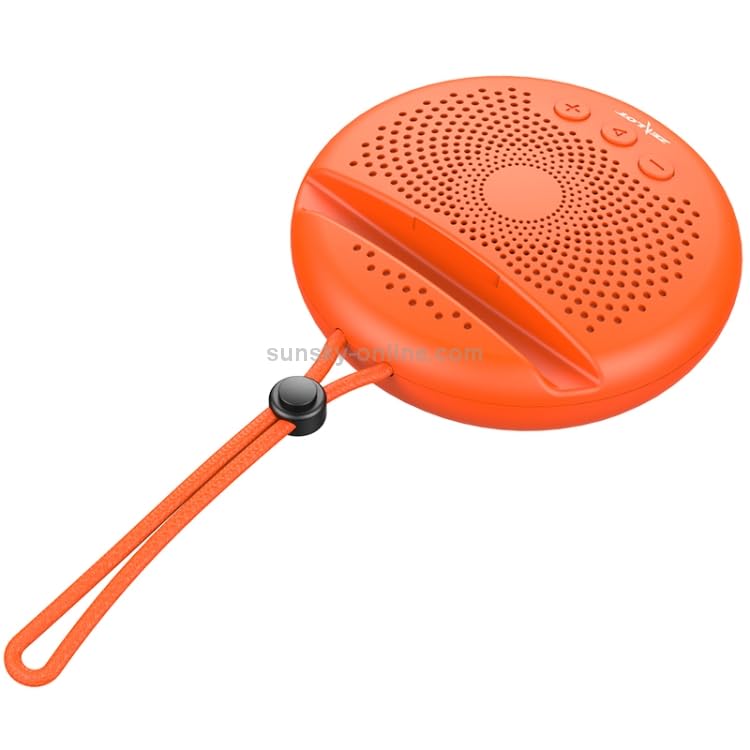
Figure 3: Side view of the speaker, illustrating the integrated phone card slot and the adjustable nylon lanyard for portability.
7. Maintenance
- Cleaning: Wipe the speaker with a soft, dry cloth. Do not use abrasive cleaners or solvents.
- Storage: Store the speaker in a cool, dry place away from direct sunlight and extreme temperatures.
- Battery Care: To prolong battery life, avoid fully discharging the battery frequently. Charge the speaker regularly, even if not in use for extended periods.
- Water Resistance: This speaker is not waterproof. Avoid exposure to water or high humidity.
8. Troubleshooting
| Problem | Possible Cause | Solution |
|---|---|---|
| Speaker does not turn on. | Low battery. | Charge the speaker fully. |
| Cannot pair with Bluetooth device. | Speaker not in pairing mode; device Bluetooth off; too far apart. | Ensure speaker is in pairing mode (flashing LED). Turn on Bluetooth on your device. Move devices closer (within 10m). Forget previous pairings on your device and try again. |
| No sound from speaker. | Volume too low; speaker not connected; incorrect mode. | Increase volume on both speaker and connected device. Ensure speaker is successfully paired. Check if speaker is in TF card mode (if no card inserted, it won't play). |
| Poor sound quality. | Interference; low battery; device too far. | Move speaker away from other electronic devices. Charge the speaker. Move devices closer. |
9. Specifications
| Model Name | Zealot S24 |
| Model Number | IPXS8011E |
| Bluetooth Version | V5.0+EDR |
| Transmission Distance | Approximately 10 meters |
| Battery Capacity | 2000mAh |
| Charging Time | Approximately 3 hours |
| Play Time | Up to 12 hours |
| Full Power Standby Time | 6 months |
| Charging Voltage | DC 5V |
| Working Voltage | 3.7V |
| Signal to Noise Ratio | ≥ 85dB |
| Speaker Impedance | 4 ohms |
| Frequency Response | 20Hz-20KHz |
| Distortion | 1% |
| Weight | 230g |
| Dimensions (L x W x H) | 120 x 118 x 37mm |
| Material | ABS, Acrylonitrile Butadiene Styrene |
10. Warranty and Support
This product is covered by a warranty policy. For details regarding warranty terms and conditions, please refer to the information provided at the point of purchase or contact ELECTROPRIME customer support. Keep your purchase receipt as proof of purchase for warranty claims.
For technical support or inquiries, please visit the official ELECTROPRIME website or contact their customer service channels as listed on their packaging or official product pages.
Note: Specific warranty duration and support contact information may vary by region.
11. Safety Information
- Do not expose the speaker to extreme temperatures, direct sunlight, or high humidity.
- Do not disassemble, repair, or modify the device yourself. This may void the warranty and cause damage.
- Keep the speaker away from children and pets.
- Use only the provided charging cable or a certified equivalent.
- Dispose of the product and its battery responsibly according to local regulations.
Ask a question about this manual
Ask about setup, troubleshooting, compatibility, parts, safety, or missing instructions. Manuals+ will review the question and use this page’s manual context to help answer it.