
Introduction
Thank you for choosing the ELECTROPRIME BY18 Stereo Wireless Bluetooth Earphones. These earphones are designed for an immersive audio experience with convenient features. This manual provides detailed instructions on how to set up, operate, maintain, and troubleshoot your earphones to ensure optimal performance.
Product Overview
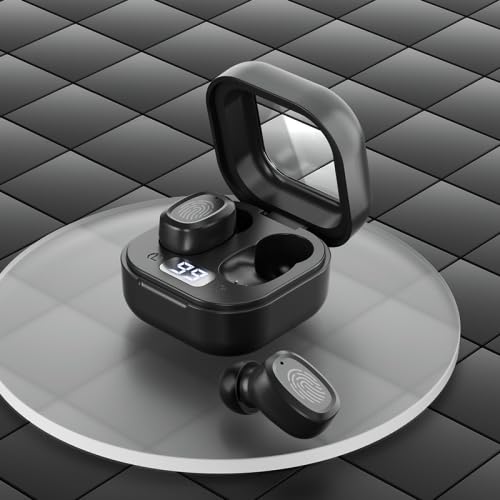
Figure 1: ELECTROPRIME BY18 Earphones and Charging Case. The image displays the black wireless earphones resting inside their open charging case, which features a digital display showing battery percentage. One earphone is shown outside the case.
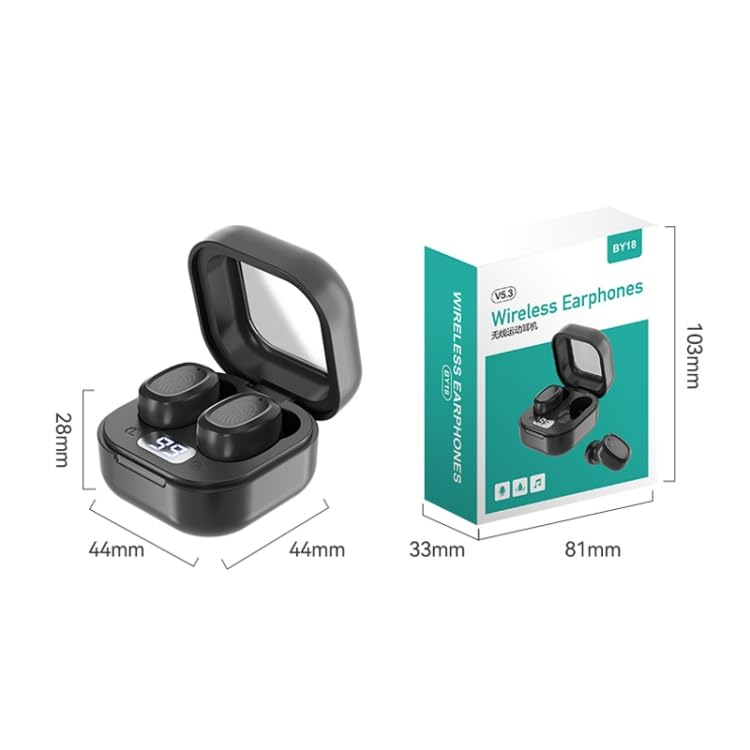
Figure 2: Dimensions of the ELECTROPRIME BY18 Earphones and Charging Case. This image illustrates the compact size of the charging case, measuring 44mm in width, 44mm in depth, and 28mm in height. The product packaging dimensions are also shown: 81mm x 33mm x 103mm.
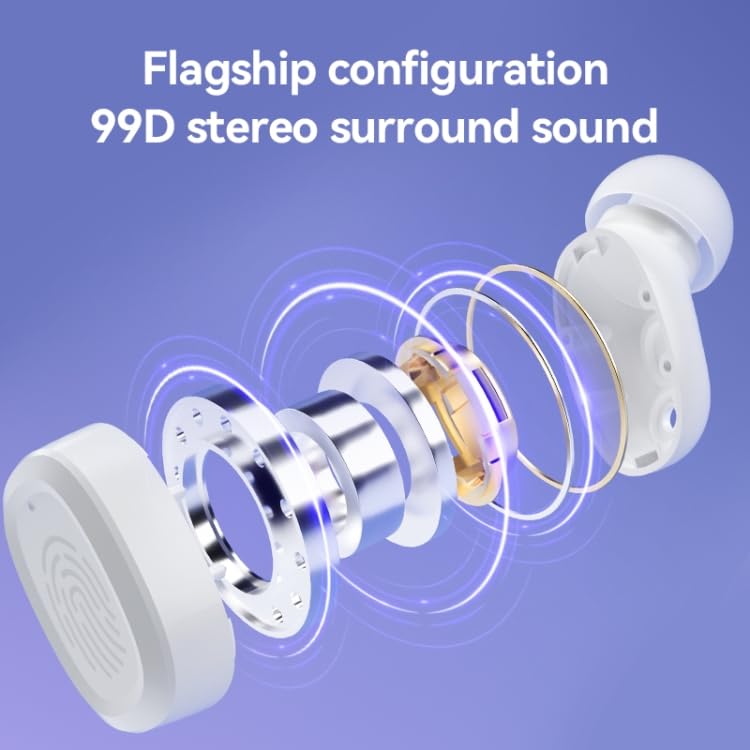
Figure 3: Internal Components and Sound Technology. This diagram shows an exploded view of an earphone, highlighting its internal structure including the 8mm copper ring bass speaker, contributing to the 99D stereo surround sound experience.
Key Features:
- Compact and in-ear fit design for portability and comfort.
- Stereo surround sound for an immersive audio experience.
- Bluetooth 5.3 chip for stable and fast wireless connection.
- Dual channel low latency mode for improved synchronization.
- Intuitive touch operation for convenient control.
- Seamless switching between single and binaural use.
- Digital display on charging compartment for easy power viewing.
Setup
1. Charging the Earphones and Case
Before first use, fully charge the earphones and the charging case.
- Connect the Type-C/USB-C charging cable to the charging port on the case and a power source.
- The digital display on the charging case will show the current battery level.
- A full charge for both the earphones and the charging bin takes approximately 1 hour.
- The headset has a 40mAh battery, and the charging bin has a 300mAh battery.
2. Pairing with Your Device
The earphones use Bluetooth 5.3 for a stable connection.
- Ensure the earphones are charged.
- Open the charging case. The earphones will automatically enter pairing mode.
- On your device (smartphone, tablet, etc.), enable Bluetooth.
- Search for available Bluetooth devices and select "BY18" (or similar name) from the list.
- Once connected, a voice prompt will confirm successful pairing.
- The transmission distance is approximately 10 meters (without obstacles).
Operating Instructions
The ELECTROPRIME BY18 earphones feature intuitive touch controls.
Power On/Off
- Power On: Open the charging case, and the earphones will automatically power on. Alternatively, long-press the touch area on both earphones for a few seconds.
- Power Off: Place the earphones back into the charging case and close the lid. Alternatively, long-press the touch area on both earphones for several seconds until they power off.
Music Playback
- Play/Pause: Tap the touch area on either earphone once.
- Next Track: Double-tap the touch area on the right earphone.
- Previous Track: Double-tap the touch area on the left earphone.
Call Management
- Answer/End Call: Tap the touch area on either earphone once.
- Reject Call: Long-press the touch area on either earphone for 2 seconds.
Single/Binaural Use
The earphones support seamless switching between single and binaural use. You can use either earphone independently or both together.
Low Latency Mode
The BY18 earphones feature a dual-channel low latency mode, ideal for gaming or video playback to minimize audio delay. Refer to your device's settings or specific app instructions for activating low latency mode if available.
Maintenance
- Clean the earphones and charging case regularly with a soft, dry cloth.
- Avoid using abrasive cleaners or solvents.
- Keep the charging contacts on both the earphones and the case clean to ensure proper charging.
- Store the earphones in their charging case when not in use to protect them and keep them charged.
- Avoid exposing the earphones to extreme temperatures, humidity, or liquids.
Troubleshooting
Earphones not pairing:
- Ensure both earphones are charged.
- Turn off Bluetooth on your device and turn it back on.
- Forget the device from your Bluetooth list and try pairing again.
- Ensure the earphones are within the 10-meter transmission range of your device.
No sound from earphones:
- Check the volume level on both your device and the earphones.
- Ensure the earphones are properly connected to your device.
- Try playing different audio files or apps.
Charging issues:
- Ensure the charging cable is securely connected to both the case and the power source.
- Check if the charging port is clean and free of debris.
- Try using a different Type-C/USB-C charging cable and power adapter.
Specifications
| Feature | Detail |
|---|---|
| Brand | ELECTROPRIME |
| Model Name | BY18 Digital Display Black |
| Item Model Number | TBD0603505203 |
| Bluetooth Version | V5.3 |
| Transmission Distance | Approx. 10m (no obstacles) |
| Chip | Zhongke Lanxun |
| Charging Port | Type-C/USB-C |
| Headset Battery Capacity | 40mAh |
| Charging Bin Battery Capacity | 300mAh |
| Charging Time | Approx. 1 hour |
| Use Time | Approx. 5-6 hours |
| Standby Time | Approx. 120 hours |
| Speaker | 8mm copper ring bass speaker |
| Total Weight | Approx. 31.67g |
| Manufacturer | ELECTROGADGETSSTORE |
| Date First Available | 18 April 2024 |
Warranty and Support
ELECTROPRIME products are manufactured with high standards of quality. For information regarding warranty coverage, please refer to the warranty policy provided at the time of purchase or contact ELECTROPRIME customer support.
For technical assistance or further inquiries, please visit the official ELECTROPRIME website or contact their customer service channels.