
ELECTROPRIME EDA005845701A
HOPESTAR A40 Portable Wireless Bluetooth Speaker User Manual
Model: HOPESTAR A40 (EDA005845701A)
Introduction
Thank you for choosing the ELECTROPRIME HOPESTAR A40 Portable Wireless Bluetooth Speaker. This manual provides essential information for setting up, operating, and maintaining your speaker. Please read it thoroughly before use to ensure optimal performance and longevity of your device.
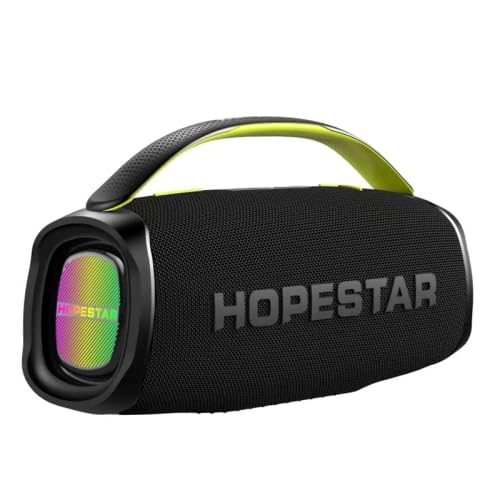
Figure 1: Front view of the HOPESTAR A40 speaker, showcasing the illuminated front panel.
Product Features
- Powerful Audio Output: Total power of 80W, with a 50W woofer and two 15W tweeters for rich sound.
- Advanced Connectivity: Bluetooth version 5.0 for stable wireless connection.
- Long-lasting Battery: Equipped with a 12000mAh battery, providing 6-8 hours of working time.
- Durable Design: Waterproof and dustproof construction, suitable for various outdoor environments.
- Microphone Support: Features adjustable microphone volume and reverberation for enhanced audio experience.
- High Fidelity Sound: Signal-to-noise ratio of approximately 80dB and separation of about 90dB.
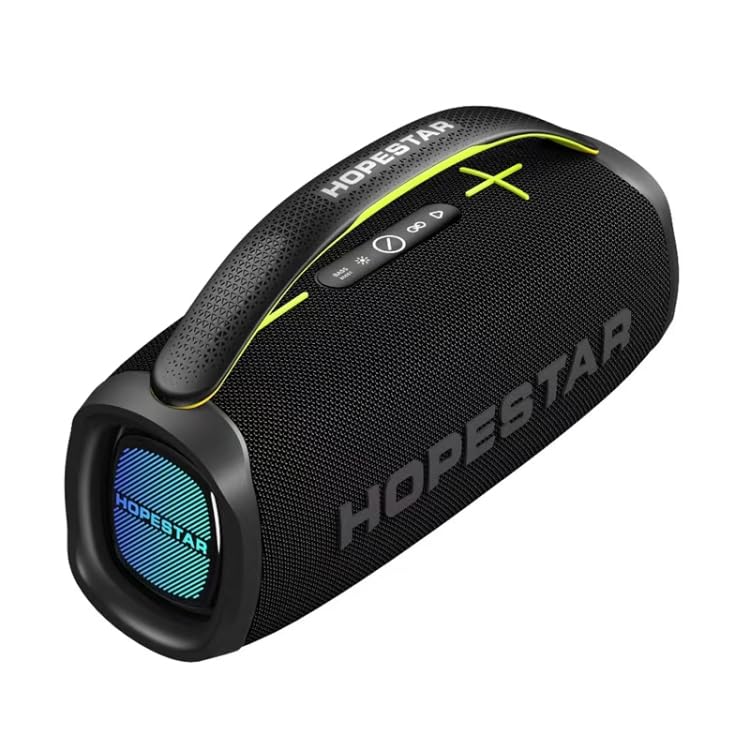
Figure 2: Top view of the HOPESTAR A40 speaker, highlighting the control panel and integrated handle.
Setup Guide
- Unpacking: Carefully remove the speaker and all accessories from the packaging. Verify that all components are present: speaker unit, charging cable, and this user manual.
- Initial Charge: Before first use, fully charge the speaker. Connect the charging cable to the speaker's charging port and a compatible USB power adapter (not included). The charging indicator will show the charging status.
- Power On: Press and hold the power button located on the control panel until you hear an audible prompt or see the indicator light illuminate.
- Bluetooth Pairing:
- Ensure the speaker is in Bluetooth pairing mode (usually indicated by a flashing LED).
- On your device (smartphone, tablet), enable Bluetooth and search for available devices.
- Select "HOPESTAR A40" from the list of found devices.
- Once paired, the speaker will provide an audible confirmation, and the LED indicator will become solid.
Operating Instructions
Basic Controls
- Power Button: Press and hold to turn on/off. Short press to switch modes (Bluetooth, USB, etc.).
- Volume Up/Down: Press '+' to increase volume, '-' to decrease volume.
- Play/Pause: Short press the play/pause button to play or pause audio.
- Next/Previous Track: Long press '+' for next track, long press '-' for previous track.
- Microphone Volume: Use dedicated knob/buttons to adjust microphone input volume.
- Microphone Reverberation: Use dedicated knob/buttons to adjust microphone echo effect.
Connectivity Modes
- Bluetooth Mode: Default mode after pairing. Stream audio wirelessly from your Bluetooth-enabled device.
- USB Playback: Insert a USB flash drive into the USB port. The speaker will automatically switch to USB mode and begin playing supported audio files.
- Aux-in Mode: Connect an external audio device using a 3.5mm audio cable (not included) to the AUX port.
Maintenance and Care
- Cleaning: Use a soft, dry cloth to clean the speaker's exterior. Do not use abrasive cleaners, alcohol, or solvents.
- Storage: When not in use for extended periods, store the speaker in a cool, dry place away from direct sunlight and extreme temperatures.
- Battery Care: To prolong battery life, avoid fully discharging the battery frequently. Charge the speaker regularly, even if not in use.
- Water Resistance: While waterproof, avoid submerging the speaker in water for extended periods or exposing it to high-pressure water jets. Ensure all port covers are securely closed before exposure to water.
- Handling: Handle the speaker with care. Avoid dropping it or subjecting it to strong impacts.
Troubleshooting
| Problem | Possible Cause | Solution |
|---|---|---|
| Speaker does not turn on. | Battery is depleted. | Charge the speaker fully. |
| No Bluetooth connection. | Speaker not in pairing mode; device Bluetooth off; too far from speaker. | Ensure speaker is in pairing mode. Turn on Bluetooth on your device. Move device closer to speaker (within 10 meters). Forget device and re-pair. |
| No sound. | Volume too low; incorrect input mode; audio source issue. | Increase speaker and device volume. Check if the correct input mode (Bluetooth, USB, AUX) is selected. Verify audio is playing on the source device. |
| Distorted sound. | Volume too high; weak Bluetooth signal; audio file quality. | Reduce volume. Move device closer to speaker. Try a different audio file. |
Specifications
| Feature | Detail |
|---|---|
| Model Name | HOPESTAR A40 |
| Item Model Number | EDA005845701A |
| Brand | ELECTROPRIME |
| Main Control Chip | AC6921A |
| Bluetooth Version | 5.0 |
| Total Power Output | 80W |
| Woofer Output | 50W |
| Tweeter Output | 15W x 2 |
| Subwoofer Size | 119mm |
| Battery Capacity | 12000mAh |
| Battery Working Time | 6-8 hours |
| Voltage | DC 7.4V |
| Signal-to-Noise Ratio (SNR) | >80dB |
| Separation | >90dB |
| Input Sensitivity | 400mV |
| Special Features | Portable, Waterproof, Dustproof, Microphone Volume & Reverberation Adjustment |
| Compatible Devices | Smartphone, Tablet |
| Connector Type | Bluetooth, USB |
| Power Source | Battery Powered |
Warranty and Support
ELECTROPRIME products are manufactured with high-quality standards. For information regarding warranty coverage, please refer to the warranty card included with your purchase or visit the official ELECTROPRIME website. Keep your purchase receipt as proof of purchase for any warranty claims.
For technical support, troubleshooting assistance, or service inquiries, please contact ELECTROPRIME customer support through the contact information provided on the product packaging or the official brand website.
Ask a question about this manual
Ask about setup, troubleshooting, compatibility, parts, safety, or missing instructions. Manuals+ will review the question and use this page’s manual context to help answer it.