1. Introduction
Thank you for choosing the Inkbird Cordless Rechargeable Vacuum Sealer Machine, Model INK-VS06. This innovative device is designed to extend the freshness of your food by removing air from specially designed bags and containers, preventing spoilage and freezer burn. Its cordless design offers unparalleled portability, making it ideal for use at home, during outdoor activities like camping and fishing, or while traveling. This manual provides essential information for safe and efficient operation of your new vacuum sealer.

Image: The Inkbird Cordless Rechargeable Vacuum Sealer Machine, showcasing its compact design and included accessories, such as vacuum bags, a bag roll, and an air suction hose. A salmon fillet is shown freshly vacuum-sealed, highlighting the product's primary function.
2. Safety Information
Please read all safety instructions carefully before using the appliance. Failure to follow these instructions may result in electric shock, fire, or serious injury.
- Do not immerse the appliance, power cord, or plug in water or other liquids.
- Keep the appliance out of reach of children.
- Do not operate the appliance with a damaged cord or plug, or after the appliance malfunctions or has been damaged in any manner.
- Use only manufacturer-recommended attachments.
- Do not use the appliance for purposes other than its intended use.
- Always unplug the appliance before cleaning or maintenance.
- Avoid touching the sealing strip immediately after use, as it may be hot.
3. Setup
3.1 Charging the Device
The Inkbird INK-VS06 features a built-in 2000mAh lithium battery, providing cordless operation. Fully charge the device before first use. A full charge takes approximately 3 hours and allows for continuous vacuuming for up to 60 minutes or 110 sealing cycles.
- Connect the included USB charging cable to the charging port on the device.
- Plug the other end of the USB cable into a compatible USB power adapter (not included).
- The battery level indicator lights on the control panel will illuminate to show charging progress.
- Once fully charged, all indicator lights will remain solid.
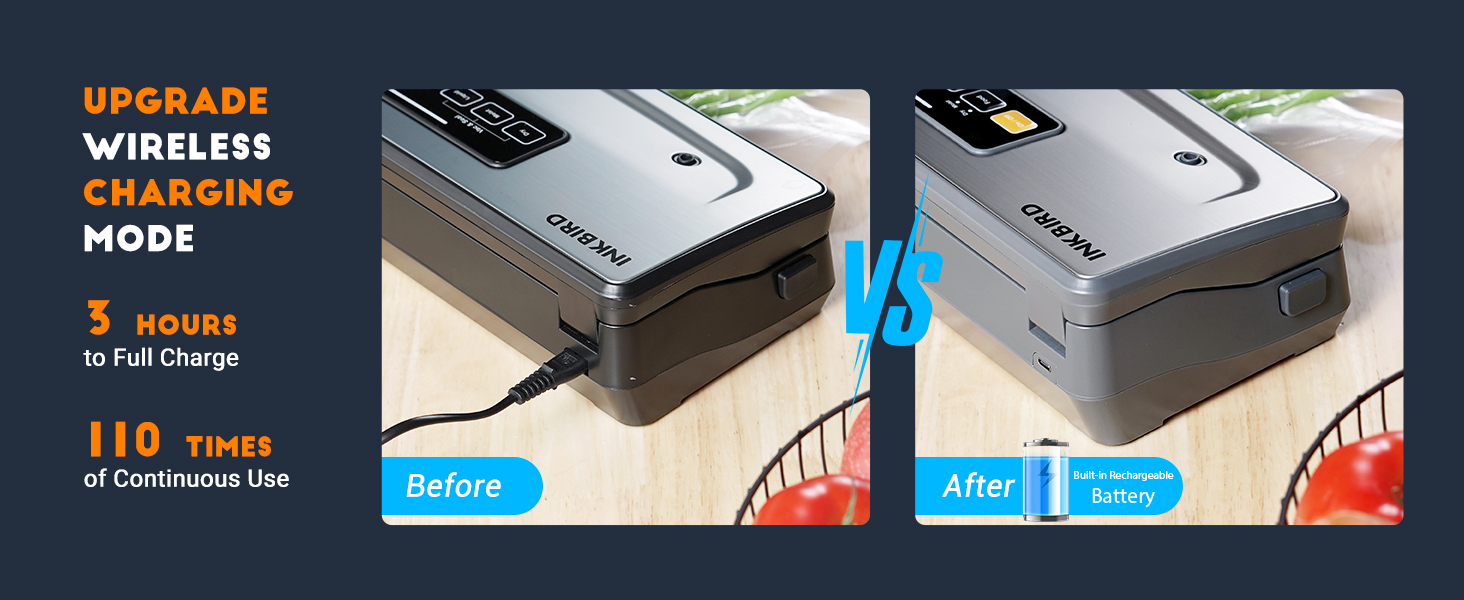
Image: A visual comparison highlighting the convenience of the wireless charging mode, showing the USB-C charging port and the device's battery indicator lights.
3.2 Understanding Battery Level Indicators
The control panel features LED lights to indicate the current battery capacity:
- One light flashing: 10% to 30% battery capacity.
- Two lights flashing: 30% to 50% battery capacity.
- Three lights flashing: 50% to 95% battery capacity.
- Four lights solid: 95% to 100% battery capacity.
When the battery capacity is lower than 10%, the LED light will flash, indicating it's time to recharge.

Image: A detailed view of the control panel illustrating how to interpret the battery level indicator lights, from low to full charge.
3.3 Preparing a Bag from the Roll
The device includes a built-in 20-foot bag storage and an 11.8-inch cutter, allowing you to create custom-sized bags.
- Open the lid of the vacuum sealer.
- Pull out the desired length of bag material from the internal roll.
- Use the integrated 11.8-inch cutter to create a clean cut.
- Place one end of the cut bag into the sealing area and press the 'Seal only' button to create the bottom seal of your custom bag.

Image: A close-up of the vacuum sealer's interior, highlighting the built-in bag roll storage and the integrated 11.8-inch cutter for convenient bag customization.
4. Operating Instructions
The Inkbird INK-VS06 offers 5 operable modes for various food types, all with one-press easy operation.
4.1 Vacuum Sealing Process
- Prepare the Bag: Place the food item into a vacuum sealer bag, ensuring the open end is clean and dry. Leave at least 2-3 inches of space between the food and the top of the bag.
- Position the Bag: Open the lid of the vacuum sealer. Place the open end of the bag into the vacuum chamber, ensuring it lies flat across the sealing strip. Close the lid firmly until both sides click into place.
- Select Food Mode: Press the 'Food' button to toggle between 'Dry' and 'Moist' settings based on your food type.
- Start Vacuum & Seal: Press the 'Vac&Seal' button. The machine will automatically vacuum the air from the bag and then seal it. The process typically completes in 15 seconds or less.
- Release: Once the indicator lights stop flashing, the process is complete. Press the release buttons on the sides to open the lid and remove your sealed bag.

Image: A step-by-step visual guide demonstrating the vacuum sealing process, from inserting the bag to pressing the food mode button and checking the final seal.
4.2 Understanding Food Modes
The device features 5 distinct food modes to optimize preservation for various items:
- Moist Mode: Ideal for wet or juicy foods like fresh meat, seafood, or fruits.
- Dry Mode: Best for dry foods such as nuts, cereals, or dried fruits.
- Pulse Mode: Allows manual control over the vacuum pressure, perfect for fragile or delicate foods like cookies, chips, or soft bread, preventing crushing.
- Seal Only: Creates a seal without vacuuming, useful for making custom-sized bags from a roll or sealing bags that do not require vacuuming.
- Canister Mode: Used with the included air suction hose to vacuum seal jars and canisters.

Image: A visual representation of the five food modes (Moist, Dry, Pulse, Seal, Canister) and examples of food types suitable for each mode.
4.3 Official Product Video: Cordless Vacuum Sealer INK-VS06
Video: An official product video demonstrating the features and operation of the Inkbird Cordless Vacuum Sealer INK-VS06, including its various modes and ease of use.
5. Maintenance
5.1 Cleaning the Appliance
The Inkbird INK-VS06 is designed for easy cleaning with its high-end stainless steel cover and ABS material.
- Always ensure the appliance is turned off and unplugged before cleaning.
- Wipe the exterior surfaces with a soft, damp cloth.
- Clean the vacuum chamber and sealing strip with a damp cloth and mild soap if necessary. Ensure these areas are completely dry before closing the lid or using the appliance again.
- Do not use abrasive cleaners or scrubbers, as they may damage the surface.

Image: A visual guide demonstrating the ease of cleaning the vacuum sealer's exterior and the internal vacuum chamber.
5.2 Replacing Accessories
The package includes replacement accessories to maintain optimal performance:
- Sealing Strip: Replace the heat-resistant sealing strip if it shows signs of wear or damage to ensure a consistent seal.
- Foam Gasket: Replace the foam sealing gasket if it becomes compressed or damaged, as this can affect vacuum performance.
Refer to the detailed diagram below for the location of these components.

Image: An exploded view diagram of the vacuum sealer, clearly labeling key components such as the heat-resistant sealing strip, foam sealing gasket, and vacuum chamber.
6. Troubleshooting
If you encounter issues with your Inkbird INK-VS06, please refer to the following common troubleshooting steps:
- No Power: Ensure the device is charged. Check the battery indicator lights. If low, recharge the unit.
- Poor Vacuum/No Seal:
- Check that the bag is properly placed in the vacuum chamber and the lid is firmly closed and latched on both sides.
- Ensure the open end of the bag is clean, dry, and free of wrinkles or food debris.
- Inspect the sealing strip and foam gaskets for any damage or wear. Replace if necessary.
- Ensure you are using compatible vacuum sealer bags.
- Bag Melts During Sealing: The sealing time might be too long. For delicate bags or thinner materials, try using the 'Seal only' function with manual control if available, or ensure the bag is not left in the sealing area for excessive periods.
- Device Overheats: Allow the device to cool down between multiple sealing cycles. Continuous heavy use can trigger an overheating protection system.
7. Specifications
| Brand | Inkbird |
| Model Number | INK-VS06 |
| Material | Acrylonitrile Butadiene Styrene (ABS), Plastic |
| Product Dimensions | 15.15"L x 5.7"W x 3.35"H |
| Item Weight | 4.33 pounds (1.97 Kilograms) |
| Power Source | Battery Powered (Built-in 2000mAh Lithium Ion battery) |
| Operation Mode | Automatic |
| Wattage | 80 watts |
| Voltage | 120V |
| Sealing Width | 11.8 inches |
| Suction Power | -80KPA |
| Certifications | ETL Certified |
7.1 Package Contents
- Inkbird Cordless Vacuum Sealer Machine (INK-VS06) x1
- Vacuum Sealer Bags (8"x11.8") x5
- Bag Roll (11"x118") x1
- Air Suction Hose x1
- USB Charging Cable x1
- Sticky Note x1
- Heat-Resistant Sealing Strip x1 (replacement)
- Foam Gasket x1 (replacement)

Image: A comprehensive view of the Inkbird vacuum sealer's dimensions and a detailed list of all items included in the package, such as bags, roll, hose, and replacement parts.
8. Warranty & Support
Inkbird provides a lifetime technical consultation for the INK-VS06. For any issues or inquiries, please contact Inkbird customer support. All problems will be addressed within 24 hours.
For further assistance, please visit the official Inkbird website or contact their customer service directly.


