
1. Introduction
This manual provides instructions for the proper installation, operation, and maintenance of your LemonNova LED Open Sign, Model OPEN-WRB-1505-MG. Please read this manual thoroughly before using the product to ensure safe and efficient operation. This LED sign is designed to clearly indicate business status and attract attention with its bright, customizable display.
2. Safety Information
Please observe the following safety precautions to prevent damage to the product or injury to yourself:
- Ensure the power adapter is connected to a suitable power outlet with the correct voltage.
- Do not expose the sign to water or excessive moisture. This product is intended for indoor or sheltered outdoor use.
- Avoid direct eye exposure to the LED lights for extended periods, as they are very bright.
- Do not attempt to open or repair the sign yourself. Refer all servicing to qualified personnel.
- Keep the sign and its components out of reach of children.
- Ensure the hanging chain is securely fastened to prevent the sign from falling.
3. Package Contents
Verify that all items listed below are included in your package:
- LemonNova LED Open Sign (1 unit)
- Power Adapter (1 unit)
- Hanging Chain (1 unit)
- Inline Flashing Switch (1 unit)
- Remote Control (1 unit, requires 1 nonstandard battery, not always included)

This image displays the complete package contents: the LED Open Sign, a power adapter, a metal hanging chain, an inline flashing switch, and a remote control.
4. Product Features
The LemonNova LED Open Sign offers the following key features:
- Attractive Display: Features an ultra-bright LED display with a USA Flag pattern, measuring 15x5 inches, designed to enhance visibility for businesses.
- Multiple Scene Modes: Includes 13 distinct scene modes, allowing selection between steady or flashing light patterns to suit various preferences and attract customers.
- Adjustable Brightness: Offers three adjustable brightness levels (25%, 50%, 100%) via the remote control to adapt to different lighting conditions or desired ambiance.
- Energy Efficient and Durable: Utilizes LED technology for brighter illumination, lower energy consumption, and a longer lifespan compared to traditional neon signs. Designed for quiet operation without flickering.
- Versatile Application: Suitable for a wide range of commercial environments including storefronts, windows, glass doors, retail stores, flower shops, hotels, bars, restaurants, beauty salons, and cafes.
5. Setup and Installation
Follow these steps to set up your LED Open Sign:
- Unpack: Carefully remove all components from the packaging.
- Attach Hanging Chain: Securely attach the provided metal hanging chain to the designated loops on the top of the LED sign.
- Mount the Sign: Hang the sign in your desired location (e.g., window, doorway) using a sturdy hook or fixture capable of supporting the sign's weight. Ensure it is level and visible.
- Connect Power: Plug the power adapter into the sign's power input port. Then, plug the power adapter into a standard electrical outlet.
- Insert Remote Battery: If not pre-installed, insert the required nonstandard battery into the remote control, observing polarity.

The LED Open Sign is designed for easy hanging in windows or doorways using the included chain, as shown in this image.
6. Operation
Once the sign is installed and powered, you can operate it using the inline flashing switch or the remote control.
6.1. Basic On/Off
- To turn the sign ON, ensure the power adapter is plugged in and the inline switch is in the 'ON' position.
- To turn the sign OFF, use the power button on the remote control or unplug the power adapter.
6.2. Remote Control Functions
The included remote control provides full command over the sign's display settings:
- Power Button: Turns the sign on or off.
- LIGHT Buttons (BRIGHT+, BRIGHT-): Adjust the brightness level. There are 3 preset levels: 25%, 50%, and 100%.
- MODE Buttons (MODE+, MODE-): Cycle through the 13 available display modes, including steady and various flashing patterns.
- SPEED Buttons (SPEED+, SPEED-): Adjust the speed of flashing patterns when a dynamic mode is selected.
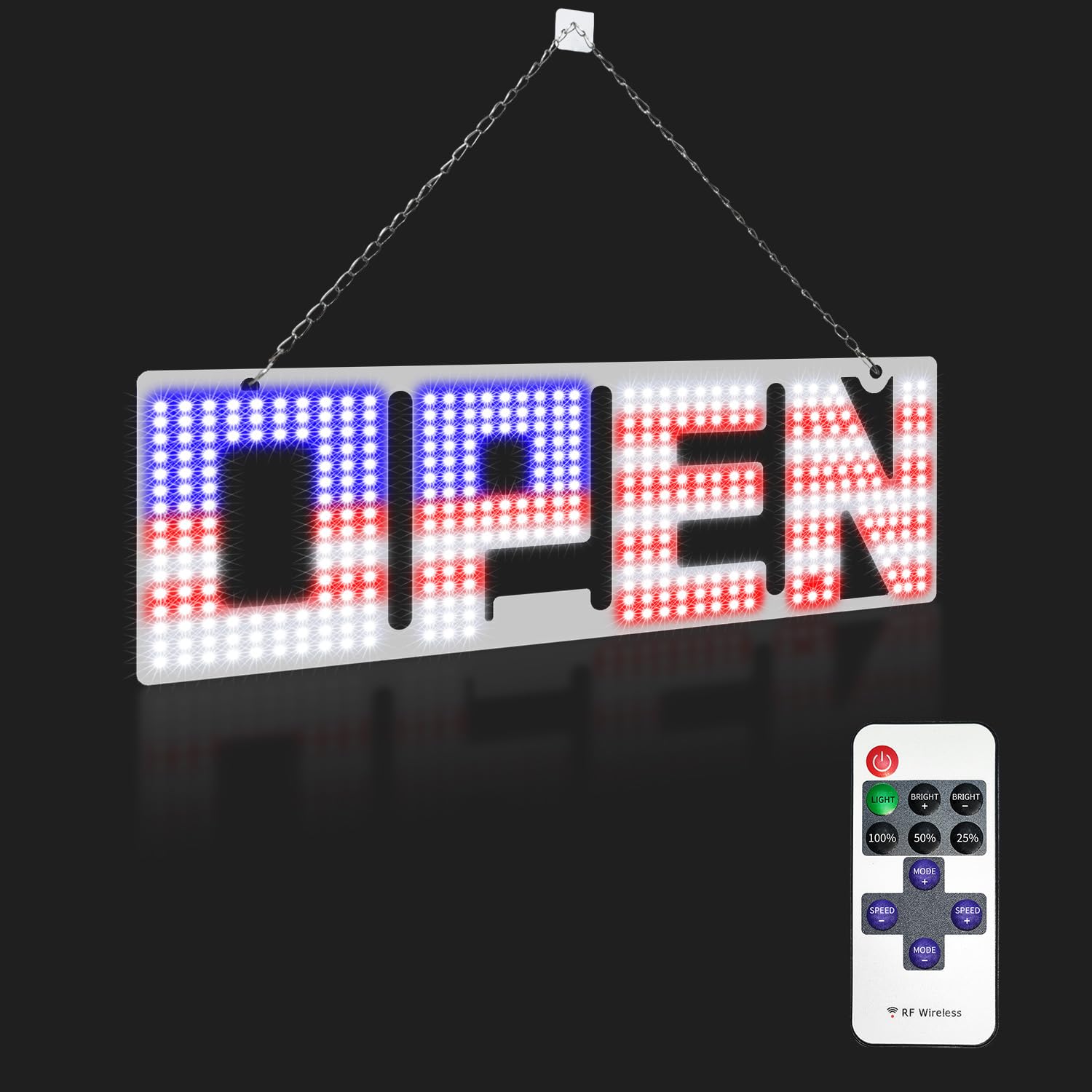
This image shows the illuminated LED Open Sign and its dedicated remote control, which allows for various settings adjustments.
7. Maintenance
To ensure the longevity and optimal performance of your LED Open Sign:
- Cleaning: Gently wipe the sign's surface with a soft, dry, or slightly damp cloth. Do not use abrasive cleaners or solvents. Ensure the sign is unplugged before cleaning.
- Storage: If storing the sign for an extended period, disconnect it from power, clean it, and store it in its original packaging or a protective container in a cool, dry place.
- Power Cord: Regularly inspect the power cord and adapter for any signs of damage. If damaged, discontinue use and replace with an approved adapter.
8. Troubleshooting
If you encounter issues with your LED Open Sign, refer to the following common problems and solutions:
| Problem | Possible Cause | Solution |
|---|---|---|
| Sign does not light up. | No power, loose connection, faulty adapter. | Check if the power adapter is securely plugged into both the sign and the outlet. Ensure the inline switch is ON. Try a different outlet. |
| Remote control not working. | Dead battery, remote out of range, obstruction. | Replace the remote control battery. Ensure you are within range and there are no obstructions between the remote and the sign's receiver. |
| Sign is too dim or too bright. | Brightness setting incorrect. | Use the 'BRIGHT+' or 'BRIGHT-' buttons on the remote control to adjust the brightness. |
| Flashing mode not changing. | Mode setting incorrect. | Use the 'MODE+' or 'MODE-' buttons on the remote control to cycle through different display modes. |
9. Specifications
- Brand: LemonNova
- Model Number: OPEN-WRB-1505-MG
- ASIN: B0D22NXNBK
- UPC: 643556177040
- Dimensions: 38.1 cm (L) x 12.7 cm (W) x 1 cm (D) / 15 inches (L) x 5 inches (W)
- Weight: Approximately 499 g
- Power Source: AC Power Adapter
- Remote Control Battery: 1 Nonstandard Battery (type may vary, check remote for details)
- Color: Flashing USA Flag-Remote
- Features: 13 Scene Modes, 3 Brightness Levels (25%, 50%, 100%)
10. Warranty and Support
LemonNova products are manufactured to high-quality standards. For specific warranty information, please refer to the warranty card included with your purchase or contact your retailer. If you require technical support or have questions regarding your LemonNova LED Open Sign, please contact the customer service department of your place of purchase. Please have your model number (OPEN-WRB-1505-MG) and purchase details ready when contacting support.