1. Introduction
This manual provides essential information for the safe and effective operation of your HYTOBP S179 Brushless Motor Drone. Please read this manual thoroughly before using the drone to ensure proper setup, flight, and maintenance. This drone is designed for adults and features a 1080P HD camera, brushless motors for stable flight, and various intelligent flight modes.
2. What's in the Box
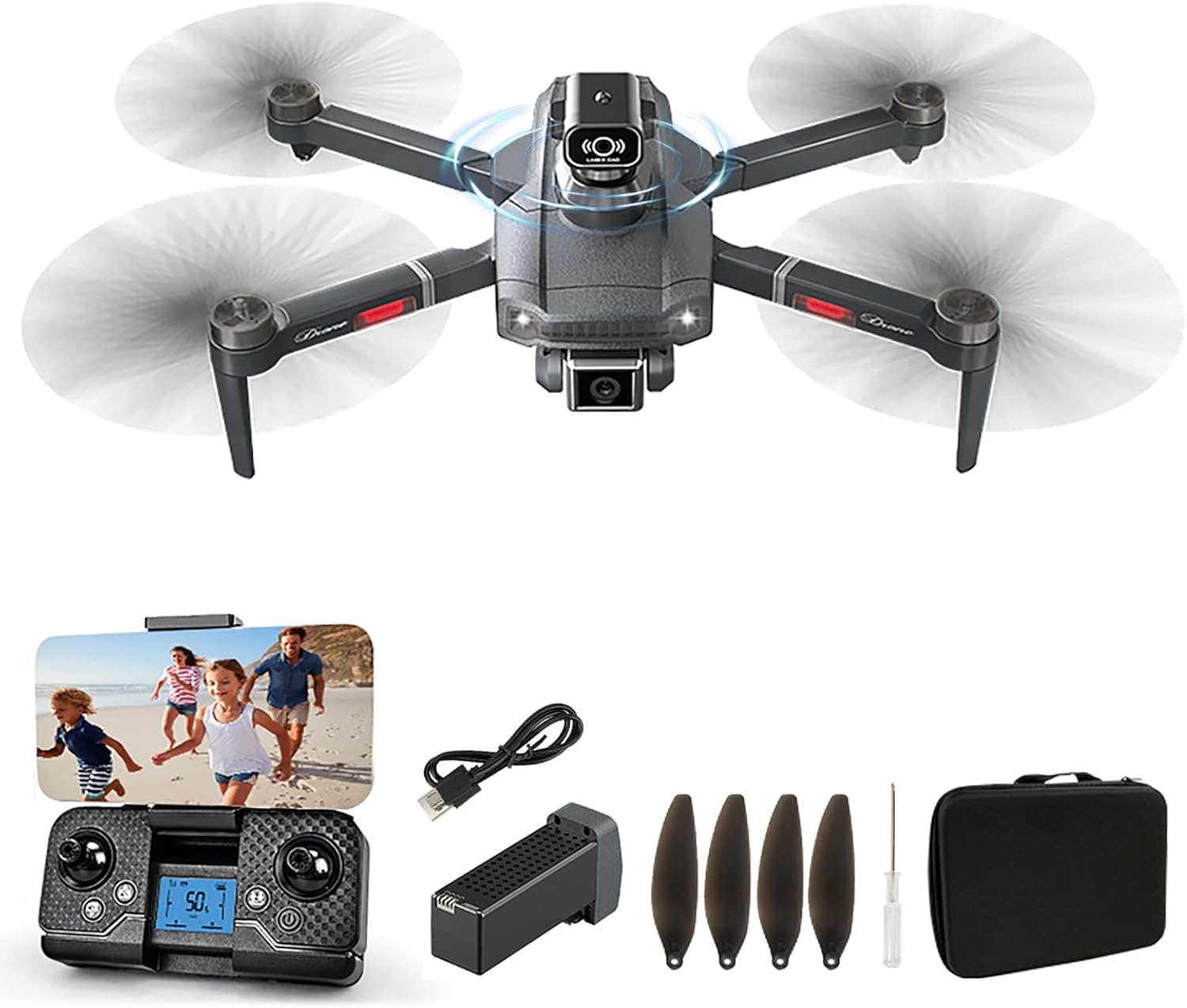
Carefully unpack your HYTOBP S179 Drone package and verify that all components are present and in good condition. The standard package includes:
- 1 x HYTOBP S179 Drone
- 1 x Remote Control
- 1 x Battery (2000mAh Lithium Ion)
- 1 x USB Charging Cable
- 4 x Spare Main Blades
- 1 x Screwdriver
- 1 x Obstacle Avoidance Head (if included in your specific package)

3. Setup Guide
3.1 Charging the Drone Battery
Before the first flight, ensure the drone battery is fully charged. Use the provided USB charging cable. Connect the battery to the charging cable, and then connect the cable to a USB power source (e.g., computer USB port, USB wall adapter). The charging indicator will show the charging status and turn off when fully charged. A full charge typically provides 12-15 minutes of flight time.

3.2 Installing the Drone Battery
Once charged, insert the battery into the designated compartment on the drone. Ensure it clicks securely into place to prevent dislodgement during flight.
3.3 Remote Control Setup
Insert the required batteries (not specified in input, assume standard AA/AAA) into the remote control. Power on the remote control.
3.4 App Installation and Connection
Download the official HYTOBP drone application on your smartphone. Allow the app to access your phone's Wi-Fi and photo albums for full functionality. Turn on the drone, then connect your phone to the drone's Wi-Fi network (usually named something like 'Drone_XXXXXX'). Open the app to establish a connection with the drone.
3.5 Pre-Flight Checks
- Ensure all propellers are securely attached and undamaged.
- Verify both drone and remote control batteries are fully charged.
- Choose an open, clear area for flight, away from obstacles, people, and animals.
- For indoor flights, consider activating the 360° obstacle avoidance system.
4. Operating Instructions
4.1 Basic Flight Controls
After successful pairing, place the drone on a flat, level surface. Use the joysticks on the remote control to operate the drone. Familiarize yourself with the controls in a safe environment before attempting complex maneuvers.
4.2 One-Key Take-Off/Landing
Press the dedicated One-Key Take-Off button on the remote control or in the app to automatically launch the drone to a stable hovering altitude. Press the One-Key Landing button to initiate an automatic descent and landing.
4.3 3D Flip Function
To perform a 3D flip, ensure the drone is at a sufficient altitude (at least 3 meters). Press the 3D Flip button on the remote control, then quickly move the right joystick in the desired flip direction (forward, backward, left, or right). The drone will perform a 360° flip.
4.4 Headless Mode
Activate Headless Mode to simplify flight control. In this mode, the drone's orientation is irrelevant; it will always move relative to the pilot's position. This is particularly useful for beginners.
4.5 Waypoint Flight
Utilize the app to set a custom flight path. Mark specific waypoints on the map within the app, and the drone will automatically follow the planned route. This allows for hands-free flight and precise aerial photography.

4.6 Gesture Control
The drone supports gesture control for taking photos and videos. With Gesture Photo enabled in the app, specific hand gestures can trigger the camera to capture images or start/stop video recording.


4.7 Adjustable Camera Operation
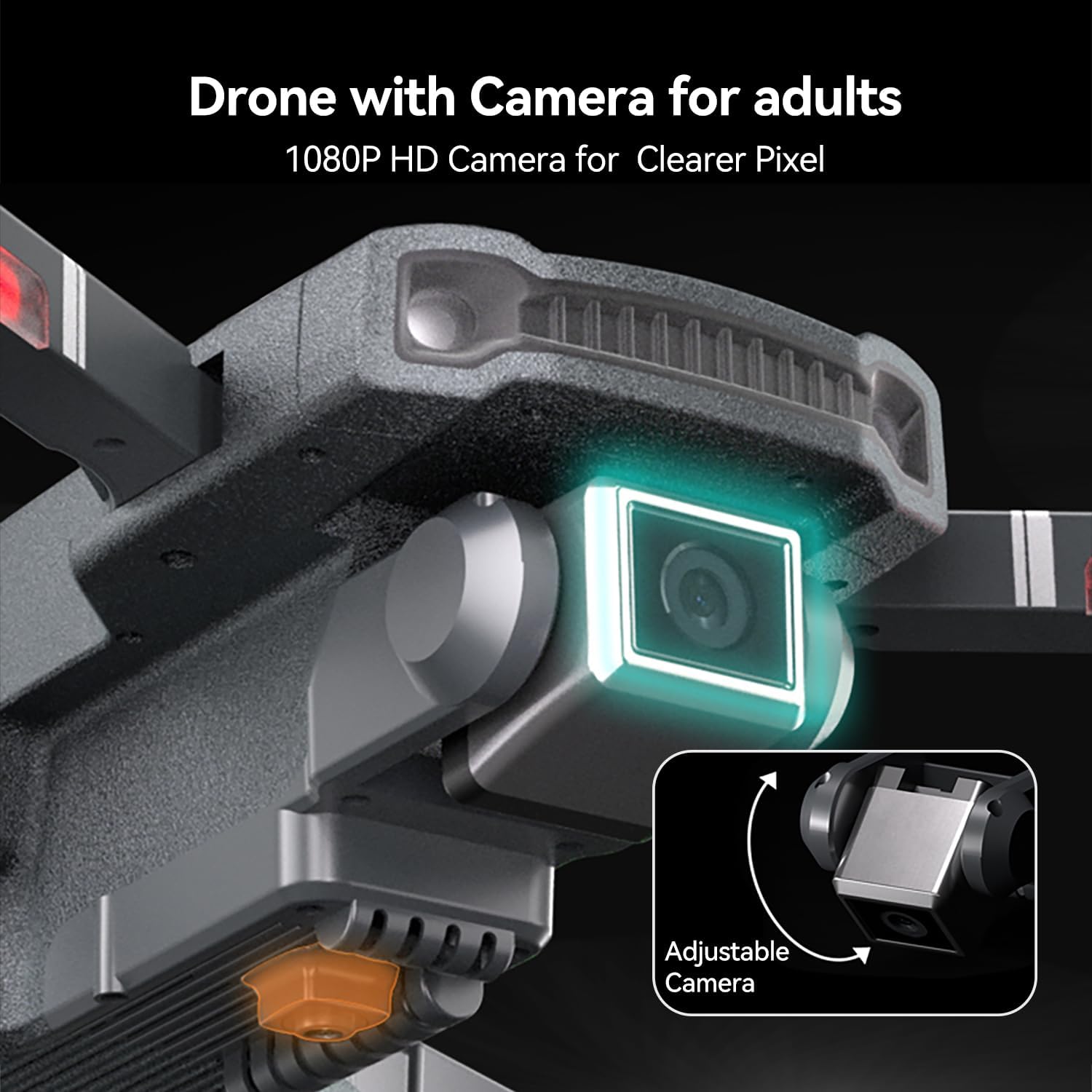
The S179 drone features a 90° adjustable motorized lens. You can switch between shooting angles directly via the app and remote control, allowing for diverse visual perspectives during flight.

4.8 Speed Modes
The S179 drone offers multiple speed modes (e.g., 3-speed mode) to accommodate different skill levels, from beginners to more experienced pilots. Adjust the speed via the remote control to suit your flying environment and comfort level.
4.9 Obstacle Avoidance System
The drone is equipped with a 360° obstacle avoidance system. When activated (recommended for indoor flights), the drone will detect obstacles, slow down, and return if it senses an inability to proceed, enhancing flight safety.
4.10 Safe Return & Low Battery Warning
The drone features a safe return function and a low battery warning system. When the battery is low, the drone will alert you, prompting you to land it safely. The safe return feature can guide the drone back towards its take-off point.

5. Maintenance
5.1 Cleaning
Regularly clean the drone's body, propellers, and camera lens with a soft, dry cloth. Avoid using harsh chemicals or abrasive materials that could damage the drone's surface or components.
5.2 Propeller Replacement
If a propeller is damaged or bent, replace it immediately using the spare blades provided and the screwdriver. Ensure the new propeller is installed correctly according to its rotation direction (indicated on the propeller or drone arm).
5.3 Battery Care and Storage
- Always use the original charging cable and adapter.
- Do not overcharge or over-discharge the battery.
- Store batteries in a cool, dry place away from direct sunlight and extreme temperatures.
- If storing for extended periods, charge the battery to approximately 50% capacity.
5.4 General Storage
When not in use, store the drone in its original packaging or a protective case to prevent dust accumulation and physical damage. Fold the drone arms if applicable to save space and protect components.
6. Troubleshooting
This section addresses common issues you might encounter with your HYTOBP S179 Drone.
| Problem | Possible Cause | Solution |
|---|---|---|
| Drone crashes with obstacle avoidance on. | Obstacle avoidance is primarily for indoor use; outdoor conditions (wind, speed) can affect its performance. | Ensure you are flying indoors when relying on obstacle avoidance. If flying outdoors, be mindful of environmental factors. |
| Short flight time / Battery not working. | Battery not fully charged; non-original charging cable; environmental factors (wind, temperature). | Ensure the battery is fully charged using the original charging cable. Flight time varies based on conditions. |
| Cannot connect drone to mobile phone. | App/Wi-Fi permissions not granted; incorrect Wi-Fi network selected. | Allow the drone app to access your phone's Wi-Fi and photo albums. Connect to the correct drone Wi-Fi network. |
| Drone take-off is slow or difficult. | Improper calibration; insufficient thrust. | Ensure the drone is placed on a flat surface for calibration. Use the one-key take-off button for quick launch. |
| Shaky landing. | Manual landing technique; environmental factors. | For smoother landings, push the right joystick to the bottom or use the one-touch landing button. |
General Advice: Always fly the drone in an open area, especially for your first flights. Children operating the drone should always be accompanied and supervised by an adult.
7. Specifications
Key technical specifications for the HYTOBP S179 Drone:
| Feature | Specification |
|---|---|
| Brand | HYTOBP |
| Model Number | S179 |
| Dimensions (L x W x H) | 13.39" x 9.84" x 3.54" |
| Item Weight | 198 Grams (approx. 7 ounces) |
| Camera Resolution | 1080P HD (Video Capture Resolution: 4K) |
| Adjustable Camera | 90° Motorized Adjustable Lens |
| Motor Type | Brushless Motor |
| Battery Capacity | 2000 mAh Lithium Ion |
| Estimated Flight Time | 12-15 minutes (per battery) |
| Control Type | Remote Control, App Control |
| Connectivity Technology | USB (for charging) |
| Special Features | 360° Obstacle Avoidance, One-Key Take-Off/Landing, 3D Flip, Headless Mode, Waypoint Flight, Gesture Control, 3-Speed Mode, Low Battery Warning, Safe Return |
| Skill Level | All |
8. Warranty and Support
HYTOBP is committed to providing high-quality products and satisfactory after-sales service. If you encounter any problems with your HYTOBP S179 drone, remote control, or the accompanying app, please do not hesitate to contact our technical support team for assistance.
You can reach us via:
- Phone: +1(617)259-4732
- Email: hytobp@htwlkj.net


