
EIGIIS KE5
EIGIIS KE5 Military Smart Watch User Manual
Model: KE5
Product Overview
The EIGIIS KE5 Military Smart Watch is a rugged and feature-rich device designed for durability and functionality in various environments. It boasts a 3ATM waterproof rating, a powerful LED flashlight, SOS alarm, and advanced sensors like a compass, altimeter, and barometer. With a large 530mAh battery and a vivid 1.45" HD screen, it offers extensive health monitoring, over 110 sports modes, Bluetooth calling, and message notifications, making it an ideal companion for outdoor adventures and daily use.
What's in the Box
- 1 * EIGIIS Smart Watch KE5
- 1 * Charging Cable
- 1 * User Manual
- 1 * Customized Box

Image: Contents of the EIGIIS KE5 Smart Watch package, including the watch, charging cable, user manual, and additional straps.
Setup
Initial Charging
Before first use, fully charge your EIGIIS KE5 Smart Watch. The built-in 530mAh battery lasts 5-7 days on a 2-hour charge, with up to 20 days standby time. Use the provided magnetic charging cable by aligning it with the charging points on the back of the watch.

Image: The EIGIIS KE5 Smart Watch connected to its magnetic charging cable, displaying a charging icon on the screen.
App Download and Pairing
To unlock the full potential of your smartwatch, download the FitCloudPro APP from your phone's app store (compatible with Android 8.0+, iOS 12.0+, and Bluetooth 5.2+). Ensure your phone's Bluetooth is enabled. Open the app, search for "KE5" in the device list, and connect. Grant necessary permissions for calls and media audio.
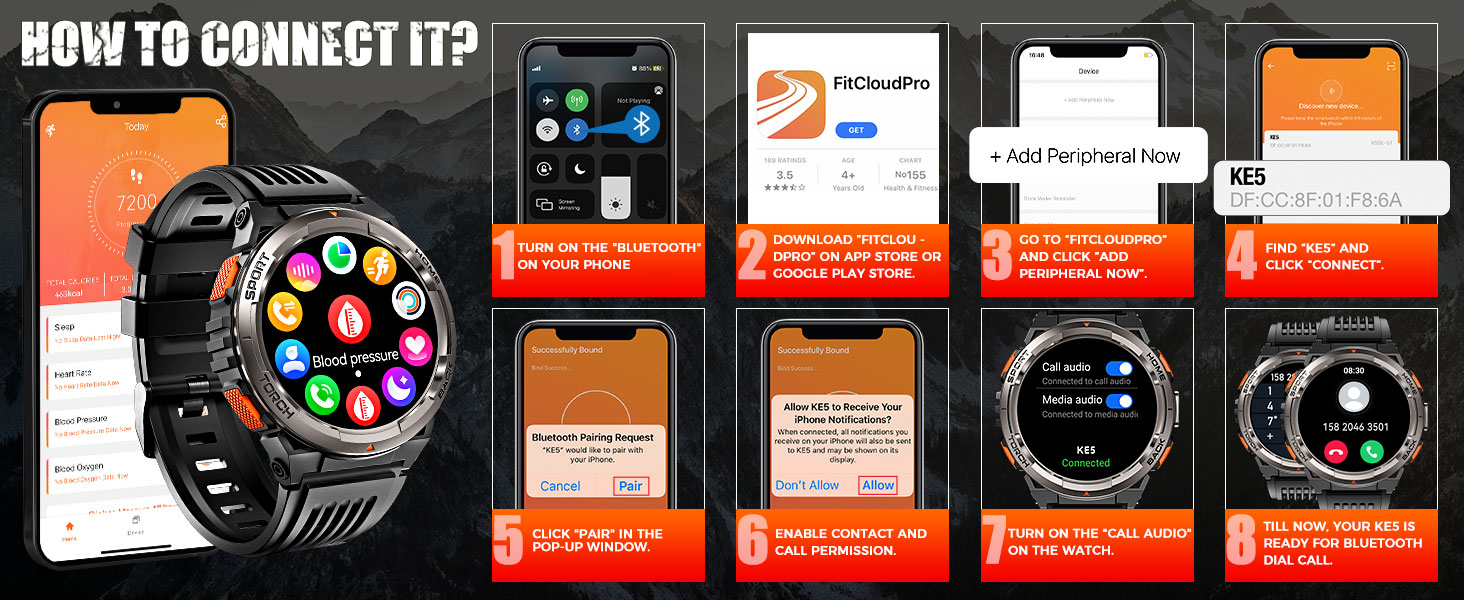
Image: A visual guide showing the steps to connect the EIGIIS KE5 Smart Watch to a smartphone via the FitCloudPro application, including enabling Bluetooth, searching for the device, and granting permissions.
Strap Installation
The watch comes with multiple interchangeable straps (silicone and camouflage). To change a strap, locate the small pin on the underside of the strap near the watch body. Pull the pin inwards to release the strap. Align the new strap with the watch body and push the pin back into place until it clicks securely.
Operating Instructions
Basic Navigation
Navigate the watch interface by swiping left, right, up, and down on the touch screen. Use the physical buttons on the side for quick access to specific functions (Home, Back, Sport, Torch).
Flashlight and SOS Alarm
The KE5 features a convenient side-mounted LED flashlight. Press and hold the "Torch" button to activate the flashlight. For emergencies, the watch also includes an SOS alarm. Access the SOS function through the main menu and activate it to emit a loud alarm and flashing light.
Video: Demonstrates the LED flashlight and SOS alarm features of the EIGIIS KE5 Smart Watch, showing how to activate them and their functionality in low-light conditions.
Bluetooth Calls and Message Notifications
With Bluetooth 5.2, you can effortlessly make and receive calls directly from your wrist. The watch vibrates to deliver real-time notifications from over 10 social apps (SMS, Facebook, WhatsApp, Instagram, etc.), ensuring you never miss an important message.

Image: The EIGIIS KE5 Smart Watch showing incoming call and message notifications from various social media applications.
Health Monitoring
The KE5 provides advanced real-time monitoring of sleep patterns, heart rate, and blood oxygen levels. Access these features through the watch's menu to track your well-being and lead a healthier lifestyle.

Image: The EIGIIS KE5 Smart Watch displaying heart rate and sleep monitoring data, with a smartphone showing detailed sleep analysis from the companion app.
Sports Modes
With over 110 sports modes (running, swimming, basketball, yoga, etc.), the watch adapts to your workout routine. Select your preferred sport mode via the FitCloudPro APP or directly on the watch to track your activity, calories burned, and other metrics.

Image: The EIGIIS KE5 Smart Watch highlighting its 3ATM waterproof rating and support for over 110 sports modes, with visuals of swimming, cycling, and hiking.
Outdoor Features (Compass, Altimeter, Barometer)
Engineered to military standards, the KE5 includes a compass for navigation, an altimeter for elevation tracking, and a barometer for air pressure readings. These tools are essential for safety and guidance during outdoor adventures.

Image: The EIGIIS KE5 Smart Watch displaying its compass, altimeter, and barometer functions, set against a backdrop of a hiker in mountainous terrain.
Other Functions
The smartwatch offers a wide array of additional features, including AI assistance, remote camera control, music control, weather forecasting, stopwatch, alarm, calculator, calendar, breathing exercises, calorie counting, sedentary reminders, and drink water reminders.

Image: A visual representation of the EIGIIS KE5 Smart Watch's various functions, including weather, music control, camera control, and SOS, along with icons for other features like sedentary reminders and voice assistant.
Maintenance
Waterproof Information
The EIGIIS KE5 is 3ATM waterproof, suitable for swimming, snorkeling, diving, or surfing. Note: Do not use it in seawater or hot water, such as baths or saunas, as this may compromise its waterproof integrity.
Video: A short preview video demonstrating the EIGIIS KE5 Smart Watch's waterproof capabilities by showing it submerged in water and still functioning.
Cleaning
Wipe the watch and straps with a soft, damp cloth. Avoid using harsh chemicals or abrasive materials that could damage the device.
Troubleshooting
General Issues
If you encounter any problems with the product, please refer to the user manual for detailed troubleshooting steps or contact EIGIIS customer support directly.
Connectivity Issues
Ensure Bluetooth is enabled on your phone and the watch. Restart both devices and try pairing again. Verify that the FitCloudPro app has all necessary permissions.
Weather Updates Not Working
Some users have reported issues with regular weather updates. Try opening the FitCloudPro app and toggling the weather feature off and on. Ensure your phone has a stable internet connection.
Specifications
- Product Dimensions: 11.81 x 4.1 x 0.86 inches
- Item Weight: 2.05 ounces (58 Grams)
- Item Model Number: KE5
- Batteries: 1 Lithium Polymer batteries required (included)
- Screen Size: 1.45 Inches TFT HD Touch Screen (360x360 resolution)
- Memory Storage Capacity: 128 MB
- Operating System: Compatible with iOS 12.0+ and Android 9.0+
- Connectivity Technology: Bluetooth 5.2
- Battery Capacity: 530 Milliamp Hours
- Water Resistance: 3ATM (up to 30 meters)
- Special Features: LED Flashlight, SOS Alarm, Compass, Altimeter, Barometer, Bluetooth Calling, Music Control, Message Notification, Health Care (Blood Oxygen, Heart Rate Monitor, Sleep Tracker, Breathe Training), AI Voice Assistance, Timer, Stopwatch, Pedometer, Weather Forecast, Remote Camera Control, Calculator, Calendar, Massive DIY Dials, Sedentary Reminder, Water Drinking Reminder.
- Languages: English, German, Italian, French, Spanish
- Manufacturer: EIGIIS
Warranty and Support
EIGIIS offers a 12-month money-back or free replacement guarantee. If you encounter any problems while using this product, please contact their professional service team by email. They aim to reply within 24 hours and provide the best solution.
Related documentsKE5


Ask a question about this manual
Ask about setup, troubleshooting, compatibility, parts, safety, or missing instructions. Manuals+ will review the question and use this page’s manual context to help answer it.