
Kqcibz 176650
Kqcibz Remote Control User Manual
Model: 176650 for Star /H2S /H2H /H5 /H5.2S Satellite Receivers
Introduction
This manual provides instructions for the Kqcibz Remote Control, Model 176650, designed for use with Star /H2S /H2H /H5 /H5.2S Satellite Receiver Combo units. This remote is ready for immediate use without any complex setup procedures.
Setup
1. Battery Installation
The remote control requires two (2) AAA batteries (not included). Follow these steps to install them:
- Locate the battery compartment on the back of the remote control.
- Slide the battery compartment cover downwards or press the latch to open it.
- Insert two AAA batteries, ensuring the positive (+) and negative (-) terminals align correctly with the markings inside the compartment.
- Close the battery compartment cover securely.
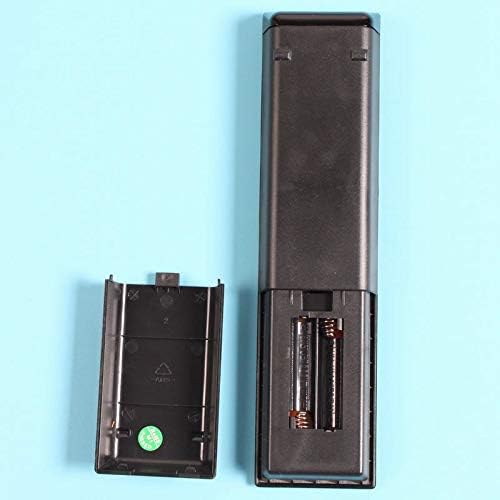
Image: Back of the remote control with the battery cover removed, revealing the battery slots. This illustrates where to insert the two AAA batteries.
2. Initial Use
This Kqcibz remote control is designed for direct use with compatible Star /H2S /H2H /H5 /H5.2S Satellite Receivers. No programming or pairing is required. Once batteries are installed, the remote is ready to operate your receiver.
Operating Instructions
The remote control features a standard layout for satellite receiver functions. Below is a general guide to its buttons and their common uses.
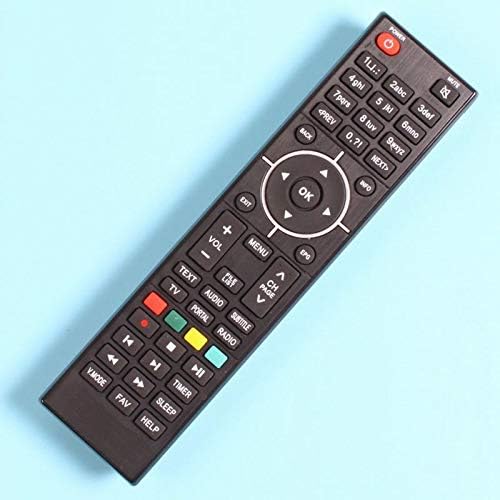
Image: Overview of the Kqcibz remote control's button layout. This image displays the full set of buttons, including power, number pad, navigation, volume, channel, and media controls.
- POWER: Turns the satellite receiver on or off.
- Number Pad (0-9): Used for direct channel input or menu selections.
- VOL +/-: Adjusts the volume level.
- CH PAGE +/-: Changes channels or navigates through pages in menus.
- OK / Navigation Arrows: The central 'OK' button confirms selections, while the arrow buttons navigate menus and lists.
- MENU: Accesses the main menu of the satellite receiver.
- EXIT: Exits current menu or screen.
- INFO: Displays program information.
- BACK: Returns to the previous screen or menu.
- MUTE: Mutes or unmutes the audio.
- Color Buttons (Red, Green, Yellow, Blue): These buttons typically correspond to specific functions displayed on-screen within the receiver's interface.
- Media Control Buttons (Play, Pause, Stop, Rewind, Fast Forward): Used for controlling playback of recorded content or media files.
- TEXT: Accesses teletext services (if supported by receiver).
- AUDIO: Changes audio tracks or language options.
- TV/RADIO: Switches between TV and Radio modes.
- SUBTITLE: Toggles subtitles on or off.
- TIMER: Sets recording timers or sleep timers.
- HELP: Accesses help functions (if supported by receiver).
- VMODE: Changes video mode or aspect ratio.
- FAV: Accesses favorite channel lists.
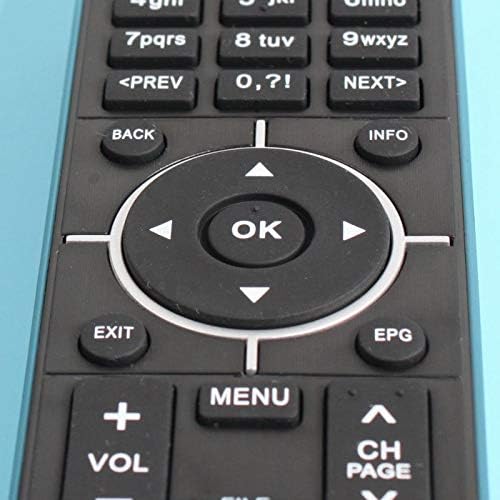
Image: Detailed view of the central navigation cluster, including the 'OK' button and directional arrows, along with 'EXIT', 'EPG', 'VOL +/-', 'MENU', and 'CH PAGE +/-' buttons.
Maintenance
- Cleaning: Use a soft, dry cloth to clean the remote control. Do not use liquid cleaners or abrasive materials.
- Battery Replacement: Replace batteries when the remote control's response becomes sluggish or stops working. Always replace both batteries at the same time with new ones of the same type (AAA).
- Storage: If the remote control will not be used for an extended period, remove the batteries to prevent leakage and potential damage.
- Avoid Exposure: Keep the remote control away from direct sunlight, heat sources, and moisture.
Troubleshooting
| Problem | Possible Cause | Solution |
|---|---|---|
| Remote control not working. |
|
|
| Buttons are unresponsive or sticky. |
|
|
Specifications
- Brand: Kqcibz
- Model: 176650
- Compatibility: Star /H2S /H2H /H5 /H5.2S Satellite Receiver Combo
- Power Source: 2 x AAA Batteries (not included)
- Material: Plastic
- Color: Black
- Dimensions (L x W x H): Approximately 20 cm x 5 cm x 3 cm (7.87 x 1.97 x 1.18 inches)
- Weight: Approximately 83 grams (excluding batteries)

Image: Visual representation of the remote control's length, measured at 20 cm (approximately 7.87 inches).
Warranty Information
Specific warranty details for this product are typically provided by the retailer or manufacturer at the time of purchase. Please refer to your purchase documentation or contact the seller for information regarding warranty coverage and terms.
Support
For further assistance or inquiries regarding your Kqcibz remote control, please contact the retailer from whom you purchased the product. They can provide support for product-specific questions or issues.
Ask a question about this manual
Ask about setup, troubleshooting, compatibility, parts, safety, or missing instructions. Manuals+ will review the question and use this page’s manual context to help answer it.