
Introduction
This manual provides comprehensive instructions for the assembly, operation, and maintenance of your SANODESK Electric Sit-Stand Desk, model 120x60 with a white tabletop. This adjustable height desk is designed to promote a healthier and more flexible working environment by allowing seamless transitions between sitting and standing positions. Please read this manual thoroughly before assembly and use to ensure safe and optimal performance.
Safety Information
- Ensure all components are present and undamaged before assembly. Do not use if any parts are missing or broken.
- Keep children and pets away from the desk during operation to prevent injury.
- Do not place hands or other objects near moving parts of the desk frame during height adjustment.
- Ensure the power cord is properly connected and routed to avoid tripping hazards or damage.
- Do not overload the desk. Refer to the specifications for maximum weight capacity.
- Only use the desk on a flat, stable surface.
- Disconnect power before cleaning or performing any maintenance.
- If the desk malfunctions or makes unusual noises, discontinue use immediately and contact support.
Setup and Assembly
Assembly of the SANODESK Electric Sit-Stand Desk requires careful attention to detail. It is recommended to have two people for certain steps, although it can be assembled by one person with patience.
- Unpack Components: Carefully remove all parts from the packaging and verify against the parts list (not provided in this manual, refer to your product's included guide).
- Assemble Desk Frame: Attach the lifting columns to the crossbar, ensuring all screws are securely tightened.
- Attach Feet: Secure the desk feet to the bottom of the lifting columns.
- Mount Tabletop: Carefully place the white tabletop upside down on a soft, clean surface. Position the assembled frame onto the tabletop and align the pre-drilled holes. Secure the frame to the tabletop using the provided screws.
- Install Control Panel: Attach the control panel to the underside of the desk, typically on the front edge, using the designated screws.
- Connect Cables: Connect the motor cables to the control box, and then connect the control box to the power supply. Ensure all connections are firm.
- Cable Management: Use the included cable ties or management system to organize and secure all cables, preventing them from interfering with desk movement or becoming a hazard.
- Initial Power-Up: Plug the desk into a power outlet. The desk may perform an initial calibration cycle.
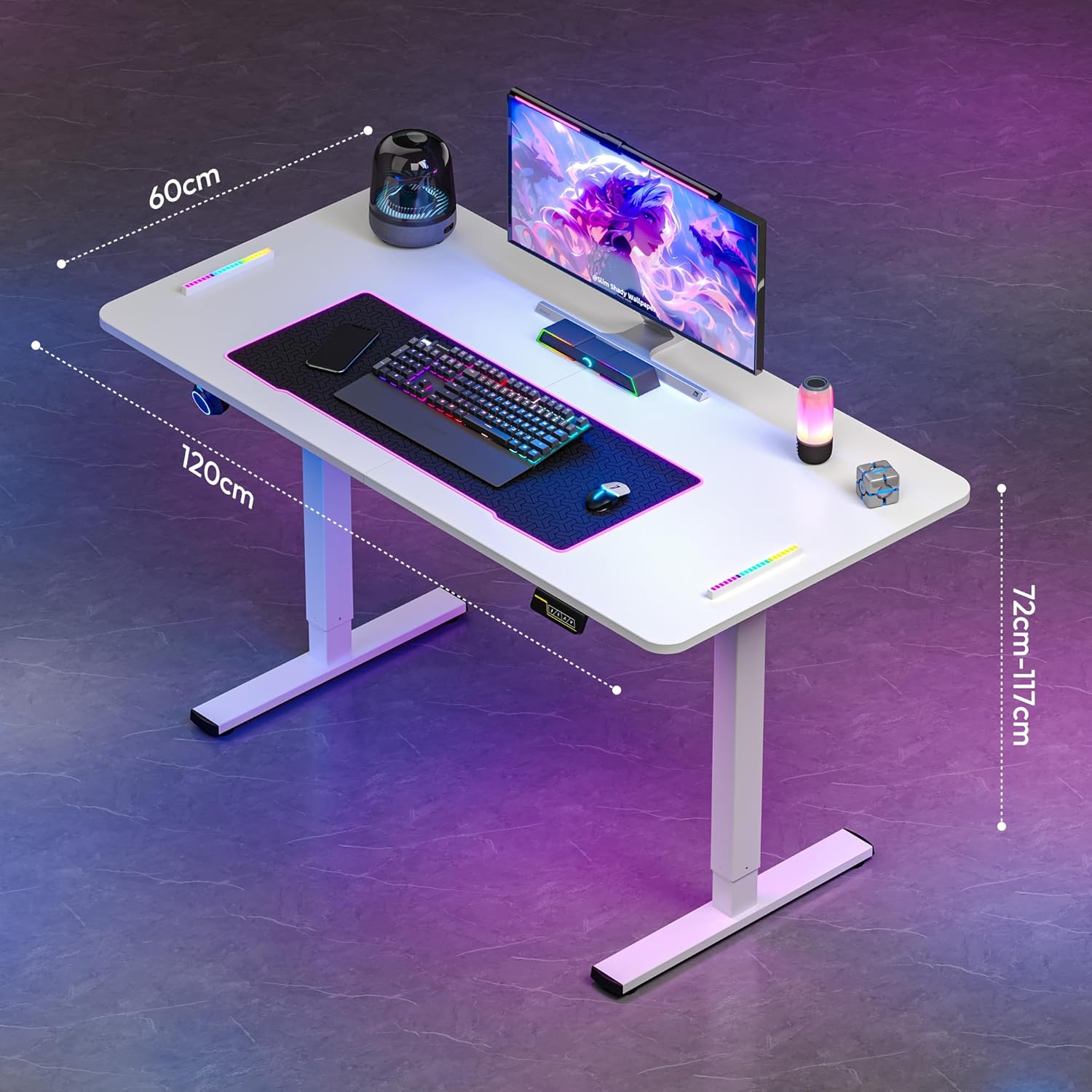
Image: Desk dimensions showing 120cm length, 60cm width, and an adjustable height range from 72cm to 117cm.
Operating Instructions
Your SANODESK Electric Sit-Stand Desk features an intuitive control panel for easy height adjustment and memory settings.

Image: The desk's memory controller, featuring an LED display and buttons for height adjustment and memory presets.
Basic Height Adjustment
- Raise Desk: Press and hold the Up (Λ) button to raise the desk to your desired standing height.
- Lower Desk: Press and hold the Down (V) button to lower the desk to your desired sitting height.
- The LED display will show the current height in centimeters.
Memory Functions
The desk allows you to save up to two preferred height settings for quick adjustments.
- Set a Memory Position:
- Adjust the desk to your desired height using the Up or Down buttons.
- Press the "M" button (Memory button, often indicated by a person icon or 'M'). The display may flash "S-".
- Immediately press one of the numbered memory buttons (e.g., "1" or "2") to save the current height to that preset. The display will show "S-1" or "S-2" to confirm.
- Recall a Memory Position: Simply press the desired numbered memory button (e.g., "1" or "2"). The desk will automatically move to the saved height.
Anti-Collision System
Your SANODESK features an integrated anti-collision system designed to prevent damage to the desk or objects in its path during height adjustment. If the desk encounters an obstruction while moving up or down, it will automatically stop and reverse slightly to clear the obstruction. This system enhances safety and protects your equipment.
Note: While the anti-collision system provides protection, always ensure the area around the desk is clear before adjusting its height to prevent potential damage or injury.
Maintenance
Regular maintenance ensures the longevity and optimal performance of your SANODESK Electric Sit-Stand Desk.
- Cleaning: Wipe the desk surface and frame with a soft, damp cloth. Avoid abrasive cleaners or harsh chemicals that could damage the finish.
- Cable Management: Periodically check all cables to ensure they are securely routed and free from kinks or damage.
- Fasteners: Occasionally check all screws and bolts to ensure they remain tight. Retighten if necessary.
- Motor Care: The electric motors are designed for durability and require no special lubrication. Avoid exposing the motor or control box to excessive moisture.
Troubleshooting
If you encounter issues with your SANODESK, refer to the following common troubleshooting steps:
| Problem | Possible Cause | Solution |
|---|---|---|
| Desk does not move. | Power cord disconnected; control box issue; motor issue. | Check power connections. Ensure the power outlet is functional. Perform a reset (unplug for 30 seconds, then plug back in). |
| Desk moves unevenly or makes unusual noise. | Overload; loose connections; obstruction. | Reduce weight on the desk. Check all frame connections for tightness. Ensure no obstructions are present. |
| Anti-collision system frequently activates. | Obstruction; sensitivity setting (if adjustable). | Clear the area around the desk. If the system has adjustable sensitivity, consult the full product manual for adjustment instructions. |
| Memory functions not working. | Incorrect programming; power cycle. | Re-program the memory positions following the operating instructions. Try a power cycle. |
If the problem persists after attempting these solutions, please contact SANODESK customer support.
Specifications
| Feature | Detail |
|---|---|
| Brand | SANODESK |
| Model | Electric Sit-Stand Desk 120x60 |
| Color | White |
| Tabletop Dimensions (L x W) | 120 cm x 60 cm |
| Height Adjustment Range | 73 cm - 118 cm |
| Material | Metal (Frame), Wood (Tabletop) |
| Maximum Load Capacity | 60 kg |
| Noise Level | <50 dB |
| Special Features | Electric Height Adjustment, Memory Presets, Anti-Collision System, Hook |
| Recommended Uses | Work, Study, Gaming, Drawing, Writing |

Image: The desk's maximum load capacity of 60 kg.

Image: Illustration of the desk's quiet operation, rated at less than 50dB.

Image: Visual representation of the desk's adjustable height range, from 72cm to 117cm.
Warranty and Support
SANODESK is committed to providing high-quality products and customer satisfaction. While specific warranty details are not provided in this manual, SANODESK stands by its products and offers dedicated customer support.
If you have any questions, require assistance with assembly, operation, or encounter any issues with your desk, please do not hesitate to contact SANODESK customer service. We aim to respond to all inquiries within 24 hours and provide satisfactory service solutions.
For support, please visit the official SANODESK website or refer to the contact information provided with your product packaging.

