
Introduction
Thank you for choosing the INXPHY Solar Shed Light. This advanced lighting solution is designed for both indoor and outdoor use, providing super bright illumination with its 174 LEDs and 1200 lumens output. It features a motion sensor, remote control, and a durable IP65 waterproof design, making it ideal for various applications such as sheds, garages, patios, and more. This manual provides detailed instructions for installation, operation, and maintenance to ensure optimal performance and longevity of your solar light.

Figure 1: Overview of the INXPHY Solar Shed Light system.
Product Features
- 1200LM Super Bright & Long-Lasting Performance: Features 2835 LED beads for enhanced luminous area and exceptional heat dissipation, providing brighter and more efficient lighting.
- 5 Lighting Modes for Day and Night & Motion Detection: Offers versatile modes to adjust brightness and lighting effects, including motion detection for both daytime and nighttime use.
- Remote Control & Separate Solar Panel with 16.5 Feet Cable: Convenient remote control for power, brightness, and mode adjustments. The 16.5-foot cable allows flexible placement of the solar panel for optimal sun exposure.
- IP65 Waterproof & 6500K High Color Temperature: IP65 rating ensures durability against various weather conditions. The 6000-6500K color temperature provides bright, natural daylight-like white light.
- Wide Angle Adjustable 120° Angle 4 + 1 Head LED Panel: Adjustable and foldable design with 4 main panels and 1 central light, allowing you to direct light precisely where needed for 360° illumination.
- Versatile Application: Ideal for garages, sheds, barns, patios, basements, and other indoor/outdoor spaces.

Figure 2: The 120° adjustable 4+1 head LED panel provides wider and more flexible illumination compared to traditional fixed lights.
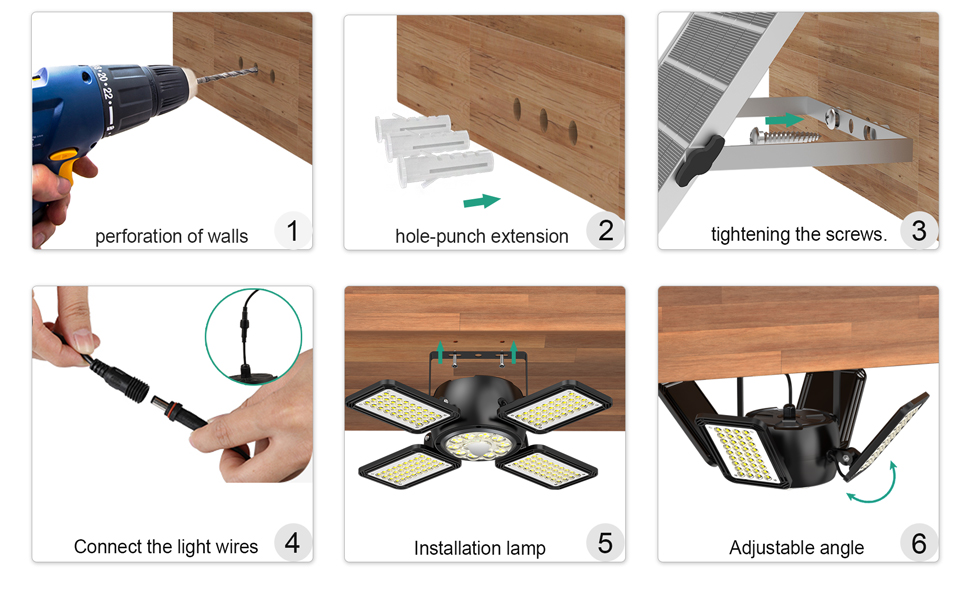
Figure 3: The solar shed light is suitable for a variety of indoor and outdoor applications.
What's in the Box
Upon opening the package, please ensure all the following components are present and in good condition:
- Solar Light (Pendant Light Unit)
- Solar Panel
- Remote Control
- Mounting Hardware (screws, wall plugs)
Setup and Installation
Follow these steps to properly install your INXPHY Solar Shed Light:
- Choose Location: Select a location for the solar panel that receives direct sunlight for at least 6-8 hours daily. The light unit can be installed indoors or in a shaded outdoor area, thanks to the 16.5-foot cable.
- Mount Solar Panel: Use the provided mounting hardware to secure the solar panel to a wall or roof. Drill pilot holes, insert wall plugs if necessary, and then screw the bracket into place. Adjust the angle of the solar panel to maximize sun exposure.
- Mount Light Unit: Secure the light unit to your desired ceiling or wall location using appropriate screws. Ensure it is firmly attached.
- Connect Cables: Connect the cable from the solar panel to the light unit. Ensure the connection is secure and waterproof.
- Adjust Light Panels: Once installed, adjust the four deformable LED panels to direct light to your preferred areas.
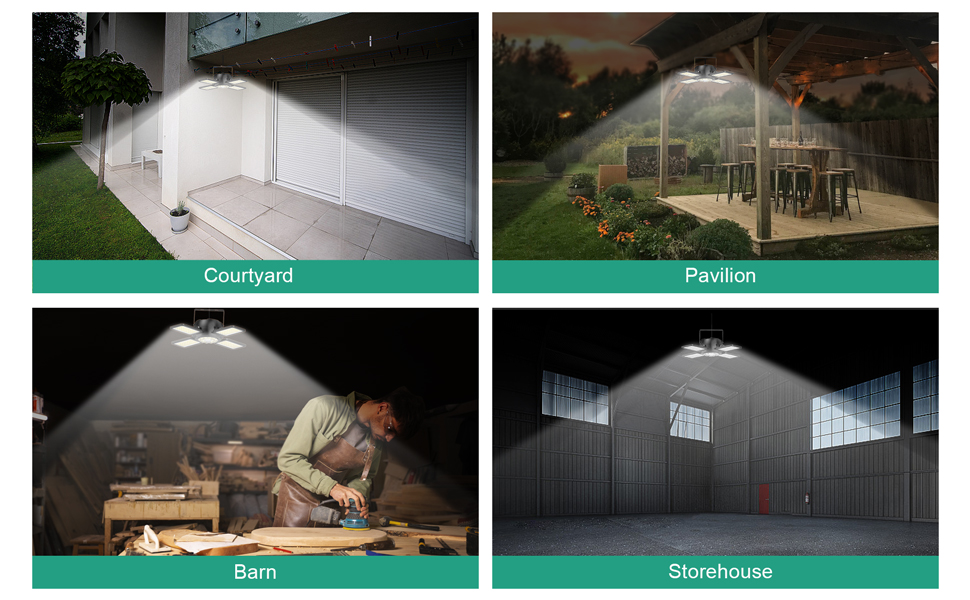
Figure 4: Visual guide for the installation process.

Figure 5: The detachable solar panel allows for flexible placement to avoid shade and maximize charging efficiency.
Installation Video Guide:
Video 1: This video demonstrates the physical installation of the solar light and panel, including drilling and mounting steps (0:08 - 0:15). It also showcases the adjustable light panels and the waterproof interface.
Operating Instructions
Your solar shed light comes with a remote control for easy operation and offers multiple lighting modes.
Initial Setup:
Before first use, ensure the light unit's internal power button is pressed. This is located on the light unit itself. (Refer to Figure 6, point 1). The remote control will not function if this button is not activated first.
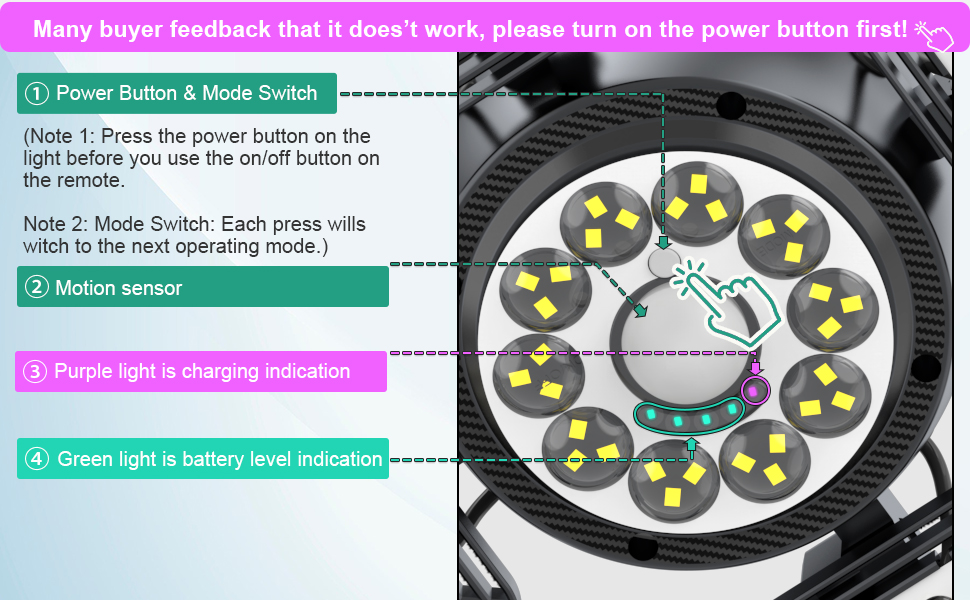
Figure 6: Location of the power button and indicators on the light unit.
Remote Control Functions:
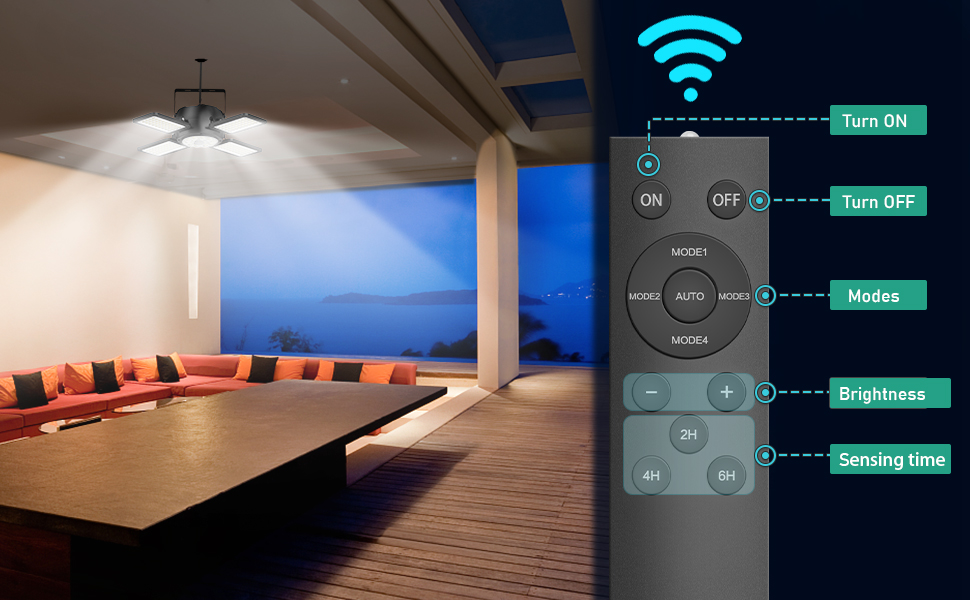
Figure 7: Remote control layout and functions.
- ON/OFF: Press to turn the light on or off.
- MODE1-MODE4 & AUTO: Select desired lighting mode. The "AUTO" button cycles through modes 1-4.
- Brightness (+/-): Adjust the light intensity.
- Sensing Time (2H, 4H, 6H): Set the duration for which the light stays on after motion is detected (in motion sensor modes).
Lighting Modes:

Figure 8: Detailed explanation of the 5 lighting modes.
- Mode 1: Stays on as a dim light, gets brighter when motion is detected at night.
- Mode 2: Stays off, activated by motion at night.
- Mode 3: Constant on at night.
- Mode 4: Stays off, activated by motion in the daytime.
- Mode 5 (Auto Mode): Stays lit all day, then automatically switches to Mode 4 when the battery level drops to 60%.
The motion sensor has a sensing range of approximately 16.5 feet (5 meters).
Operation Video Guide:
Video 2: This video illustrates the motion sensing capabilities of the light (0:24 - 0:28) and how it operates in auto modes during both daytime and nighttime (0:29 - 0:34).
Maintenance
- Clean Solar Panel: Regularly wipe the solar panel with a soft, damp cloth to remove dust, dirt, and debris. A clean panel ensures maximum sunlight absorption and charging efficiency.
- Check Connections: Periodically inspect the cable connections between the solar panel and the light unit to ensure they remain secure and free from corrosion.
- Battery Care: For optimal battery life, allow the light to fully charge in direct sunlight before its first use. Avoid prolonged periods of storage without charging.
- Storage: If storing the light for an extended period, ensure it is fully charged and store it in a cool, dry place.
Troubleshooting
| Problem | Possible Cause | Solution |
|---|---|---|
| Light does not turn on. |
|
|
| Light is dim or short-lived. |
|
|
| Motion sensor not working. |
|
|
Specifications
| Feature | Detail |
|---|---|
| Brand | INXPHY |
| Model Name | PA1 |
| Light Source Type | LED (174 LEDs) |
| Brightness | 1200 Lumen |
| Color Temperature | 6500 Kelvin (Cool White) |
| Power Source | Solar Powered |
| Material | Plastic, Acrylonitrile Butadiene Styrene |
| Water Resistance Level | IP65 Waterproof |
| Control Method | Remote Control |
| Special Features | Dimmable, Motion Sensor, Foldable, Deformable, Timer Setting |
| Solar Panel Cable Length | 16.5 Feet |
| Motion Sensor Range | Approx. 16.5 ft (5 meters) |
| Battery | 1 AAA battery required (included for remote) |
| Product Dimensions | 12"L x 12"W x 2.4"H (Light Unit) |
| Item Weight | 2.2 Pounds |

Figure 9: Feature comparison table.
Warranty and Support
For warranty information, technical support, or any inquiries regarding your INXPHY Solar Shed Light, please refer to the product listing on the retailer's website or contact the seller directly. Keep your purchase receipt as proof of purchase for any warranty claims.
