
1. Introduction
This manual provides detailed instructions for the proper use and care of your 7artisans 50mm F1.4 Tilt-Shift Lens. Please read this manual thoroughly before using the lens to ensure optimal performance and longevity. This lens is designed for Fuji X Mount mirrorless cameras.
2. Product Overview
The 7artisans 50mm F1.4 Tilt-Shift lens is a versatile optical instrument that functions as both a standard 50mm f/1.4 prime lens and a specialized tilt-shift lens. It features a large f/1.4 aperture for low-light performance and shallow depth of field, combined with tilt and shift mechanisms for creative control over perspective and focus plane.

Image 2.1: The 7artisans 50mm F1.4 Tilt-Shift Lens, showing its main body and included accessories.
2.1 Lens Components

Image 2.2: Labeled diagram of the lens, indicating the aperture ring, aperture scale, distance scale, focus ring, 360° rotation mechanism, and lens mount. The lens has an approximate diameter of 75mm and a length of 73mm.
- Aperture Ring: Adjusts the lens aperture (f-stop).
- Focus Ring: Manually adjusts the focus distance.
- Distance Scale: Indicates the current focus distance in meters (m) and feet (ft).
- Aperture Scale: Displays the selected aperture value.
- Depth of Field Scale: Provides an indication of the depth of field at various apertures.
- Tilt Mechanism: Allows adjustment of the lens's optical axis relative to the sensor plane.
- Shift Mechanism: Allows lateral movement of the lens's optical axis relative to the sensor plane.
- 360° Rotation: Enables rotation of the tilt and shift mechanisms for flexible application.
- Lens Mount: Connects the lens to the camera body.
3. Setup and Installation
3.1 Attaching the Lens to Your Camera
- Ensure your camera is powered off.
- Remove the rear lens cap from the 7artisans 50mm F1.4 lens and the body cap from your Fuji X Mount camera.
- Align the red dot on the lens mount with the corresponding red dot on your camera's lens mount.
- Insert the lens into the camera mount and rotate it clockwise until it clicks into place. Do not force the lens.
- Once attached, remove the front lens cap.

Image 3.1: The 7artisans 50mm F1.4 Tilt-Shift Lens correctly mounted on a Fuji X-Pro3 mirrorless camera.
3.2 Detaching the Lens
- Ensure your camera is powered off.
- Press and hold the lens release button on your camera body.
- Rotate the lens counter-clockwise until it detaches from the camera mount.
- Immediately attach the rear lens cap to the lens and the body cap to your camera to protect them from dust and damage.
4. Operating the Lens
This is a manual focus and manual aperture lens. All adjustments for focus, aperture, tilt, and shift are performed directly on the lens.
4.1 Adjusting Aperture
Rotate the aperture ring to select your desired f-stop. The aperture values are marked on the lens barrel (e.g., F1.4, F2, F2.8, etc.). A larger f-number (e.g., F16) results in a smaller aperture opening, increasing depth of field. A smaller f-number (e.g., F1.4) results in a larger aperture opening, decreasing depth of field and allowing more light.
4.2 Manual Focusing
Rotate the focus ring to achieve sharp focus on your subject. Use your camera's focus peaking or magnification assist features for precise focusing, especially with wide apertures.

Image 4.1: An example photograph demonstrating the shallow depth of field achievable with the F1.4 large aperture, resulting in a blurred background.
4.3 Tilt Function
The tilt function allows you to pivot the lens's optical axis relative to the camera's sensor. This changes the plane of focus, enabling you to extend or limit the depth of field in specific areas of your image, or to create a "miniature" effect. The lens can be tilted to achieve unique perspectives.

Image 4.2: A visual representation of the lens tilting mechanism, showing how the lens can pivot on its axis.

Image 4.3: An example photograph demonstrating the miniature effect achieved by manipulating the plane of focus using the tilt function on a cityscape.
4.4 Shift Function
The shift function allows you to move the lens parallel to the camera's sensor. This is primarily used to correct perspective distortion, especially in architectural photography, by keeping parallel lines parallel. It can also be used to create panoramas by shifting the lens without moving the camera, thus avoiding parallax errors.

Image 4.4: A visual representation of the lens shifting mechanism, showing how the lens can move laterally.
4.5 360° Rotation
The lens features a 360° rotation mechanism, allowing you to orient the tilt and shift movements in any direction relative to the camera body. This provides maximum flexibility for creative control.
5. Maintenance and Care
- Cleaning the Lens: Use a soft, lint-free cloth or a lens brush to remove dust from the lens surfaces. For smudges or fingerprints, use a specialized lens cleaning solution and a microfiber cloth. Apply the solution to the cloth, not directly to the lens.
- Storage: When not in use, always attach the front and rear lens caps. Store the lens in a dry, cool place, away from direct sunlight and extreme temperatures.
- Avoid Impact: Protect the lens from drops and impacts, which can damage the optical elements or mechanical components.
- Moisture: Avoid exposing the lens to moisture or rain. If it gets wet, wipe it dry immediately with a clean cloth.
6. Troubleshooting
- Lens not attaching to camera: Ensure the lens is correctly aligned with the camera mount's red dot and rotated clockwise until it clicks. Do not force it.
- Difficulty focusing: This is a manual focus lens. Ensure your camera's focus assist features (e.g., focus peaking, magnification) are enabled. Practice manual focusing for best results.
- Images are too dark/bright: Adjust the aperture ring and your camera's shutter speed and ISO settings to achieve proper exposure.
- Tilt/Shift mechanism feels stiff: Ensure no debris is obstructing the mechanism. If the issue persists, contact customer support. Do not attempt to disassemble the lens.
7. Specifications
| Feature | Detail |
|---|---|
| Brand | 7artisans |
| Model Number | MI20250704120 |
| Focal Length | 50mm |
| Maximum Aperture | F1.4 |
| Lens Type | Tilt Shift |
| Compatible Mountings | Fujifilm X |
| Lens Structure | 7 elements in 6 groups |
| Filter Size | Φ46mm |
| Product Dimensions | 2.87 x 2.95 x 2.95 inches (approx. 7.3 x 7.5 x 7.5 cm) |
| Item Weight | 1.21 pounds (approx. 0.55 kg) |
8. What's in the Box
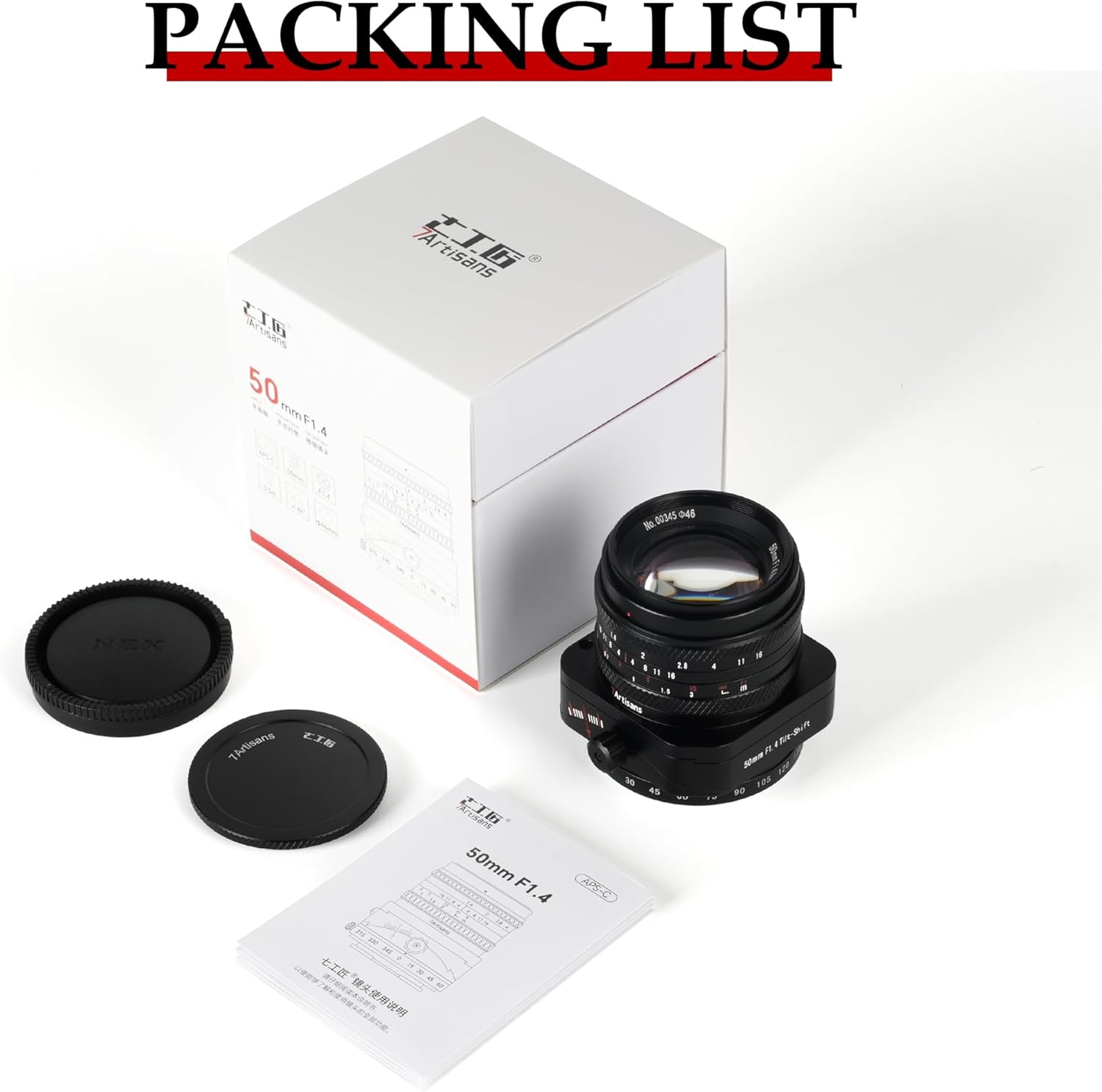
Image 8.1: The packaging contents, including the lens, lens caps, and instruction manual.
- 7artisans 50mm F1.4 Tilt-Shift Lens
- Front Lens Cap
- Rear Lens Cap
- Instruction Manual
9. Warranty and Support
For warranty information and customer support, please refer to the official 7artisans website or contact your retailer. Keep your purchase receipt as proof of purchase for any warranty claims.
For further assistance, you may visit the official 7artisans store page: 7artisans Official Store
