
Sudrov PN-W33A
Sudrov 42800mAh Solar Charger Power Bank PN-W33A User Manual
1. Introduction
Thank you for choosing the Sudrov 42800mAh Solar Charger Power Bank, model PN-W33A. This portable power bank is designed to provide reliable power for your electronic devices, featuring a high-capacity battery, multiple charging options including solar and wireless, and integrated safety features. This manual provides essential information for the safe and efficient operation of your device.

Image 1.1: Front and back view of the Sudrov Solar Charger Power Bank.
2. Product Overview
2.1 Key Features
- High Capacity: 42800mAh Li-polymer battery for extended usage.
- Multiple Charging Outputs: Built-in Type-C, Lightning, and Micro USB cables, plus USB-C and USB-A output ports.
- Wireless Charging: Qi-compatible wireless output for supported devices.
- Solar Charging: Supplementary solar panel for emergency power.
- Fast Charging: QC3.0 and 15W output for efficient device charging.
- Integrated Lighting: Dual LED flashlight with 3 modes (SOS/Strobe/Stable) and a red light pointer.
- Durability: Waterproof, shockproof, and dustproof design for outdoor use.
- Additional Features: Built-in thermometer and carabiner for portability.
2.2 Package Contents
Verify that all items are present in your package:
- 1x Sudrov 42800mAh Solar Power Bank
- 1x User Manual
- 1x Carabiner
- 1x 2FT USB C Charging Cable
2.3 Product Diagram
Familiarize yourself with the components of your power bank:

Image 2.1: Detailed diagram showing the various ports, buttons, and features of the power bank, including the solar panel, LED lights, built-in cables, and thermometer.
3. Setup
3.1 Initial Charging
Before first use, fully charge the power bank using a wall adapter. This ensures the internal battery is properly activated and calibrated.
- Connect the provided USB-C charging cable to the power bank's USB-C In/Output port.
- Plug the other end of the cable into a USB wall adapter (not included) and connect to a power outlet.
- The LED indicators will illuminate to show charging progress. All indicators will be solid when fully charged.
3.2 Solar Charging (Supplementary)
The solar panel is designed for emergency use and supplementary charging. It is not intended as the primary charging method due to its slower speed.
- Place the power bank in direct sunlight with the solar panel facing upwards.
- The solar charging indicator light will illuminate when solar charging is active.
- Avoid leaving the power bank in extreme heat or direct sunlight for prolonged periods, especially inside a vehicle, as this can damage the battery.

Image 3.1: Various methods for charging the power bank: solar, USB-A, and USB-C wall adapter.
4. Operating Instructions
4.1 Charging Devices (Wired)
The power bank supports charging up to 6 devices simultaneously using its various output options.
- Using Built-in Cables: Pull out the appropriate built-in cable (Type-C, Lightning, or Micro USB) and connect it to your device.
- Using USB-A/USB-C Ports: Connect your device's charging cable to the USB-A output port or the USB-C In/Output port on the power bank.
- The power bank will automatically begin charging. If not, press the power button once.

Image 4.1: The power bank connected to and charging multiple smartphones and a tablet simultaneously.
4.2 Wireless Charging
For Qi-compatible devices:
- Press the power button once to activate the power bank.
- Place your Qi-enabled device on the wireless charging area of the power bank.
- Ensure the device is centered on the wireless charging pad for optimal connection. The wireless charging indicator light will illuminate.
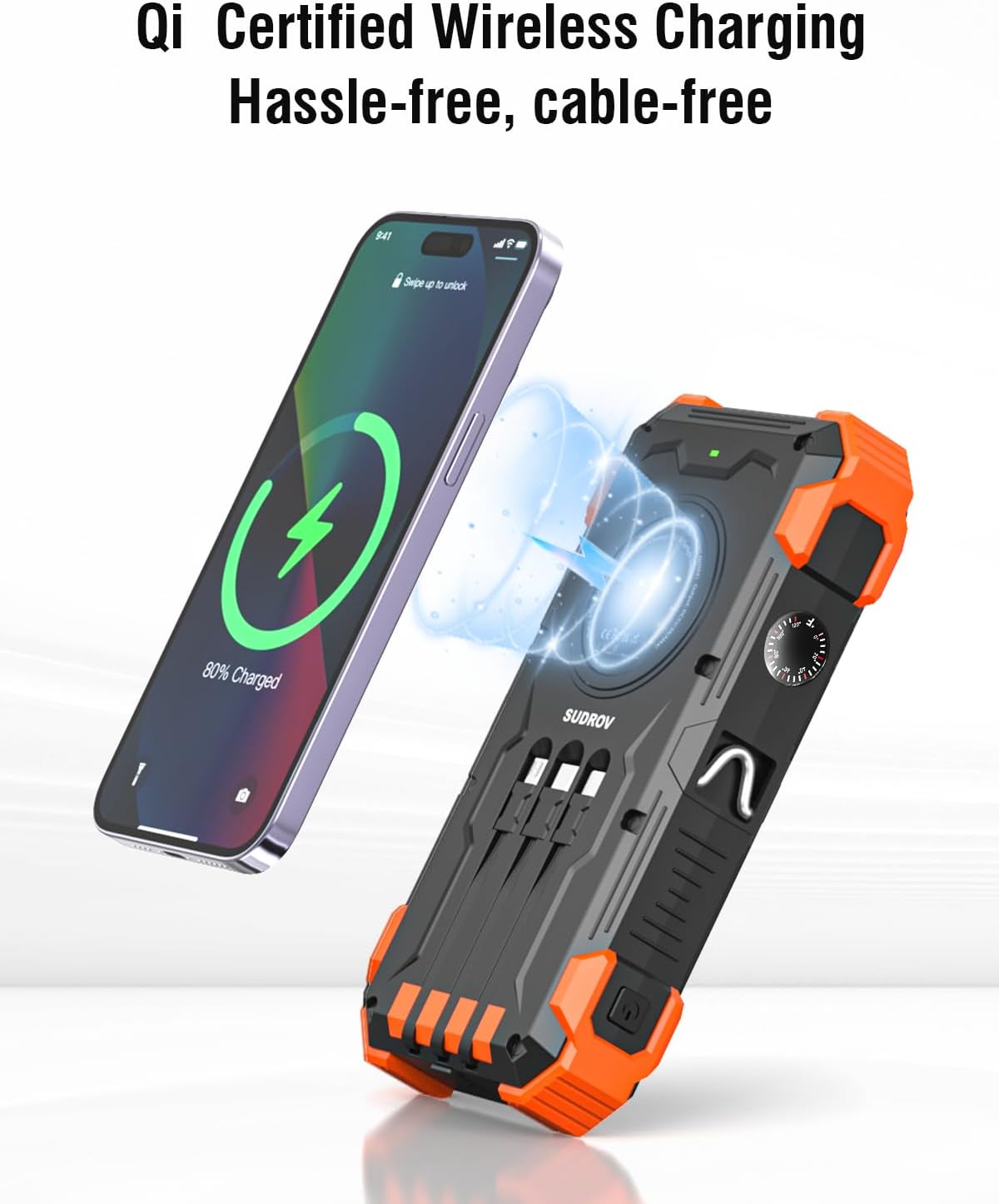
Image 4.2: A smartphone being wirelessly charged by the power bank, showing the magnetic connection.
4.3 LED Flashlight
The dual LED flashlight has three modes:
- To turn ON/OFF: Press and hold the power button for approximately 3 seconds.
- To cycle modes: Once the flashlight is ON, press the power button briefly to switch between Steady, SOS, and Strobe modes.

Image 4.3: Examples of using the integrated LED flashlight for outdoor activities and the red light pointer for various tasks.
4.4 Red Light Pointer
The red light pointer can be activated independently:
- Press the dedicated red light pointer button (refer to Product Diagram) to turn it ON.
- Press the button again to turn it OFF.
4.5 Thermometer
The power bank includes a built-in thermometer for environmental temperature readings. The display is located on the side of the device (refer to Product Diagram).
5. Important Safety Information
Please read and follow these safety guidelines to prevent damage to the device or injury to yourself:
- Do not expose the power bank to extreme temperatures (above 60°C/140°F or below -10°C/14°F), direct sunlight for extended periods (especially in enclosed spaces like cars), or fire.
- Do not immerse the power bank in water, despite its waterproof rating. Avoid prolonged exposure to heavy rain or submersion.
- Do not disassemble, repair, or modify the device. Contact customer support for assistance.
- Keep out of reach of children.
- Use only compatible charging cables and adapters.
- Avoid dropping or subjecting the power bank to severe impacts.
- If the power bank swells, overheats, or emits an unusual odor, discontinue use immediately and contact customer support.
- Dispose of the power bank according to local regulations for electronic waste.

Image 5.1: The power bank incorporates multiple protection mechanisms for safe operation.
6. Maintenance
- Clean the power bank with a soft, dry cloth. Do not use harsh chemicals or abrasive materials.
- Store the power bank in a cool, dry place away from direct sunlight and extreme temperatures.
- If storing for an extended period, charge the power bank to approximately 50-75% every 3 months to maintain battery health.
7. Troubleshooting
| Problem | Possible Cause | Solution |
|---|---|---|
| Power bank not charging | Charging cable or adapter faulty; power bank fully discharged; loose connection. | Try a different cable/adapter. Ensure connections are secure. Allow a few minutes for a deeply discharged unit to respond. |
| Device not charging from power bank | Power bank low on charge; device cable faulty; power bank not activated; device incompatible. | Recharge the power bank. Try a different cable. Press the power button once. Ensure your device supports the charging method (wired/wireless). |
| Wireless charging not working | Device not Qi-compatible; device not properly aligned; power bank not activated. | Ensure your device supports Qi wireless charging. Realign the device on the charging pad. Press the power button once. |
| Solar charging is slow or not working | Insufficient sunlight; solar panel obstructed; solar charging is supplementary. | Ensure direct, strong sunlight. Clean the solar panel. Solar charging is not meant for rapid charging; use wall charging for primary power. |
| Flashlight not turning on | Incorrect button press; power bank low on charge. | Press and hold the power button for 3 seconds. Recharge the power bank. |
8. Product Specifications
| Feature | Detail |
|---|---|
| Model Number | PN-W33A |
| Battery Capacity | 42800mAh |
| Battery Type | Li-polymer |
| Input (USB-C) | 5V/3A (QC3.0 compatible) |
| Output (USB-C Cable) | 5V/3A |
| Output (Lightning Cable) | 5V/2.4A |
| Output (Micro USB Cable) | 5V/2.4A |
| Output (USB-A Port) | 5V/3A |
| Wireless Output | 15W (Qi-compatible) |
| Solar Panel | Supplementary charging |
| Dimensions | 7.79 x 1.5 x 4.76 inches |
| Weight | 1.25 pounds |
| Special Features | Built-in cables, Flashlight (3 modes), LED Indicator Lights, Wireless Charging, Thermometer, Red Light Pointer, Shockproof, Waterproof, Dustproof |
9. Warranty and Customer Support
Sudrov provides a 365-Day Quality Guarantee for this product. If you encounter any issues or have questions, please contact our customer service team. We are committed to providing lifetime friendly customer service and will offer a satisfactory solution.
For support, please refer to the contact information provided on the product packaging or the official Sudrov website.
Related documentsPN-W33A


Ask a question about this manual
Ask about setup, troubleshooting, compatibility, parts, safety, or missing instructions. Manuals+ will review the question and use this page’s manual context to help answer it.