
1. Introduction
The MeLE Overclock 4C Mini PC N100 is a compact and powerful micro desktop computer designed for business, education, and multimedia use. Featuring an Intel N100 processor, 32GB DDR4 RAM, and a 512GB SSD, it supports 4K triple display output and runs Windows 11 Pro, with compatibility for Linux and Ubuntu.

Front view of the MeLE Overclock 4C Mini PC N100.
2. Setup
2.1 What's in the Box
- 1*Overclock 4C Mini PC
- 1*12V/3A Power Adapter
- 1*Vesa Mount
- 1*User Manual
2.2 Initial Connection
Connect the power adapter, display cables (HDMI or USB-C), and any peripherals such as a keyboard and mouse to the appropriate ports on the mini PC. Once all connections are secure, press the power button to start the device.
An overview video demonstrating the unboxing, port connections, and basic usage scenarios like light gaming and triple display multitasking of the MeLE Overclock 4C Mini PC N100.

Close-up view of the MeLE Overclock 4C Mini PC N100's ports, including Kensington Lock Slot, USB 3.2 Gen2, USB 2.0, USB Type-C (PD3.0, DP1.4, Data), Micro-SD slot, Audio Jack, HDMI 2.0, Reset Button, and Gigabit Ethernet port.
2.3 VESA Mount Installation
The included VESA mount allows for convenient installation of the mini PC on the back of a compatible TV or monitor, helping to save desk space.
3. Operating Instructions
3.1 Powering On/Off
Press the power button located on the front of the device to turn it on. To shut down, use the operating system's power options. A brief press of the power button can also initiate sleep mode.
3.2 Display Configuration
The mini PC supports triple display output via two HDMI 2.0 ports and one USB-C port, enabling 4K UHD video playback (4096x2160@60Hz) and HDR. Configure display settings through your operating system.
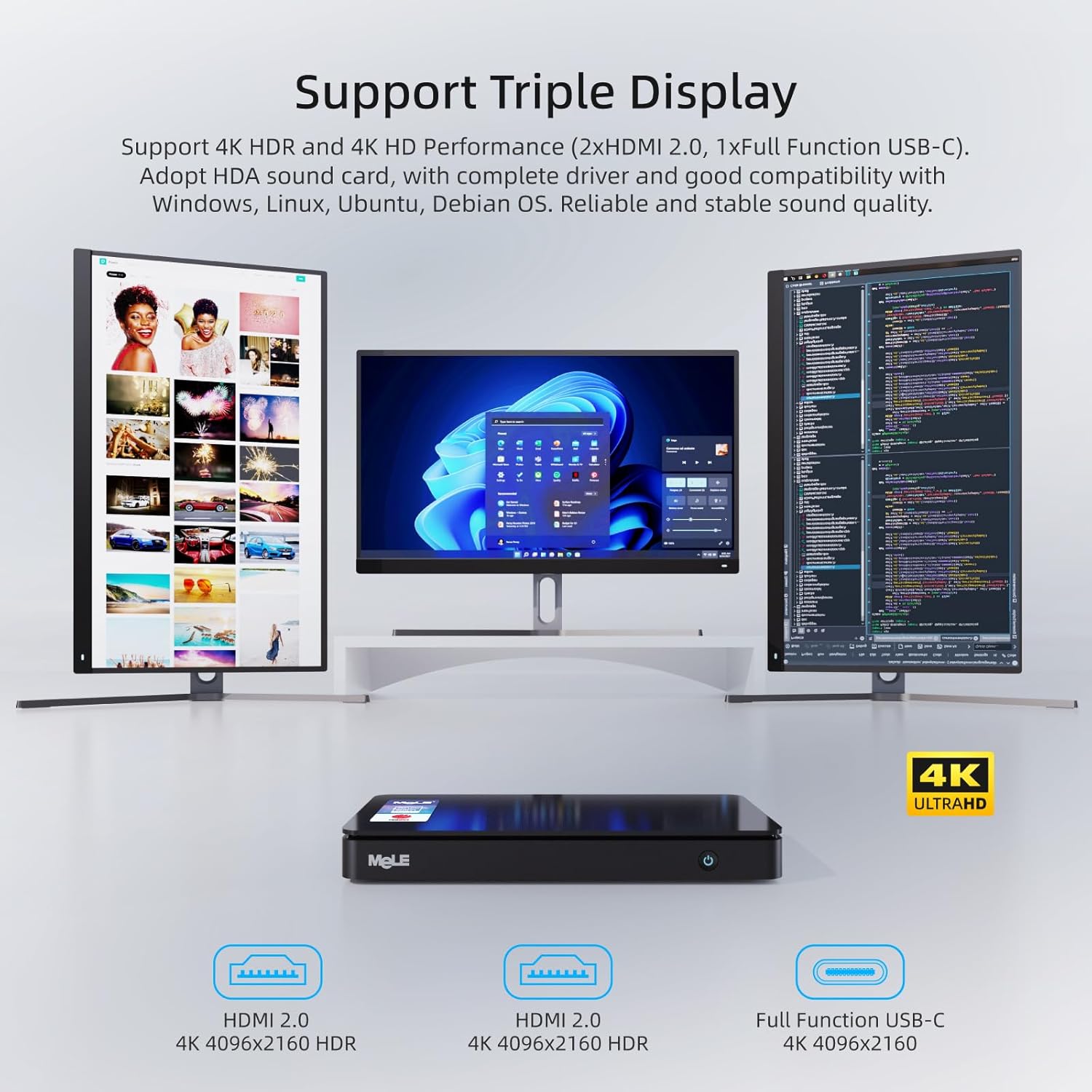
The MeLE Overclock 4C Mini PC N100 connected to three monitors, demonstrating its triple display multitasking capability with 4K resolution.
A video showcasing the 4K video playback capabilities of the MeLE Overclock 4C Mini PC N100, highlighting smooth and detailed visual performance.
3.3 Network and Wireless Connectivity
Connect to the internet using the Gigabit Ethernet port or via dual-band Wi-Fi (2.4G and 5.0G) with Wi-Fi 5 MU-MIMO support. Bluetooth 5.1 is available for connecting wireless peripherals.

Illustration of the MeLE Overclock 4C Mini PC N100's stable connectivity options, including Wi-Fi 5, Bluetooth 5.1, and Gigabit Ethernet.
4. Maintenance
4.1 Storage Upgrade
The device supports storage expansion via an M.2 22x80 Key M Slot for PCIe3.0 x4 SSDs (up to 4TB) and a Micro SD slot (up to 2TB). Refer to the video below for instructions on how to upgrade the SSD.
A step-by-step guide on how to safely open the MeLE Mini PC and replace or upgrade the SSD storage.

Internal view of the MeLE Overclock 4C Mini PC N100, illustrating the M.2 2280 slot for PCIe3.0 x4 SSDs up to 4TB and Micro SD slot for up to 2TB, along with RAM upgrade options.
4.2 Cleaning
To ensure optimal performance and longevity, regularly clean the exterior of the mini PC with a soft, dry cloth. Avoid using liquid cleaners directly on the device. Ensure ventilation openings are free from dust and obstructions.

Exploded view of the MeLE Overclock 4C Mini PC N100, showcasing its intelligent cooling fan design, pure copper pipe, Intel N100 processor, and thermal conductive engineering plastic for efficient heat dissipation.
5. Troubleshooting
5.1 No Power
- Ensure the power adapter is securely connected to both the mini PC and a working power outlet.
- Verify the power outlet is functional by plugging in another device.
- Check the power adapter for any visible damage.
5.2 No Display Output
- Confirm that the display cables (HDMI, USB-C) are securely connected to both the mini PC and the monitor.
- Ensure the monitor is powered on and set to the correct input source.
- Try using a different display cable or monitor to rule out hardware issues.
5.3 Slow Performance
- Close unnecessary applications running in the background.
- Check for available operating system updates and install them.
- Ensure there is sufficient free space on the SSD.
- Monitor system temperatures to ensure proper cooling.
6. Specifications
| Feature | Detail |
|---|---|
| Brand | MeLE |
| Model Name | Overclock 4C |
| Operating System | Windows 11 Pro (supports Linux, Ubuntu, Debian) |
| CPU Model | Intel N100 (12th Gen Alder Lake) |
| CPU Speed | Up to 3.4 GHz |
| Processor Cores/Threads | 4 Cores / 4 Threads |
| Smart Cache | 6 MB |
| TDP | 15W |
| RAM Memory Installed | 32 GB DDR4 |
| Memory Speed | 3200 MHz |
| Memory Storage Capacity | 512 GB SSD |
| Expandable Storage | M.2 2280 SATA SSD & NVMe SSD up to 4TB, Micro SD slot up to 2TB |
| Graphics Coprocessor | Intel UHD Graphics (up to 1.20 GHz) |
| Video Output | 2x HDMI 2.0 (4K@60Hz), 1x USB-C (DP1.4, 4K@60Hz) |
| USB Ports | 2x USB 3.2 Gen2, 1x USB 2.0, 1x USB-C (PD3.0, DP1.4, Data) |
| Network Connectivity | Gigabit Ethernet (RJ45), Wi-Fi 5 (2.4G/5.0G, MU-MIMO), Bluetooth 5.1 |
| Audio Interface | 3.5mm Audio Jack (Headphone and MIC) |
| Security Features | Kensington Lock Slot, Windows 11 Pro security features |
| Additional Features | Auto power on, PXE/iPXE boot, RTC wake, Wake on LAN, BIOS/CMOS reset |
| Dimensions | 7.0 x 3.7 x 0.8 inches (178 x 94 x 21 mm) |
| Weight | 0.7 lbs (0.32 kg) |
| Cooling Method | Smart Fan |
7. Warranty and Support
7.1 Warranty Information
MeLE offers a one-year warranty for this product, with a three-month replacement policy and lifetime service. MeLE is committed to complying with all applicable laws on privacy protection and personal data security.
7.2 Customer Support
For any inquiries or technical assistance, please contact MeLE customer service. Replies are typically provided within 24 hours. Service Contact: Service@mele.cn


