
1. Introduction
This manual provides comprehensive instructions for the installation, operation, and maintenance of your WonVon 10" 800W Underseat Subwoofer. Designed for car and truck audio systems, this unit features a built-in amplifier and dual speakers (bass and tweeter) to enhance your vehicle's sound experience. Please read this manual thoroughly before installation and use to ensure proper function and safety.
2. Setup and Installation
2.1 Package Contents
Before beginning installation, verify that all components are present:
- WonVon 10" Underseat Subwoofer Unit
- Remote Control
- Wiring Kit (power, ground, remote turn-on, RCA cables)
- Mounting Hardware (screws, brackets)

Figure 2.1: Main product unit with all included accessories for installation.
2.2 Placement Considerations
The compact design of this subwoofer allows for flexible placement. Common locations include under the front seats or within the vehicle's trunk. Ensure the chosen location provides adequate ventilation and does not obstruct any vehicle controls or passenger movement.

Figure 2.2: Recommended mounting locations: under the seat or in the car trunk.

Figure 2.3: Example of the subwoofer unit installed discreetly under a car seat.

Figure 2.4: Illustrative comparison of sound system performance before and after subwoofer installation, highlighting bass enhancement.
2.3 Wiring Instructions
Proper wiring is crucial for performance and safety. Consult a professional if you are unsure about any steps.
- Power Connection: Connect the main power wire (typically red) from the subwoofer to the positive terminal of your vehicle's battery. Ensure an inline fuse is installed close to the battery for protection.
- Ground Connection: Connect the ground wire (typically black) from the subwoofer to a clean, unpainted metal surface on the vehicle's chassis. A strong ground connection is essential for optimal performance and to prevent noise.
- Remote Turn-On: Connect the remote turn-on wire (often blue) to your head unit's remote output. This allows the subwoofer to turn on and off with your car's audio system.
- Audio Input:
- RCA Inputs: For head units with RCA pre-outs, connect RCA cables from the head unit's subwoofer output to the subwoofer's RCA input jacks.
- High-Level Inputs: If your head unit lacks RCA outputs, use the high-level input option by connecting the speaker wires from your head unit directly to the subwoofer's high-level input terminals.
- Remote Control Connection: Plug the wired remote control into the designated "REMOTE CONTROL" port on the subwoofer.
3. Operating the Subwoofer
The WonVon subwoofer features several controls for fine-tuning its audio output to match your preferences and vehicle acoustics.

Figure 3.1: Rear panel controls and connections of the subwoofer.

Figure 3.2: Internal view highlighting the built-in independent amplifier.
3.1 Control Functions
- Input Gain: Adjusts the input sensitivity to match the output level of your head unit. Start with the gain at minimum and slowly increase until distortion is heard, then back off slightly.
- Low-Pass Filter (LPF) / Bass Freq: This control (labeled "BASS FREQ" on the unit) sets the upper frequency limit for the subwoofer. Frequencies above this setting will be filtered out. The range is typically 50Hz to 150Hz. Adjust this to blend the subwoofer's output seamlessly with your main speakers.
- Bass Boost: This control (labeled "BASS BOOST" on the unit) provides an adjustable boost to bass frequencies, typically up to +12dB. Use sparingly to avoid distortion.
- Phase Switch: Allows you to adjust the phase of the subwoofer's output (0° or 180°). This helps to align the subwoofer's sound waves with those of your main speakers, preventing cancellation and improving bass impact. Experiment with both settings to find the best sound.
- Remote Control: The included wired remote allows for convenient adjustment of the subwoofer's volume level from the driver's seat.
3.2 Bluetooth Connectivity
The subwoofer supports Bluetooth connectivity for wireless audio streaming. Refer to your device's Bluetooth pairing instructions and search for the subwoofer's Bluetooth name (usually "WonVon Subwoofer" or similar) to connect.
4. Maintenance
Regular maintenance ensures the longevity and optimal performance of your subwoofer.
- Cleaning: Use a soft, dry cloth to wipe down the exterior of the unit. Avoid using harsh chemicals or abrasive cleaners.
- Ventilation: Ensure the subwoofer's vents are clear of obstructions to prevent overheating. The cast aluminum enclosure aids in heat dissipation.
- Connections: Periodically check all wiring connections to ensure they are secure and free from corrosion. Loose connections can lead to poor performance or damage.
- Speaker Protection: The subwoofer comes with a protective speaker cover. Ensure it remains in place to safeguard the speaker from physical damage.
5. Troubleshooting
If you experience issues with your subwoofer, consult the table below for common problems and solutions.
| Problem | Possible Cause | Solution |
|---|---|---|
| No Power / Power Indicator Off | Loose power/ground connection, blown fuse, no remote turn-on signal. | Check all power and ground connections. Verify the inline fuse and the subwoofer's internal fuse. Ensure the remote turn-on wire is connected and receiving signal from the head unit. |
| No Sound Output | Incorrect input gain setting, disconnected audio input cables, incorrect head unit settings, subwoofer in "Full" mode instead of "Bass" mode. | Adjust input gain. Check RCA or high-level input connections. Verify head unit's subwoofer output is enabled. Ensure the "Phase" switch is set to "Bass" if only bass output is desired. |
| Distorted Sound | Gain set too high, LPF set too high, poor ground connection, damaged speaker. | Reduce input gain. Adjust LPF to a lower frequency. Check ground connection for cleanliness and security. If distortion persists, the speaker may be damaged. |
| Remote Control Not Working | Loose connection, faulty remote. | Ensure the remote control cable is securely plugged into the subwoofer. Test with another remote if available. |
6. Specifications
Detailed technical specifications for the WonVon 10" 800W Underseat Subwoofer.
| Feature | Detail |
|---|---|
| Model Name | CP3C2021US-CC |
| Speaker Type | Subwoofer |
| Speaker Maximum Output Power | 800 Watts |
| Subwoofer Diameter | 10 Inches |
| Woofer Diameter | 8 Inches |
| Tweeter Diameter | 3.14 Inches |
| Product Dimensions (D x W x H) | 13.5"D x 10.2"W x 3.1"H |
| Item Weight | 11.27 pounds (5.12 Kilograms) |
| Material | Aluminum |
| Color | Black |
| Connectivity Technology | RCA, Bluetooth |
| Control Method | Button, Remote Control, App |
| Signal-to-Noise Ratio | 91 dB |
| Power Source | Corded Electric |
| Vehicle Service Type | Car, Truck |
| Water Resistance Level | Not Water Resistant |
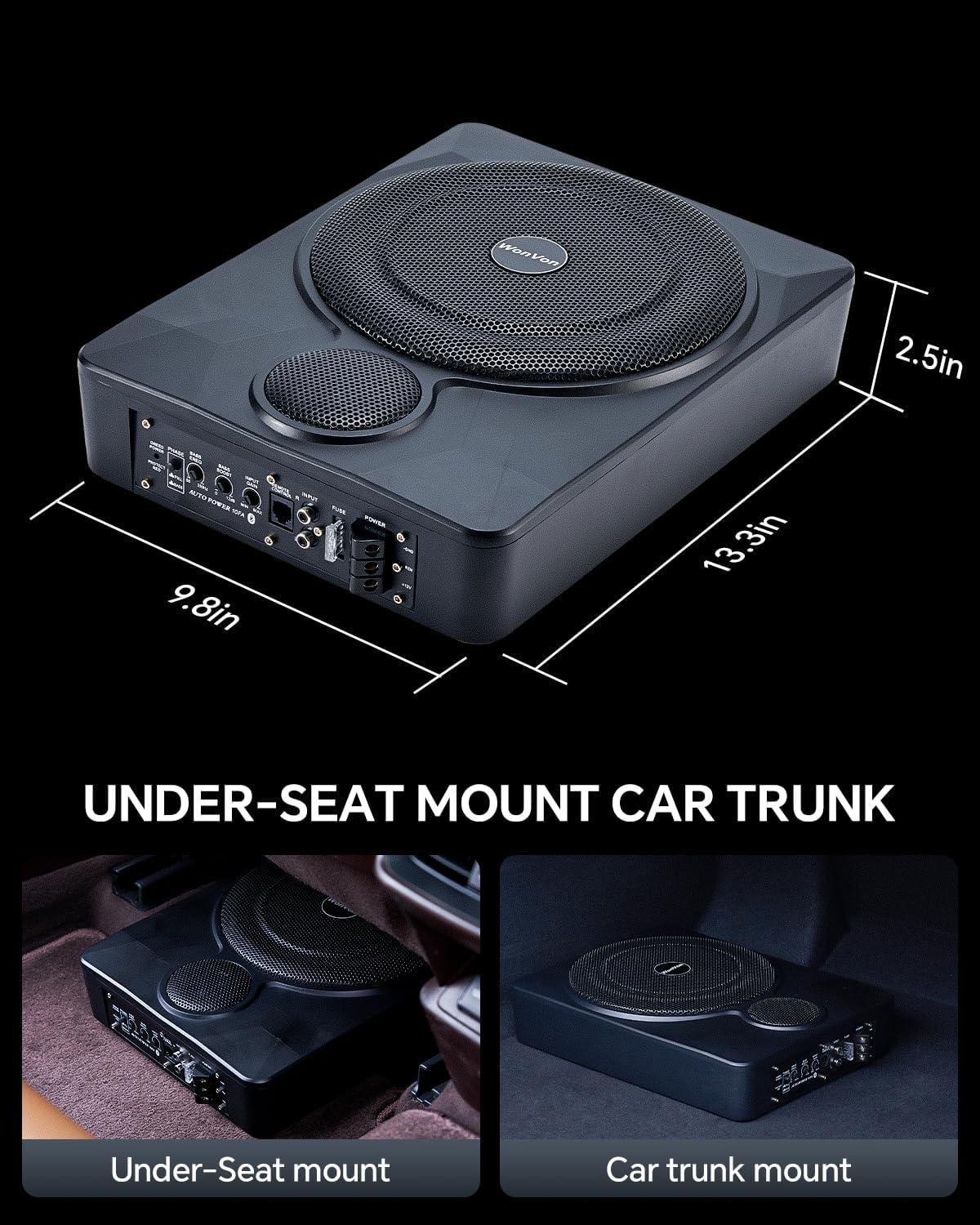
Figure 6.1: Product dimensions for installation planning.

Figure 6.2: Frequency response ranges for the subwoofer's bass and tweeter components.
7. Warranty and Support
For warranty information, technical support, or service inquiries, please refer to the official WonVon website or contact the seller directly through your purchase platform. Keep your proof of purchase for warranty claims.