
Introduction
This manual provides detailed instructions for the installation, operation, and maintenance of your YUHAO 44 Inch Black Ceiling Fan with Light and Remote Control. This fan is designed for efficient air circulation and lighting in indoor or covered outdoor environments. Please read this manual thoroughly before installation and use to ensure safe and efficient operation and to maximize the lifespan of your product.
Important Safety Information
To reduce the risk of electric shock, fire, or injury to persons, always follow these basic safety precautions:
- Always turn off power at the circuit breaker or fuse box before beginning installation or performing any maintenance.
- All electrical connections must be in accordance with local codes, ordinances, and the National Electric Code. If you are unfamiliar with electrical wiring, consult a qualified electrician.
- The mounting structure must be capable of supporting a minimum of 35 lbs (15.9 kg).
- Ensure the fan blades are at least 7 feet (2.1 meters) from the floor and have at least 30 inches (76 cm) clearance from any wall or obstruction.
- Do not operate the fan with damaged power cords or plugs.
- Avoid placing fingers or objects into the fan blades while the fan is operating.
- This fan is suitable for indoor and covered outdoor use only. Do not expose to direct water spray or rain.
What's in the Box
Please verify that all components are present and undamaged before beginning installation. If any parts are missing or damaged, contact YUHAO customer support immediately.
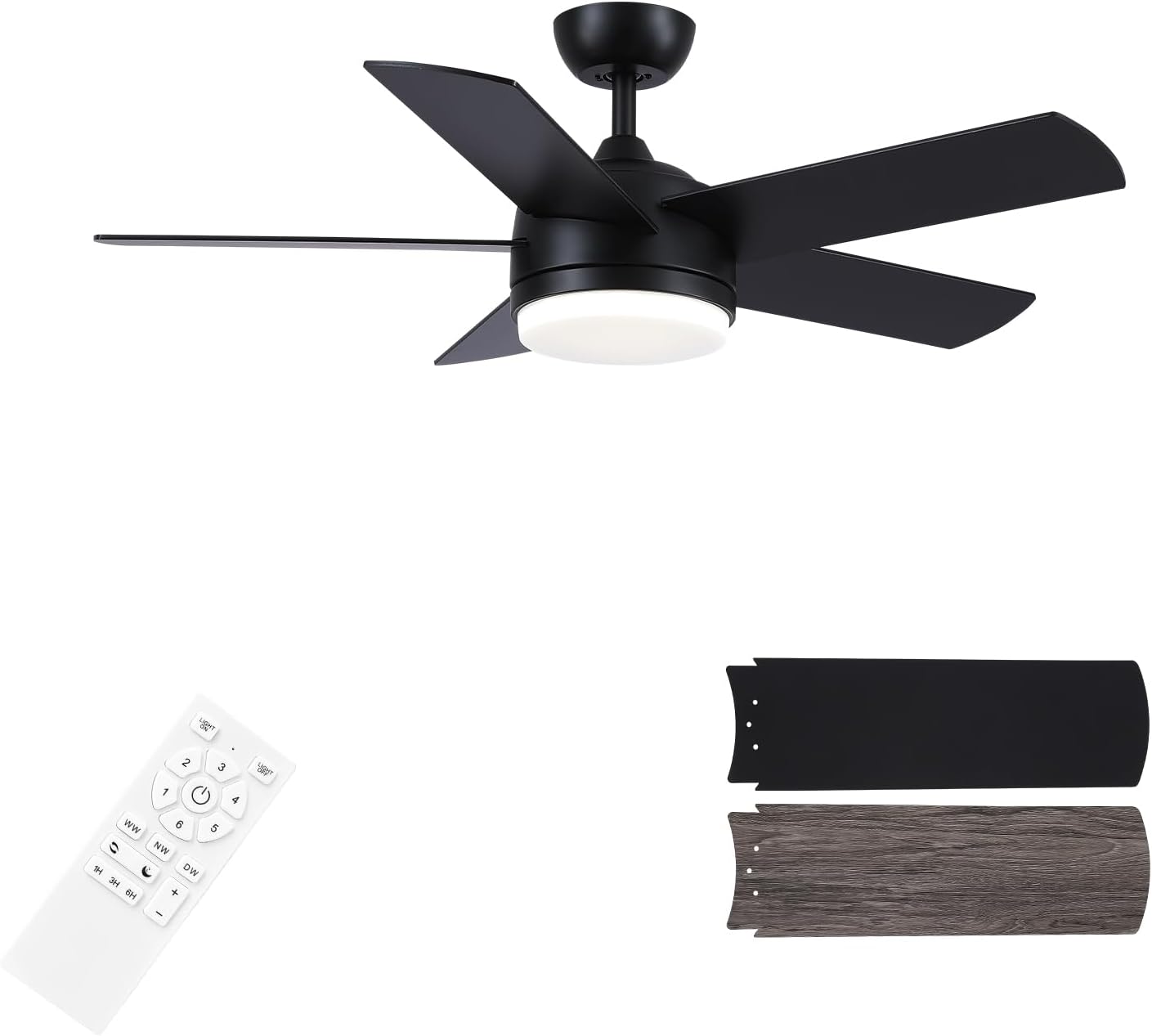
Image: All components of the YUHAO 44 Inch Black Ceiling Fan, including the main fan body, five black fan blades, the remote control, and the integrated LED light kit.
- Ceiling Fan Motor Housing
- Fan Blades (5)
- Remote Control
- Receiver (for remote control)
- Integrated LED Light Kit
- Light Diffuser
- Downrod
- Canopy
- Mounting Bracket
- Hardware Pack (screws, wire nuts, etc.)
- Instruction Manual
Setup and Installation
Professional installation by a qualified electrician is highly recommended. Ensure power is disconnected at the circuit breaker before proceeding with any installation steps.
Video: This video demonstrates the step-by-step installation process for the YUHAO Ceiling Fan, including mounting the bracket, assembling the fan body and blades, connecting wiring, and attaching the light kit.
Installation Steps:
- Prepare for Installation: Turn off power at the main circuit breaker or fuse box. Ensure the ceiling junction box is securely mounted and capable of supporting the fan's weight.
- Attach Mounting Bracket: Secure the mounting bracket to the ceiling junction box using the provided screws. Ensure it is firmly attached and level.
- Assemble Fan Blades: Attach each of the five fan blades to the motor housing using the provided screws. Ensure they are securely fastened.
- Install Downrod: Insert the downrod into the motor housing and secure it with the provided pin and screw. Feed the electrical wires from the motor through the downrod.
- Hang Fan: Carefully lift the fan assembly and hang it on the mounting bracket. Ensure the ball joint of the downrod is properly seated in the bracket.
- Wire Connections: Connect the fan's electrical wires to the household wiring (Live, Neutral, Ground) and the remote receiver according to the wiring diagram provided in the full manual. Ensure all connections are secure with wire nuts.
- Attach Light Kit: Connect the integrated LED light kit wires to the fan's light wires. Secure the light kit to the bottom of the fan motor housing using the designated screws.
- Install Light Diffuser: Twist or snap the light diffuser into place over the LED light kit.
- Secure Canopy: Slide the canopy up to the ceiling and secure it to the mounting bracket with screws, ensuring all wiring is neatly tucked inside.
- Power On: Restore power at the circuit breaker.
Operating Instructions
Your YUHAO ceiling fan is controlled by the included remote control. Ensure the remote has 2 AAA batteries installed (included) before use.

Image: The remote control for the YUHAO Ceiling Fan, showing buttons for light control, fan speed, forward/reverse, color temperature, dimming, and timer functions.
Remote Control Functions:
- Light ON/OFF: Press the "Light ON" or "Light OFF" buttons to control the integrated LED light.
- Fan Speed (1-6): Use buttons "1" through "6" to select desired fan speed. "1" is the lowest speed, "6" is the highest.
- Fan OFF: Press the "Fan OFF" button to turn off the fan.
- Color Temperature (WW/NW/DW): Press "WW" for Warm White (3000K), "NW" for Natural White (4000K), and "DW" for Cool White (6500K) to cycle through the three available light color temperatures.
- Dimmable (+/-): Use the "+" and "-" buttons to smoothly adjust the brightness of the LED light from 100% down to 20%.
- Forward/Reverse: Press the "Forward/Reverse" button to change the direction of the fan blades. This function is useful for seasonal air circulation:
- Forward Mode (Summer): Blades rotate counter-clockwise, circulating air downward to create a cooling effect.
- Reverse Mode (Winter): Blades rotate clockwise, circulating air upward to help distribute warm air evenly throughout the room.

Image: Illustration showing fan blades circulating air downward for cooling in summer (Forward mode) and upward for heat distribution in winter (Reverse mode).
- Fan Timer (1H/3H/6H): Press "1H", "3H", or "6H" to set the fan to automatically turn off after 1, 3, or 6 hours, respectively.
Pairing Remote Control:
If the remote control does not operate the fan, it may need to be paired. Within 10 seconds of turning on the fan's power at the wall switch, press and hold the "1" and "2" buttons on the remote simultaneously until you hear a beep or see the light flash, indicating successful pairing.
Maintenance
Regular maintenance helps ensure the longevity and optimal performance of your ceiling fan.
- Cleaning: To clean the fan, wipe surfaces with a soft, damp cloth. Do not use abrasive cleaners, solvents, or harsh chemicals, as these can damage the finish.
- Blade Cleaning: Clean fan blades regularly to prevent dust buildup, which can affect performance and balance.
- Tighten Screws: Periodically check and tighten all screws on the fan and mounting bracket to ensure secure and safe operation.
- No Lubrication Needed: The fan's DC motor is permanently lubricated and does not require oiling.
Troubleshooting
If you experience issues with your fan, consult the following table for common problems and their solutions.
| Problem | Possible Cause | Solution |
|---|---|---|
| Fan does not operate. | No power to the fan; remote control not paired; remote batteries low. | Check circuit breaker and wall switch. Ensure power is ON. Pair remote control (see Operating Instructions). Replace remote batteries. |
| Fan wobbles. | Loose blades or mounting hardware; unbalanced blades. | Ensure all blade screws and mounting screws are tight. Use a balancing kit (not included) if necessary to correct blade imbalance. |
| Light does not work. | Loose wire connection; LED light kit failure. | Check light kit wiring connections. If the LED light kit is faulty, contact customer support for assistance. |
| Remote control not responding. | Batteries are dead; remote not paired; interference. | Replace batteries with new AAA batteries. Re-pair the remote control with the fan. Ensure no strong interference sources (e.g., other remote devices) are nearby. |
| Fan makes unusual noise. | Loose screws; motor hum; blades hitting an obstruction. | Tighten all screws on the fan and mounting bracket. A slight motor hum is normal for DC motors, but excessive noise may indicate an issue. Ensure nothing is obstructing blade rotation. |
Specifications
| Feature | Detail |
|---|---|
| Brand | YUHAO |
| Model Number | DY1176-5B/44 |
| Size | 44 Inch |
| Color | Black |
| Material | Copper wire Motor, Wooden blades, Metal housing, LED Light. |
| Style | Modern |
| Room Type | Bedroom (also suitable for living rooms, covered outdoor areas) |
| Product Dimensions | 44"L x 44"W x 14"H |
| Indoor/Outdoor Usage | Indoor or Covered Outdoor |
| Power Source | DC |
| Installation Type | Semi Flush Mount |
| Special Features | Timer, Adjustable brightness, 6 Wind Speeds, 3 Color Temperatures LED, Forward and Reverse |
| Control Method | Remote Control |
| Light Source Type | LED |
| Voltage | 120 Volts |
| Light Color | Warm yellow (3000K), Natural (4000K), Cool white (6500K) |
| Wattage | 32 watts (Light) |
| Brightness | 2000 lumen |
| Number of Blades | 5 |
| Batteries Required | 2 AAA batteries (included) |
Warranty and Support
This YUHAO ceiling fan comes with a Limited Warranty. For specific warranty terms and conditions, including duration and coverage details, please refer to the warranty card included in your product packaging. It is important to retain your proof of purchase for warranty claims.
For technical assistance, troubleshooting, replacement parts, or any other inquiries, please contact YUHAO customer support. You can typically reach support through the Amazon platform where you purchased the product, or by visiting the official YUHAO store:
Please have your model number (DY1176-5B/44) and purchase date ready when contacting support.


