
1. Introduction
This manual provides essential information for the safe installation, operation, and maintenance of your MEIKEE 70W 6800LM Sensor Flood Light. Please read these instructions thoroughly before installation and retain for future reference.
The MEIKEE Sensor Flood Light is designed for outdoor security lighting, featuring high brightness, motion detection, and remote control capabilities. It is suitable for various outdoor applications such as walkways, porches, garages, and gardens.

Image 1.1: MEIKEE 70W 6800LM Sensor Flood Light and its remote control.
2. Safety Instructions
- Electrical Safety: Always turn off the main power supply at the circuit breaker before installing or servicing the light fixture. Improper wiring can lead to electric shock or fire.
- Qualified Electrician: Installation should be performed by a qualified electrician or a person with electrical knowledge to ensure compliance with local electrical codes.
- Mounting: Ensure the mounting surface is structurally sound and can support the weight of the fixture.
- Grounding: The fixture must be properly grounded to prevent electrical hazards.
- Operating Temperature: Do not operate the fixture outside its specified temperature range.
- Waterproof Rating: The fixture is IP66 rated for outdoor use. Ensure all connections are sealed properly to maintain this rating.
- Light Source: Do not stare directly into the LED light source when illuminated, as it can cause eye strain or damage.
3. Package Contents
Verify that all components are present before beginning installation:
- MEIKEE 70W Sensor Flood Light
- Remote Control
- Mounting Bracket
- Mounting Screws and Wall Anchors
- Wire Nuts
- User Manual (this document)

Image 3.1: Included components for installation.
4. Product Overview
The MEIKEE 70W Sensor Flood Light features three adjustable light heads and an integrated PIR motion sensor. The light heads can be adjusted to provide a wide lighting angle, and the motion sensor detects movement within its range.

Image 4.1: Key features including adjustable heads, PIR sensor, heat dissipation, and LED.
- Adjustable Light Heads: Each of the three light heads can be independently adjusted up to 180 degrees horizontally and 90 degrees vertically, allowing for a total lighting angle of 270 degrees.
- PIR Motion Sensor: Detects movement of persons, animals, or vehicles to automatically activate the light. The sensing angle is 180 degrees.
- Remote Control: Provides convenient adjustment of working modes, brightness, sensing distance, and lighting duration.
- Durable Construction: Made from Aluminum and ABS material with an IP66 waterproof rating for the lamp body and IP65 for the sensor head, ensuring resilience against various weather conditions.
5. Installation
Important: Before starting installation, ensure the power supply is turned off at the circuit breaker.
- Prepare Wiring: Identify the live wire (typically black or red) and neutral wire (typically white or blue) from your electrical box.
- Mount Bracket: Secure the mounting bracket to the wall using the provided screws and anchors. Ensure it is firmly attached.
- Connect Wires: Connect the live wire from the electrical box to the live wire of the flood light using a wire nut. Connect the neutral wire from the electrical box to the neutral wire of the flood light. Ensure a proper ground connection.
- Attach Fixture: Carefully attach the flood light fixture to the mounting bracket, ensuring all wires are tucked safely inside the electrical box.
- Adjust Light Heads: Once mounted, adjust the three light heads to cover your desired lighting area.
Image 5.1: Simplified installation steps for the flood light.
6. Operating Instructions
6.1. Remote Control Functions
The included 15-key remote control allows for convenient adjustment of the flood light's settings.

Image 6.1: Remote control and sensor head adjustment options.
- ON/OFF: Toggles the light on or off.
- Constant Light Mode: Activates the light to stay on continuously.
- Lighting Duration: Sets how long the light stays on after motion detection (45s, 90s, 120s, 5mins, 10mins).
- Detection Distance: Adjusts the motion sensor's range (6m/20ft, 9m/30ft, 12m/39ft).
- Adjustable Brightness: Sets the light output from 10% to 100%.
- Timer: Sets the light to stay on for 1, 2, or 3 hours before switching to night sensing mode.
- 24H Detection Mode: Sensor works day and night.
- Night Detection Mode: Sensor works only at night.
6.2. Sensor Head Control
The sensor head also has manual controls for basic settings:
- Sensing Time: Adjusts the duration the light stays on after motion is detected.
- Day/Night Mode: Selects whether the sensor operates during the day and night, or only at night.
6.3. Working Modes
The flood light offers four distinct working modes, selectable via the remote control:

Image 6.2: Visual representation of the four operating modes.
- Constant Light Mode (Always On): The light remains continuously on, regardless of motion or ambient light conditions.
- 24 Hours Sensing Mode: The motion sensor is active both during the day and at night. The light will turn on when motion is detected and turn off after the set duration if no further motion is detected.
- Night Sensing Mode: The motion sensor is active only at night or in low-light conditions. The light will turn on when motion is detected and turn off after the set duration.
- Timing Mode (1H/2H/3H + Detection): The light stays on for a set period (1, 2, or 3 hours) and then automatically switches to Night Sensing Mode.
6.4. Adjustable Settings
Fine-tune the light's performance to your specific needs:
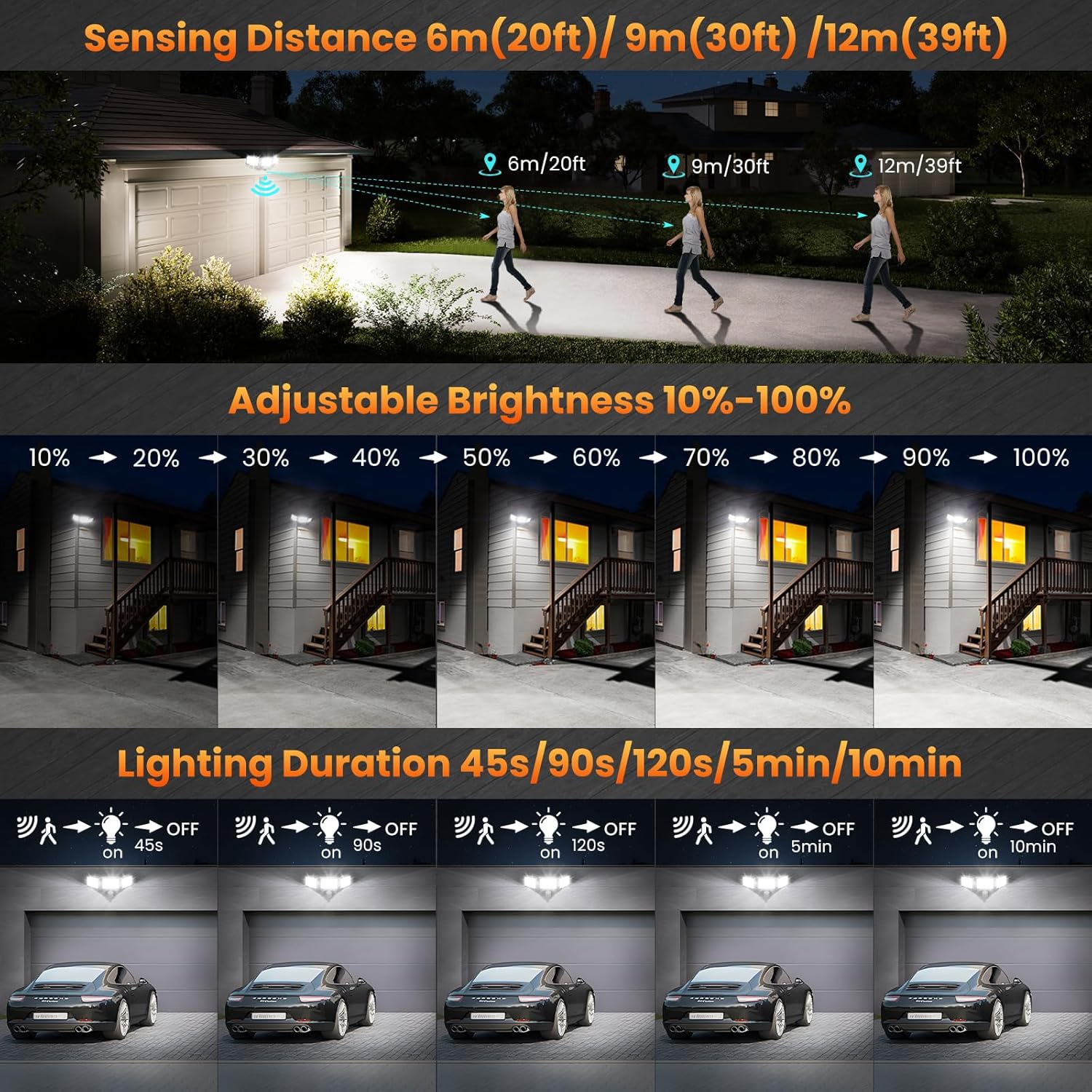
Image 6.3: Adjustable parameters for sensing and lighting.
- Brightness: Adjustable from 10% to 100% in all modes.
- Sensing Distance: Selectable between 6m (20ft), 9m (30ft), and 12m (39ft) for motion detection.
- Sensing Time (Lighting Duration): Configurable to 45 seconds, 90 seconds, 120 seconds, 5 minutes, or 10 minutes. A 5-second test mode is available for quick adjustments.
7. Maintenance
- Cleaning: Periodically clean the light fixture and sensor lens with a soft, damp cloth. Do not use abrasive cleaners or solvents.
- Inspection: Regularly inspect the wiring and mounting for any signs of wear, damage, or loose connections.
- LEDs: The LED light source is designed for long life and is not user-replaceable.
8. Troubleshooting
| Problem | Possible Cause | Solution |
|---|---|---|
| Light does not turn on. | No power, loose wiring, faulty sensor, incorrect mode. | Check power supply and circuit breaker. Verify wiring connections. Ensure sensor is clean and unobstructed. Check remote settings for correct mode. |
| Light stays on continuously. | Constant Light Mode selected, continuous motion detected, faulty sensor. | Switch to a sensing mode using the remote. Ensure no constant motion is within sensor range. |
| Light flashes or flickers. | Unstable power supply, loose connection, incompatible dimmer. | Check power source stability. Tighten all wiring connections. This fixture is not designed for use with external dimmers. |
| Motion sensor not detecting. | Sensor obstructed, incorrect sensitivity, wrong mode (e.g., Night Sensing during day). | Clear any obstructions from the sensor. Adjust sensing distance and mode via remote. |
9. Specifications
| Model Number | P02B1 |
| Wattage | 70W |
| Lumen Output | 6800LM |
| Color Temperature | 6500K (White Light) |
| Sensing Angle | 180° |
| Sensing Distance | Up to 12m (39ft) |
| Lighting Angle | 270° (Adjustable) |
| Waterproof Rating | IP66 (Lamp Body), IP65 (Sensor Head) |
| Material | Aluminum, Plastic |
| Lifespan | Approx. 50,000 hours |
| Product Dimensions | 23 x 16 x 18 cm |
| Weight | 1.32 kg |

Image 9.1: The flood light's IP66 waterproof rating ensures durability in outdoor conditions.
10. Warranty and Support
MEIKEE products are manufactured to high-quality standards. For warranty information or technical support, please refer to the contact details provided with your purchase or visit the official MEIKEE website. Keep your purchase receipt as proof of purchase for warranty claims.


