
Lexar SL600
Lexar SL600 Portable External SSD User Manual
Model: SL600 (843367)
Introduction
The Lexar SL600 USB 3.2 Type-C Portable External SSD is designed for high-performance data storage and transfer. It offers fast read/write speeds, robust durability, and broad compatibility, making it an ideal solution for professionals and users requiring reliable portable storage.

Figure 1: Front view of the Lexar SL600 Portable External SSD, showcasing its sleek black design and Lexar branding.
What's in the Box
Upon opening your Lexar SL600 package, you should find the following items:
- Lexar SL600 Portable External SSD
- USB Type-C to Type-C cable
- USB Type-C to Type-A cable
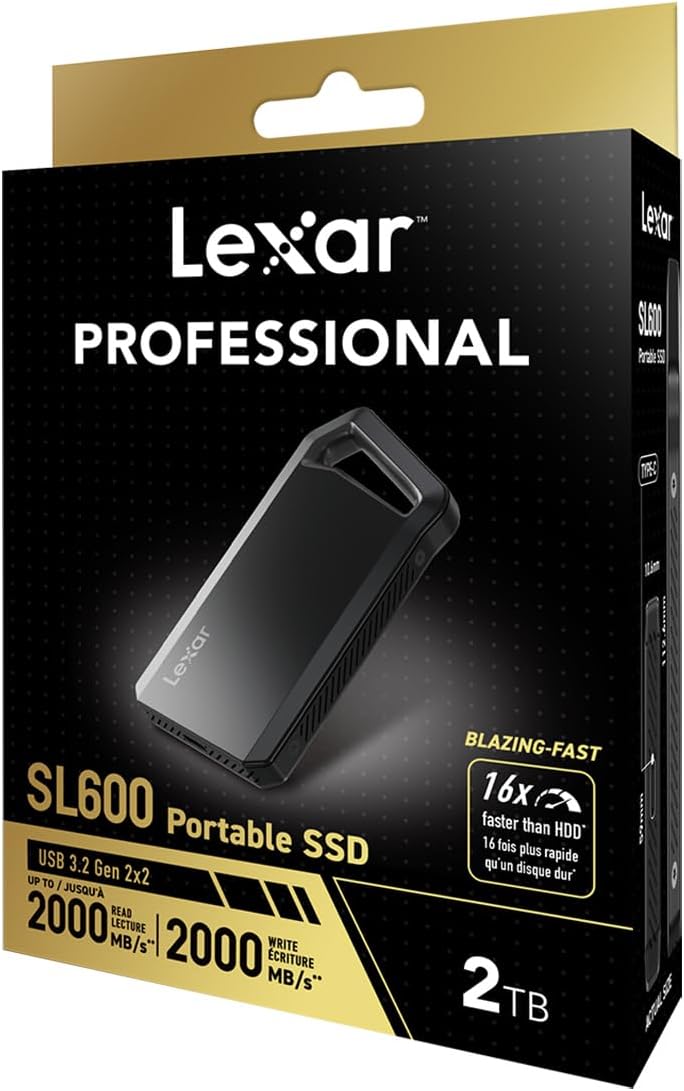
Figure 2: The Lexar SL600 Portable External SSD shown within its retail packaging, indicating the product and its included accessories.
Setup Guide
Follow these steps to set up your Lexar SL600 SSD:
- Connect the SSD: Use the provided USB Type-C to Type-C cable or USB Type-C to Type-A cable to connect the Lexar SL600 SSD to an available USB port on your computer or compatible device.
- Power On: The SSD is bus-powered and does not require an external power adapter. It will power on automatically once connected.
- Initial Recognition: Your operating system (Windows, macOS, Android) should automatically detect the new storage device.
- Formatting (Optional): For optimal performance or if you encounter issues, you may need to format the drive. Refer to your operating system's disk management tools for instructions. Note: Formatting will erase all data on the drive.

Figure 3: Side view of the Lexar SL600 SSD, highlighting the USB Type-C port for connection.
Operating Instructions
The Lexar SL600 is designed for ease of use and high-speed data management.
Data Transfer
Utilize the SSD for rapid file transfers. With USB 3.2 Gen 2x2 technology, it supports read and write speeds of up to 2000MB/s. Simply drag and drop files to and from the drive, or use your system's copy/paste functions.
Data Security (Lexar DataShield)
The Lexar SL600 comes with Lexar DataShield software, which provides 256-bit AES encryption to protect your sensitive files. Install and configure the software according to the instructions provided with the drive or available on the Lexar support website.
Portability and Design
Its compact and lightweight design, coupled with a durable aluminum enclosure, makes it highly portable and resistant to shock and vibration. The integrated carabiner loop allows for easy attachment to bags or keychains for convenient transport.

Figure 4: The Lexar SL600 SSD featuring its integrated carabiner loop, designed for easy attachment and portability.
Maintenance
To ensure the longevity and optimal performance of your Lexar SL600 SSD, consider the following maintenance tips:
- Safe Removal: Always safely eject the SSD from your computer before disconnecting it to prevent data corruption.
- Physical Care: While durable, avoid exposing the SSD to extreme temperatures, direct sunlight, or excessive moisture. Clean the exterior with a soft, dry cloth.
- Firmware Updates: Periodically check the Lexar official website for any available firmware updates for your SL600 model. Updates can improve performance and stability.
- Data Backup: Regularly back up important data stored on the SSD to another location to prevent data loss in case of unforeseen issues.
Troubleshooting
If you encounter issues with your Lexar SL600 SSD, try the following common troubleshooting steps:
| Problem | Solution |
|---|---|
| SSD not detected by computer. |
|
| Slow transfer speeds. |
|
| Cannot write files to the SSD. |
|
Specifications
| Feature | Detail |
|---|---|
| Model Name | SL600 |
| Model Number | 843367 |
| Interface | USB 3.2 Gen 2x2 (USB Type-C) |
| Read Speed | Up to 2000 MB/s |
| Write Speed | Up to 2000 MB/s |
| Capacities Available | 1TB, 2TB, 4TB (as per product description) |
| Dimensions (LxWxH) | 5.5 x 4.25 x 1.37 inches |
| Weight | 5.4 ounces |
| Color | Black |
| Durability Features | Shock and Vibration Resistant, Aluminum Enclosure |
| Security | Lexar DataShield (256-bit AES encryption) |
| Compatibility | Mac OSX 10.6+, Windows 11/10/7/8, Android 4.4+ |
Warranty and Support
Lexar products are designed for reliability and performance. For detailed warranty information specific to your region and product, please refer to the warranty card included with your purchase or visit the official Lexar website.
For technical support, driver downloads, firmware updates, or frequently asked questions, please visit the Lexar support page:
When contacting support, please have your product model number (SL600 / 843367) and purchase information ready.
Related documentsSL600


Ask a question about this manual
Ask about setup, troubleshooting, compatibility, parts, safety, or missing instructions. Manuals+ will review the question and use this page’s manual context to help answer it.