
Lite-On PA-1200-3SA1
LiteOn PA-1200-3SA1 AC Adapter User Manual
Model: PA-1200-3SA1 (P/N: 341-0417-01)
Introduction
This manual provides essential instructions for the safe and efficient use of your LiteOn PA-1200-3SA1 AC Adapter. Please read this manual thoroughly before using the product and retain it for future reference.
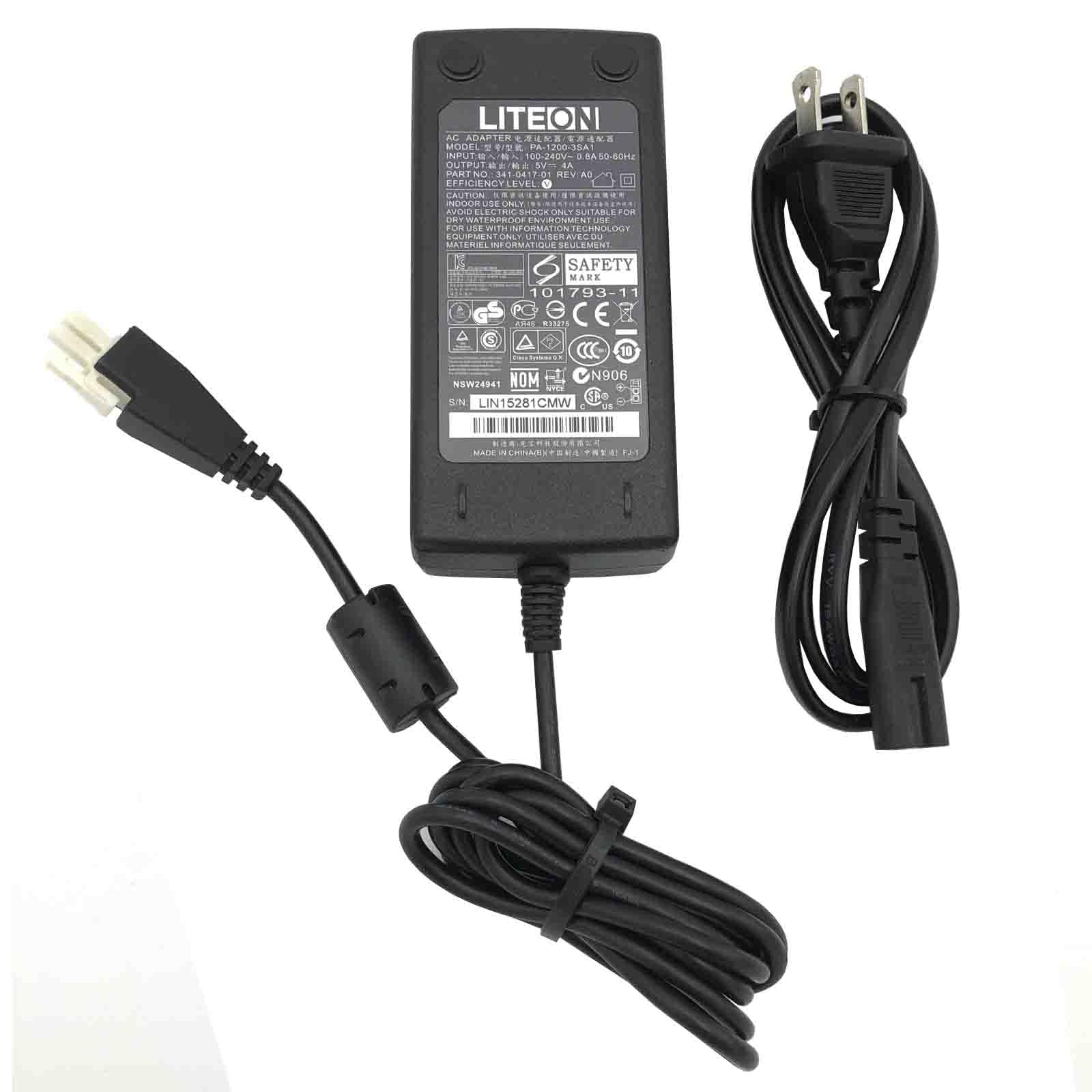
Image: The LiteOn PA-1200-3SA1 AC Adapter with its power cord, showcasing the complete unit.
Important Safety Information
To prevent electric shock, fire, or damage to the adapter or connected devices, observe the following safety precautions:
- Indoor Use Only: This adapter is designed for indoor use in dry environments. Do not expose it to rain, moisture, or extreme temperatures.
- Avoid Electric Shock: Do not open the adapter casing. There are no user-serviceable parts inside. Refer all servicing to qualified personnel.
- Dry Environment: This product is not suitable for use in wet or waterproof environments. Ensure the adapter and its connections remain dry.
- Correct Voltage and Polarity: Always verify that the voltage, amperage, and connector tip size of this adapter match the requirements of your device. Incorrect specifications can cause damage.
- Overload Protection: Do not overload the adapter. Ensure the connected device's power requirements do not exceed the adapter's output capacity (5V 4A, 20W).
- Ventilation: Ensure adequate ventilation around the adapter during use. Do not cover it or place it in an enclosed space that could lead to overheating.
- Cable Care: Do not place heavy objects on the power cord or allow it to be pinched. Avoid bending or twisting the cord excessively.

Image: Close-up view of the adapter's label, displaying safety certifications, input/output specifications, and usage warnings.
Setup Instructions
- Unpack the Adapter: Carefully remove the LiteOn PA-1200-3SA1 AC Adapter and its power cord from the packaging.
- Inspect for Damage: Before use, visually inspect the adapter and power cord for any signs of damage. Do not use if damaged.
- Connect the Power Cord: Insert the AC power cord into the adapter's input port. Ensure it is firmly seated.

Image: The LiteOn AC adapter showing the input port where the AC power cord connects.
- Connect to Device: Plug the 2-pin output connector of the adapter into the corresponding power input port of your compatible device (e.g., router). Ensure the connector is inserted correctly and securely.

Image: A detailed view of the 2-pin output connector, highlighting its shape and pin configuration.

Image: An alternative perspective of the 2-pin output connector, showing its design from a different angle.
- Connect to Power Outlet: Plug the AC power cord into a standard wall outlet (100-240V AC).
- Verify Operation: Once connected, your device should power on or indicate that it is receiving power.
Operating Instructions
The LiteOn PA-1200-3SA1 AC Adapter is designed for continuous operation within its specified parameters. Once properly connected, it will supply stable 5V 4A power to your compatible device.
- Ensure the adapter is placed in a well-ventilated area to prevent overheating.
- Avoid disconnecting the adapter from the power source or your device abruptly during critical operations, if applicable to your device.
- The adapter features built-in safeguards against incorrect voltage, short circuits, and internal overheating for reliable performance.
Maintenance
Proper maintenance ensures the longevity and safe operation of your AC adapter.
- Cleaning: Disconnect the adapter from all power sources before cleaning. Use a soft, dry cloth to wipe the exterior. Do not use liquid cleaners or solvents.
- Storage: When not in use for extended periods, store the adapter in a cool, dry place, away from direct sunlight and moisture. Coil the power cord loosely to prevent damage.
- Inspection: Periodically inspect the adapter casing and power cords for any signs of wear, cuts, or damage. Replace the adapter if any damage is observed.
Troubleshooting
If you encounter issues with your LiteOn PA-1200-3SA1 AC Adapter, refer to the following common solutions:
| Problem | Possible Cause | Solution |
|---|---|---|
| Device not powering on. |
|
|
| Adapter feels hot. |
|
|
| Intermittent power to device. |
|
|
Specifications
| Feature | Detail |
|---|---|
| Brand | Lite-On |
| Model Number | PA-1200-3SA1 |
| Part Number (P/N) | 341-0417-01 |
| Serial Number (S/N) | LIN15281CMW |
| Input Voltage | 100-240V~0.8A, 50-60Hz |
| Output Voltage | 5V |
| Output Amperage | 4A |
| Wattage | 20W |
| Connector Type | 2-Pin |
| Compatible Devices | Router (verify device specifications) |
| Special Features | Short Circuit Protection, Incorrect Voltage Protection, Internal Overheating Protection |
| Included Components | 1 AC Adapter, 1 Power Cord |
| ASIN | B0D1RWBT48 |
| Date First Available | April 15, 2024 |
Warranty and Support
This LiteOn AC Adapter is manufactured with quality materials and includes multiple smart features for safe and efficient operation. While specific warranty details are not provided in this manual, the manufacturer aims to provide reliable products.
For technical support, troubleshooting beyond this guide, or warranty inquiries, please contact the retailer or manufacturer directly. Refer to your purchase documentation for contact information.
When contacting support, please have the following information ready:
- Product Model: PA-1200-3SA1
- Part Number: 341-0417-01
- Date of Purchase
- Description of the issue
Ask a question about this manual
Ask about setup, troubleshooting, compatibility, parts, safety, or missing instructions. Manuals+ will review the question and use this page’s manual context to help answer it.