1. Product Overview
The SKRT Mobility Scooter is a compact and convenient 4-wheel electric powered device designed for adults and seniors, offering enhanced mobility for travel and daily activities. It features a lightweight and portable design, equipped with LED headlights and a storage basket for user convenience. This manual provides essential information for the safe and effective use of your mobility scooter.

Image: The SKRT Mobility Scooter, showcasing its design with LED headlights and a front basket.
Key Features:
- Supports up to 300 lbs weight capacity.
- Maximum speed of 4.5 MPH.
- Standard driving distance up to 10 miles per charge.
- 24-volt 12AH battery, chargeable on or off the scooter.
- Adjustable armrests for comfortable fit.
- Bright front LED headlight for safety and visibility.
- Equipped with four solid tires to prevent punctures.
- Features anti-roll technology for enhanced stability.
- Includes an unbreakable storage basket.
- Quickly disassembles into five lightweight pieces for portability.
2. Safety Guidelines
Always prioritize safety when operating the mobility scooter. Adhere to all local traffic laws and regulations. Ensure you are familiar with the controls and capabilities of the scooter before operating it in public areas.
Important Safety Information:
- Do not operate the scooter under the influence of alcohol or medication that impairs judgment.
- Always wear appropriate safety gear, such as a helmet, if required by local regulations or for personal safety.
- Avoid sudden stops or turns, especially at high speeds.
- Be aware of your surroundings and potential obstacles.
- Ensure the battery is properly charged before each use to avoid unexpected power loss.
- Do not exceed the maximum weight capacity of 300 lbs.
Legal Disclaimer: Statements regarding dietary supplements have not been evaluated by the FDA and are not intended to diagnose, treat, cure, or prevent any disease or health condition. This product is a mobility device and not a medical treatment.
3. Assembly and Setup
The SKRT Mobility Scooter is designed for easy assembly. Follow these steps to set up your scooter for first use.
Assembly Steps:
- Unpack all components from the packaging.
- Assemble the main body of the mobility scooter.
- Attach the seat and secure it in place.
- Install the tiller (handlebar assembly) and ensure it is firmly locked.
- Attach the front storage basket to the tiller.
- Connect the battery pack.

Image: A visual guide demonstrating the 5-step quick disassembly and assembly process of the scooter.
Initial Setup:
- Charge the battery fully before first use. Refer to the 'Charging the Battery' section for details.
- Adjust the seat height and armrests for your comfort. The armrests extend out from the seat and can be adjusted.
4. Operating Instructions
Once assembled and charged, your SKRT Mobility Scooter is ready for operation.
Basic Operation:
- Press the power button to turn on the scooter.
- Use the control lever on the tiller to move the scooter forward or backward.
- Steer the scooter using the handlebars.
- To activate the headlights, locate the green light button on the control panel.
- The red button on the control panel is for the horn.
- Apply the brakes by releasing the control lever or using the designated brake control if available.

Image: Details of the scooter's control panel, highlighting its user-friendly design, anti-tilt wheels, and front anti-collision bar.
Charging the Battery:
The 24-volt 12AH battery can be charged both on or off the scooter. Ensure the charger is connected to a standard power outlet and then to the scooter's charging port or directly to the battery pack.

Image: Illustration of the two available methods for charging the scooter's battery.
Disassembly for Transport:
The scooter quickly disassembles into five lightweight pieces, making it convenient for transport in a vehicle trunk or back seat.
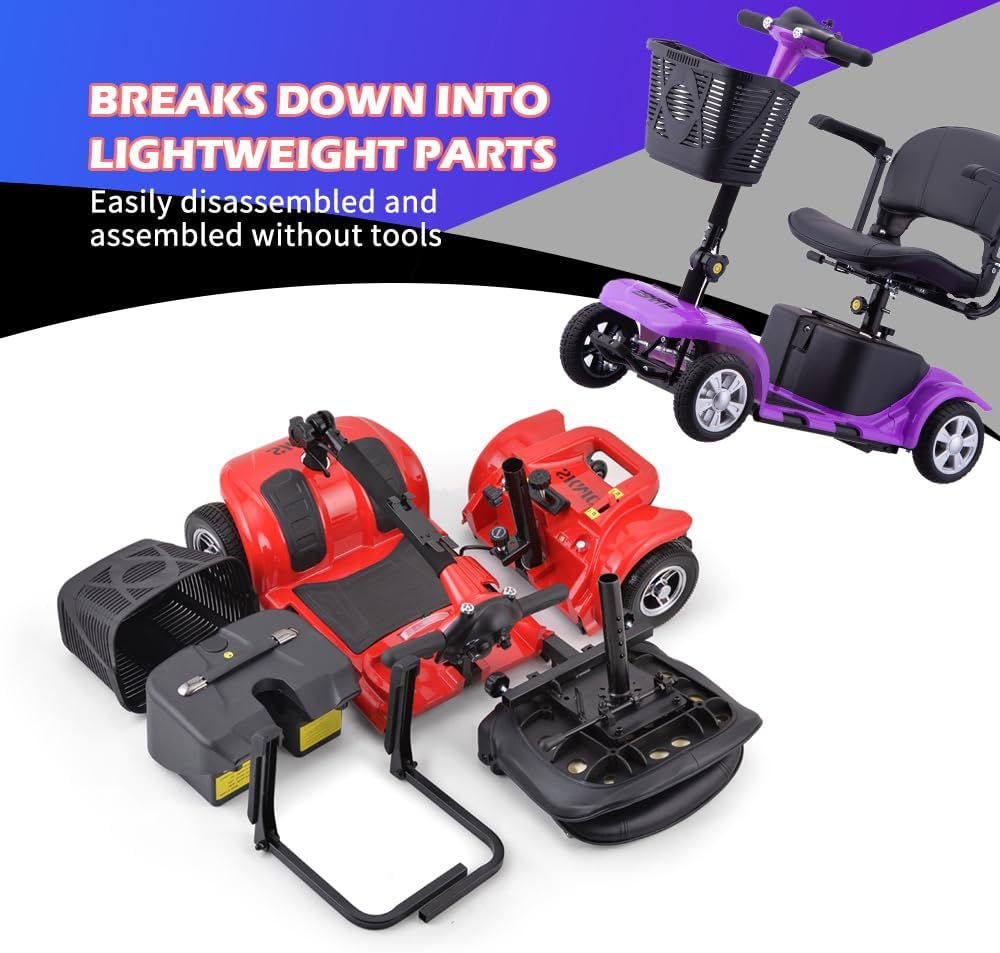
Image: The SKRT Mobility Scooter broken down into its easily transportable lightweight parts.
5. Care and Maintenance
Regular care and maintenance will ensure the longevity and optimal performance of your SKRT Mobility Scooter.
- Keep the scooter clean by wiping it with a damp cloth. Avoid using harsh chemicals.
- Regularly check tire pressure (if applicable, though this model has solid tires, inspect for damage).
- Inspect all nuts, bolts, and fasteners periodically to ensure they are tight.
- Store the scooter in a dry, cool place when not in use.
- Charge the battery regularly, even if the scooter is not used frequently, to maintain battery health.
6. Troubleshooting
This section provides general guidance for common issues. For more complex problems, please contact customer support.
| Problem | Possible Cause | Solution |
|---|---|---|
| Scooter does not turn on | Battery is not charged or not connected; Power switch is off. | Charge the battery; Ensure battery is properly connected; Turn on the power switch. |
| Reduced speed or range | Low battery charge; Overload; Rough terrain. | Fully charge the battery; Reduce load; Operate on smoother surfaces. |
| Unusual noises during operation | Loose components; Obstruction. | Check for loose parts and tighten; Remove any obstructions. If noise persists, contact support. |
7. Specifications
Detailed specifications for the SKRT Mobility Scooter Model R100.

Image: Overall dimensions and weight capacity of the SKRT Mobility Scooter.
| Feature | Detail |
|---|---|
| Product Dimensions | 39"D x 20"W x 33"H (39 x 20 x 33 inches) |
| Item Model Number | R100 |
| Weight | 112.44 Pounds |
| Batteries | 1 Unknown batteries required (included) |
| Brand | SKRT |
| Color | Blue/Red (Purple variant) |
| Manufacturer | DOUBLE GLOBAL INC |
| Max Speed | 4.5 MPH |
| Drive Mileage | Up to 10 miles per charge |
| Weight Capacity | 300 lbs |
8. Customer Support and Warranty
For any questions, technical support, or service inquiries, please refer to the information below.

Image: Information regarding after-sale service and customer support.
After-Sale Service Policy:
- 1-30 days: Free returns and exchanges. Please keep the original packaging.
- 31-90 days: Free replacement/replacement of accessories (depending on status of vehicle). Non-refundable payment.
- 90 days to 3 years: Limited Maintenance. Technical team support available. Accessories shipped from our California warehouse.
Contact Information:
- Service Hours: Monday to Friday, 10am to 6pm Pacific Standard Time.
- Technical Hotline: 909-278-0155. Please call our tech John for your issue.
Important: Please keep the product box for after-sales and maintenance. If box damage occurs during delivery, please contact us to request a new box.


