
1. Overview
The JBL Tune T160 In-Ear Headphones are designed to deliver powerful audio with comfort and convenience. These lightweight headphones feature 9mm drivers for JBL Pure Bass Sound, an integrated 1-button remote with a microphone for hands-free calls and music control, and a tangle-free flat cable for ease of use. This manual provides essential information for setting up, operating, and maintaining your headphones.
2. What's in the Box
- JBL Tune T160 In-Ear Headphones
- Eartips (various sizes)
- Protective Case
- User Manual

This image displays the complete JBL Tune T160 In-Ear Headphones package, including the blue in-ear headphones with their integrated remote and 3.5mm audio jack, alongside the black carrying pouch.
3. Product Features
- JBL Pure Bass Sound: Experience powerful and precise audio.
- 9mm Drivers: Deliver deep and impactful bass.
- Lightweight and Compact Design: Ensures comfort and portability for daily use.
- 1-Button Remote with Microphone: Seamlessly control music playback and manage calls.
- Tangle-Free Flat Cable: Designed for durability and convenience, preventing knots.
- 3.5mm Gold Plated Jack: Ensures reliable audio connection.
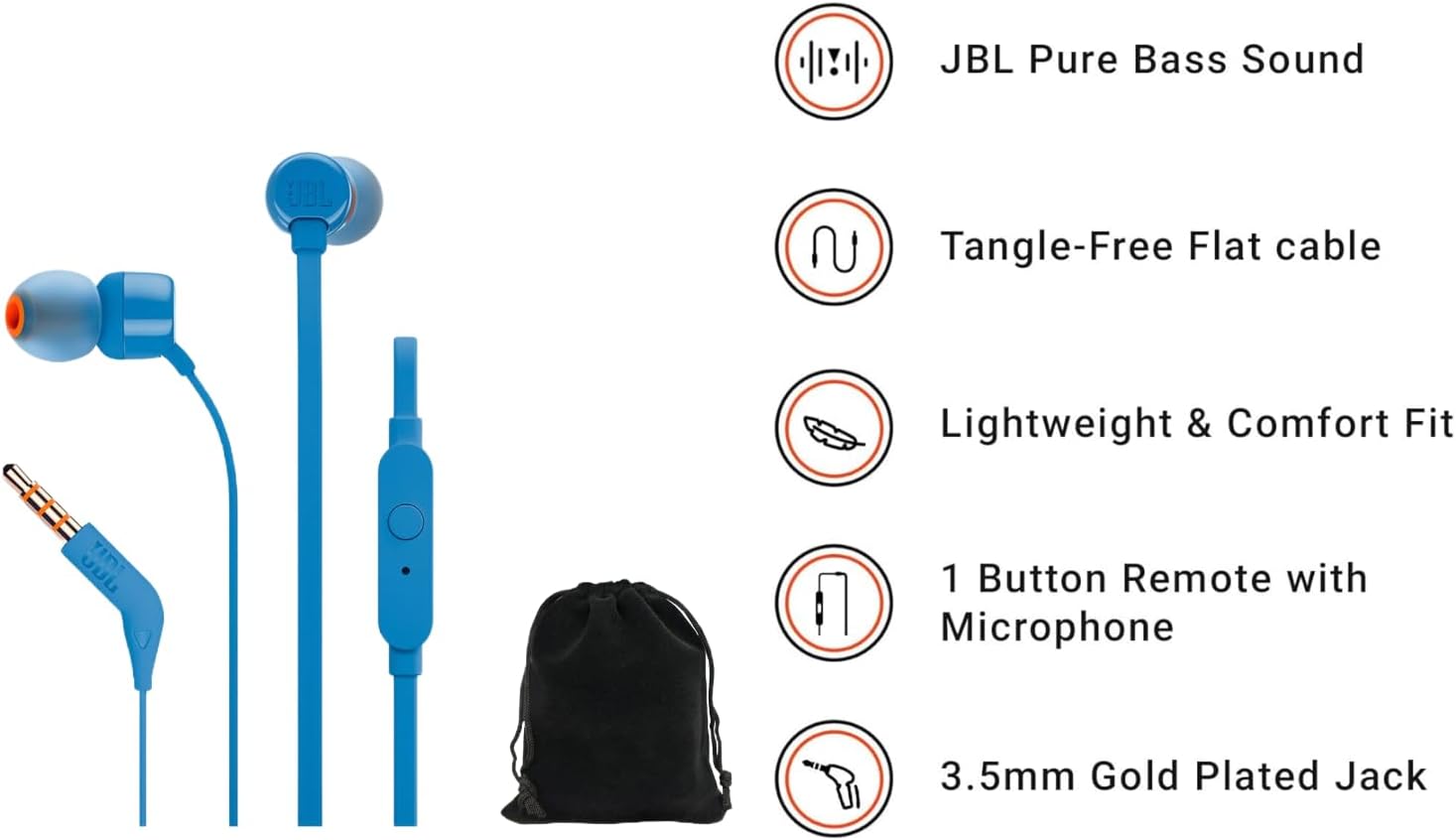
A visual representation of the JBL Tune T160 In-Ear Headphones' main features, including Pure Bass Sound, the tangle-free flat cable design, lightweight construction for comfort, the single-button remote with microphone, and the 3.5mm gold-plated audio jack.
4. Setup
Follow these steps to begin using your JBL Tune T160 In-Ear Headphones:
- Select Eartips: Choose the eartip size that provides the most comfortable and secure fit for your ears. A good seal is crucial for optimal sound quality and bass response.
- Insert Headphones: Gently insert the earpieces into your ears. Ensure they are seated comfortably and securely.
- Connect to Device: Plug the 3.5mm audio jack into the headphone port of your audio source (e.g., smartphone, tablet, laptop, MP3 player).
The 3.5mm audio jack of the JBL Tune T160 headphones is shown, ready for connection to a compatible audio device.
5. Operating Instructions
The JBL Tune T160 headphones feature a convenient 1-button in-line remote for easy control of your audio and calls.

This image provides a detailed view of the in-line remote control for the JBL Tune T160 headphones, showing the single button for media control and call management, along with the integrated microphone.
Music Control:
- Play/Pause: Press the button once.
- Next Track: Press the button twice quickly.
- Previous Track: Press the button three times quickly.
Call Control:
- Answer/End Call: Press the button once.
- Reject Call: Press and hold the button.
6. Maintenance
Proper care ensures the longevity and performance of your headphones:
- Cleaning: Use a soft, dry cloth to wipe the earpieces and cable. For eartips, remove them and clean with a mild soap solution, then rinse thoroughly and dry completely before reattaching.
- Storage: When not in use, store the headphones in the provided protective case to prevent tangling and damage.
- Avoid Moisture: Do not expose the headphones to excessive moisture or liquids.
- Handle with Care: Avoid pulling on the cable or bending the jack excessively.
7. Troubleshooting
If you encounter issues with your JBL Tune T160 headphones, refer to the following common solutions:
| Problem | Possible Solution |
|---|---|
| No sound or low volume |
|
| Microphone not working |
|
| Poor sound quality / lack of bass |
|
8. Specifications
| Feature | Detail |
|---|---|
| Model Name | JBLTUNET160-Pouch |
| Connectivity Technology | Wired |
| Headphones Jack | 3.5 mm Jack |
| Audio Driver Size | 9 Millimeters |
| Frequency Range | 20 Hz - 20,000 Hz |
| Control Type | Media Control (Push Button) |
| Cable Feature | Tangle Free Flat Cable |
| Special Features | Lightweight, Microphone Included |
| Item Weight | 0.05 Kilograms (1.76 ounces) |
| Included Components | Eartip, Protective Case, User Manual |
| UPC | 050036338967 |
9. Warranty and Support
JBL products are engineered for reliability and performance. For information regarding warranty coverage, technical support, or service inquiries, please refer to the warranty card included with your product or visit the official JBL website. Keep your proof of purchase for any warranty claims.


