
1. Product Overview
The TROND 20W USB C Travel Power Strip (Model TD-PS-US24S) is a versatile and compact power solution designed for both home and travel use. It features an ultra-thin flat plug, multiple outlets, and fast USB charging capabilities to efficiently power your devices.

Image: The TROND 20W USB C Travel Power Strip, a compact white unit with a 5ft ultra-thin flat plug, shown ready for use.
2. Key Features
- Space-Saving Flat Plug: 0.33-inch ultra-thin flat head design fits into tight spots behind furniture.
- 20W Fast USB-C Charging: Dedicated USB-C port for rapid charging of compatible devices.
- 7-in-1 Power Solution: 3 AC wide outlets, 2 USB-A ports, and 2 USB-C ports for simultaneous charging of up to 7 devices.
- Wall Mountable Design: Features a mounting hole for secure installation on walls or furniture.
- Travel-Friendly: Compact size and wide-range voltage support (120V-240V) make it ideal for travel, including cruise ships (no surge protection).
3. Setup and Installation
3.1 Connecting to a Wall Outlet
The TROND power strip features an ultra-thin flat plug designed to fit in narrow spaces. Simply plug the power strip's flat plug into any standard 120V-240V AC wall outlet. The 45° angled design ensures it does not block adjacent receptacles.
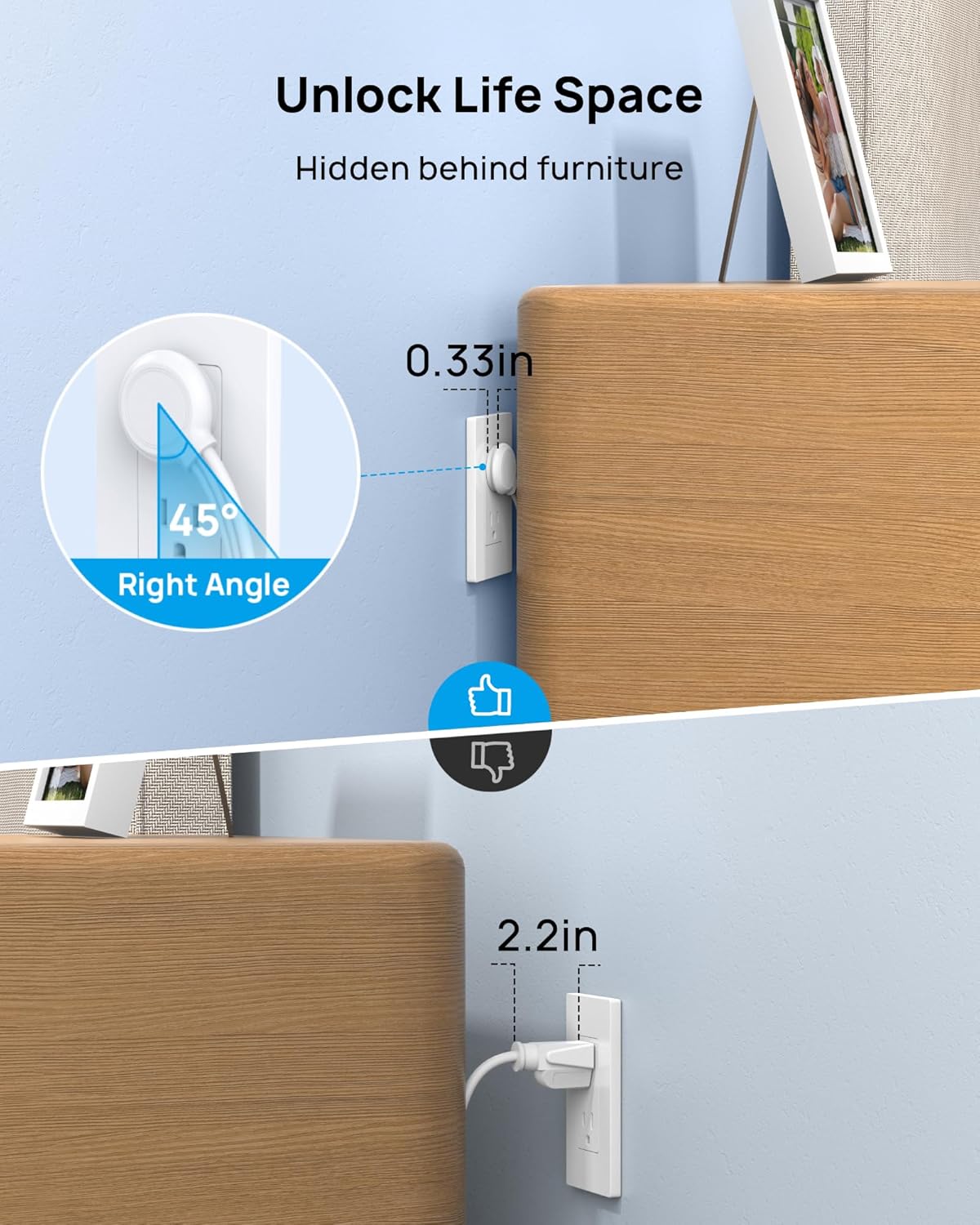
Image: A close-up showing the 0.33-inch ultra-thin, 45-degree angled flat plug of the TROND power strip fitting seamlessly behind a piece of furniture, contrasting with a standard plug that protrudes significantly.
3.2 Wall Mounting (Optional)
For a more permanent setup, the power strip can be wall-mounted. Locate the mounting hole on the back of the unit. Use a suitable screw (not included) to secure the power strip to a wall, nightstand, dresser, or other desired surface. Four rubber bottoms on the unit also help prevent slipping on flat surfaces.

Image: The TROND power strip is shown mounted on a wall next to a television, with its cable neatly routed. A circular inset highlights the mounting hole on the back of the unit.
4. Operating Instructions
4.1 Using AC Outlets
Plug your devices directly into the 3 AC wide outlets. The 3-sided design allows for larger adapters without blocking adjacent outlets. The maximum power supported is 1250W (125V~10A).
4.2 Using USB Charging Ports
The power strip includes 2 USB-A ports and 2 USB-C ports. The dedicated 20W USB-C 1 port (labeled "PD") offers fast charging for compatible devices. The built-in intelligent charging technology automatically detects and delivers the optimal charging speed for your devices, ensuring both speed and safety.

Image: The TROND power strip is shown charging an iPhone 15 via its 20W USB-C port, with a visual indicator of 20W charging speed. Text on the image states "Charge an iPhone 15 to 50% in 26 Minutes".
Note: For 20W charging speed, only one device should be plugged into the PD port. Multi-USB output has a 15W shared maximum.
5. Product Specifications
| Feature | Detail |
|---|---|
| Model Number | TD-PS-US24S |
| Material | UL94 V-0 Flame Retardant PC+ABS |
| Input Voltage | AC 100-250V, 50/60Hz |
| Rated Power | 1250W (125V/10A) |
| AC Outlets | 3 |
| USB-C PD Output (Green) | 5V/3A, 9V/2.22A, 12V/1.67A (20W Max) |
| USB-C2 Output | 5V/3A (15W Max) |
| USB-A1/A2 Output | 5V/2.4A (12W Max) |
| Multi USB Output (Shared Max) | 15W |
| Product Dimensions | 3.07 x 1.73 x 1.57 inches |
| Item Weight | 7.4 ounces |
| Cord Length | 5 feet |
| Special Features | 20W USB C Travel Power Strip, No Surge Protection |
6. Travel and Cruise Essentials
The compact size (3.07*1.73*1.57 inches) and wide voltage compatibility (120V-240V) make this power strip an ideal travel companion. It is designed without surge protection, making it safe for use on cruise ships where surge protectors are often prohibited.

Image: The TROND power strip is displayed in the foreground with a large cruise ship sailing on the ocean in the background, emphasizing its suitability as a cruise essential. The text "Non surge protector" is visible.
7. Maintenance
To ensure optimal performance and longevity of your TROND power strip, follow these maintenance guidelines:
- Keep the unit dry and away from moisture.
- Clean the exterior with a soft, dry cloth. Do not use liquid cleaners or aerosols.
- Avoid exposing the power strip to extreme temperatures.
- Do not disassemble or attempt to repair the unit yourself.
8. Troubleshooting
If you encounter any issues with your TROND power strip, please refer to the following common troubleshooting steps:
- No Power: Ensure the power strip is securely plugged into a working wall outlet. Test the wall outlet with another device to confirm it has power.
- Device Not Charging (USB): Verify that your device's charging cable is properly connected to both the device and the power strip's USB port. Ensure the device is compatible with the charging specifications (e.g., 20W PD for fast charging). If using the 20W PD port, ensure only one device is connected to that specific port for maximum speed.
- AC Outlet Not Working: Check if the device plugged into the AC outlet is functioning correctly. Ensure the total wattage of all connected devices does not exceed 1250W.
- Loose Fit in Wall Outlet: If the power strip feels loose in the wall outlet, ensure the outlet itself is not worn out. Consider using a different outlet.
If problems persist, please contact TROND customer support.
9. Official Product Videos
TROND TD-PS-US24S Travel Power Strip with USB C Ports
Video: An official product video from TROND showcasing the features and benefits of the TD-PS-US24S Travel Power Strip, including its compact design, USB-C ports, and flat plug.
TROND Electrical Outlet Extender 360 Rotating Plug
Video: An official product video from TROND demonstrating the TROND Electrical Outlet Extender, highlighting its 360-degree rotating plug feature for flexible placement.
10. Warranty and Support
All TROND products come with an 18-month product warranty and a 30-day money-back guarantee. For any questions, technical support, or warranty claims, please visit the TROND Official Store on Amazon or contact their customer service directly.


