1. Product Overview
The Jebao EOW-3 DC Wave Maker Pump is designed for aquariums, providing efficient water circulation with ultra-quiet operation. This compact pump features an external drive controller for enhanced longevity and energy efficiency. It is suitable for creating natural wave patterns in your aquarium, promoting a healthy aquatic environment.
Key Features:
- External drive controller for extended product life.
- High water flow up to 792 GPH (3000 LPH).
- 3D large rotation angle for adjustable water output direction.
- Compact size with powerful performance.
- Four-pole super quiet motor utilizing SINE wave technology for stable operation.
- Energy-saving DC 12V, 6 Watt power consumption.
- Recommended for aquariums with a length less than 40 cm (15.7 inches) and glass thickness less than 8 mm.
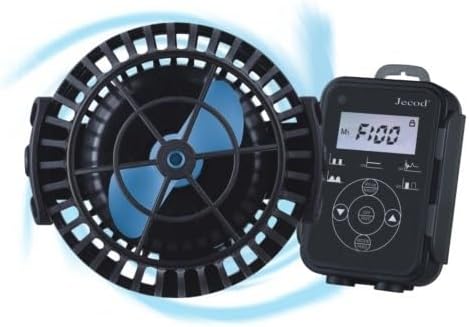
Figure 1: Jebao EOW-3 Wave Maker Pump and its external controller. The pump features a black housing with a blue impeller, and the controller has a digital display and control buttons.
2. Safety Information
Please read all safety instructions carefully before operating the pump. Failure to follow these instructions may result in electric shock, fire, or serious injury.
- Always disconnect power to the pump and all other aquarium equipment before performing any maintenance or handling the pump.
- Do not operate the pump if the power cord or plug is damaged.
- Ensure the pump is fully submerged in water during operation. Dry running can cause damage.
- This pump is designed for indoor use in aquariums only. Do not use it for other purposes.
- Keep the controller and power adapter away from water.
- Do not attempt to disassemble or repair the pump or controller yourself. Refer to qualified personnel for service.
3. Package Contents
Verify that all components are present in the package:
- Jebao EOW-3 Wave Maker Pump
- External Controller
- Magnetic Mounting Base
- Power Adapter
4. Setup Instructions
Follow these steps to set up your Jebao EOW-3 Wave Maker Pump:
- Placement: Select a suitable location inside your aquarium for the pump. Ensure it is fully submerged and positioned to create the desired water flow pattern. The pump can be rotated to adjust the direction of water output.
- Mounting: Use the magnetic mounting base to secure the pump. Place the pump with its internal magnet on the inside of the aquarium glass, and align the external magnet on the outside of the glass directly opposite the internal magnet. Ensure the glass thickness is less than 8 mm for secure attachment.
- Connect to Controller: Connect the pump's cable securely to the designated port on the external controller.
- Power Connection: Connect the power adapter to the controller, then plug the power adapter into a standard electrical outlet. Ensure a drip loop is formed with the power cord to prevent water from traveling along the cord to the outlet.
- Initial Check: Once powered, the pump should begin operating. Observe the water flow and adjust the pump's position or angle as needed.
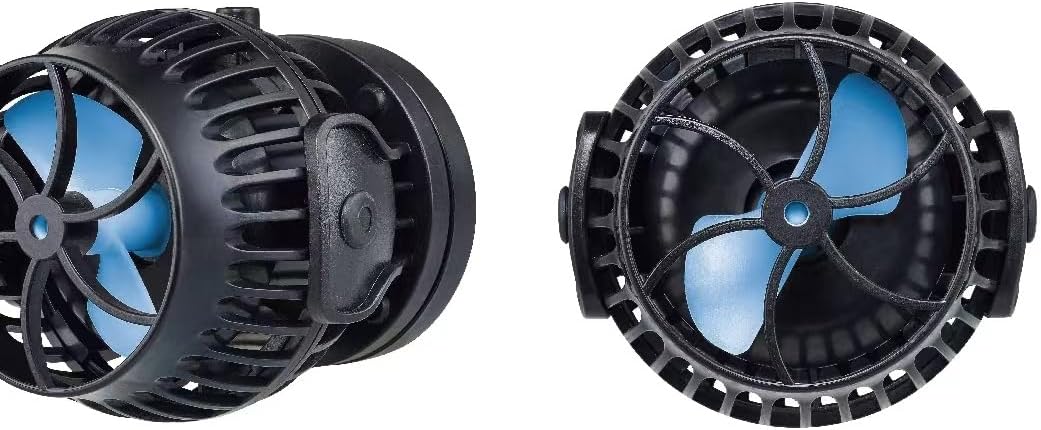
Figure 2: Side and front views of the Jebao EOW-3 Wave Maker Pump, illustrating its compact design and impeller.
5. Operating Instructions
The external controller allows you to manage the pump's operation and adjust settings.
- Power On/Off: Use the designated button on the controller to turn the pump on or off.
- Mode Selection: The controller typically offers various wave-making modes (e.g., constant flow, pulse mode, random flow). Refer to the controller's display and buttons to cycle through and select your desired mode.
- Flow Adjustment: Adjust the water flow intensity using the controller's controls. This allows you to fine-tune the wave action to suit your aquarium's needs.
- Master/Slave Function: If using multiple EOW pumps, the controller supports master/slave configuration, allowing synchronized operation or varied patterns between pumps. Consult the controller's specific instructions for detailed setup of this feature.
6. Maintenance
Regular maintenance ensures optimal performance and extends the lifespan of your wave maker pump.
- Disconnect Power: Always unplug the pump from the power outlet before performing any maintenance.
- Remove from Tank: Carefully remove the pump from the aquarium.
- Disassemble (if necessary): Gently twist or unclip the pump housing to access the impeller chamber.
- Clean Impeller: Remove the impeller and clean it thoroughly with a soft brush under running water. Remove any algae, debris, or mineral deposits that may have accumulated.
- Clean Pump Body: Clean the inside of the pump housing and the magnetic base.
- Reassemble: Carefully reassemble the pump, ensuring all parts are correctly aligned and secured.
- Frequency: Perform cleaning every 2-4 weeks, or more frequently if you notice reduced flow or increased noise.
7. Troubleshooting
If you encounter issues with your Jebao EOW-3 Wave Maker Pump, refer to the following common problems and solutions:
| Problem | Possible Cause | Solution |
|---|---|---|
| Pump not starting / No power | Power outage; Loose connection; Faulty power adapter/controller. | Check power outlet; Ensure all connections are secure; Test with another outlet; Contact support if power adapter/controller is suspected faulty. |
| Reduced water flow | Impeller clogged with debris/algae; Mineral buildup; Pump not fully submerged. | Clean the impeller and pump housing; Ensure pump is fully submerged. |
| Excessive noise or vibration | Foreign object in impeller; Impeller not seated correctly; Worn impeller. | Disconnect power and inspect impeller for foreign objects; Reassemble impeller correctly; If noise persists, impeller may need replacement. |
| Pump lost power after short use | Internal component failure; Overheating; Power supply issue. | Disconnect power, allow to cool, then reconnect; Verify stable power supply; If issue persists, contact customer support for warranty claim. |
If the problem persists after attempting these solutions, please contact customer support.
8. Specifications
| Brand | Jebao |
| Model Number | EOW-3 |
| Color | Black |
| Material | Stainless Steel |
| Product Dimensions (L x W x H) | 2.4" x 2" x 2.4" |
| Power Source | DC |
| Voltage | 12 Volts (DC) |
| Item Weight | 1 Pound |
| Max Flow Rate | 792 GPH / 3000 LPH |
| Included Components | Wave Maker Pump, Controller |
9. Warranty and Support
The Jebao EOW-3 DC Wave Maker Pump comes with a 1-Year Warranty through your Amazon order for non-damage hardware issues.
For technical support, troubleshooting assistance beyond this manual, or warranty claims, please contact the seller or manufacturer directly through your purchase platform. Keep your order details readily available for faster service.


