
1. Introduction
Thank you for choosing the EBERLE UTE 3800-U-RAL9010-G-55 Room Control Unit. This device is designed to provide precise temperature control for various heating systems, offering smart home compatibility and user-friendly operation. This manual provides essential information for safe installation, operation, and maintenance of your new control unit. Please read it thoroughly before installation and keep it for future reference.
2. Safety Information
Warning: Installation and electrical connections must only be performed by a qualified electrician in accordance with local regulations and standards. Failure to follow these instructions may result in electric shock, fire, or damage to the device.
- Always disconnect power to the circuit before installing or servicing the unit.
- Do not expose the unit to moisture, extreme temperatures, or direct sunlight.
- Ensure proper grounding and wiring connections.
- Keep out of reach of children.
3. Product Overview
The EBERLE UTE 3800-U-RAL9010-G-55 is a smart home compatible room control unit, featuring a sleek design and advanced functionalities for optimal climate management.
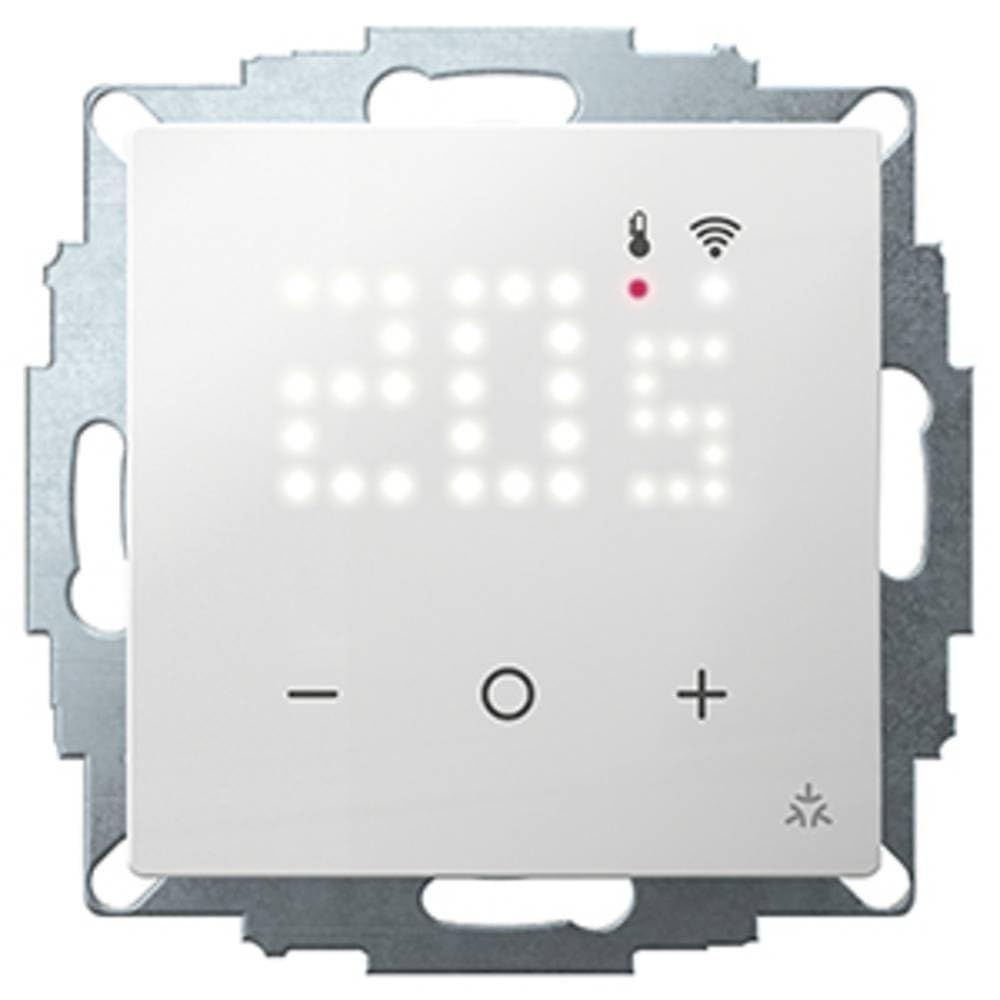
Image showing the EBERLE UTE 3800-U-RAL9010-G-55 room control unit, a white, square-shaped device with a digital display, designed for flush mounting.
Key Features:
- Digital display for clear temperature readings and settings.
- Smart home compatibility for integration with systems like Google Home, Apple Home, and Amazon Alexa (via Wi-Fi standard).
- Suitable for controlling central floor heating, hot water systems, and hot air heaters.
- Programmable clock function adjustable via a smart home application.
- White LED dot matrix display, briefly activated upon button press.
- Frost protection function to prevent freezing.
- Adjustable temperature range limitation.
- PWM valve protector or adjustable two-point control method.
- Presence/absence inputs for enhanced control.
- Adaptable to normally closed (without current) valves.
- Optional remote sensor F193 720 support.
4. Setup and Installation
The EBERLE UTE 3800-U-RAL9010-G-55 is designed for flush mounting in a standard 55 box. Installation without a direct Wi-Fi connection is possible, with smart home integration configured later.
Included Components:
- EBERLE UTE 3800-U-RAL9010-G-55 Room Control Unit
- Fixing devices
Installation Steps:
- Power Disconnection: Ensure the main power supply to the installation area is switched off at the circuit breaker.
- Mounting: Mount the control unit into a flush-mounted 55 box using the provided fixing devices. Ensure it is securely fastened.
- Wiring: Connect the electrical wires according to the wiring diagram provided in the separate installation guide (not included in this manual). Pay close attention to live, neutral, load, and sensor connections.
- Secure Cover: Once wiring is complete and verified, attach the front cover of the unit.
- Power Restoration: Restore power to the circuit. The unit should power on and display initial settings.
- Initial Configuration: Follow the on-screen prompts or refer to the operating instructions for initial setup, including setting the current time and date.
5. Operating Instructions
The EBERLE UTE 3800-U-RAL9010-G-55 is operated via its integrated buttons and digital display. For advanced features and smart home integration, use the dedicated smart home application.
Basic Operation:
- Power On/Off: Press and hold the main button (if applicable) to turn the unit on or off.
- Adjusting Temperature: Use the up/down arrow buttons to set your desired room temperature. The digital display will show the current and target temperatures.
- Display Activation: The white LED dot matrix display activates briefly after any button press to conserve energy.
- Mode Selection: Cycle through available operating modes (e.g., heating, frost protection, manual) using the mode button.
Smart Home Integration:
To integrate the control unit with your smart home system (Google Home, Apple Home, Amazon Alexa), follow these general steps:
- Download App: Download the relevant smart home application (e.g., EBERLE Smart Home App, or your preferred smart home platform app) on your smartphone or tablet.
- Add Device: In the app, select the option to add a new device.
- Pairing: Follow the app's instructions to put the control unit into pairing mode. This usually involves a specific button sequence on the unit.
- Wi-Fi Connection: Connect the unit to your home Wi-Fi network through the app.
- Configuration: Once connected, you can configure advanced settings such as the programmable clock function, temperature schedules, and remote control.
Special Functions:
- Frost Protection: This function automatically activates heating if the room temperature drops below a preset minimum to prevent pipes from freezing.
- Temperature Range Limitation: The maximum and minimum adjustable temperature range can be limited to prevent unauthorized or accidental changes. Refer to the smart home app or advanced settings menu for configuration.
- PWM Valve Control: The unit supports Pulse Width Modulation (PWM) for precise control of heating valves, or a two-point control method.
6. Maintenance
The EBERLE UTE 3800-U-RAL9010-G-55 Room Control Unit requires minimal maintenance.
- Cleaning: Wipe the unit's surface with a soft, dry cloth. Do not use abrasive cleaners, solvents, or chemical sprays, as these can damage the finish and internal components.
- Inspection: Periodically check for any visible damage or loose connections. If any issues are found, contact a qualified technician.
- Software Updates: Ensure your smart home application and the device firmware are kept up-to-date for optimal performance and security.
7. Troubleshooting
If you encounter issues with your EBERLE UTE 3800-U-RAL9010-G-55, refer to the following common problems and solutions:
| Problem | Possible Cause | Solution |
|---|---|---|
| Unit does not power on. | No power supply; incorrect wiring. | Check circuit breaker. Verify wiring connections (consult a qualified electrician). |
| Heating system not responding. | Incorrect settings; valve issue; wiring problem. | Check target temperature. Ensure operating mode is correct. Verify valve connections. |
| Wi-Fi connection unstable or failing. | Weak Wi-Fi signal; incorrect network credentials. | Move unit closer to router or use a Wi-Fi extender. Re-enter Wi-Fi password in the app. |
| Display is blank or unresponsive. | Power issue; unit malfunction. | Check power. If power is present, try resetting the unit (refer to advanced settings or contact support). |
If the problem persists after attempting these solutions, please contact EBERLE customer support or a qualified technician.
8. Specifications
| Specification | Value |
|---|---|
| Manufacturer | EBERLE |
| Part Number | CE6592 |
| Item Weight | 170 g |
| Product Dimensions | 5.5 x 5.5 x 5.5 cm |
| Item Model Number | CE6592 |
| Color | White |
| Style | Modern |
| Finish | Powder Coated |
| Material | Metal |
| Shape | Round |
| Number of Units | 1 |
| Number of Pieces | 1 |
| Special Features | Adjustable |
| Included Components | Fixing devices |
| Batteries Included? | No |
| Batteries Required? | No |
| ASIN | B0D1R3FP38 |
| First Available Date | June 28, 2024 |
9. Warranty and Support
The EBERLE UTE 3800-U-RAL9010-G-55 Room Control Unit comes with a manufacturer's warranty. For specific warranty terms and conditions, please refer to the warranty card included with your product or visit the official EBERLE website.
For technical support, troubleshooting assistance, or to inquire about replacement parts, please contact EBERLE customer service through their official channels. Contact information can typically be found on the product packaging or the manufacturer's website.

