
HGLRC Zeus VTX PRO 1.6W
HGLRC Zeus 1.6W VTX PRO User Manual
Model: Zeus VTX PRO 1.6W
For FPV Racing Drone Quad (MMCX)
1. Product Overview
The HGLRC Zeus VTX PRO 1.6W is a high-performance video transmitter engineered for FPV racing and long-range drone applications. It offers flexible power output options, from a low-power PIT mode to a powerful 1.6W, ensuring clear video transmission over various distances. The integrated microphone allows for audio feedback, enhancing the FPV experience. Its durable CNC heat sink shell is designed to maintain stable output even at high power settings, preventing overheating.
Key Features:
- 1.6W High Power Output: Provides strong signal penetration and extended range, reducing interference.
- CNC Heat Sink Shell: Ensures efficient heat dissipation for stable and reliable performance.
- MMCX Antenna Interface: Secure connection designed to prevent antenna detachment during flight.
- Built-in Microphone: Captures ambient audio for an immersive FPV experience.
- OSD Support: Compatible with On-Screen Display systems for easy configuration and status monitoring.
- Switchable Power: PIT/25/400/800/1.6W options for versatile use.
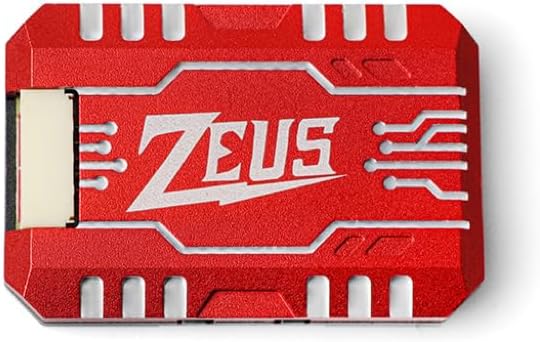
Figure 1.1: Top view of the HGLRC Zeus VTX PRO 1.6W, showcasing its compact design and 'ZEUS' branding.
2. Setup and Installation
Proper installation is crucial for the performance and longevity of your VTX. Follow these steps carefully.
2.1 Wiring Diagram
Connect the VTX to your flight controller and power source according to the following pinout and wiring diagrams. Ensure correct polarity to prevent damage.

Figure 2.1: Bottom view of the VTX showing pinout labels for power, video, and control.

Figure 2.2: Detailed pinout diagram with color-coded connections for easy identification.

Figure 2.3: Example wiring diagram illustrating connections between the VTX and a typical flight controller.
- DC IN: Connect to your drone's main battery voltage (7-36V DC).
- GND: Ground connection.
- 5V OUT: Provides 5V/500mA output for powering a camera or other peripherals.
- RX: Telemetry receive pin (connect to TX on flight controller for OSD control).
- VID: Video signal input from your FPV camera.
2.2 Antenna Connection
The Zeus VTX PRO uses an MMCX antenna interface. Carefully connect the provided 5.8G MMCX Linear Brass Antenna or your preferred MMCX antenna. Ensure the connection is secure to prevent signal loss during flight.

Figure 2.4: Close-up view of the MMCX antenna interface, highlighting the secure connection design.
2.3 Mounting
The VTX features 20x20mm M2 mounting holes, allowing for easy integration into most modern FPV drone frames. Use appropriate standoffs and screws to secure the VTX, ensuring it is protected from vibrations and potential crash damage.
3. Operating Instructions
The Zeus VTX PRO offers various power output levels and channel configurations. Understanding these settings is key to optimal performance.
3.1 Power Output and Channel Selection
The VTX supports standard 40 channels across A/B/E/F/R frequency groups and switchable power outputs: PIT, 25mW, 400mW, 800mW, and 1.6W. These settings can typically be controlled via your flight controller's OSD (On-Screen Display) or through physical buttons/LED indicators on the VTX itself.

Figure 3.1: Front and back diagram of the VTX, indicating the location of power, channel, and FR indicators.
- PIT Mode: Lowest power output, ideal for bench testing or racing events where minimal interference is required.
- 25mW: Standard legal power for many racing events, suitable for close-range flying.
- 400mW/800mW: Increased power for better penetration and medium-range flying.
- 1.6W: Maximum power for long-range FPV and challenging environments.
Refer to your flight controller's firmware documentation (e.g., Betaflight, ArduPilot) for specific instructions on configuring VTX tables and controlling settings via OSD.
3.2 Built-in Microphone
The VTX includes a built-in microphone to transmit audio along with the video feed. Ensure your FPV goggles or ground station support audio reception to utilize this feature.
4. Maintenance
Regular maintenance helps ensure the longevity and reliable operation of your VTX.
- Heat Management: The Zeus VTX PRO features a CNC heat sink. Ensure adequate airflow around the VTX, especially when operating at higher power levels, to prevent overheating. Avoid prolonged operation on the bench without proper cooling.
- Antenna Care: Always connect the antenna before powering on the VTX. Operating without an antenna can severely damage the transmitter. Inspect the MMCX connector and antenna for any damage before each flight.
- Cleaning: Keep the VTX free from dirt, dust, and moisture. Use a soft, dry brush or compressed air to clean the unit.
- Physical Inspection: Periodically check for loose wires, damaged components, or signs of stress on solder joints.

Figure 4.1: Side view illustrating the CNC heat sink design, crucial for thermal management.
5. Troubleshooting
This section addresses common issues you might encounter with your HGLRC Zeus VTX PRO.
5.1 No Video Signal / Poor Video Quality
- Check Connections: Verify all wiring (power, ground, video input) is correct and secure.
- Antenna: Ensure the antenna is properly connected and undamaged. Try a different antenna if available.
- Channel/Band Mismatch: Confirm your FPV goggles/receiver are on the exact same channel and band as the VTX.
- Power Output: Ensure the VTX is not in PIT mode if you expect a strong signal. Increase power output if flying at a distance or through obstacles.
- Interference: Move away from sources of electromagnetic interference (e.g., Wi-Fi routers, other FPV systems).
5.2 VTX Overheating
- Airflow: Ensure the VTX has sufficient airflow, especially when operating at 800mW or 1.6W. Avoid enclosing it in tight spaces without ventilation.
- Bench Testing: Do not run the VTX at high power for extended periods on the bench without active cooling (e.g., a fan).
- Power Input: Verify the input voltage is within the specified 7-36V range.
5.3 Cannot Control VTX via OSD (VTX Tables)
Some users report difficulty with VTX tables or OSD control. This is often due to incorrect VTX table configuration in your flight controller firmware (e.g., Betaflight).
- Firmware Update: Ensure your flight controller firmware is up to date.
- VTX Table Configuration: Manually configure the VTX tables in your flight controller configurator (e.g., Betaflight Configurator). You may need to search online forums or the manufacturer's support pages for the correct VTX table values for the HGLRC Zeus VTX PRO 1.6W.
- UART Connection: Verify the RX pin of the VTX is correctly connected to a TX pin on your flight controller and that the corresponding UART is enabled for VTX control in the flight controller software.
6. Specifications
| Feature | Specification |
|---|---|
| Model | Zeus VTX PRO 1.6W |
| Input Voltage | DC 7-36V |
| Output Voltage | 5V/500mA |
| Output Power | PIT/25/400/800/1.6W |
| Antenna Interface | MMCX |
| Channels | Standard 40 channels (A/B/E/F/R frequency group) |
| Mounting Hole | 20x20mm M2 |
| Dimensions | 25mm x 37mm x 6.5mm (0.98"W x 1.45"L x 0.25"H) |
| Weight | 13g (0.459 ounces) |
| Built-in Microphone | Yes |
| Material | Metal (CNC heat sink) |
7. Package Contents
The following items are included in your HGLRC Zeus VTX PRO 1.6W package:
- 1 x Zeus VTX PRO 1.6W Video Transmitter
- 1 x 80mm 5.8G MMCX Linear Brass Antenna
- 1 x MMCX to SMA 100mm Adapter Cable
- 1 x GH1.25 6Pin 100mm Cable (for wiring)
8. Warranty and Support
HGLRC products are designed for quality and performance. For warranty information, technical support, or any inquiries regarding your Zeus VTX PRO 1.6W, please refer to the official HGLRC website or contact their customer service directly. Keep your proof of purchase for warranty claims.
Ask a question about this manual
Ask about setup, troubleshooting, compatibility, parts, safety, or missing instructions. Manuals+ will review the question and use this page’s manual context to help answer it.