
Introduction
This manual provides essential information for the safe and efficient use of your HEYMIX 100W 20000mAh Laptop Power Bank. Please read these instructions carefully before using the product and retain them for future reference.
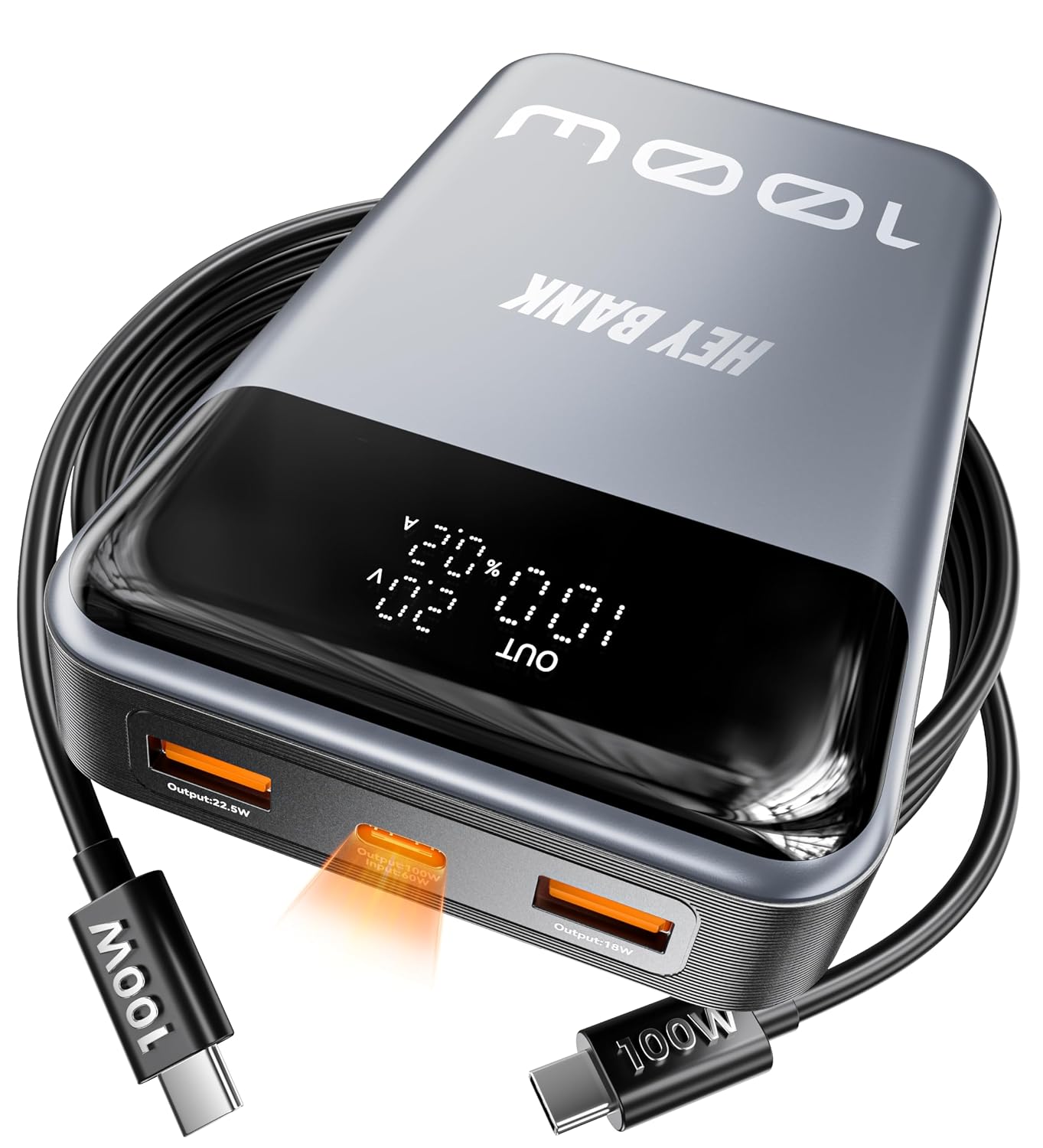
Image: The HEYMIX 100W 20000mAh Laptop Power Bank, dark grey in color, shown with two USB-C cables. The power bank features a digital display indicating charge status and output.
What's in the Box
- HEYMIX 100W 20000mAh Laptop Power Bank
- 1M/3FT 100W USB C Cable
- User Manual (this document)
Setup
Charging the Power Bank
Before initial use, fully charge your HEYMIX 100W Power Bank. The power bank supports 60W fast self-charging, allowing it to be fully recharged in approximately one hour when using a compatible 60W power input.
- Connect the provided 100W USB-C cable to the USB-C input port on the power bank.
- Connect the other end of the USB-C cable to a compatible 60W (or higher) USB-C power adapter (not included).
- The digital display on the power bank will show the charging status and current input wattage.

Image: The HEYMIX Power Bank connected to a wall adapter via a USB-C cable, illustrating 60W fast input charging. The power bank's display shows charging status.
Operating Instructions
Charging Your Devices
The HEYMIX 100W Power Bank features multiple output ports for versatile charging.
- USB-C Output (100W Max): Connect your laptop, tablet, or smartphone using a compatible USB-C to USB-C cable. The single USB-C port can deliver up to 100W, suitable for charging devices like the MacBook Pro.
- USB-A Output: Two USB-A ports are available for charging other compatible devices.
- Simultaneous Charging: You can charge multiple devices concurrently using the available USB-A and USB-C ports. The power bank intelligently distributes power to optimize charging speed for all connected devices.

Image: The HEYMIX Power Bank connected to a MacBook Pro via a USB-C cable and an iPhone via another cable, demonstrating simultaneous charging with 100W PD output.
Power Bank Display
The integrated digital display provides real-time information:
- Battery Percentage: Shows the remaining charge level of the power bank.
- Input/Output Wattage: Displays the current power input when charging the power bank, or the power output when charging devices.

Image: The HEYMIX Power Bank connected to a laptop, with "100W Fast Charges Laptops" text, indicating its high-power output for notebooks.
Air Travel Friendly
The HEYMIX 100W Power Bank is designed to comply with standard international aviation limits for flying. Always check with your airline for specific regulations regarding portable power banks before flying.

Image: A hand holding the HEYMIX Power Bank inside an airplane cabin, viewed through a window, highlighting its air-travel friendly design.
Maintenance
- Keep the power bank away from extreme temperatures, direct sunlight, and liquids.
- Clean the device with a soft, dry cloth. Do not use abrasive cleaners or solvents.
- Avoid dropping or subjecting the power bank to strong impacts.
- Store the power bank in a cool, dry place when not in use. For long-term storage, it is recommended to keep the battery at approximately 50-75% charge.
Troubleshooting
| Issue | Possible Cause | Solution |
|---|---|---|
| Power bank not charging | Charging cable or adapter is faulty; power bank is fully charged; power input is insufficient. | Check cable and adapter. Ensure the power bank is not already full. Use a compatible 60W (or higher) USB-C power adapter. |
| Device not charging from power bank | Charging cable is faulty; device is fully charged; power bank is depleted; device is incompatible. | Check cable. Ensure device is not already full. Recharge the power bank. Verify device compatibility and ensure correct port usage. |
| Slow charging | Cable or adapter not supporting fast charging; multiple devices connected; device not supporting fast charging. | Use a high-quality, fast-charging compatible cable and adapter. Disconnect other devices if faster charging is needed for a single device. |
Specifications
| Feature | Detail |
|---|---|
| Brand | HEYMIX TECH |
| Model Number | P13LCDPD |
| Battery Capacity | 20000 Milliamp Hours (20000mAh) |
| Max Output (Single C Port) | 100W |
| Fast Self-Recharge | 60W input, fully recharges in approximately 1 hour |
| Connector Type | USB Type A, USB Type C (2 USB-A, 1 USB-C) |
| Color | Dark Grey |
| Item Weight | 400 g |
| Package Dimensions | 17.9 x 10.6 x 3.6 cm |
Warranty and Support
HEYMIX TECH is committed to providing exceptional customer support and ensuring your satisfaction. Your HEYMIX 100W Power Bank is backed by a 365-Day worry-free warranty.
- Warranty Period: 365 Days from the date of purchase.
- Contact Support: For any questions, concerns, or issues, please contact HEYMIX TECH customer support at insupport@heymix.com.au.
Product Overview Video
Video: An overview of the HEYMIX 100W Laptop Power Bank, demonstrating its features such as fast charging for laptops, high capacity, and portability. This video highlights the product's design and functionality.