
1. Introduction
Thank you for choosing the TIMEURE Talking Watch, Model TU-2210. This watch is designed to assist individuals with visual impairments by audibly announcing the time, day, and date. It features an automatic radio-controlled time setting function for accuracy and ease of use. Please read this manual carefully to understand the watch's functions and ensure proper operation.

Image: The TIMEURE TU-2210 Talking Watch, featuring a silver-tone case, white dial with large black Arabic numerals, and a matching silver expansion band.
2. Product Features
- Radio Controlled: Automatically sets and adjusts time based on radio signals for precise accuracy.
- Voice Announcement: Clearly speaks the current time, day, and date.
- Large Display: Features big, easy-to-read numbers on an analog dial.
- Alarm Function: Includes an audible alarm with adjustable settings.
- Hourly Chime: Can be set to announce the time every hour.
- Automatic Daylight Saving Time (DST) Adjustment: Automatically switches between standard time and daylight saving time.
- Long Battery Life: Designed for extended operation without frequent battery changes.

Image: An overview of the watch's multi-function capabilities, highlighting features such as radio-controlled time, large numbers, alarm, clear voice, and long battery life.
3. Watch Controls Overview
The watch features three main controls on the side of the case:
- 2 O'Clock Button: Used for time and date announcements, and for checking time synchronization status.
- Crown: This is a dummy crown and should not be used to adjust the watch hands. Adjusting the crown manually will cause the analog hands to become unsynchronized with the spoken time.
- 4 O'Clock Button: Used to announce the alarm time/status and to enter the setting mode for various functions.

Image: A detailed view of the watch's right side, labeling the 2 o'clock button, the non-functional crown, and the 4 o'clock button, which are used for various operations and settings.
4. Setup and Initial Use
4.1. Initial Power-On
Upon receiving your watch, it may already be running. If the watch hands are not moving, it might be in a power-saving state or require activation. Press any button to 'wake up' the watch.
4.2. Automatic Time Synchronization
The watch is designed to automatically synchronize its time with the atomic clock signal. This process typically occurs overnight. Ensure the watch is placed in an area where it can receive a clear radio signal, away from electronic interference.
To check the synchronization status:
- Press the 2 O'Clock Button three times.
- The watch will announce "USA time updated" or "USA time not updated."
4.3. Setting Time Zone
The watch supports four US time zones: Pacific, Mountain, Central, and Eastern. To set your time zone:
- Press and hold the 4 O'Clock Button for 3 seconds until the watch announces "Setting Mode."
- Press the 4 O'Clock Button repeatedly until you hear the time zone setting announcement.
- Use the 2 O'Clock Button to cycle through the available time zones (Pacific, Mountain, Central, Eastern).
- Once your desired time zone is announced, stop pressing buttons. The watch will automatically save the setting and exit setting mode after a few seconds of inactivity.
5. Operating Instructions
5.1. Announcing Time and Date
To hear the current time and date:
- Press the 2 O'Clock Button once to hear the current time (e.g., "The time is 10:10 a.m.").
- Press the 2 O'Clock Button a second time to hear the current day and date (e.g., "Today is Friday, December 10th").

Image: A visual representation of the watch's talking function, showing how pressing the 2 o'clock button announces the time and date.
5.2. Setting the Alarm
To set or adjust the alarm time:
- Press and hold the 4 O'Clock Button for 3 seconds to enter "Setting Mode."
- Press the 4 O'Clock Button repeatedly until the watch announces "Alarm Setting."
- Use the 2 O'Clock Button to adjust the alarm hour. Each press advances the hour.
- Press the 4 O'Clock Button again to move to minute adjustment. Use the 2 O'Clock Button to adjust the alarm minutes.
- Continue pressing the 4 O'Clock Button to cycle through other settings or wait for the watch to exit setting mode automatically.
To check the alarm time or turn it ON/OFF:
- Press the 4 O'Clock Button once (without holding) to hear the current alarm time and its ON/OFF status.
- While in "Alarm Setting" mode, pressing the 2 O'Clock Button after setting the minutes will toggle the alarm ON or OFF.
5.3. Setting the Hourly Chime
The hourly chime announces the time at the top of every hour. To set or adjust the hourly chime:
- Press and hold the 4 O'Clock Button for 3 seconds to enter "Setting Mode."
- Press the 4 O'Clock Button repeatedly until the watch announces "Hourly Chime Setting."
- Use the 2 O'Clock Button to toggle the hourly chime ON or OFF.
- Wait for the watch to exit setting mode automatically to save the setting.
6. Maintenance
6.1. Battery Replacement
The watch uses one CR2032 battery (included). When the voice becomes faint or the watch stops functioning, it's time to replace the battery. Battery replacement should ideally be performed by a qualified watch technician to ensure proper sealing and function.
6.2. Care Instructions
- Water Resistance: This watch is not water resistant. Avoid exposure to water, moisture, or high humidity.
- Cleaning: Wipe the watch with a soft, dry cloth. Do not use chemical cleaners.
- Temperature: Avoid extreme temperatures, both hot and cold, as they can affect battery life and watch performance.
- Magnetic Fields: Keep the watch away from strong magnetic fields, which can interfere with its movement and radio signal reception.
6.3. Expansion Band Care
The expansion band is designed for comfort and ease of wear. To maintain its flexibility and appearance:
- Clean the band periodically with a soft, damp cloth to remove dirt and oils.
- Avoid harsh chemicals or abrasive materials that could damage the metal finish.
- Do not overstretch the band excessively, as this can weaken the links over time.

Image: A close-up view of the watch's expansion band, demonstrating its stretchable design.
7. Troubleshooting
| Problem | Possible Cause | Solution |
|---|---|---|
| Watch is not speaking. | Low battery; watch in power-saving mode; speaker malfunction. | Press any button to wake up. Replace battery if voice is faint. Contact support if issue persists. |
| Incorrect time/date announcement. | Failed radio synchronization; incorrect time zone setting. | Ensure watch is in an area with good signal. Check time zone setting (Section 4.3). Allow time for automatic synchronization. |
| Analog hands do not match spoken time. | Manual adjustment of the crown; synchronization error. | Do not use the crown to adjust hands. Allow the watch to re-synchronize automatically. If hands remain unsynchronized, contact support. |
| Watch not receiving radio signal. | Interference; location. | Move watch to a window or open area, away from electronics. Try synchronization overnight. |
8. Specifications
- Model Number: TU-2210
- Display Type: Analog
- Movement Type: Japanese Automatic
- Power Source: Battery Powered (1 x CR2032, included)
- Case Material: Stainless Steel
- Band Material: Stainless Steel (Expansion Band)
- Case Diameter: 36 mm (1.41 inches)
- Case Thickness: 16 mm (0.62 inches)
- Band Width: 18 mm (0.70 inches)
- Band Length: Suitable for wrist sizes from 160 mm (6.3 inches) to 210 mm (8.26 inches)
- Item Weight: 59 grams (2.08 ounces)
- Water Resistance: Not Water Resistant
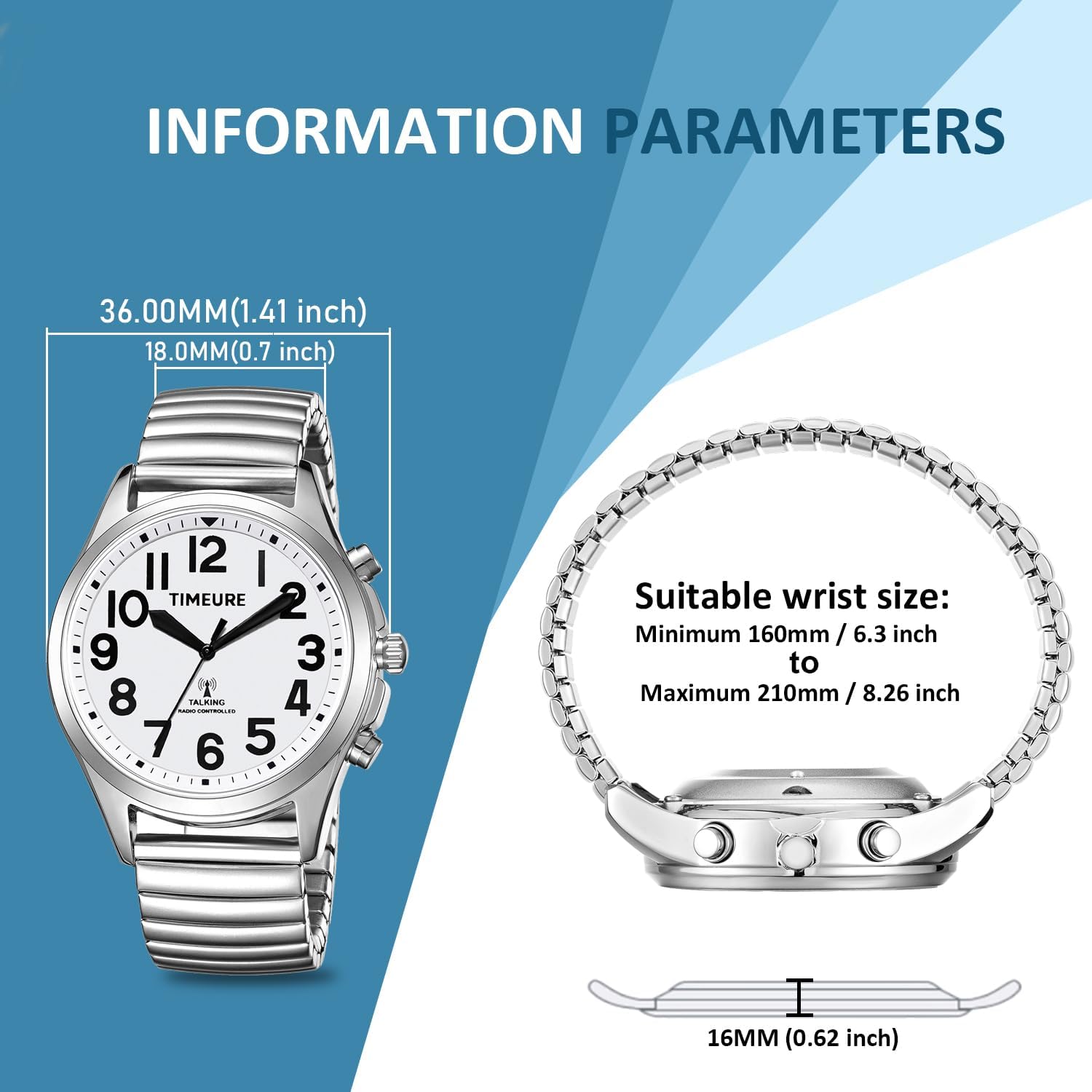
Image: Technical specifications and dimensions of the watch, including case diameter, band width, case thickness, and recommended wrist size range.
9. Warranty and Support
TIMEURE is committed to providing quality products and customer satisfaction.
- 1-Year After-Sales Service: Your watch is covered by a 1-year after-sales service period.
- 30-Day Return Policy: You may return the product within 30 days of purchase for a refund or replacement.
- Customer Support: For any queries or concerns, please contact our online customer service. We aim to respond within 12 hours.
For assistance, please refer to the contact information provided with your purchase or visit the official TIMEURE store on Amazon.