
1. Product Overview
The WINGBO 72-inch DC Ceiling Fan is designed to provide efficient air circulation and lighting for large indoor and covered outdoor spaces. Featuring a modern design with 8 plywood blades, a quiet DC motor, and integrated LED lighting, this fan offers both functionality and style. It includes a remote control for convenient operation of its 6 speeds, light settings, and reversible modes.
- Contemporary Design: Minimalist silhouette with sharp, curved blades for effective air movement.
- Efficient Airflow: 8 lightweight plywood blades designed for high volume air circulation (CFM: 8883).
- Advanced Control: Includes a 6-speed remote control with light control (on/off, non-dimmable), summer/winter reversing modes, fan-off timers, and natural breeze mode.
- Integrated LED Light: 18W LED light with 3 CCT options: Warm (3000K), Cool (4500K), and Daylight (6000K).
- Whisper-Quiet DC Motor: Energy-efficient motor uses only 40W on high speed and 5W on low speed.
- Versatile Installation: Installable on flat ceilings and sloped ceilings up to 15°. Includes 4.5", 12", and 24" downrods. ETL Approved for DAMP Locations.

Figure 1: Remote Control Features. This image displays the remote control with labeled buttons for fan speed (1-6), light control, reverse function, and timer settings (1H, 2H, 4H, 8H).
2. Safety Information
Please read and understand all instructions before beginning installation. Failure to follow these instructions may result in electric shock, fire, or personal injury.
- WARNING: To reduce the risk of electric shock, ensure electricity is turned off at the circuit breaker or fuse box before installation.
- WARNING: All wiring must be in accordance with national and local electrical codes. Consult a qualified electrician if you are unsure about wiring.
- WARNING: To reduce the risk of fire or electric shock, do not use this fan with any solid-state speed control device.
- WARNING: To reduce the risk of personal injury, do not bend the blade brackets when installing, balancing the blades, or cleaning the fan. Do not insert foreign objects between rotating fan blades.
- The mounting structure must be securely attached to the building structure and capable of supporting a minimum of 35 lbs (15.9 kg).
- Install the fan with a minimum of 7 feet (2.1 meters) clearance from the floor to the trailing edge of the blades.
- This fan is suitable for indoor and covered outdoor (damp rated) use. Do not expose to direct water spray.
3. Package Contents
Carefully unpack your fan and check the contents. You should have the following items:
- Fan Motor Assembly
- Fan Blades (8 Plywood Blades)
- Downrods (4.5", 12", 24")
- Mounting Bracket
- Canopy
- Remote Control and Receiver
- LED Light Kit
- Hardware Pack (screws, washers, wire nuts, etc.)
- Instruction Manual
4. Specifications
| Feature | Specification |
|---|---|
| Brand | WINGBO |
| Model Number | SYCF7210 |
| Size | 72 inches |
| Color | Black and Gray |
| Number of Blades | 8 |
| Blade Material | Engineered Wood (Plywood) |
| Motor Type | DC Motor |
| Number of Speeds | 6 |
| Wattage | 40 watts (max) |
| Air Flow Capacity | 8883 CFM |
| Light Type | Integrated 18W LED |
| Color Temperature (CCT) | 3000K (Warm), 4500K (Cool), 6000K (Daylight) |
| Control Method | Remote Control |
| Mounting Type | Downrod Mount (4.5", 12", 24" included) |
| Ceiling Compatibility | Flat and Sloped Ceilings (up to 15°) |
| Indoor/Outdoor Usage | Indoor and Covered Outdoor (Damp Rated) |
| Product Dimensions (D x W x H) | 72"D x 72"W x 31"H (with 24" downrod) |
| Certifications | ETL Approved |

Figure 2: Fan Dimensions and Downrod Options. This image illustrates the overall dimensions of the fan and the three available downrod lengths for installation.
5. Setup and Installation
Professional installation is recommended. Ensure power is disconnected at the circuit breaker before proceeding.
5.1 Mounting Options
The WINGBO ceiling fan supports both flat ceiling and angled/sloped ceiling installations up to 15 degrees. Choose the appropriate downrod length (4.5", 12", or 24") based on your ceiling height and desired fan position.

Figure 3: Flat and Sloped Ceiling Installation. This image shows examples of the fan mounted on both flat and angled ceilings.
5.2 Wiring and Assembly
Follow the detailed instructions provided in the installation video for proper wiring and assembly of the fan components, including the motor, blades, and light kit. Ensure all connections are secure and wires are properly tucked into the canopy.
Video 1: WINGBO 8-Blade Large Ceiling Fan with Lights Installation. This video provides a step-by-step guide on how to install the WINGBO 8-blade ceiling fan with lights, covering assembly and wiring.
6. Operating Instructions
Your WINGBO ceiling fan is operated using the included remote control.
6.1 Fan Speed Control
Use the speed buttons (1-6) on the remote to adjust the fan's rotation speed. Speed 1 is the lowest, and Speed 6 is the highest.
6.2 Light Control
Press the light button on the remote to turn the LED light ON or OFF. The light is not dimmable.
6.3 Color Temperature (CCT) Adjustment
The LED light offers three color temperature options: Warm (3000K), Cool (4500K), and Daylight (6000K). Cycle through these options using the dedicated CCT button on the remote.

Figure 4: LED 3 Color Temperature Options. This image demonstrates the three distinct light color temperatures available for the integrated LED.
6.4 Reversible Modes (Summer/Winter)
The fan features a reversible DC motor, allowing for both summer (downdraft) and winter (updraft) modes. Use the reverse button on the remote to switch between modes.
- Summer Mode (Forward Direction): Blades rotate counter-clockwise to push air down, creating a cooling breeze.
- Winter Mode (Reverse Direction): Blades rotate clockwise to draw air up, circulating warm air near the ceiling throughout the room.
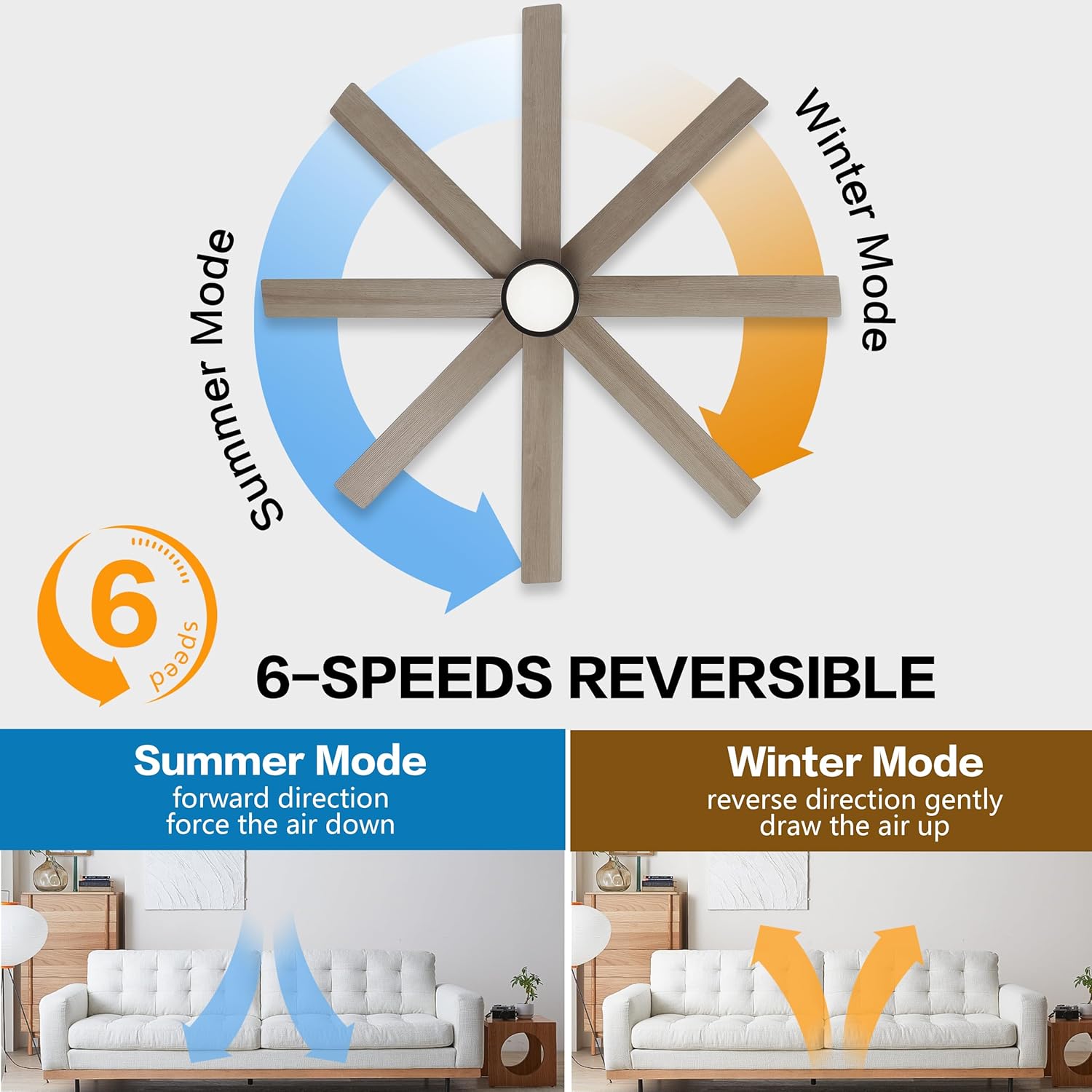
Figure 5: Summer and Winter Reversible Modes. This diagram visually explains how the fan's direction changes for summer (cooling) and winter (warm air circulation) modes.
6.5 Timer Function
Set a timer for the fan to automatically turn off after 1, 2, 4, or 8 hours using the corresponding buttons on the remote control.
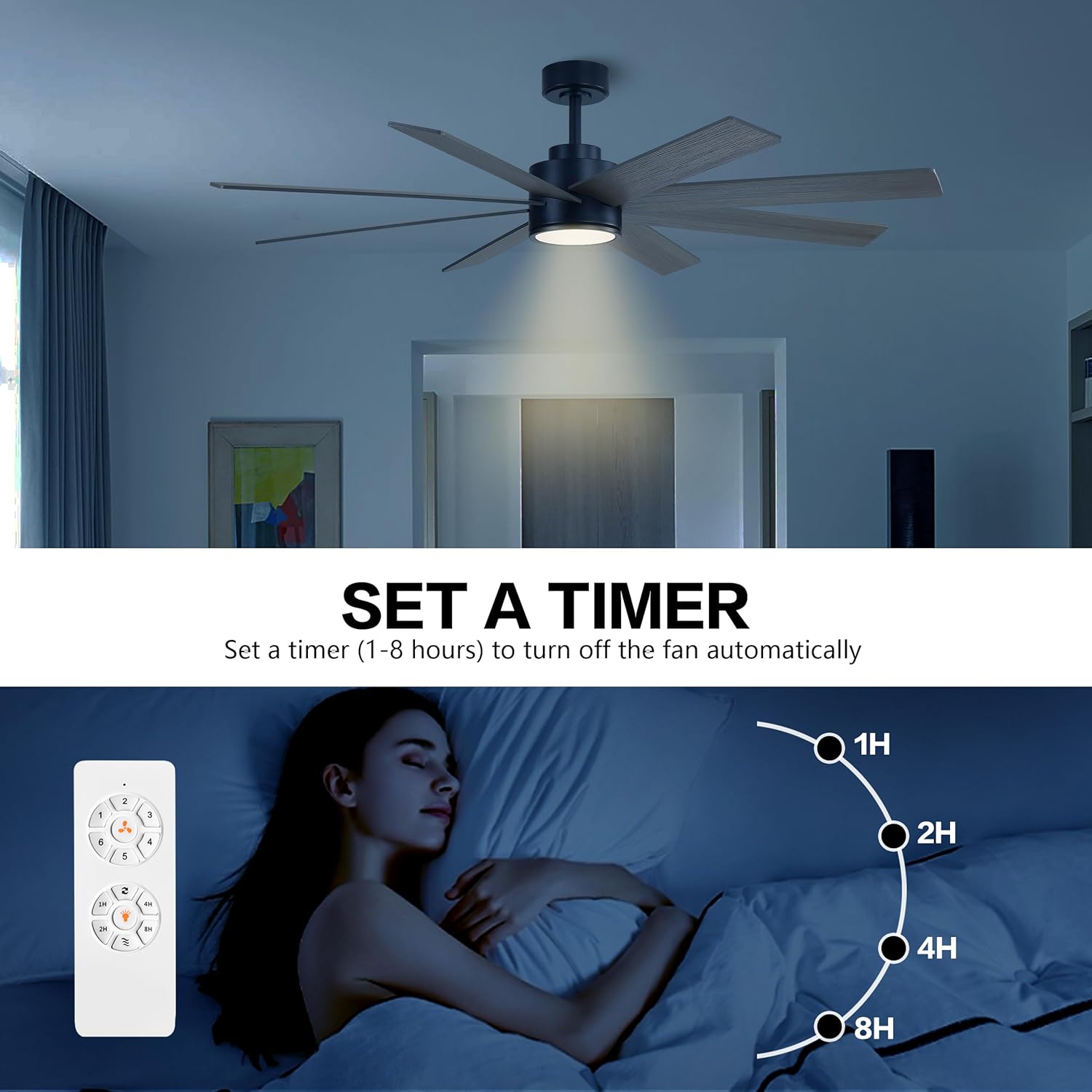
Figure 6: Timer Function. This image illustrates the use of the fan's timer feature for automatic shut-off.
6.6 Natural Breeze Mode
Activate the natural breeze mode for a varying fan speed that simulates a gentle outdoor breeze.
Video 2: WINGBO 8-Blade Large Ceiling Fan in Operation. This video demonstrates the WINGBO 8-blade ceiling fan in action, showcasing its quiet operation and airflow.
7. Maintenance
Regular maintenance ensures optimal performance and extends the life of your ceiling fan.
- Cleaning: Periodically clean the fan blades and motor housing with a soft, damp cloth. Do not use abrasive cleaners or solvents.
- Blade Balance: If the fan wobbles, check that all blade screws are tight and the blades are properly balanced. A balancing kit (not included) may be used if necessary.
- Light Kit: The integrated LED light is designed for long life and typically does not require replacement. If issues arise, consult customer support.
- General Inspection: Annually check all connections and mounting hardware for tightness.
8. Troubleshooting
Before attempting any repairs, ensure the power supply to the fan is disconnected.
| Problem | Possible Cause | Solution |
|---|---|---|
| Fan does not start | No power to the fan; Loose wire connections; Remote control not paired or battery dead. | Check circuit breaker/fuse; Verify all wire connections are secure; Replace remote battery or re-pair remote (refer to remote instructions). |
| Fan wobbles | Loose blade screws; Unbalanced blades; Loose mounting bracket. | Tighten all blade screws; Use a balancing kit (not included) to balance blades; Ensure mounting bracket is securely fastened. |
| Light does not work | Loose wire connection to light kit; Faulty LED driver. | Check light kit wiring; Contact customer support if LED driver is suspected to be faulty. |
| Remote control not working | Dead battery; Remote not paired with receiver. | Replace remote battery; Re-pair remote with receiver (instructions usually in remote manual). |
| Fan makes noise | Loose screws; Motor hum; Blades hitting an obstruction. | Tighten all screws; Ensure no obstructions are in the fan's path; A slight motor hum is normal for some DC motors. |
9. Warranty and Support
For warranty information, please refer to the documentation included with your purchase or visit the official WINGBO website. If you encounter any issues not covered in this manual or require further assistance, please contact WINGBO customer support.
WINGBO Customer Support:
- Refer to your product packaging for contact details.
- Visit the WINGBO Store on Amazon for more information.


