
Introduction
Thank you for choosing the deAO Kids Electric Musical Guitar Set. This manual provides essential information for the safe and proper use, assembly, and maintenance of your new musical toy. Please read these instructions carefully before use and retain them for future reference.
Safety Information
- Age Recommendation: This product is suitable for children aged 36 months (3 years) to 144 months (12 years).
- Material Safety: The toy guitar set is constructed from environmentally friendly ABS plastic, which is sturdy, durable, non-toxic, and drop-resistant.
- Design Safety: Features smooth edges and a string-free design to minimize risk of injury during play.
- Battery Safety: Always use new alkaline batteries of the specified type and size. Do not mix old and new batteries, or different types of batteries. Ensure batteries are inserted with correct polarity (+/-). Remove batteries if the toy will not be used for an extended period. Dispose of used batteries responsibly.
- Supervision: Adult supervision is recommended during play, especially during initial setup and battery installation.
- Choking Hazard: Keep small parts away from young children.
Package Contents
The deAO Kids Electric Musical Guitar Set includes the following components:
- Electric Toy Guitar
- Adjustable Microphone with Stand and Base
- Amplifier (Stereo)
- Shoulder Strap for Guitar
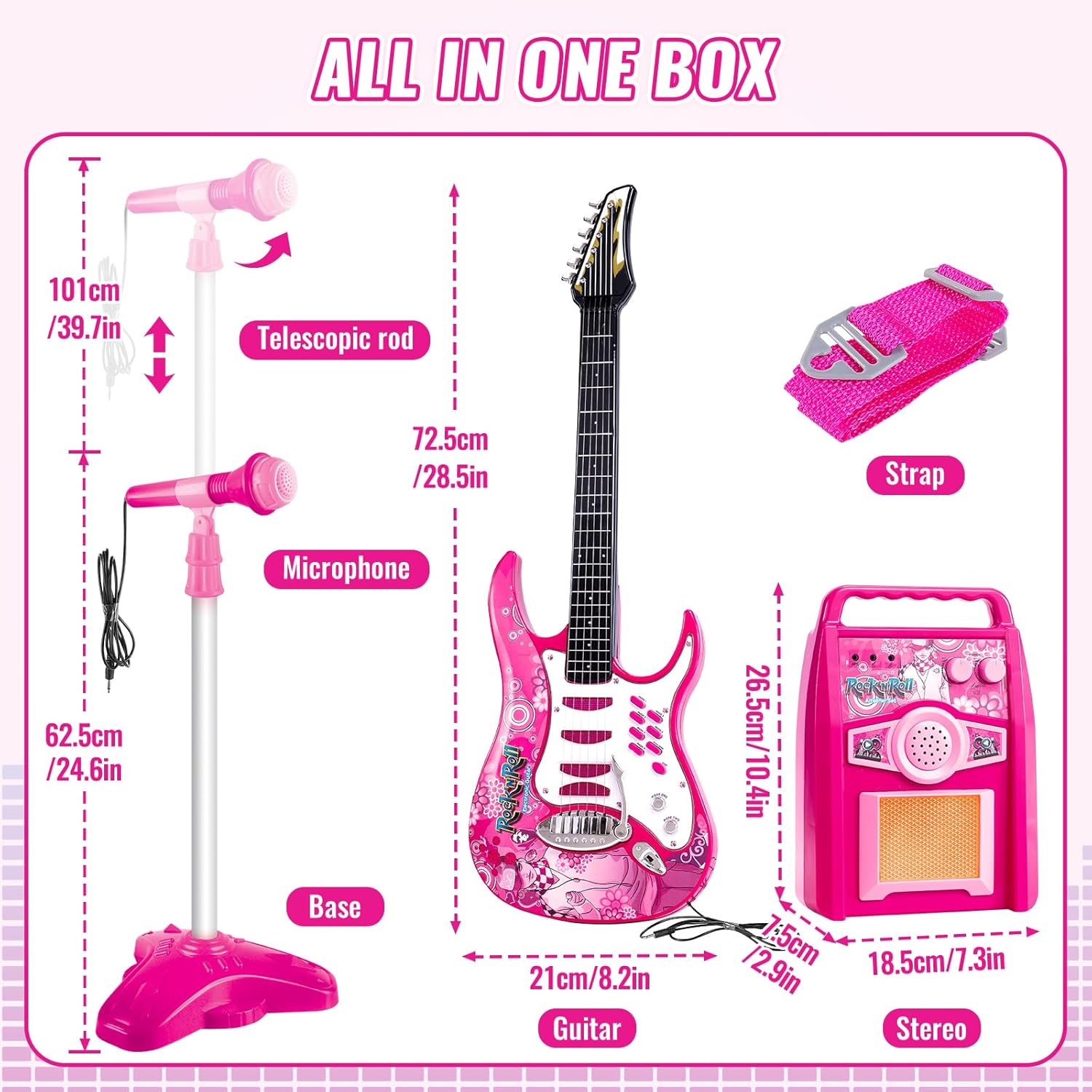
Image: All components included in the deAO Kids Electric Musical Guitar Set, with approximate dimensions for each part.
Setup Instructions
1. Battery Installation
Both the guitar and the amplifier require batteries for operation. Please ensure you have 6 new AA alkaline batteries (3 for the guitar, 3 for the amplifier).
- Locate the battery compartment on the back of the electric toy guitar. Use a screwdriver to open the compartment.
- Insert 3 AA alkaline batteries, ensuring correct polarity (+/-). Close the compartment securely.
- Locate the battery compartment on the back of the amplifier. Use a screwdriver to open the compartment.
- Insert 3 AA alkaline batteries, ensuring correct polarity (+/-). Close the compartment securely.
2. Microphone Stand Assembly
- Attach the microphone base to the bottom of the telescopic rod.
- Attach the microphone holder to the top of the telescopic rod.
- Insert the microphone into the microphone holder.
- Adjust the height of the telescopic rod by loosening the adjustment knob, extending or retracting the rod, and then tightening the knob to secure it at the desired height.

Image: Step-by-step guide for assembling the microphone stand and connecting the microphone.
3. Connecting Components
- Connect the guitar's audio cable to the input jack on the amplifier.
- Connect the microphone's audio cable to the microphone input jack on the amplifier.
- Attach the guitar shoulder strap to the strap pins on the guitar body.
Operating Instructions
1. Power On/Off
Locate the ON/OFF switch on the guitar and the amplifier. Switch both to the 'ON' position to power on the devices. Switch to 'OFF' when not in use to conserve battery life.
2. Volume Control
Adjust the volume using the dedicated volume knob on the amplifier. Turn clockwise to increase volume and counter-clockwise to decrease it.

Image: Amplifier controls, highlighting the volume and power functions.
3. Guitar Functions

Image: Detailed view of the guitar's control panel.
- Music 1-6 Buttons: Press these buttons to play different preset songs.
- Music Demo Button: Activates a demonstration mode with blinking lights and a sequence of sounds.
- Stop Button: Halts any currently playing music or demo.
- Mode 1-2 Switch: Toggles between two playback modes:
- Mode 1: Plays a variety of preset rhythms and 6 preset songs.
- Mode 2: Allows for free play to create your own melodies.
- Tremolo Bar: Use this bar to add vibrato effects to the guitar sounds.
- Flashing Lights: The guitar features flashing lights that activate during play, especially in demo mode.
4. Auxiliary Input
The amplifier includes an auxiliary input port. You can connect external audio devices, such as phones or MP3 players (auxiliary cable not included), to play music through the amplifier and play along with the guitar.
Maintenance
- Cleaning: Wipe the toy guitar set with a soft, dry cloth. Do not use harsh chemicals or abrasive cleaners.
- Storage: Store the toy in a cool, dry place away from direct sunlight and moisture when not in use.
- Battery Care: Remove batteries if the product is not used for extended periods to prevent leakage and damage.
Troubleshooting
| Problem | Possible Cause | Solution |
|---|---|---|
| No sound from guitar/microphone. |
|
|
| Lights not flashing. |
|
|
| Sound is distorted or cuts out. |
|
|
| Microphone stand is unstable. |
|
|
Specifications
| Feature | Detail |
|---|---|
| Model Number | HK-8010D |
| Material | ABS Plastic |
| Color | Red (variant) |
| Power Source | Battery (Alkaline) |
| Battery Requirements | 3 x AA for Guitar, 3 x AA for Amplifier (6 AA batteries total) |
| Guitar Dimensions | Approx. 72.5 cm (28.5 in) length, 21 cm (8.2 in) width |
| Amplifier Dimensions | Approx. 18.5 cm (7.3 in) width, 26.5 cm (10.4 in) height |
| Microphone Stand Height | Adjustable up to 101 cm (39.7 in) |
| Playback Modes | 2 (Preset Rhythms/Songs, Free Play) |
| Included Songs | 6 Demo Songs |
| Connectivity | Auxiliary input for external devices |
Warranty and Support
For any questions, concerns, or support regarding your deAO Kids Electric Musical Guitar Set, please refer to the retailer's return policy or contact deAO customer service directly. Please retain your proof of purchase for any warranty claims.