
Introduction
This manual provides essential instructions for the installation, operation, and maintenance of your Generico Wireless Home Alarm System, Model ZX-G30. This system offers a comprehensive and effective solution for protecting your home, office, or shop without the need for complex wiring.
The system allows for remote monitoring via a dedicated smartphone application, providing instant notifications for any detected intrusions. The kit includes magnetic sensors for doors and windows, motion sensors for detecting presence in key areas, and an indoor/outdoor siren that activates upon alarm detection. All components are designed for easy, wireless installation.
Product Overview
System Components
- Control Panel: The central unit for managing the alarm system, featuring a keypad and display.
- Pet-Immune Motion Sensor: Detects movement within its range while minimizing false alarms from pets (up to 10 kg).
- Door/Window Sensors: Magnetic sensors designed to detect unauthorized openings of doors and windows.
- Remote Controls: Handheld devices for convenient arming, disarming, and activating the SOS function.
- RFID Transponders: Key-fob style tags for quick and easy arming or disarming of the system.
- Siren: An indoor/outdoor siren that emits a loud 110 dB sound when the alarm is triggered.
- Power Supply: For the main control panel.
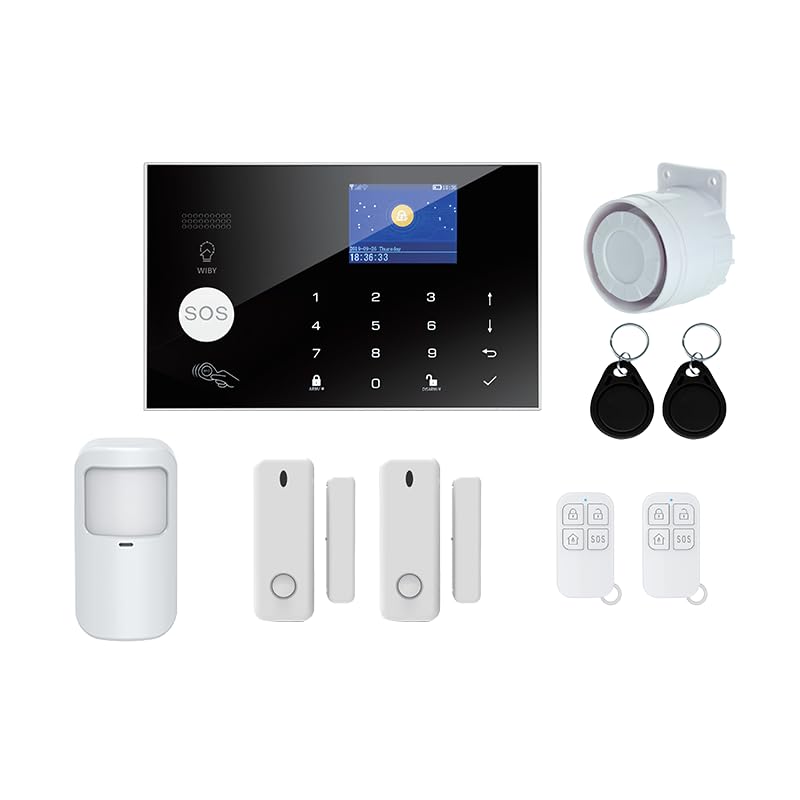
Image: The main control panel with a digital display and numeric keypad.

Image: A white, rectangular motion sensor with a detection window.

Image: A two-part white magnetic sensor for doors or windows.

Image: A white remote control with four buttons for alarm functions.

Image: Two black RFID key fobs with metal rings.

Image: A white, cylindrical siren unit designed for wall mounting.
Setup
1. Unboxing and Initial Placement
Carefully unpack all components. Choose a central and secure location for the control panel, away from direct sunlight and moisture. Ensure it is within Wi-Fi range for app connectivity.
2. Control Panel Installation
- Connect the power supply to the control panel and plug it into a wall outlet.
- The panel will power on and display the current time and status.
3. Sensor Installation (Door/Window & Motion)
- Door/Window Sensors: Mount the two parts of the magnetic sensor on the door/window frame and the movable part, ensuring they are aligned and within 1 cm of each other when closed. Use the provided adhesive or screws.
- Motion Sensors: Install motion sensors in key areas such as hallways or living rooms. Mount them at a height of approximately 2-2.5 meters for optimal coverage. Ensure the pet-immune feature is considered for placement if you have pets.
- Follow the instructions in the control panel menu to pair each sensor with the system.
4. Remote Control and RFID Pairing
- Access the pairing menu on the control panel.
- Follow the on-screen prompts to pair the remote controls and RFID transponders with the system.
5. App Configuration (Tuya App)
- Download the Tuya Smart app from your smartphone's app store (iOS or Android).
- Register an account or log in.
- Add a new device in the app and follow the in-app instructions to connect your alarm system to your home Wi-Fi network.
- Once connected, you can manage your alarm system remotely via the app.
Operating Instructions
Arming the System
- Via Control Panel: Enter your PIN and press the 'ARM' button.
- Via Remote Control: Press the 'Arm' button on the remote.
- Via RFID Transponder: Tap the RFID tag on the designated area of the control panel.
- Via Tuya App: Select the 'Arm' option within the app.
Disarming the System
- Via Control Panel: Enter your PIN and press the 'DISARM' button.
- Via Remote Control: Press the 'Disarm' button on the remote.
- Via RFID Transponder: Tap the RFID tag on the designated area of the control panel.
- Via Tuya App: Select the 'Disarm' option within the app.
SOS Function
In case of emergency, press the 'SOS' button on the control panel or remote control to trigger an immediate alarm and send notifications.
Remote Control via Tuya App
The Tuya app allows you to manage your alarm system from anywhere. You can arm/disarm the system, check sensor status, and receive real-time alerts directly on your smartphone.
Notifications
The system sends instant notifications to your smartphone via the Tuya app when an intrusion is detected (e.g., door/window opened, motion detected) or when the alarm is triggered.
Maintenance
Battery Replacement
The sensors are powered by long-life batteries, typically lasting up to 12 months. The system will notify you via the control panel and app when a sensor's battery is low. Replace batteries promptly to ensure continuous protection. Refer to individual sensor manuals for specific battery types and replacement procedures.
Cleaning
Clean the control panel and sensors with a soft, dry cloth. Avoid using abrasive cleaners or solvents, as these can damage the surfaces.
Troubleshooting
Common Issues and Solutions
- System not arming: Check if all sensors are closed and properly paired. Ensure the control panel has power.
- False alarms: Verify motion sensor placement to avoid detecting pets or moving objects. Ensure door/window sensors are securely mounted and aligned.
- No app notifications: Check your smartphone's notification settings for the Tuya app. Ensure the control panel is connected to Wi-Fi and has internet access.
- Sensor not responding: Check the sensor's battery level and replace if necessary. Re-pair the sensor with the control panel if issues persist.
- Siren not activating: Ensure the siren is properly connected and powered (if applicable). Check system settings to confirm siren activation is enabled.
If you encounter persistent issues, consult the detailed troubleshooting section in the full product manual or contact customer support.
Specifications
| Feature | Specification |
|---|---|
| Brand | Generico |
| Model | ZX-G30 |
| Power Source | Battery Powered (sensors), 230V (control panel) |
| Compatible Devices | Smartphone, Tablet |
| Item Dimensions (LxWxH) | 20 x 15 x 10 centimeters |
| Connectivity Technology | Wireless |
| Alert Type | Sound and Motion |
| Voltage | 230 Volts |
| Control Method | App |
| Included Components | Door/Window Sensor, Alarm Control Panel, Motion Sensor, Power Supply, Remote Controls |
| Sound Level | 110 Decibels |
Warranty and Support
For warranty information and technical support, please refer to the seller's documentation provided with your purchase or contact the retailer directly. Keep your proof of purchase for any warranty claims.