
1. Introduction and Safety Guidelines
This manual provides essential information for the safe operation, assembly, maintenance, and troubleshooting of your ECOROAD EC9 Electric Scooter. Please read it thoroughly before your first ride to ensure proper use and to prevent accidents.
General Safety Warnings
- Always wear a helmet and appropriate safety gear (knee pads, elbow pads) when riding.
- Do not ride in wet conditions, heavy rain, or through puddles deeper than 1 inch.
- Avoid riding on uneven surfaces, loose gravel, or steep inclines/declines that exceed the scooter's capabilities.
- Ensure all bolts and quick-release mechanisms are securely fastened before each ride.
- Observe local traffic laws and regulations. Riding on public roads may be restricted in some areas.
- The scooter is designed for riders aged 13 and above.
- Do not exceed the maximum weight limit of 264 pounds (120 kg).
- Maintain a safe distance from other vehicles and pedestrians.
- Familiarize yourself with the braking system and practice emergency stops in a safe, open area.
2. Package Contents and Assembly
Your ECOROAD EC9 Electric Scooter comes partially assembled. Please check all components upon unpacking.
Included Components:
- EC9 Electric Scooter ×1
- Charger ×1 + Power Cord ×1
- Hexagonal wrench ×1 + Spare screw set
- Instruction manual ×1
Assembly Steps:
- Unfold the Scooter: Carefully lift the handlebar stem until it locks into the upright position. Ensure the folding mechanism is securely latched.
- Attach the Handlebars: Insert the handlebar assembly into the stem. Align the holes and secure it with the provided screws using the hexagonal wrench.
- Check Connections: Ensure all cables (brake, display, throttle) are properly connected and not pinched.
- Initial Charge: Before first use, fully charge the scooter battery. Refer to the 'Charging the Battery' section for details.
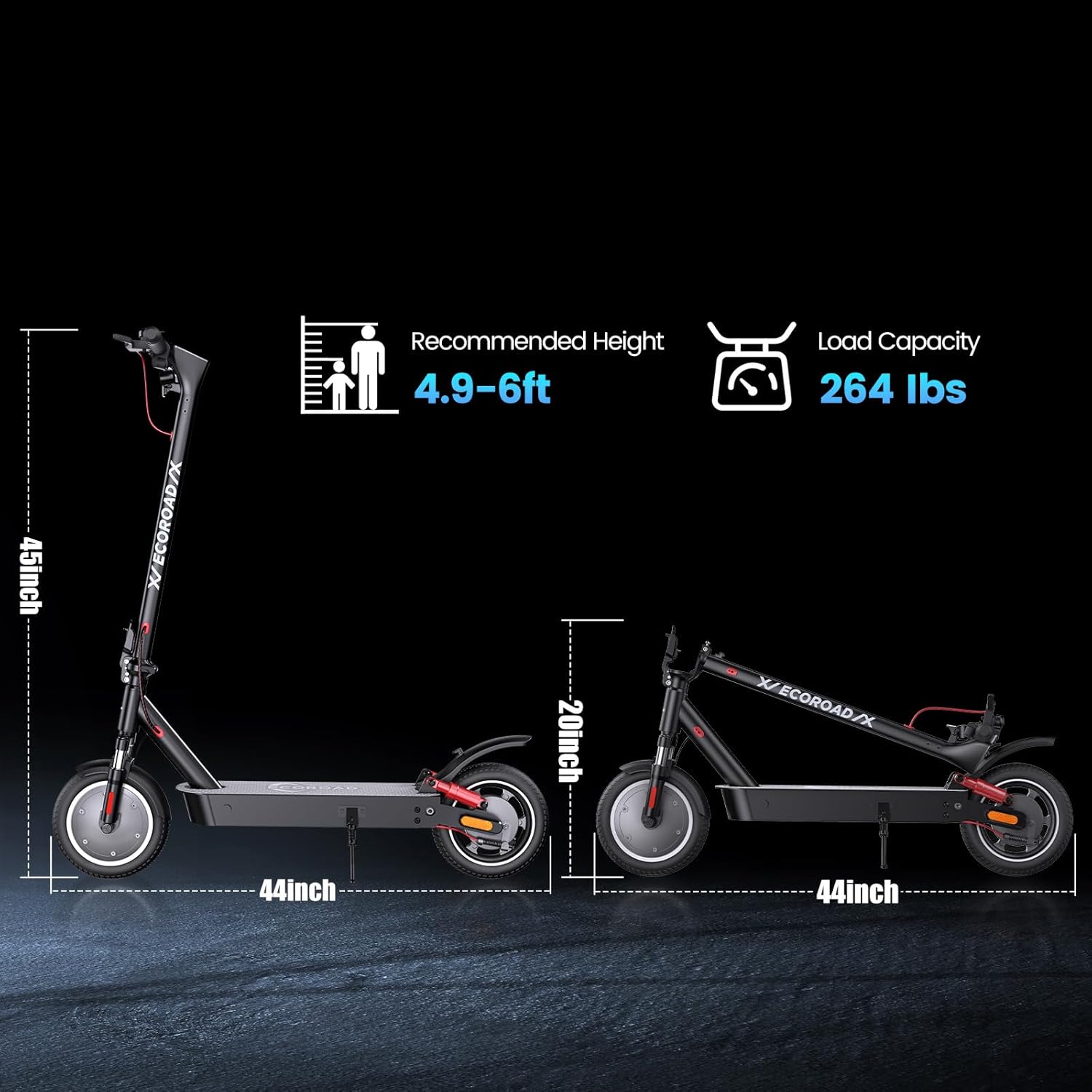
Image: The ECOROAD EC9 Electric Scooter shown in both its unfolded and folded states, illustrating its dimensions and compact storage capability. The unfolded height is approximately 45 inches, and the length is 44 inches. When folded, the height reduces to about 20 inches.
3. Charging the Battery
The ECOROAD EC9 is equipped with a UL2272-certified 36V 13Ah lithium battery.
Charging Procedure:
- Ensure the scooter is powered off before charging.
- Locate the charging port, usually covered by a rubber flap, on the scooter deck.
- Connect the charger to the charging port, then plug the power cord into a standard electrical outlet.
- The indicator light on the charger will typically turn red during charging and green when fully charged.
- A full charge takes approximately 6 hours. Do not overcharge the battery.
- Disconnect the charger once charging is complete and securely close the charging port cover.
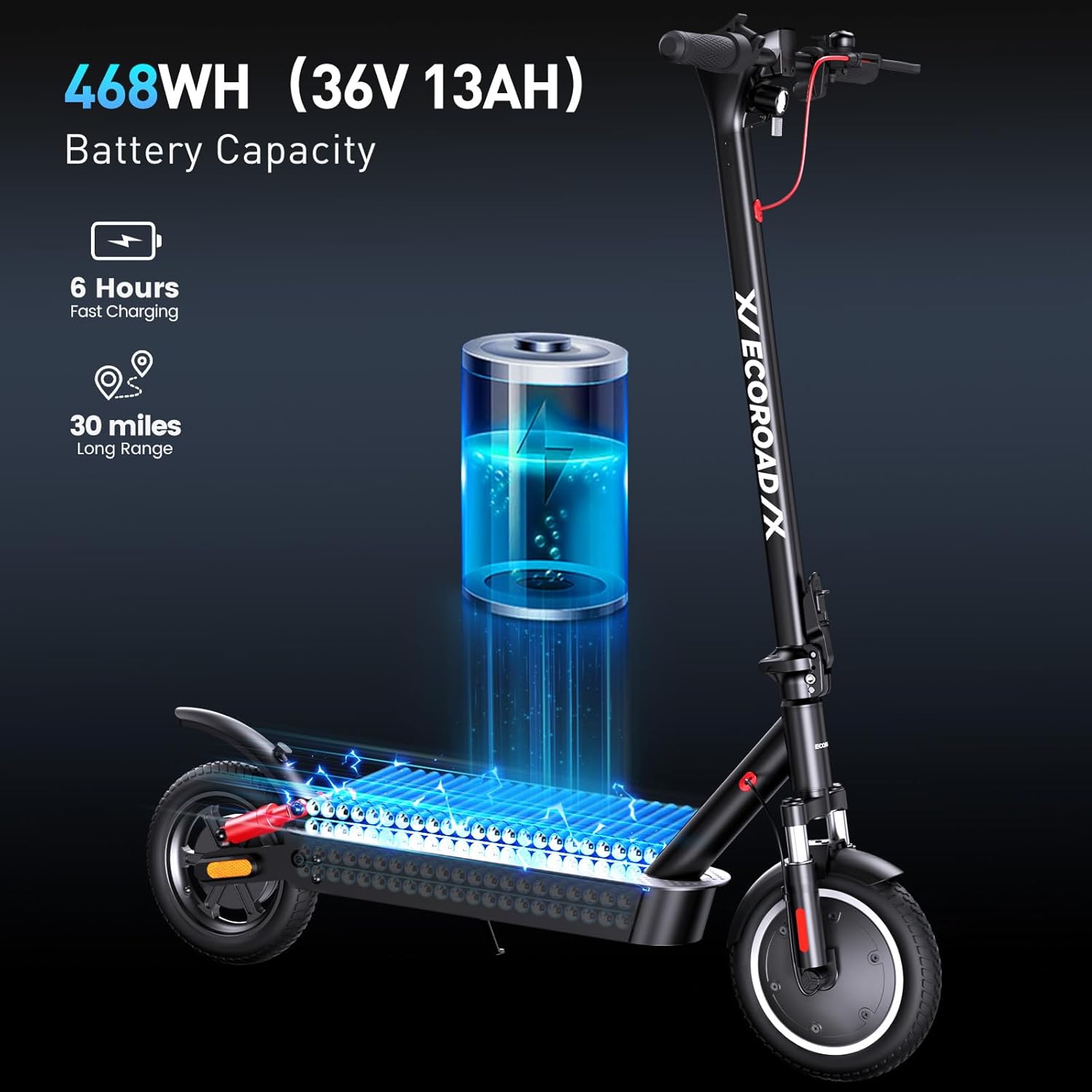
Image: An illustration highlighting the 468WH (36V 13AH) battery capacity of the ECOROAD EC9 Electric Scooter. It indicates a 6-hour fast charging time and a maximum range of 30 miles.
4. Operating Instructions
Familiarize yourself with the controls and features of your ECOROAD EC9 Electric Scooter before riding.
Power On/Off and Riding Modes:
- Power On: Press and hold the power button on the display for a few seconds.
- Power Off: Press and hold the power button again until the display turns off.
- Riding Modes: The scooter features three riding modes: Eco (9 MPH), Race (15 MPH), and Sport (21 MPH). Cycle through these modes by pressing the mode button (usually a short press of the power button after turning on).
- Cruise Control: Activate cruise control by maintaining a consistent speed for a few seconds. The scooter will hold this speed until the brake is applied or the throttle is disengaged.

Image: A visual representation of the ECOROAD EC9 Electric Scooter's cruise control feature and its three distinct riding modes: Eco (9 MPH), Race (15 MPH), and Sport (21 MPH).
Display and App Integration:
- The anti-glare LED display shows real-time speed, battery level, riding mode, and mileage.
- The scooter can sync with the ECOROAD App via Bluetooth for ride analytics, digital locking, and firmware updates.

Image: The ECOROAD EC9 Electric Scooter's integrated LED display showing speed and battery, alongside a smartphone screen demonstrating the ECOROAD app with features like Bluetooth pairing, lock/unlock, heading control, cruise control, and real-time speed/mileage display.
Lighting and Signals:
- The scooter is equipped with 360° LED lights for visibility, including a bright headlight, taillight, and turn signals.
- Activate the headlight and taillight for night riding or low-light conditions.
- Use the turn signals to indicate your direction to others.

Image: A close-up view of the ECOROAD EC9 Electric Scooter's safety lighting system, showcasing the illuminated headlight, turn signals, and taillight for enhanced visibility during rides.
Braking System:
- The EC9 features a dual braking system: EABS (Electronic Anti-lock Braking System) and a rear disc brake.
- To brake, gently squeeze the brake levers on the handlebars. Apply both brakes simultaneously for optimal stopping power.
- Practice braking at different speeds to understand the scooter's stopping distance.

Image: A rider on the ECOROAD EC9 Electric Scooter demonstrating the efficient brake system, which includes a rear drum brake and a hidden power-off brake for quick and safe stopping.
5. Maintenance and Care
Regular maintenance ensures the longevity and safe operation of your ECOROAD EC9 Electric Scooter.
General Care:
- Cleaning: Wipe the scooter with a damp cloth after each ride. Avoid using high-pressure water jets or harsh chemicals.
- Storage: Store the scooter in a cool, dry place away from direct sunlight and extreme temperatures.
- Battery Care: Do not allow the battery to fully discharge. Charge it regularly, even if not in use, to maintain battery health.
Tires and Suspension:
- The EC9 features 10-inch solid puncture-proof tires, reducing the need for frequent inflation checks.
- Regularly inspect tires for wear, cuts, or embedded debris.
- The scooter is equipped with 4 shock absorbers (front and rear) for comfort. Periodically check the suspension components for any signs of damage or looseness.

Image: A close-up view of the ECOROAD EC9 Electric Scooter's 10-inch solid tire, emphasizing its anti-skid effects and long service life due to its puncture-proof design.
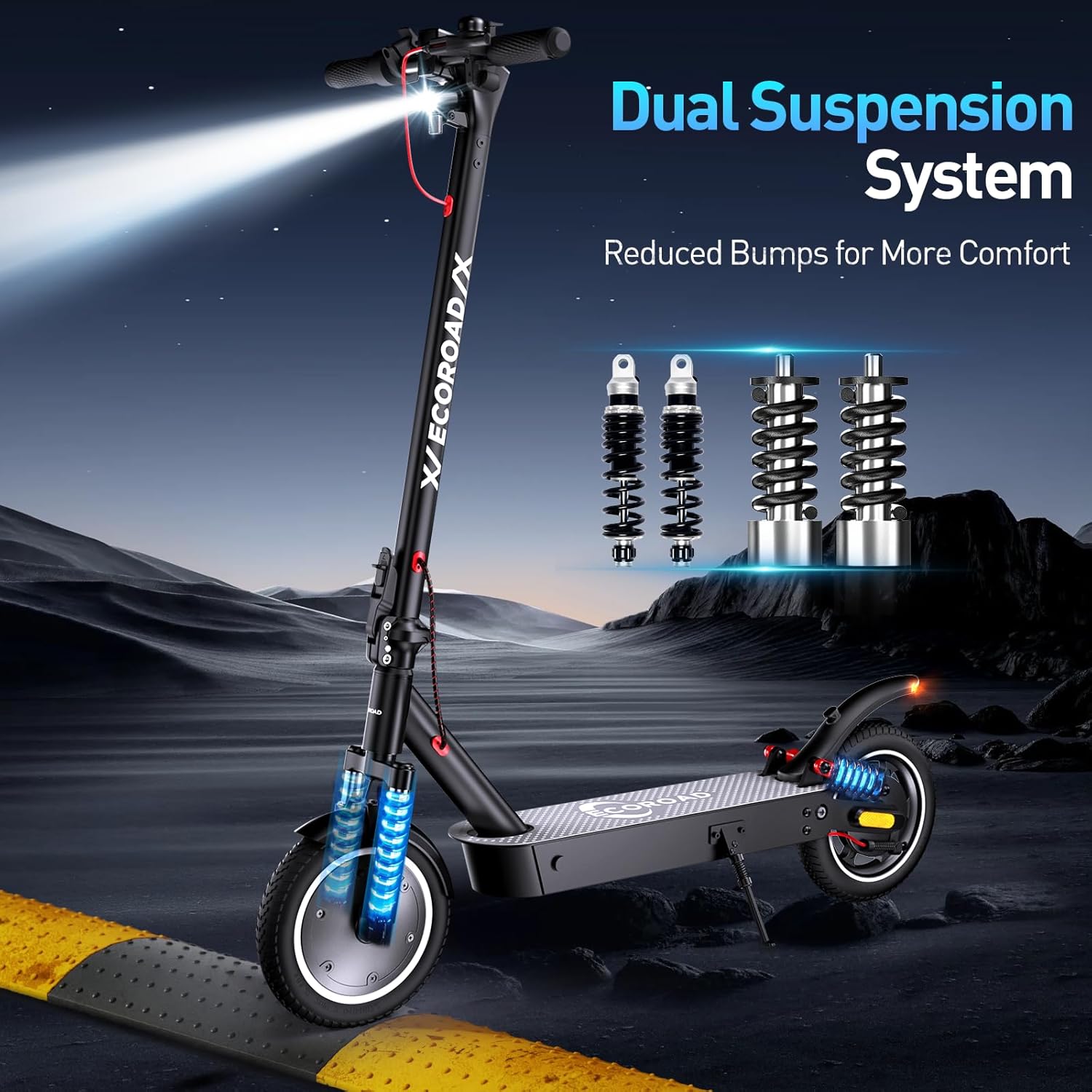
Image: An illustration of the ECOROAD EC9 Electric Scooter's dual suspension system, featuring four shock absorbers (two front, two rear) designed to reduce bumps and enhance rider comfort.
6. Troubleshooting
This section addresses common issues you might encounter with your ECOROAD EC9 Electric Scooter.
| Problem | Possible Cause | Solution |
|---|---|---|
| Scooter does not power on. | Low battery; loose battery connection; power button malfunction. | Charge the battery fully. Check battery connections. If issue persists, contact support. |
| Reduced range or power. | Undercharged battery; riding conditions (uphill, heavy load); battery degradation. | Ensure full charge. Adjust riding style. Battery replacement may be needed over time. |
| Brakes feel weak or too strong. | Brake cable adjustment needed; worn brake pads. | Adjust brake cable tension. Inspect and replace brake pads if worn. |
| Unusual noises during operation. | Loose components; debris in wheels; motor issue. | Inspect all visible parts for looseness. Check wheels for obstructions. Contact support if motor noise is unusual. |
| Display not working correctly. | Loose cable connection; display unit malfunction. | Check display cable connections. If problem persists, contact support. |
7. Technical Specifications
Detailed specifications for the ECOROAD EC9 Electric Scooter.
| Feature | Specification |
|---|---|
| Brand | ECOROAD |
| Model Name | EC9 |
| Motor Power | 500W Brushless Motor |
| Top Speed | Up to 21 MPH (34 km/h) |
| Max Incline | 20° |
| Battery | 36V 13Ah Lithium Battery (UL2272-certified) |
| Max Distance Range | Up to 30 Miles (48 km) |
| Charging Time | Approximately 6 Hours |
| Weight Limit | 264 Pounds (120 kg) |
| Item Weight | 37.4 Pounds (17 kg) |
| Product Dimensions (Unfolded) | 21.3"L x 45.7"W x 44.5"H (54.1 x 116.1 x 113 cm) |
| Wheel Size | 10 Inches |
| Wheel Type | Solid Puncture-Proof |
| Brake Style | Dual Braking System (EABS + Rear Disc Brake) |
| Special Features | Cruise Control, Foldable, Lightweight, Lockable, Dual Suspension, LED Display, App Connectivity, Turn Signals |
| Age Range (Description) | 13+ |
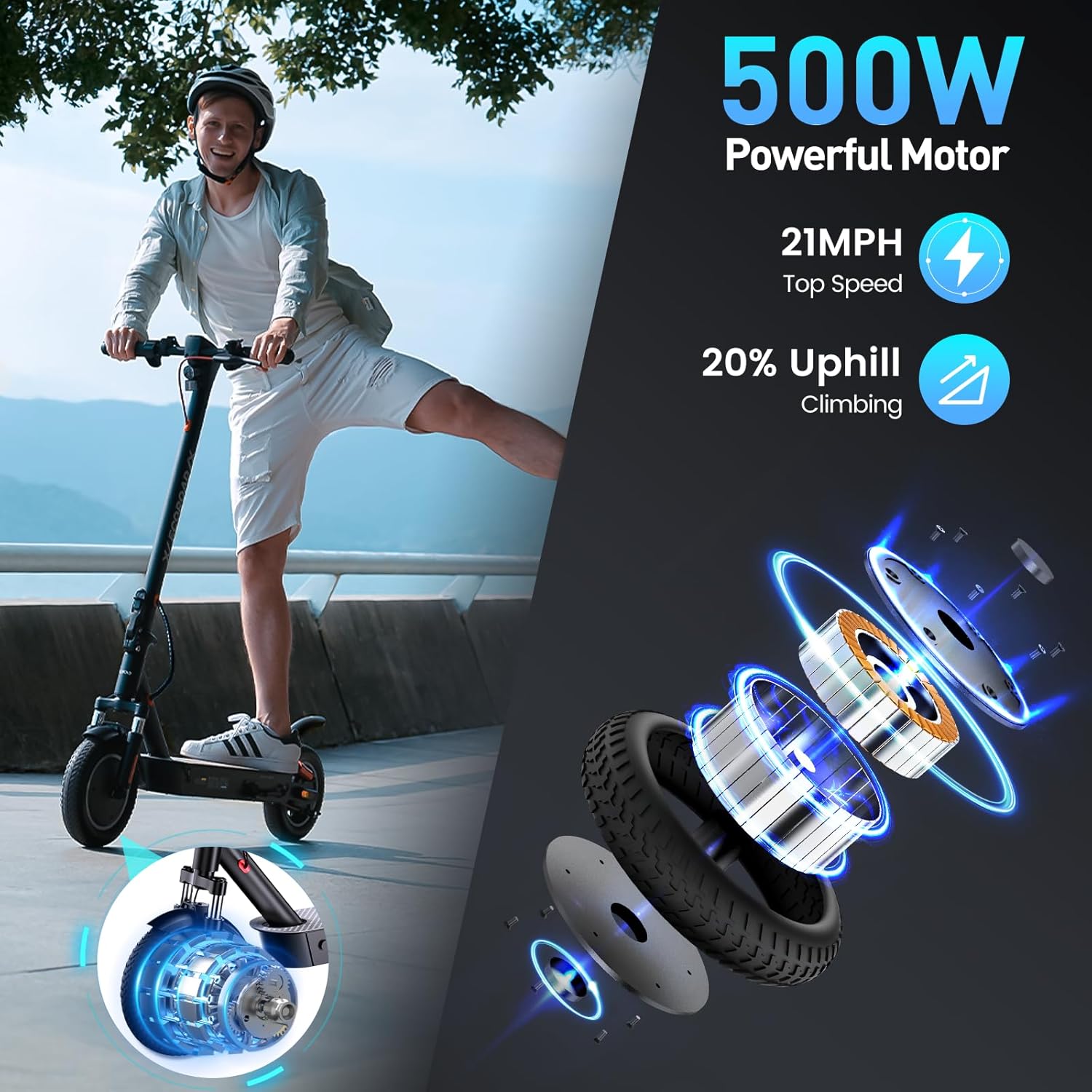
Image: An exploded view illustrating the 500W powerful motor of the ECOROAD EC9 Electric Scooter, highlighting its capability to reach 21 MPH top speed and conquer 20% uphill inclines.
8. Warranty and Support
ECOROAD provides warranty coverage for your EC9 Electric Scooter.
Warranty Information:
- The ECOROAD EC9 Electric Scooter comes with a limited warranty.
- Specific warranty periods apply to different parts: a 1-year warranty for the main components and a 180-day warranty for other parts.
- Please retain your proof of purchase for warranty claims.
Customer Support:
For any questions, technical assistance, or warranty claims, please contact ECOROAD customer support. Support is available 24/7.
Refer to the contact information provided with your purchase or visit the official ECOROAD website for assistance.


